Moving email from a cPanel account to DirectAdmin hosting has two parts: recreate each mailbox on DirectAdmin, then copy the old messages across over IMAP. Done before you change DNS, nobody loses mail and nobody has to start from an empty inbox. This guide covers the email part of a move; for files, databases and DNS, follow the full website migration guide.
Create the same mailboxes in DirectAdmin first. Add the old cPanel mailbox and the new DirectAdmin mailbox to an email program such as Thunderbird, both over IMAP, and drag the folders from old to new. Then point the domain at your DirectAdmin hosting, copy anything that arrived in the old mailbox during the switch, and update the settings on every phone and computer. Keep the old hosting until you have checked everything.
This article covers email only. For files, databases, testing and the DNS switch, see How to migrate your website.
1. Before you start
Make a list of what you have on the cPanel side:
- every email account (mailbox) and roughly how large it is;
- every forwarder, autoresponder and email filter, because these are settings, not messages, and they don't copy themselves;
- how each person reads their mail: IMAP (messages stay on the server) or POP3 (messages were downloaded to one computer).
In cPanel, Email Accounts lists the mailboxes and their size, and the Connect Devices link next to a mailbox shows the incoming and outgoing server names and ports for it. Note those down; you need them to reach the old mailbox later.
If someone used POP3, their old messages may live only in the email program on their computer, not on the cPanel server. Copying server mailboxes will not bring those across. Move them from that computer instead: add the new DirectAdmin mailbox to the same program over IMAP and drag the local folders into it.
2. Create the mailboxes in DirectAdmin
Log in to DirectAdmin (see how to log in to the DirectAdmin control panel) and, in its email accounts section, create each mailbox with the same address you had on cPanel. Give each one a strong password and a quota large enough for the mail you are about to copy in.
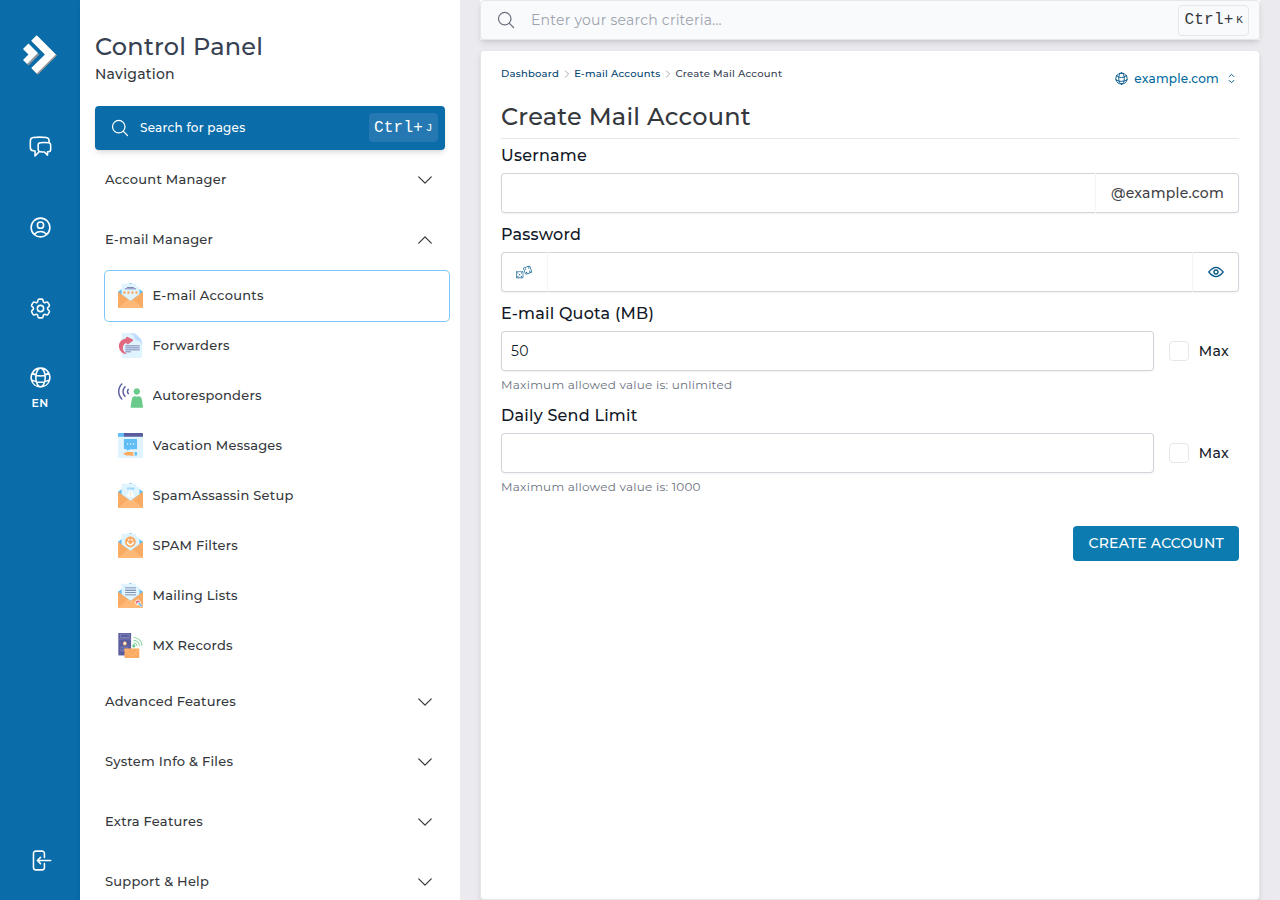
Then recreate forwarders, autoresponders and filters from your list. For autoresponders, see how to configure autoresponders in DirectAdmin.
3. Copy the messages over IMAP
The simplest method needs only a free email program on your computer. Thunderbird works on Windows, macOS and Linux; Outlook works too.
- Add the old cPanel mailboxto the email program as an IMAP account, using the server names from Connect Devices. Let it download the folder list.
- Add the new DirectAdmin mailboxas a second IMAP account. Use the incoming and outgoing server details for your DirectAdmin hosting, from your panel or from support.
- Copy folder by folder.Select the messages in the old Inbox, Sent and any other folders, and drag them into the matching folders of the new account. Create the extra folders on the new side first.
- Compare the counts.Check that each new folder holds the same number of messages as the old one. Large mailboxes can take a while, so leave the program open until it finishes.
Use IMAP on both sides. If either account is added as POP3, the program downloads messages instead of copying them between servers.
For many mailboxes, a server-to-server tool such as imapsync can do the same job without a desktop program. It connects to both servers with the mailbox passwords and copies every folder.
4. Point the domain at DirectAdmin
Mail arrives wherever your domain's MX records point. When the new mailboxes are ready, point the domain at your DirectAdmin hosting by setting its nameservers to the hosting nameservers shown on your hosting service in the client area, or by updating the MX and mail records wherever the domain's DNS is managed. The full method is in how do I change my nameservers.
DNS changes take several hours to reach every network. During that time, some messages still arrive at the old cPanel mailbox. Once the change has settled, open the old mailbox once more in your email program and copy anything new across.
5. Update phones and computers
Every device that used the old server needs the new settings. The simplest way is to remove the old account from the device and add it again with the DirectAdmin server details and the new password. Standard secure ports are 993 for IMAP and 465 or 587 for sending; see email client settings.
On Domain India DirectAdmin hosting, webmail opens at https://yourdomain.com/webmail or /roundcube. There is no webmail.yourdomain.com address on DirectAdmin. More in how to log in to webmail.
6. What changes on DirectAdmin
A few things differ from cPanel on our servers and are worth knowing before users start sending:
| Item | cPanel (measured) | DirectAdmin (measured) |
|---|---|---|
| Outgoing mail limit | 200 messages per hour per account | 1,000 messages per day |
| Webmail address | /webmail and webmail.yourdomain.com | /webmail and /roundcube only |
| Forwarded mail (SRS) | Off | On |
If someone sends newsletters or large mailings from their mailbox, plan around the daily limit. Mail in the new mailboxes is covered by the weekly JetBackup 5 backups on DirectAdmin hosting.
7. Clean up
When everyone has used the new mailboxes for a few days and nothing is missing:
- remove the old account from every device that still has it;
- keep an exported copy of any mailbox you are unsure about;
- only then cancel the old cPanel hosting, or ask support to remove the old email accounts.
8. DirectAdmin hosting at Domain India
DirectAdmin shared hosting includes email accounts on your own domain, Roundcube webmail and weekly JetBackup 5 backups. The card shows the live price, excluding 18% GST.
- 10 GB NVMe SSD Storage
- 50 GB Monthly Bandwidth
- 1 Website
- 5 Email Accounts
If you would rather keep mail separate from your website, Domain India also sells Business Email per mailbox.
How do I move emails from cPanel to DirectAdmin?
Create the same mailboxes in DirectAdmin, add the old cPanel mailbox and the new DirectAdmin mailbox to an email program such as Thunderbird as IMAP accounts, and drag the folders from the old account to the new one. Then point the domain's DNS at the new hosting and copy any messages that arrived during the switch.
Do forwarders and autoresponders move with the mailboxes?
No. Copying over IMAP moves messages only. Recreate each forwarder, autoresponder and email filter by hand in DirectAdmin before you switch DNS.
Will I lose email while DNS changes?
Not if you keep the old hosting running. For a few hours some mail still arrives at the old cPanel mailbox. Open it again once DNS has settled and copy those messages across.
My old mail was downloaded with POP3. How do I move it?
POP3 mail may exist only in the email program on that computer. Add the new DirectAdmin mailbox to the same program as an IMAP account and drag the local folders into it.
What is the webmail address on Domain India DirectAdmin hosting?
Use https://yourdomain.com/webmail or https://yourdomain.com/roundcube. The webmail.yourdomain.com address does not exist on DirectAdmin.
How many emails can I send from DirectAdmin hosting?
On Domain India DirectAdmin servers the outgoing limit is 1,000 messages per day per account (200 per mailbox by default). On our cPanel servers it is 200 messages per hour per account.
Ready to move your mail? Follow the steps above alongside the website migration guide, or open a support ticket if you would like help planning the switch.
Tell us the domain, how many mailboxes you have and roughly how large they are, and we will help you plan the move.
Open a support ticket