Most websites, from WordPress to a custom PHP app, need a MySQL database and a database user that can log in to it. This guide shows how to create both in cPanel, link them with the right privileges, change a password, and delete a database or user safely when you no longer need it. It also covers DirectAdmin and Webuzo.
In cPanel, open Databases › Manage My Databases (or the Database Wizard), create the database, create a user with a strong password, then use Add User To Database and tick ALL PRIVILEGES for a normal website. Names get your account username as a prefix, for example acme_shop, and the host is localhost. Deleting a database is permanent and does not delete its user, so export the database first and delete the user separately.
1. Databases and users: how they fit together
A database holds your site's data. A database user is a separate login with its own password. The user can do nothing until you add it to a database and grant privileges. These are three separate steps, and forgetting the third is the most common mistake.
| Item | What it is | Example on cPanel |
|---|---|---|
| Database | Where your tables and data live | acme_shop |
| Database user | The login your website uses | acme_shopuser |
| Privileges | What that user may do in that database | ALL PRIVILEGES |
| Host | Where the website connects | localhost |
One user can be added to several databases, and one database can have several users. For security, give each website its own user.
2. Create a database and user with the Database Wizard
The wizard does all three steps in one flow, so it is the quickest way.
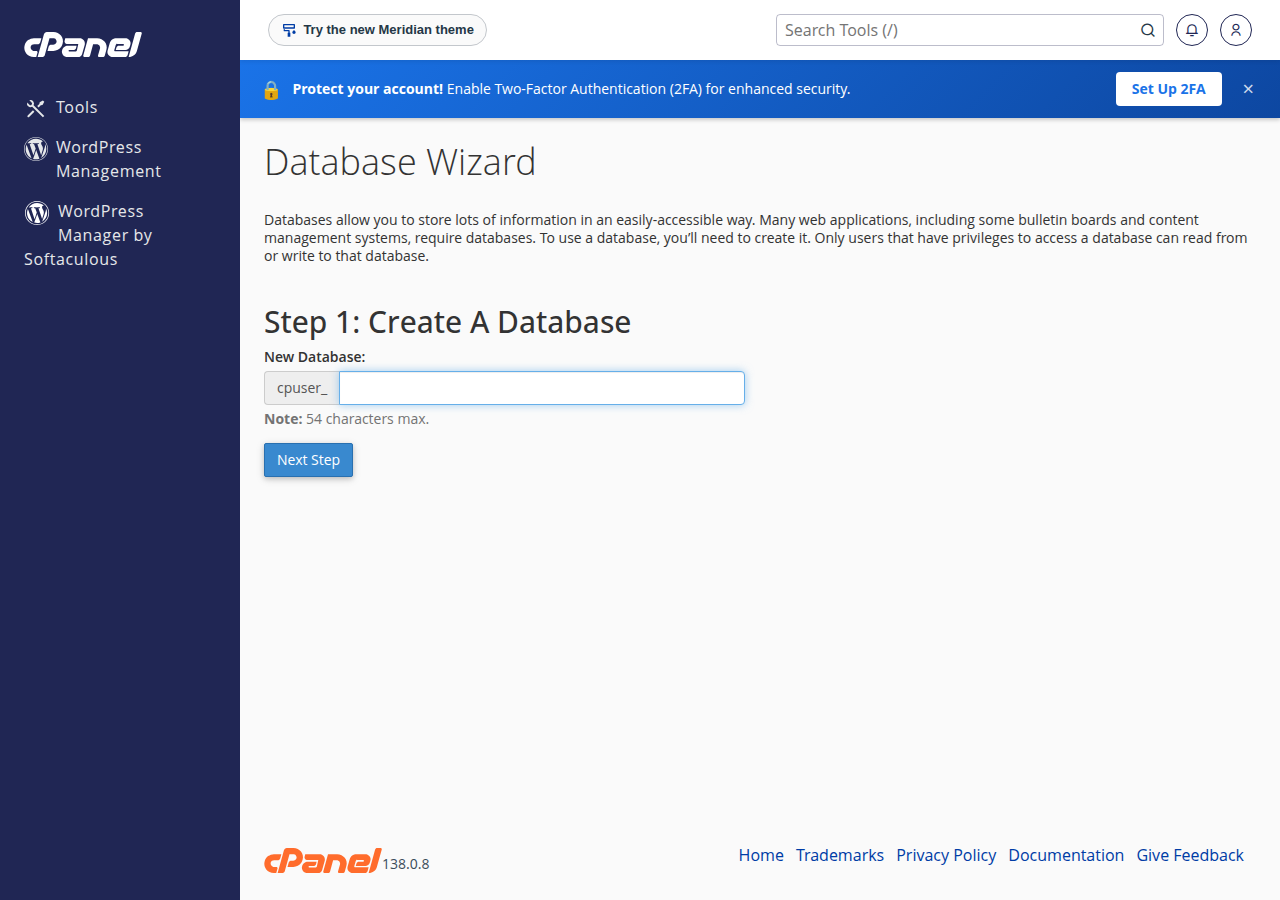
- Open the wizard.Log in to cPanel (how to log in) and, under Databases, click Database Wizard.
- Name the database.Type a short name such as
shopand click Next Step. cPanel createsacme_shop, whereacmeis your cPanel username. - Create the user.Type a user name such as
shopuser, click Password Generator for a strong password, copy it somewhere safe and click Create User. - Grant privileges.Tick ALL PRIVILEGES for WordPress or another normal website, then click Next Step.
- Note the details.You now have the database name, the user name and the password. The host is
localhost.
3. Or do it step by step on the Manage My Databases page
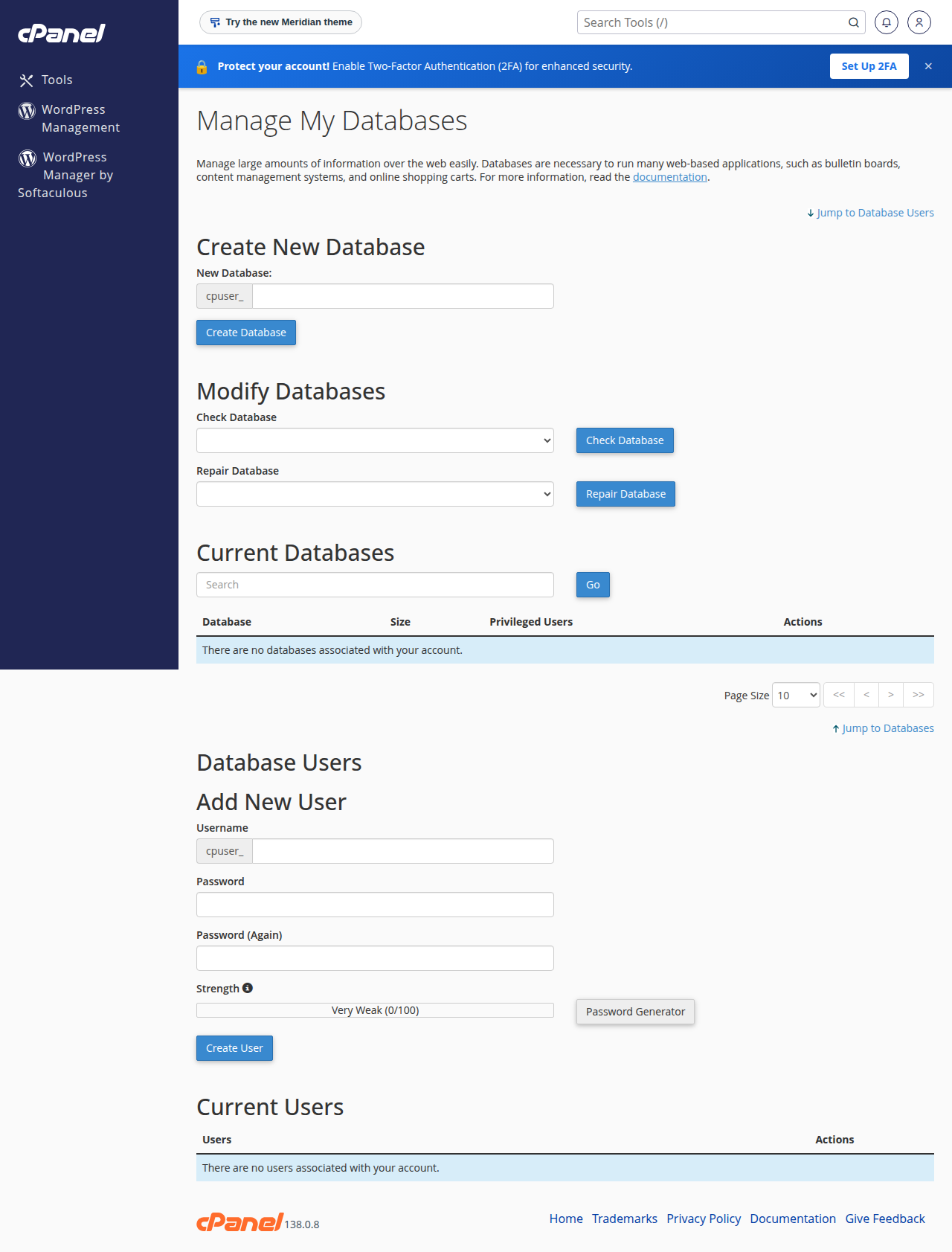
The Manage My Databases page does the same jobs separately. Use it when you want to add an existing user to a new database, or manage what is already there.
- Create New Database: type the name and click Create Database.
- MySQL Users › Add New User: type the user name and a strong password, then click Create User.
- Add User To Database: choose the user and the database from the two lists and click Add.
- Manage User Privileges: tick ALL PRIVILEGES, or only the ones the application needs, and click Make Changes.
Creating a database and a user does not link them. If you skip Add User To Database, your installer or website fails with "Access denied" or "could not find database user". See installer could not find database: user is not assigned to database.
Why the names have a prefix
On our cPanel servers, every database and database user name starts with your cPanel username and an underscore. If your username is acme and you type shop, the real name is acme_shop. Your website must use the full name. There is also a length limit on names, so keep the part you type short.
4. Which privileges to grant
For WordPress, Joomla, WooCommerce and most PHP applications, choose ALL PRIVILEGES. The application creates and changes its own tables during installation and updates.
Grant fewer privileges when a user needs only part of the access, for example a reporting tool that only reads data needs just SELECT. You can change privileges at any time by clicking the user name next to the database under Current Databases.
5. Use the details in your website
Your website needs the four values from section 1. For WordPress they go in wp-config.php:
define( 'DB_NAME', 'acme_shop' );
define( 'DB_USER', 'acme_shopuser' );
define( 'DB_PASSWORD', 'the-database-user-password' );
define( 'DB_HOST', 'localhost' );
The password is the database user's password, not your cPanel or client-area password. For PHP code with PDO or mysqli, and for Laravel, see how to connect to the MySQL database.
If you install WordPress or another app through Softaculous or WP Toolkit in cPanel, the installer creates the database, the user and the configuration file for you. You need the manual steps only for custom code, a migration or a manual install.
Importing a database. phpMyAdmin's Import tab on our cPanel servers accepts files up to 50 MB. For a bigger export, compress it, split it, or ask support to import it for you.
Connecting from outside the server. Use localhost from your website. MySQL port 3306 is closed to the internet on our shared servers, so a desktop tool such as MySQL Workbench cannot connect to it directly. Use an SSH tunnel instead, if jailed SSH is enabled on your account (it is off by default; ask support). The steps are in how to connect to the MySQL database.
6. Change a database user's password
On the Manage My Databases page, under Current Users, click Change Password next to the user, set a new password and save. Then update the password in your website's configuration file straight away. Until you do, the site cannot connect and shows a database error.
7. Delete a database or a user
Before you delete anything, make sure nothing still uses it, and take a copy.
- Export the database first.In phpMyAdmin, export it to a
.sqlfile and save it on your computer. See how to back up a MySQL database using phpMyAdmin. - Check which site uses it.Look at the database name in the site's configuration file, such as
wp-config.php. Deleting a database that a live site uses takes that site down. - Delete the database.On Manage My Databases, under Current Databases, click Delete next to the database and confirm.
- Delete the user, if nothing else uses it.Under Current Users, click Delete next to the user and confirm.
Deleting a database does not delete its users, and deleting a user does not delete any database. To take one user's access away from one database while keeping both, click the delete icon next to the user under that database in Current Databases.
The tables and data are removed at once, and there is no recycle bin. Your hosting includes weekly backups, but a backup can be days old, so always export the database yourself before you delete it.
Removing an app you installed with Softaculous or WP Toolkit? Uninstall it from the same installer. It removes the files and the database together, so nothing is left behind.
8. DirectAdmin and Webuzo
DirectAdmin: open Account Manager › Databases (use the search box if you cannot see it). In the Create Database form, type a database name and click CREATE. DirectAdmin creates a user with the same name and a secure password; open Advanced mode first if you want a separate user name and your own password. Copy the details it shows. Click a database name to add another user, change a password or adjust privileges. Deleting works from the same list. Names get your username as a prefix, like on cPanel.
Webuzo: go to Database › Manage Databases. Create the database, create a user, then add the user to the database with its privileges. Copy the full names that Webuzo shows after creation. If a menu is different from this description, ask support.
9. Where Domain India fits
Every Domain India cPanel, DirectAdmin and Webuzo shared hosting plan includes MySQL-compatible databases and phpMyAdmin. Starter plans include 5 databases, the middle plans (Growth, or Developer on Webuzo) include 10, and the higher plans include 50 or more. Compare plans and live prices on the cPanel hosting and DirectAdmin hosting pages; Domain India list prices exclude 18% GST.
For error messages after you set up a database, see database troubleshooting. Support is on 24/7 live chat, and tickets get a first response within 15 minutes; how long a fix takes depends on the problem. We do not offer phone support.
Frequently asked questions
My database user lost permission to CREATE or ALTER tables. How do I fix it?
The user's privileges on that database were changed. In cPanel open Manage My Databases, find the database under Current Databases, click the user's name in the Privileged Users column, tick ALL PRIVILEGES (or at least CREATE and ALTER) and click Make Changes. On Webuzo use Database, Add User To Database; on DirectAdmin, or if you are unsure, ask support.
How do I create a MySQL database in cPanel?
Log in to cPanel and open Database Wizard under Databases. Enter a database name, create a user with a strong password, tick ALL PRIVILEGES and finish. The database and user names get your cPanel username as a prefix, and the host is localhost.
Why does my database name start with my username?
On cPanel and DirectAdmin, every database and database user name starts with your account username and an underscore, for example acme_shop. Your website must use the full name, including the prefix.
Does deleting a database also delete its user?
No. In cPanel, databases and users are deleted separately. After deleting a database, delete the user under Current Users on the Manage My Databases page if no other database uses it.
Can I recover a database I deleted by mistake?
Not from the Manage My Databases page, because deletion is immediate. Import your own export in phpMyAdmin if you have one (files up to 50 MB on cPanel), or restore it from the weekly backup with JetBackup 5 on cPanel and DirectAdmin. Ask support if you need help.
Which privileges should I give the database user?
For WordPress and most PHP applications, give ALL PRIVILEGES on that application's own database. Give fewer only when a user needs limited access, such as SELECT for a tool that only reads data.
How many databases can I create?
It depends on your plan. On Domain India cPanel, DirectAdmin and Webuzo hosting, Starter plans include 5 MySQL databases, the middle plans include 10, and the higher plans include 50 or more.
Can I connect to my database remotely on port 3306?
Not directly. MySQL port 3306 is closed to the internet on Domain India shared hosting servers. Websites on the same account connect with localhost. For a desktop tool, use an SSH tunnel; jailed SSH is available on every shared plan but is off by default, so ask support to enable it.
Ready to build? Set up your connection with how to connect to the MySQL database, compare cPanel hosting plans if you need more databases, or open a support ticket if something does not work.
Every shared hosting plan includes MySQL databases and phpMyAdmin, with free SSL and weekly backups.
See cPanel hosting plans