When a folder on your website has no index page, the web server can show visitors a plain list of every file inside it. That is handy for a download folder and a real risk for a folder of backups, invoices or configuration files. cPanel's Index Manager lets you choose, folder by folder, whether that list appears. In current cPanel the tool is called Indexes. This guide shows where it is, what each option does, and the one-line .htaccess alternative that works on every panel.
On Domain India's cPanel server, a folder without an index file (such as index.php or index.html) shows a file list by default. To stop that, open cPanel › Advanced › Indexes, open the folder, choose No Indexing and click Save. The setting applies to that folder and its subfolders. It only hides the list: files are still downloadable by anyone who knows or guesses the exact address, so protect or move anything private. On DirectAdmin and Webuzo, add Options -Indexes to the folder's .htaccess file instead.
1. What directory indexing is
When someone opens a folder address such as https://example.in/files/, the web server looks for an index file in that folder. On our cPanel server it checks, in order, names such as index.php, index.html and index.htm. If it finds one, it shows that page.
If it finds none, one of two things happens:
- Indexing on: the server builds a page listing every file and subfolder, which anyone can click to download.
- Indexing off: the visitor gets a "403 Forbidden" message instead.
We checked on 23 September 2026: on our cPanel server, directory listing is on by default for folders without an index file. So any folder you upload without an index page, such as /backup/, /uploads/ or /old-site/, is browsable until you change it.
2. Open Indexes in cPanel
- Sign in to cPanel.
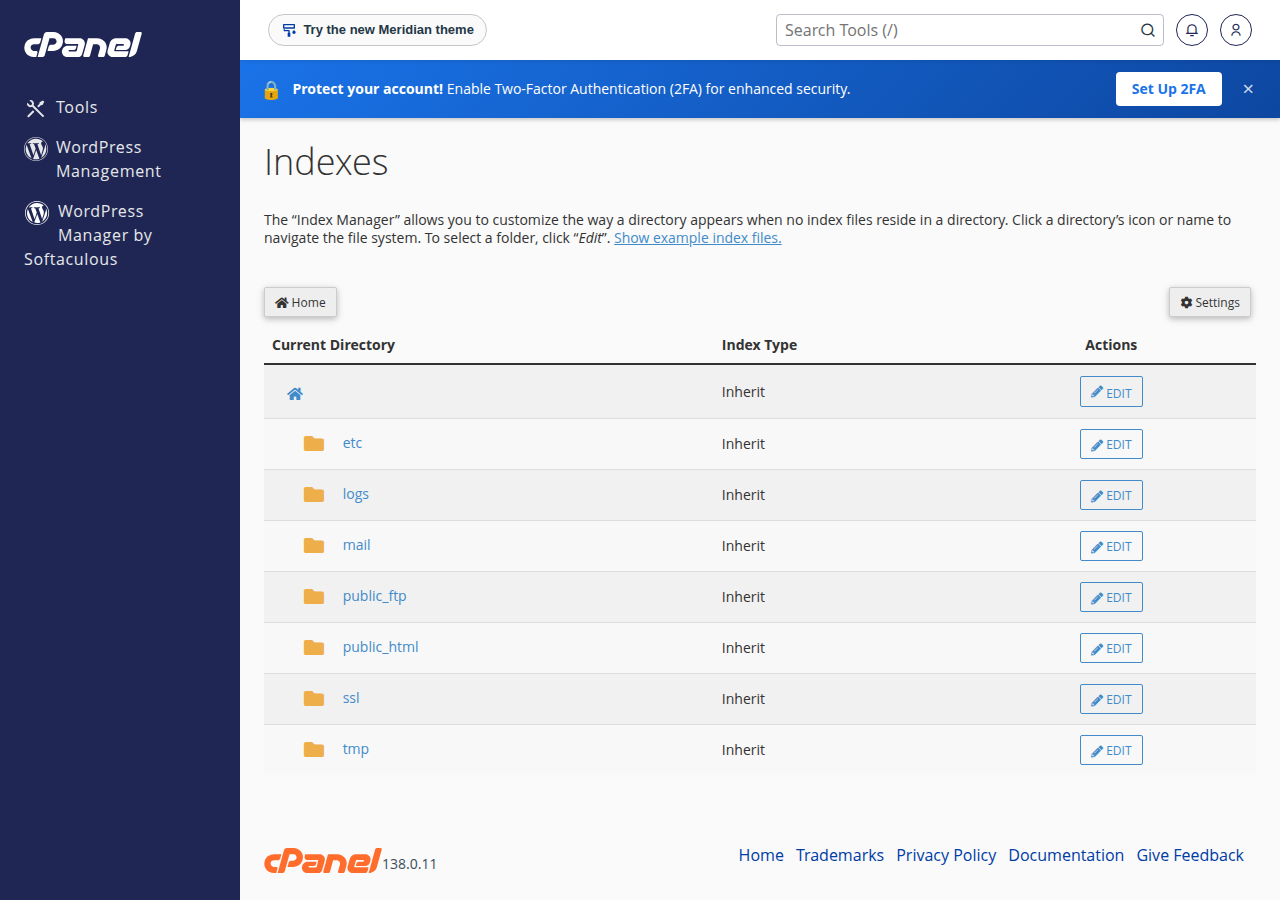
- Find Indexes.Scroll to the Advanced section and click Indexes, or type "indexes" in the search box at the top of cPanel.
- Browse to the folder.The page lists the folders in your home directory with their current index type. Click a folder's name to open it, and click Edit next to the folder you want to change. Your website files are in public_html.
- Choose a setting.Pick one of the four options described in section 3.
- Save.Click Save. cPanel confirms that it updated the directory index settings for that folder.
3. The four options
| Option | What visitors see in a folder with no index file | Use it for |
|---|---|---|
| Inherit | Whatever the parent folder uses; if no parent sets it, the server default (a file list on our cPanel server) | Undoing an earlier change |
| No Indexing | A 403 Forbidden message, no file list | Almost every folder on a normal website |
| Show Filename Only | A simple list of file names | A basic public download folder |
| Show Filename and Description | A list with file size, type and other details | A public download folder where size helps visitors |
The setting applies to the folder you chose and every folder inside it, unless you give a subfolder its own setting. The simplest safe choice for most websites is to set No Indexing on public_html once, and switch individual download folders back on only where you want a list.
4. What Indexes actually changes
Indexes doesn't change any server setting. It writes a couple of lines into the .htaccess file of the folder you chose. For No Indexing the line is:
Options -IndexesFor the two listing options, cPanel writes Options +Indexes with an IndexOptions line for the simple or detailed list. You can see the result in File Manager by turning on Show Hidden Files in Settings and opening .htaccess in that folder.
Two practical consequences:
- If you edit
.htaccessby hand later, keep that line, or the listing comes back. - If you delete the folder's
.htaccess, the folder goes back to inheriting from its parent.
5. The .htaccess method for DirectAdmin and Webuzo
The Indexes tool is part of cPanel. On DirectAdmin and Webuzo, and on cPanel too if you prefer, you can get the same result with one line.
- Open File Manager.
- Open the folder.Go to the folder you want to protect, for example
public_html. - Edit or create .htaccess.If the folder has a
.htaccessfile, edit it; otherwise create a new file named.htaccess. - Add the line.Add
Options -Indexeson its own line, near the top, and save. - Test.Open the folder address in a private browser window. You should see a 403 Forbidden message.
On our DirectAdmin server, .htaccess accepts only these Options values: Indexes, IncludesNOEXEC, MultiViews, SymLinksIfOwnerMatch, FollowSymLinks and None. Options -Indexes is allowed; any value outside that list turns the whole site into a 500 error. If that happens, remove the line you added. Our 500 Internal Server Error guide covers the other causes.
6. Test the change, and allow for the cache
On our cPanel server, a caching layer in front of the web server keeps a copy of successful pages for up to 120 minutes. A file list is a successful page, so after you switch to No Indexing, someone could still be served the old list for a while.
To check the real result, add any query string to the address, for example https://example.in/files/?t=1. If that shows 403 Forbidden, the change is working and the cached copy will expire on its own.
No Indexing only removes the list. Every file in the folder can still be downloaded by anyone who has, or guesses, its exact address. Names like backup.zip, site.sql or wp-config.php.bak are guessed by bots every day. Don't keep backups, database dumps or old copies of configuration files inside public_html at all: download them to your computer and delete them from the server.
7. Protect folders that must stay private
For content that should never be public, use one of these instead of, or as well as, No Indexing:
- Move it out of public_html. Files in your home directory but outside
public_htmlcan't be reached from the web at all. - Password-protect the folder. cPanel's Directory Privacy adds a username and password prompt to a folder. See how to password-protect the WordPress wp-admin directory for the same technique.
- Add an empty index file. An empty
index.htmlin a folder stops the list even if indexing is on. It is a useful backstop, but it doesn't protect the files either.
If a folder was browsable before you fixed it, assume its contents may have been downloaded. Change any passwords or keys it contained, and follow our security checklist for a hacked or defaced website if you find anything suspicious.
8. Troubleshooting
| Symptom | Likely cause | Fix |
|---|---|---|
| The folder still shows a file list | A cached copy, or a subfolder with its own .htaccess setting | Test with ?t=1 added to the address; check the subfolder's .htaccess |
| 403 Forbidden on a folder that should show a page | No index file, and indexing is off | Upload an index.php or index.html, or check the file name |
| The whole site shows a 500 error after a change | A mistyped or disallowed line in .htaccess | Remove the last line you added; see the 500 error guide |
| A download folder should list files but shows 403 | No Indexing inherited from public_html | Set Show Filename Only on that folder |
For more about 403 messages, see understanding and resolving HTTP error 403 Forbidden.
9. Where Domain India hosting fits
Every Domain India cPanel plan includes Indexes, Directory Privacy and File Manager, and .htaccess rules work on our cPanel, DirectAdmin and Webuzo servers:
- 25 GB NVMe SSD Storage
- 50 GB Monthly Bandwidth
- 1 Website
- 10 Email Accounts
The card shows the Domain India list price on 19 September 2026, excluding 18% GST. Compare all plans on cPanel hosting. Support is on 24/7 live chat, and tickets get a first response within 15 minutes.
10. Frequently asked questions
Where is the Index Manager in cPanel?
In current cPanel it is called Indexes and sits in the Advanced section. You can also type indexes in the search box at the top of the cPanel home page.
How do I stop people seeing a list of files in a folder?
In cPanel, open Advanced, then Indexes, choose the folder, select No Indexing and click Save. On any panel you can instead add the line Options -Indexes to the folder's .htaccess file.
Is directory listing on by default on Domain India hosting?
On Domain India's cPanel server, yes: a folder without an index file shows a file list unless you turn indexing off. Setting No Indexing on public_html turns it off for the whole site.
Does No Indexing protect my files?
No. It only hides the list. Anyone who knows or guesses a file's exact address can still download it. Keep backups and private files outside public_html, or protect the folder with a password.
Does the Indexes setting apply to subfolders?
Yes. The setting applies to the chosen folder and all folders inside it, unless a subfolder has its own setting in its .htaccess file.
I turned indexing off but still see the file list. Why?
On Domain India's cPanel server, a cache in front of the web server can keep the old page for up to 120 minutes. Add ?t=1 to the address to see the current result; if that shows 403 Forbidden, the change is working.
Ready to lock down your folders? Sign in to your control panel from My Hosting in the client area, or see how to enable mod_rewrite for more .htaccess rules.
Tell us the domain and the folder you are worried about, and our support team will help you check and protect it.
Open a support ticket