Yes, one hosting account can run several websites, each on its own domain with its own folder, email addresses and free SSL. In cPanel you add each extra site from Domains › Create A New Domain; in DirectAdmin you add it under Account Manager › Domains. How many you can add depends on your plan's website limit.
See How to add an addon domain in cPanel or How to add an addon domain in DirectAdmin. To choose between an addon domain, an alias and a subdomain, read the difference between parked, addon and subdomains.
Check that your plan allows another website, add the domain in your control panel (in cPanel, untick Share document root so it becomes a separate site), then point the domain at your hosting with the nameservers or server IP shown for your hosting service in the client area. Upload or install the site in the new domain's folder. Free SSL is issued once the domain's DNS points to our server.
1. How many websites your plan allows
Each extra domain that runs its own website counts towards your plan's website limit. In the Domain India catalogue on 19 September 2026:
| Panel | Starter | Growth | Business |
|---|---|---|---|
| cPanel | 1 website | 5 websites | 25 websites |
| DirectAdmin | 1 website | 5 websites | 25 websites |
On a one-website plan, a second site needs an upgrade. An alias that only shows your main site under another name is a different thing; see the comparison article above.
- 50 GB NVMe SSD Storage
- 100 GB Monthly Bandwidth
- 5 Websites
- 50 Email Accounts
- 30 GB NVMe SSD Storage
- Unmetered Bandwidth
- 5 Websites
- 50 Email Accounts
Prices on the cards exclude 18% GST.
2. Add the domain in your panel
- Open your control panelfrom your hosting list in the client area, using the cPanel or DirectAdmin button.
- cPanel:open Domains, click Create A New Domain, type the domain without
www, untick Share document root, accept the suggested folder and click Submit. - DirectAdmin:open Domains under Account Manager, create a new domain, type the name without
www, leave bandwidth and disk on their defaults, keep Secure SSL and PHP Access ticked, and save.
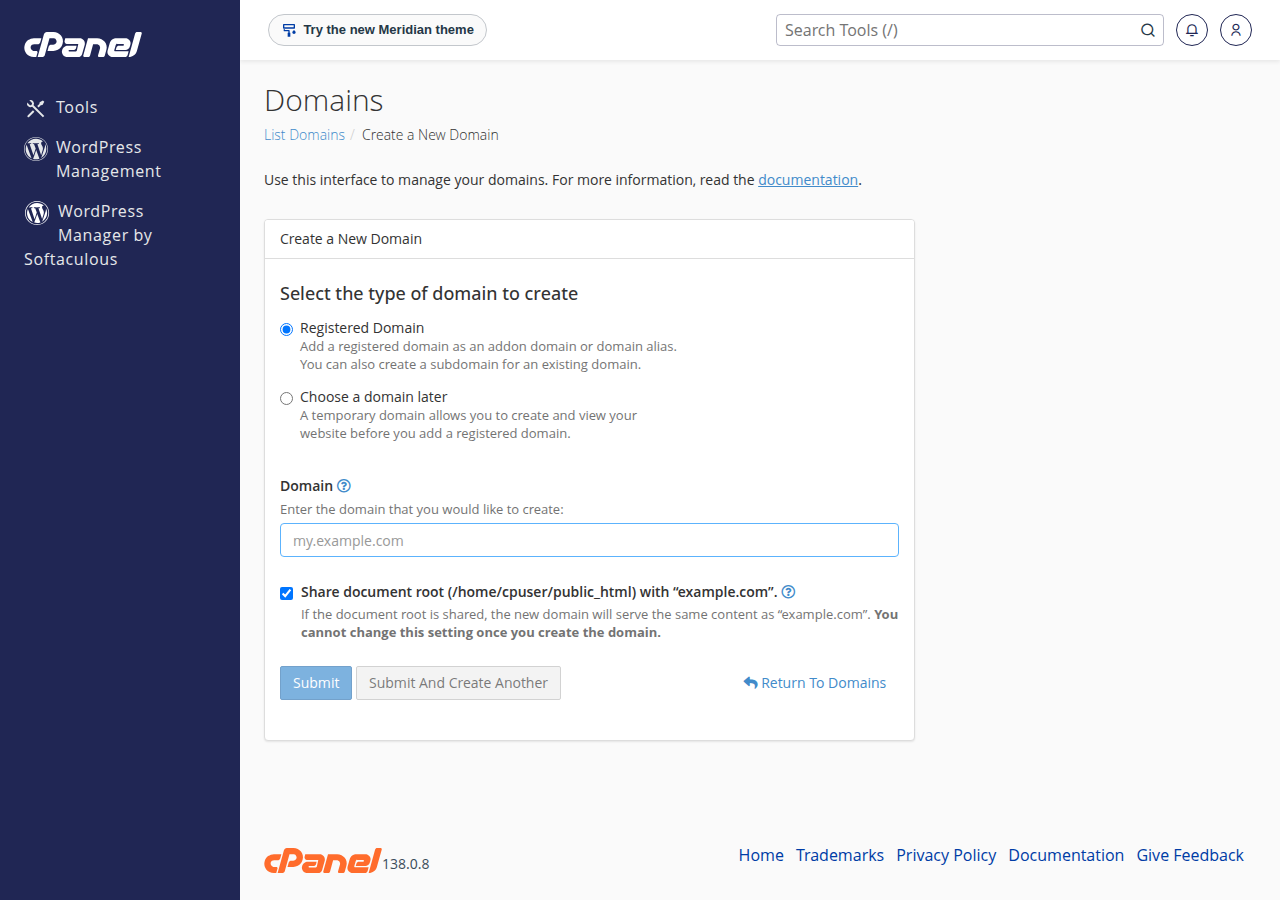
Both panels create the new domain's DNS zone on the server for you. The domain must not already exist in another hosting account, or the panel will refuse it. On Webuzo hosting, use Domain › Add Addon Domain for a separate website (the plain Add Domain page defaults to a parked domain).
3. Where each website's files live
| Panel | Main website | Each extra domain |
|---|---|---|
| cPanel | public_html | The folder cPanel suggests, named after the domain (you can change it when you add the domain) |
| DirectAdmin | domains/maindomain.com/public_html | domains/newdomain.com/public_html |
Upload files into the right folder with the File Manager or FTP, or install WordPress into the new domain with Softaculous (both panels) or WP Toolkit (cPanel).
4. Point the domain at your hosting
Adding the domain in the panel only prepares the server. Visitors reach the new site once the domain's DNS points to your hosting. Your hosting service page in the client area shows the nameservers and server IP for your account:
- Hosting nameservers: best when the website and its email both live on this hosting.
- A records for
@andwwwto the server IP: best when email stays with another provider.
Copy the values from your own service page, never from an old article. Step by step: how do I change my nameservers. DNS changes can take several hours to reach every network.
Free SSL follows the DNS: on cPanel, AutoSSL runs every 3 hours and issues the certificate once the domain points to our server; on DirectAdmin, issue Let's Encrypt from the SSL area once DNS has updated. Each domain can have its own mailboxes, which share your plan's email account limit.
5. If the new site doesn't work
- It shows the old site or a default page: DNS still points elsewhere. Check the nameservers or A records.
- The panel says the domain already exists: it is in another account, or a stale DNS zone remains. See fixing the "DNS entry already exists" error.
- 403 Forbidden: usually wrong permissions on the new folder or its files (folders 755, files 644), or a missing index file. See resolving a 403 error.
Can I host multiple websites on one Domain India hosting account?
Yes, up to your plan's website limit. In the catalogue on 19 September 2026, cPanel and DirectAdmin Starter host 1 website, Growth 5 and Business 25. Each extra domain gets its own folder, email and free SSL.
Where is Addon Domains in the new cPanel?
Current cPanel has no separate Addon Domains icon. Open Domains, click Create A New Domain, enter the domain and untick Share document root to make it a separate website.
Does the extra domain have to be registered with Domain India?
No. It can be registered anywhere, as long as you can point its nameservers or A records to your hosting.
Why does my new domain not open yet?
Usually its DNS does not point to your hosting server yet. Set the nameservers, or A records for @ and www, using the values on your hosting service page in the client area, then allow a few hours for the change to spread.
Ready to add your next website? Open your control panel from your hosting list, register the domain if you still need it, or compare cPanel and DirectAdmin plans for more room. Stuck? Open a support ticket or use the 24/7 live chat.
Growth and Business plans host 5 or 25 websites in one account, each with its own folder, email and free SSL.
See hosting plans