You type your domain and a different website opens: your old site, another of your domains, or a page you have never seen. The domain is working; it is being sent to the wrong place. That happens in only a few ways: a redirect, WordPress still set to another address, the domain added as an alias of another site, DNS pointing at a different server, or a stored copy of an old page. This guide helps you find which one in a few minutes.
First, check where the address bar ends up. If it changes to the other address, a redirect is doing it: check your control panel's redirects, .htaccess and, for WordPress, Settings › General. If the address stays the same but the content is wrong, check the domain's folder (the Document Root on cPanel's Domains page), whether the domain was added as an alias, and whether its DNS points at your Domain India server. If the site sends visitors to an unknown or spam site, treat it as a hack.
1. Look at the address bar first
Open the domain in a private (incognito) window and watch the address bar after the page loads.
| What you see | What it means | Go to |
|---|---|---|
| The address changes to another domain | Something redirects visitors | Section 2 |
| The address stays the same, but it shows another of your sites | The domain uses the wrong folder or is an alias | Section 3 |
| The address stays the same and shows your old site or old host's page | DNS still points at the old server, or you see a stored copy | Section 4 |
| It sends you to an unknown, adult, betting or "you won a prize" site, often only from Google or on mobile | The site is probably hacked | Section 5 |
2. A redirect sends visitors away
Check these in order. The first one you find is usually the cause.
- The control panel's redirects.On cPanel, open Domains › Domains: the Redirects To column shows any redirect, and Domains › Redirects lists them all under Current Redirects. On DirectAdmin, open Account Manager › Site Redirects. On Webuzo, open Domain › Redirects. Remove a redirect you don't want.
- WordPress addresses.In WordPress, open Settings › General and check WordPress Address (URL) and Site Address (URL). After a move or a copy of the site, these often still hold the old domain. If you can't log in, look for
WP_HOMEandWP_SITEURLlines inwp-config.php, or, with jailed SSH enabled, runwp option get homein the site's folder. See moving a WordPress site to a new URL. - The
.htaccessfile.Open.htaccessin the site's folder with the File Manager and look forRedirectorRewriteRulelines that name another domain. Keep a copy before you edit it. See redirects explained. - A plugin or the theme.Redirect, SEO and "coming soon" plugins can also send visitors elsewhere. Turn them off one at a time to test.
A permanent (301) redirect is remembered by your browser, so after you remove it, test in a new private window, or the old redirect may still appear on your own computer.
3. The domain shows another of your own sites
Each domain on your account opens the folder set as its Document Root. If two domains share a folder, they show the same site.
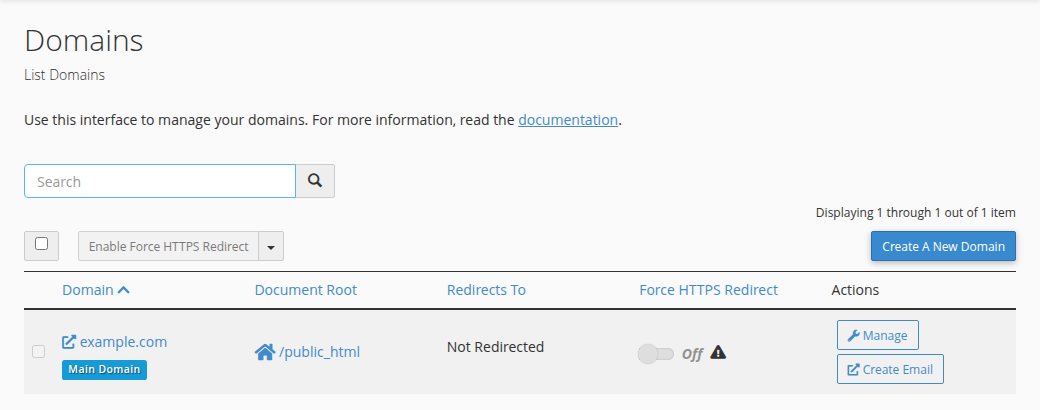
- Check the folder.On cPanel, open Domains and read the Document Root next to each domain. A separate website needs its own folder, for example
/yourseconddomain.com, not/public_html. On DirectAdmin, each domain added under Account Manager › Domains has its owndomains/yourdomain.com/public_htmlfolder. - Check whether it was added as an alias.A domain added as an alias, or as a Domain Pointer on DirectAdmin or under Domain › Aliases on Webuzo, deliberately shows the same site as the main domain. To give it its own website, remove the alias and add the domain as a separate domain with its own folder. See the difference between parked, addon and subdomains.
- Upload the right filesto that domain's own folder.
4. You still see the old site or the old host's page
- Check where DNS points.Run
dig +short A yourdomain.in(ornslookup yourdomain.in) and compare the address with the server IP on the Access tab of your hosting in the client area. If they differ, the domain still points at the old server. Fix the A record, or the nameservers, where your DNS is managed. - Allow time after a change.After a DNS or nameserver change, some visitors still reach the old server for a while. See DNS propagation.
- Rule out a stored copy.Our cPanel servers have a caching proxy that can serve a stored copy of a page for up to two hours. Add
?t=1to the address to see what the server sends now. If you use Cloudflare or another CDN, purge its cache too.
The client area's DNS tab may offer Activate Free DNS or Switch to Free DNS. It changes your nameservers without copying your records, so a working website and email can stop. Correct the A record where your DNS is managed today, or change nameservers as described in How do I change my nameservers.
5. Visitors are sent to a site you don't recognise
A redirect to a spam, betting or adult site, especially one that happens only for visitors arriving from Google or on mobile phones, is a typical sign of a hacked site. The code is usually hidden in .htaccess, in a plugin or theme file, or in the WordPress database, so you may not see it while you are logged in. Follow the hacked website security checklist, change your passwords and update every plugin and theme.
Frequently asked questions
Why does my domain open a different website?
A redirect sends visitors to another address, WordPress is still set to another domain, the domain uses the same folder as another site or was added as an alias, or its DNS points at a different server. Check whether the address bar changes: if it does, look for a redirect; if it doesn't, check the domain's folder and its DNS.
My new domain shows my main website. How do I give it its own site?
It was probably added as an alias, or it shares the main domain's folder. Remove the alias and add the domain as a separate domain with its own folder, then upload its website there.
I moved my WordPress site and it still redirects to the old domain. Why?
WordPress still has the old address in Settings, General, under WordPress Address and Site Address, or in WP_HOME and WP_SITEURL in wp-config.php. Change both to the new domain and clear any caching plugin.
I fixed it but I still see the old site. Why?
Your browser remembers permanent redirects, and DNS changes take time to reach everyone. Test in a new private window, add ?t=1 to the address, and allow time after a DNS change.
My site redirects to a spam site only from Google. What should I do?
That is a common sign of a hacked website. Follow the hacked website security checklist, clean the files and database, change every password and update all plugins and themes.
Still opening the wrong site? Open a support ticket with the domain, what you expected to see and what opens instead, and we will check the redirects, folders and DNS on your hosting with you. Support is by 24/7 live chat and tickets; there is no phone support.