Most websites, from WordPress to a custom PHP app, need a MySQL database and a database user that can log in to it. In cPanel you create both in a couple of minutes, link them with the right privileges, and put four values into your site's configuration. This page is the quick version; the full guide also covers changing passwords and deleting databases safely.
In cPanel, open Databases › Database Wizard, name the database, create a user with a strong password, tick ALL PRIVILEGES and finish. Names get your cPanel username as a prefix (for example acme_shop), and the host is localhost. Use the full prefixed names and the database user's own password in your website's configuration file.
Step-by-step screens for cPanel, DirectAdmin and Webuzo, choosing privileges, changing a password and deleting safely are in How do I create a MySQL database, user, and then delete if needed.
1. Create the database and user in cPanel
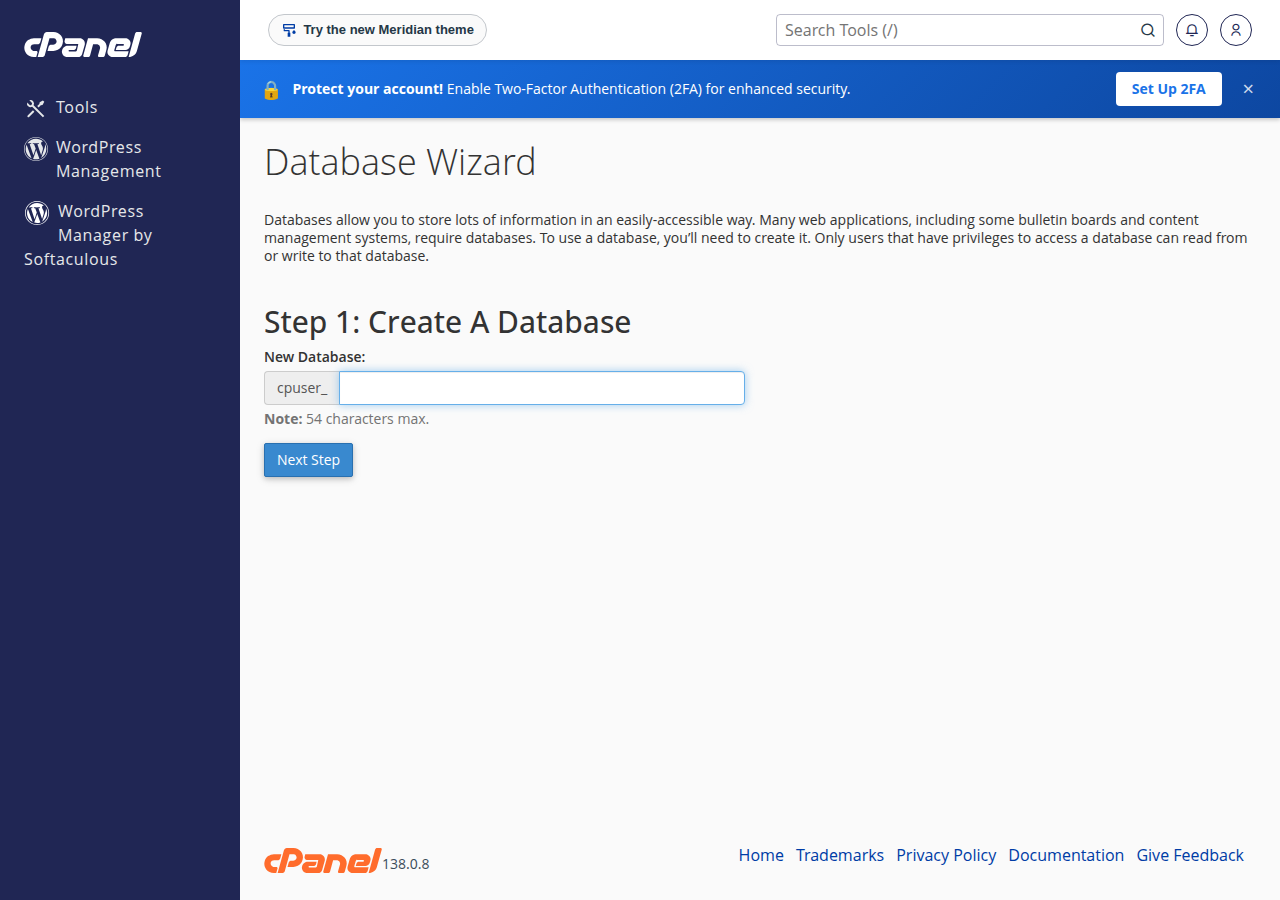
- Open the wizard.Log in to cPanel (how to log in) and, under Databases, click Database Wizard.
- Name the database.Type a short name such as
shopand click Next Step. cPanel createsacme_shop, whereacmeis your cPanel username. - Create the user.Type a user name, click Password Generator for a strong password, copy it somewhere safe and click Create User.
- Grant privileges.Tick ALL PRIVILEGES for WordPress or another normal website, then click Next Step.
If you use the Manage My Databases page instead of the wizard, remember the third step: Add User To Database. Creating a database and a user does not link them, and a site with an unlinked user fails with "Access denied".
If you install WordPress or another app with Softaculous or WP Toolkit, the installer creates the database, the user and the configuration file for you.
DirectAdmin: use the Create Database form under Account Manager › Databases; see creating and connecting to a MySQL database in DirectAdmin. Webuzo: see creating and managing MySQL databases in Webuzo.
2. Connection details for your website
| Setting | Value |
|---|---|
| Host | localhost |
| Database name | The full prefixed name, for example acme_shop |
| Username | The full prefixed user name, for example acme_shopuser |
| Password | The database user's password, not your cPanel or client-area password |
For WordPress these go in wp-config.php as DB_NAME, DB_USER, DB_PASSWORD and DB_HOST. For PDO, mysqli and Laravel examples, see how to connect to the MySQL database.
MySQL port 3306 is closed to the outside on our shared servers. To reach a database from your own computer, use an SSH tunnel (jailed SSH is available on request) or the panel's remote MySQL allow list, and expect the firewall may still block it. See connecting to a MySQL database remotely.
3. Manage and import with phpMyAdmin
In cPanel, open Databases › phpMyAdmin and pick your database from the left panel to browse tables, run queries, export or import.
To import a .sql file, select the database, open the Import tab, choose the file and click Import (or Go). The phpMyAdmin import limit on our cPanel servers is 50 MB; for a larger file, compress it or ask support. Always export a copy before you change or replace data. The full walk-through is import a MySQL database in cPanel, and phpMyAdmin itself is covered in how to access and manage your MySQL database with phpMyAdmin.
For new databases, use the utf8mb4_unicode_ci collation so emoji and every language store correctly.
4. How many databases your plan includes
Domain India cPanel, DirectAdmin and Webuzo Starter plans include 5 MySQL databases, the middle plans (Growth, or Developer on Webuzo) 10, and the higher plans 50 or more (Domain India plan list, 19 September 2026). Weekly JetBackup 5 backups on cPanel and DirectAdmin include your databases, and you can restore a database from JetBackup in your panel.
- 25 GB NVMe SSD Storage
- 50 GB Monthly Bandwidth
- 1 Website
- 10 Email Accounts
Prices on the cards exclude 18% GST.
Frequently asked questions
How do I create a MySQL database in cPanel?
Log in to cPanel and open Database Wizard under Databases. Enter a database name, create a user with a strong password, tick ALL PRIVILEGES and finish. The names get your cPanel username as a prefix, and the host is localhost.
What host name do I use for the database?
Use localhost. Your website runs on the same server as the database on Domain India shared hosting.
Why does my database name start with my username?
On cPanel and DirectAdmin, every database and database user name starts with your account username and an underscore, for example acme_shop. Your website must use the full name.
Why does my site say Access denied for the database user?
Usually the user was never added to the database, or the password is wrong. On the Manage My Databases page use Add User To Database with ALL PRIVILEGES, and check that the configuration file uses the database user's password.
How large a file can I import in phpMyAdmin?
On Domain India cPanel hosting the phpMyAdmin import limit is 50 MB. Compress a larger dump or ask support for help.
Ready to build? Follow the full database guide, see database troubleshooting if something fails, or open a support ticket.
Every shared hosting plan includes MySQL databases and phpMyAdmin, with free SSL and weekly backups.
See cPanel hosting plans