When you open cPanel on a Domain India hosting account, you land on one long page of tools grouped into sections: Files, Databases, Domains, Email, Metrics, Security, Software and Advanced. The fastest way to reach any tool is the search box at the top. This page is a quick map of the dashboard and of the few places where our servers differ from a generic cPanel guide.
Open cPanel with the cPanel button in the client area (Hosting › My hosting), or at https://yourdomain.com:2083. Type a tool's name in the search box at the top, or scroll to its section. On our servers, backups are in JetBackup (cPanel's own Backup tool is switched off), and Terminal appears only after support enables jailed SSH for your account.
Every section of cPanel is explained in detail in What is cPanel, and Mastering cPanel links the step-by-step guide for each task. This page is the short navigation map.
1. Getting to the dashboard
- Sign in to the client areaand open Hosting › My hosting (your hosting list).
- Click the cPanel buttonon your domain's row. cPanel opens in a new tab, already signed in. The button appears only while the account is Active.
- Or log in directlyat
https://yourdomain.com:2083with the username and password shown under Manage › Access.
Your client-area password and your cPanel password are separate. Login problems are covered in How to log in to cPanel.
2. The home screen
- Search box: type "email", "zone" or "php" and the tools filter as you type.
- Tool sections: the main area, grouped as in the table below.
- Side panel: your account details and usage statistics (disk space, databases, email accounts and other plan limits).
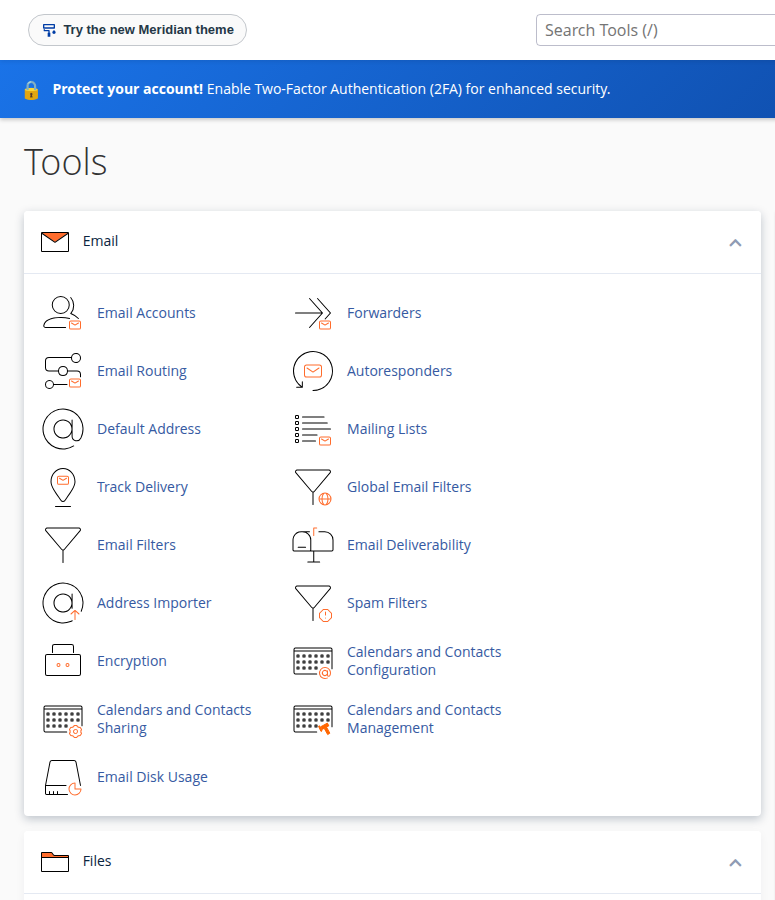
3. Where each tool lives
| Section | Tools you will use most | Use it to |
|---|---|---|
| Files | File Manager, Directory Privacy, Disk Usage, FTP Accounts, JetBackup | Upload files, create FTP logins, restore or download backups |
| Databases | Manage My Databases, Database Wizard, phpMyAdmin, Remote Database Access | Create databases and users, import and export data |
| Domains | Domains, Redirects, Zone Editor | Add sites and subdomains, force HTTPS, edit DNS records |
| Email Accounts, Forwarders, Autoresponders, Email Deliverability, Mailing Lists | Create mailboxes, forward mail, check SPF and DKIM | |
| Metrics | Visitors, Errors, Bandwidth, Raw Access, Resource Usage | See traffic, read error logs, check account limits |
| Security | SSL/TLS Certificates, Two-Factor Authentication, IP Blocker, Hotlink Protection, Imunify360 | Check free SSL, protect the login, block addresses |
| Software | Softaculous, WP Toolkit, MultiPHP Manager, Setup Node.js App, Setup Python App | Install WordPress, choose PHP versions, run apps |
| Advanced | Cron Jobs, Error Pages, Indexes, Terminal (if SSH is enabled) | Schedule tasks, customise error pages, control folder listings |
The exact position of a tool can change between cPanel versions. If it is not where the table says, use the search box.
4. What is different on Domain India servers
- Backups: JetBackup 5 takes a weekly backup of every account on Sunday and keeps 5 copies. Restore or download from JetBackup in cPanel. cPanel's own Backup and Backup Wizard are switched off. See backup and restore with JetBackup.
- Terminal and SSH: jailed SSH access is available on every shared hosting plan. It is off by default; ask support to enable it for your account. The Terminal icon only works once it is on. See the cPanel Terminal guide.
- Security: Imunify360 and the web application firewall run server-wide and are managed by us. You can't start your own malware scan, and there is no ModSecurity switch in the panel. See Imunify360 on cPanel.
- Two-factor login: cPanel's Two-Factor Authentication works for your cPanel login. Turn on two-factor authentication for the client area too, because its cPanel button signs you in without a cPanel password.
- Resource Usage (Metrics) is where to look when your site is slow or shows "Resource Limit Is Reached". See check hosting resource usage.
If searching finds nothing, the tool may depend on a setting support controls; ask by live chat or open a ticket.
5. Where Domain India cPanel hosting fits
cPanel hosting suits most business and WordPress sites, with the widest set of tools. Plans start at ₹125 a month for cPanel Starter (Domain India list price on 24 September 2026, excluding 18% GST). Compare all plans on cPanel hosting.
How do I open the cPanel dashboard from Domain India's client area?
Sign in, open Hosting, My hosting, and click the cPanel button on your domain's row. cPanel opens in a new tab already signed in. You can also go to https://yourdomain.com:2083 and use the username and password on the account's Access tab.
What is the quickest way to find a tool in cPanel?
Use the search box at the top of the cPanel home screen. Start typing the tool's name, such as File Manager or Zone Editor, and the list filters as you type.
Where are backups in cPanel on Domain India hosting?
In JetBackup. It takes a weekly backup on Sunday and keeps 5 copies, which you can restore or download. cPanel's own Backup and Backup Wizard tools are switched off on our servers.
Why is there no Terminal icon in my cPanel?
Terminal needs shell access, and jailed SSH is off by default on every shared plan. Ask support to enable it for your account.
Ready to find your way around? Open your hosting list and click cPanel, read the full tour in What is cPanel, or open a ticket if a tool is missing. Support is on 24/7 live chat, and tickets get a first response within 15 minutes.
Tell us your domain and the tool you are looking for, and we will point you to it or make the change with you.
Open a support ticket