JetBackup already takes weekly backups of your Domain India hosting account. This guide adds a second, independent copy that you control: a nightly database dump and file archive, encrypted and sent off-site to S3-compatible storage such as Backblaze B2, Wasabi, Cloudflare R2 or Amazon S3, with rclone and a cron job. It works on your own VPS and, with some limits, on shared hosting.
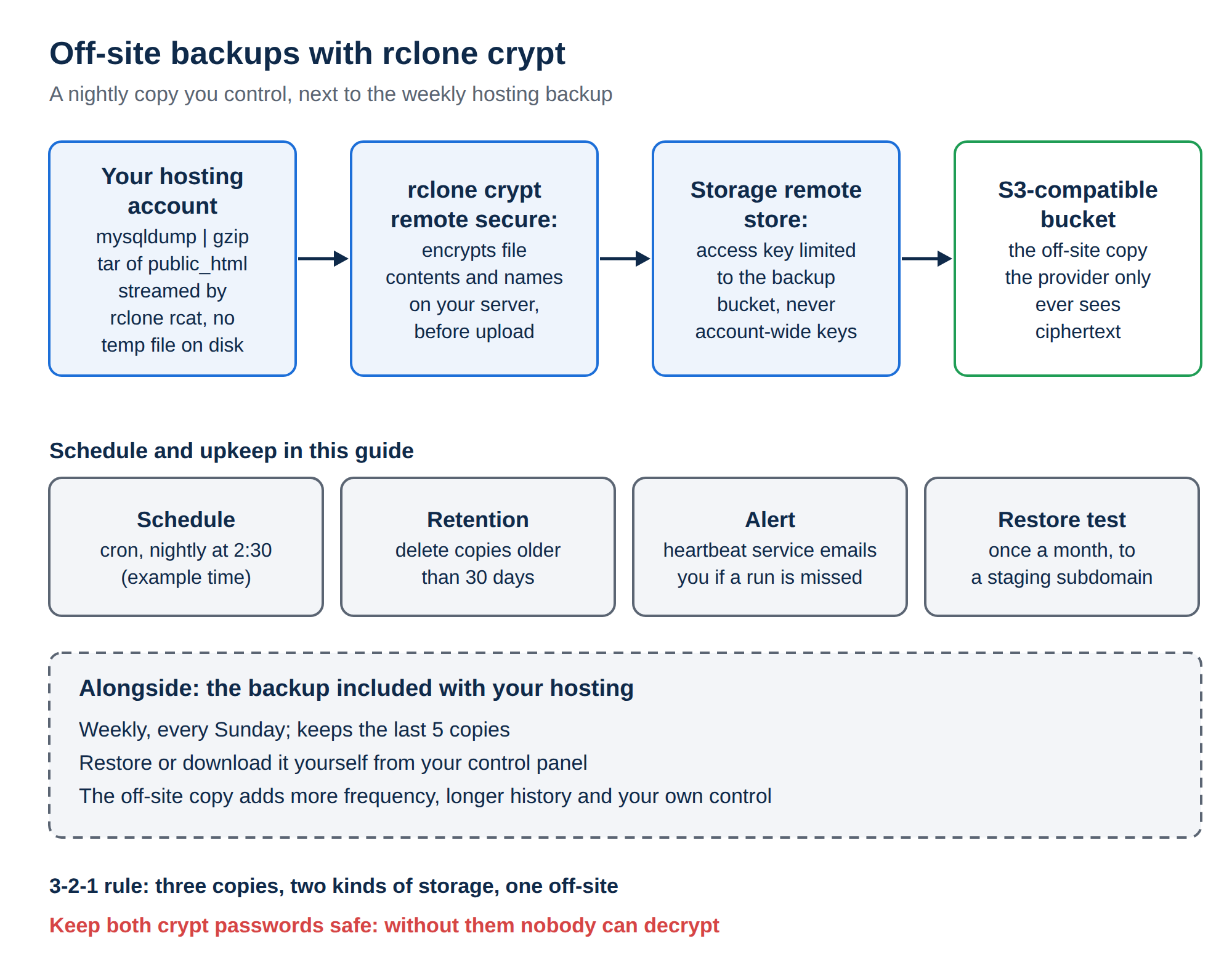
Configure an rclone remote for your storage provider, wrap it in an rclone crypt remote so everything is encrypted before it leaves your server, then schedule a script that streams mysqldump and tar output straight into it with rclone rcat. Prune old copies by age, get an alert when a run is missed, and test a restore every month. On a VPS this is straightforward; on shared hosting it needs jailed SSH (off by default; ask support) and your own copy of the rclone binary.
1. Why an off-site copy, when JetBackup exists
On Domain India cPanel and DirectAdmin hosting, JetBackup 5 takes a backup every Sunday and keeps the last 5 copies, and you can restore or download from it yourself (see Backup and Restore with JetBackup). That covers "I deleted something" very well.
An independent copy covers what a provider backup can't:
- Frequency. A weekly copy can be up to a week old. A busy shop or forum may want a nightly database dump.
- History. Five weekly copies reach back about five weeks. A hack noticed late may be older than that.
- Your own control. A copy in your own storage account survives a mistake in your hosting account and is there if you ever move provider.
This follows the familiar 3-2-1 rule: three copies of your data, on two different kinds of storage, with one copy off-site.
2. Choose S3-compatible storage
rclone speaks to all the common providers with the same commands. Compare them on:
- Storage price per GB per month.
- Egress (download) fees, which you pay when you restore. Some providers charge nothing, some include a free allowance.
- Minimum storage duration or minimum monthly charge. Some providers bill deleted files for a minimum number of days, which matters if you prune often.
- Region, if you want the data held in a particular country.
Prices change, so check each provider's current pricing page. For a small site, any of them costs very little.
Create a bucket for backups, and an access key limited to that bucket. Never use your provider's root or account-wide keys on a web server.
3. Install rclone
On your own VPS (root access):
curl https://rclone.org/install.sh | sudo bash
rclone version
On shared hosting, the install script needs root, so it will not work. rclone is a single binary, so you can place it in your home folder over jailed SSH instead:
mkdir -p ~/bin && cd ~/bin
curl -LO https://downloads.rclone.org/rclone-current-linux-amd64.zip
unzip -j rclone-current-linux-amd64.zip '*/rclone' && rm rclone-current-linux-amd64.zip
chmod 700 rclone && ./rclone versioncurl, unzip, mysqldump, tar, gzip and crontab are all available inside the jailed shell on our cPanel and DirectAdmin servers. SSH is off by default; ask support to enable it, and see Enabling and accessing jailed SSH. If rclone does not run on your account, pull backups from another machine instead (section 8).
4. Configure the storage and encryption remotes
Run rclone config (or ~/bin/rclone config) and create two remotes:
- The storage remote.Choose
nfor a new remote, name itstore, pick your provider (for example Backblaze B2, or S3 and then Wasabi, Cloudflare R2 or AWS), and paste the bucket-limited key. - The crypt remote.Create another new remote named
secure, type crypt, with the remote set tostore:your-bucket/backups. Let rclone generate a strong password and a salt. - Save both passwords elsewhere.Store them in a password manager. Without them, the backups can't be decrypted, and nobody can recover them for you.
- Test it. Run
rclone lsf store:your-bucketto check the key can see your bucket, then `echo testrclone rcat secure:test.txtandrclone cat secure:test.txt`.
Everything written to secure: is encrypted on your server before upload, including the file names. The provider only ever sees ciphertext.
5. The backup script
Keep the database password out of the script and out of the process list. Put it in ~/.my.cnf, readable only by you (chmod 600 ~/.my.cnf). If the file already exists, add the section to it:
[mysqldump]
user=youruser_dbuser
password=your-database-password
Then create ~/bin/offsite-backup.sh:
#!/bin/bash
set -euo pipefail
RCLONE="$HOME/bin/rclone"        # or: rclone, on a VPS
DB="youruser_wpdb"
DEST="secure:$(date +%Y/%m)"
STAMP=$(date +%Y%m%d-%H%M)

# 1. Database: streamed, never written to local disk
mysqldump --single-transaction --quick --default-character-set=utf8mb4 "$DB" \
  | gzip | "$RCLONE" rcat "$DEST/db-$STAMP.sql.gz"

# 2. Files: streamed the same way
tar -czf - -C "$HOME" public_html \
  --exclude='public_html/wp-content/cache' \
  | "$RCLONE" rcat "$DEST/files-$STAMP.tar.gz"

# 3. Prune copies older than 30 days
"$RCLONE" delete secure: --min-age 30d

# 4. Optional: tell a monitoring service the run finished
[ -n "${HEARTBEAT_URL:-}" ] && curl -fsS --retry 3 "$HEARTBEAT_URL" >/dev/null
echo "$(date) backup OK"
Make it executable with chmod 700 ~/bin/offsite-backup.sh and run it once by hand.
Streaming with rclone rcat means no temporary archive takes up your disk quota. --single-transaction gives a consistent dump of InnoDB tables without locking your site.
6. Schedule it with cron
Add a line in your control panel's Cron Jobs page, or with crontab -e:
30 2 * * * $HOME/bin/offsite-backup.sh >> $HOME/offsite-backup.log 2>&1That runs at 2:30 every night. Pick a quiet hour. For the syntax, see the Cron Expression Cheat Sheet.
Compressing a large site uses CPU and disk I/O, and on shared hosting that counts against your account's limits. If a run hits them, back up the database nightly and the files weekly, and exclude caches. See Understanding Hosting Resource Limits.
7. Retention, alerts and restore tests
- Retention: 30 daily copies is enough for most small sites. For longer history, run a second weekly job to a separate folder with a longer
--min-age, or use a tool with built-in rotation, such as restic. - Alerts: a cron job that silently stops is the most common backup failure. A heartbeat service such as Healthchecks.io emails you when the expected ping doesn't arrive. Set
HEARTBEAT_URLin the crontab line or the script. - Restore tests: once a month, download a copy and restore it somewhere harmless, such as a staging subdomain:
rclone copy secure:2026/09/db-20260915-0230.sql.gz .
gunzip -c db-20260915-0230.sql.gz | mysql -u youruser_dbuser -p youruser_stagingdb
rclone cat secure:2026/09/files-20260915-0230.tar.gz | tar -xzf - -C ~/staging
A backup you have never restored is only a hope.
8. Other ways to do it
- Pull instead of push. From a VPS or your own computer, copy the files over SFTP or
scp, ortarover SSH, and dump the database through an SSH tunnel.rsyncis not available in the shared hosting jail. - restic or Borg give encrypted, deduplicated snapshots with rotation built in. They suit a VPS well.
- Download from JetBackup now and then, and store the archive yourself.
9. Running this on Domain India
| Where your site runs | What works |
|---|---|
| cPanel or DirectAdmin shared hosting | Cron plus mysqldump and tar inside the jailed shell; rclone from your home folder if it runs on your account; jailed SSH on request, key login only |
| Your own VPS | Everything in this guide, with root access; VPS plans are self-managed |
| Webuzo shared hosting | Not measured; ask support before relying on it |
Domain India cPanel and DirectAdmin hosting includes weekly JetBackup backups, and Webuzo accounts are backed up every night; we don't sell a separate backup add-on. If you need a server you control fully, for this and more, see VPS plans.
- 1 vCPU
- 2 GB DDR4 RAM
- 64 GB NVMe SSD Storage
- 2 TB Monthly Bandwidth
Prices on the cards exclude 18% GST.
Do I need off-site backups if my Domain India hosting has JetBackup?
JetBackup on cPanel and DirectAdmin takes a weekly backup every Sunday and keeps the last 5, which covers most accidents. An off-site copy you control adds more frequent backups, longer history and protection that doesn't depend on your hosting account.
Can I run rclone on Domain India shared hosting?
Only with jailed SSH, which is off by default and enabled by support on request. The rclone install script needs root, so download the single rclone binary into your home folder instead. If it does not run on your account, pull backups from another machine.
How do I keep my database password out of the backup script?
Put it in a ~/.my.cnf file under a [mysqldump] section and set its permissions to 600. mysqldump reads it automatically, so the password never appears in the script or in the process list.
Are my backups encrypted with rclone?
Only if you use an rclone crypt remote or encrypt them yourself. A crypt remote encrypts file contents and names on your server before upload. Keep its password in a password manager, because without it the backups can't be restored.
How often should I back up?
Back up the database as often as its data changes, nightly for most shops and forums. Files change less often and can be backed up weekly. Test a restore at least once a month.
Which storage provider is cheapest?
It depends on how much you store and how often you restore. Compare storage price, download fees and any minimum storage duration on each provider's current pricing page.
Ready to set it up? Read Backup and Restore with JetBackup for the backups you already have, ask for jailed SSH, or compare VPS plans if you want full control.
Ask us to enable jailed SSH on your hosting account, or for help restoring from JetBackup.
Open a support ticket