Disk space and bandwidth are the two hosting allowances that quietly run out. A full disk stops uploads, new email and database writes; a used-up bandwidth allowance can take the website offline until the next month. This guide shows where to check both on Domain India hosting, what counts towards them, and how to bring them down.
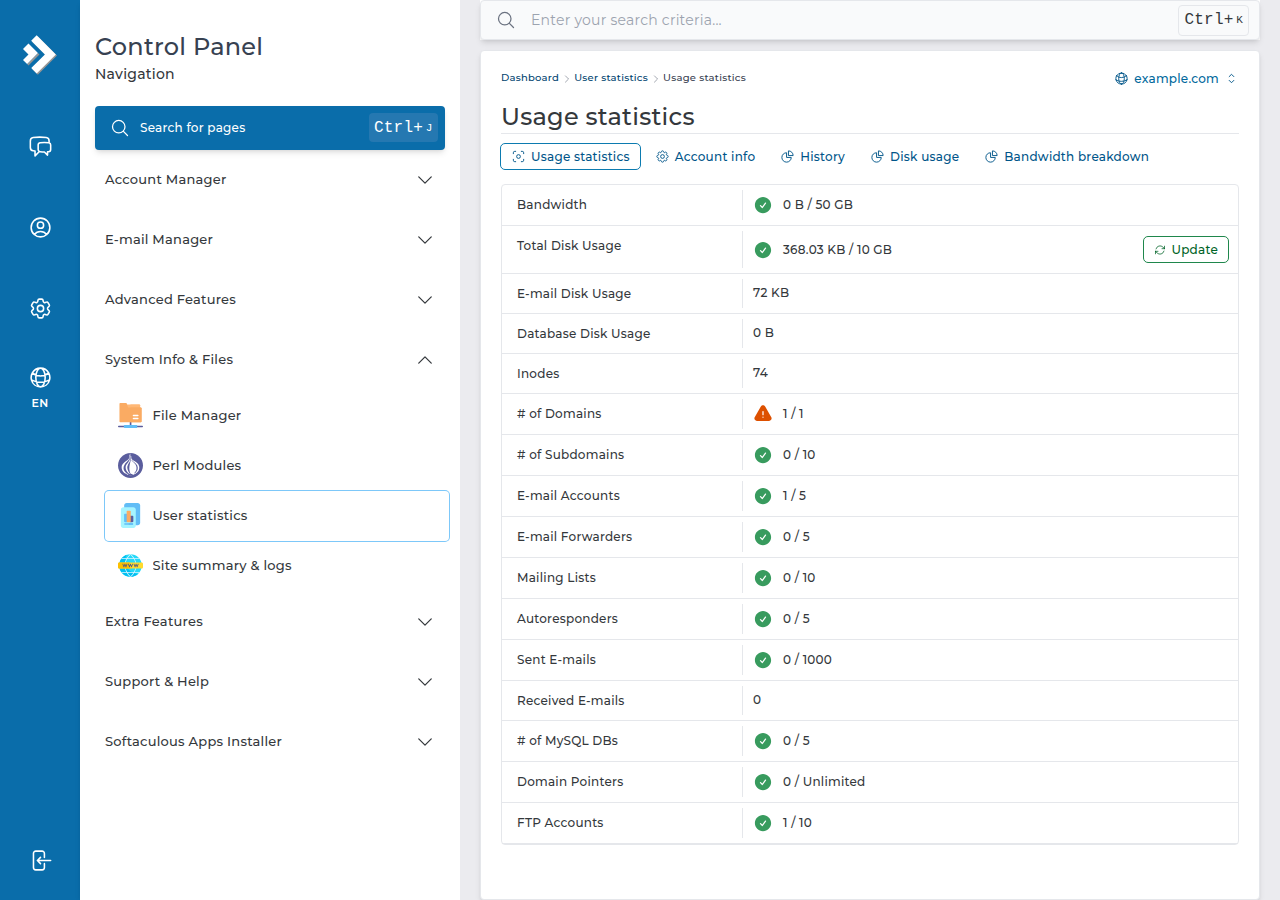
Check your usage in your control panel, not the client area: the client area shows your plan and its login button, but not live disk or bandwidth figures. In cPanel, the home page shows both at a glance, Files › Disk Usage shows which folders use the space, Email › Email Disk Usage shows mailboxes, and Metrics › Bandwidth shows this month's data transfer. On DirectAdmin, open System Info & Files › User statistics, or ask support and we will read the figures for you.
1. Disk space and bandwidth in one minute
| Allowance | What it measures | What happens when it runs out |
|---|---|---|
| Disk space | Everything stored in your account: website files, databases, email, logs and any archives you left there | Uploads fail, new email bounces, database writes fail and the site can break |
| Bandwidth | Data your account sends and receives in a calendar month: pages, images, downloads, and on cPanel also email and FTP | The website can stop serving pages until the next month or until the limit is raised |
Both are separate from the CPU, memory and process limits that cause "Resource Limit Is Reached" errors. For those, see how to check your hosting resource usage.
2. What your plan includes
These are the allowances in the Domain India catalogue on 19 September 2026:
| Plan | Disk space | Monthly bandwidth |
|---|---|---|
| cPanel Starter | 25 GB NVMe | 50 GB |
| cPanel Growth | 50 GB NVMe | 100 GB |
| cPanel Business | 100 GB NVMe | Unmetered |
| DA Starter | 10 GB NVMe | 50 GB |
| DA Growth | 30 GB NVMe | Unmetered |
| DA Business | 100 GB NVMe | Unmetered |
| Webuzo Starter | 10 GB NVMe | 50 GB |
| Webuzo Developer | 30 GB NVMe | 100 GB |
| Webuzo Agency | 100 GB NVMe | Unmetered |
If your account was set up on an older plan, its limits may differ; your control panel shows the real figure. Unmetered means no fixed monthly transfer cap; your other resource limits still apply. More on bandwidth in facts on bandwidth.
3. Check your usage in cPanel
- Open cPanel.In the client area, go to Hosting › My hosting and click the cPanel button on your account's row. See how to log in to cPanel.
- Glance at the home page.The statistics column shows disk usage and monthly bandwidth against your plan's limits.
- Open Files › Disk Usageto see which folders use the space. Your MySQL databases are counted in your disk usage on our cPanel servers, so check them here too.
- Open Email › Email Disk Usage,or the Email Accounts page, to see how much each mailbox holds.
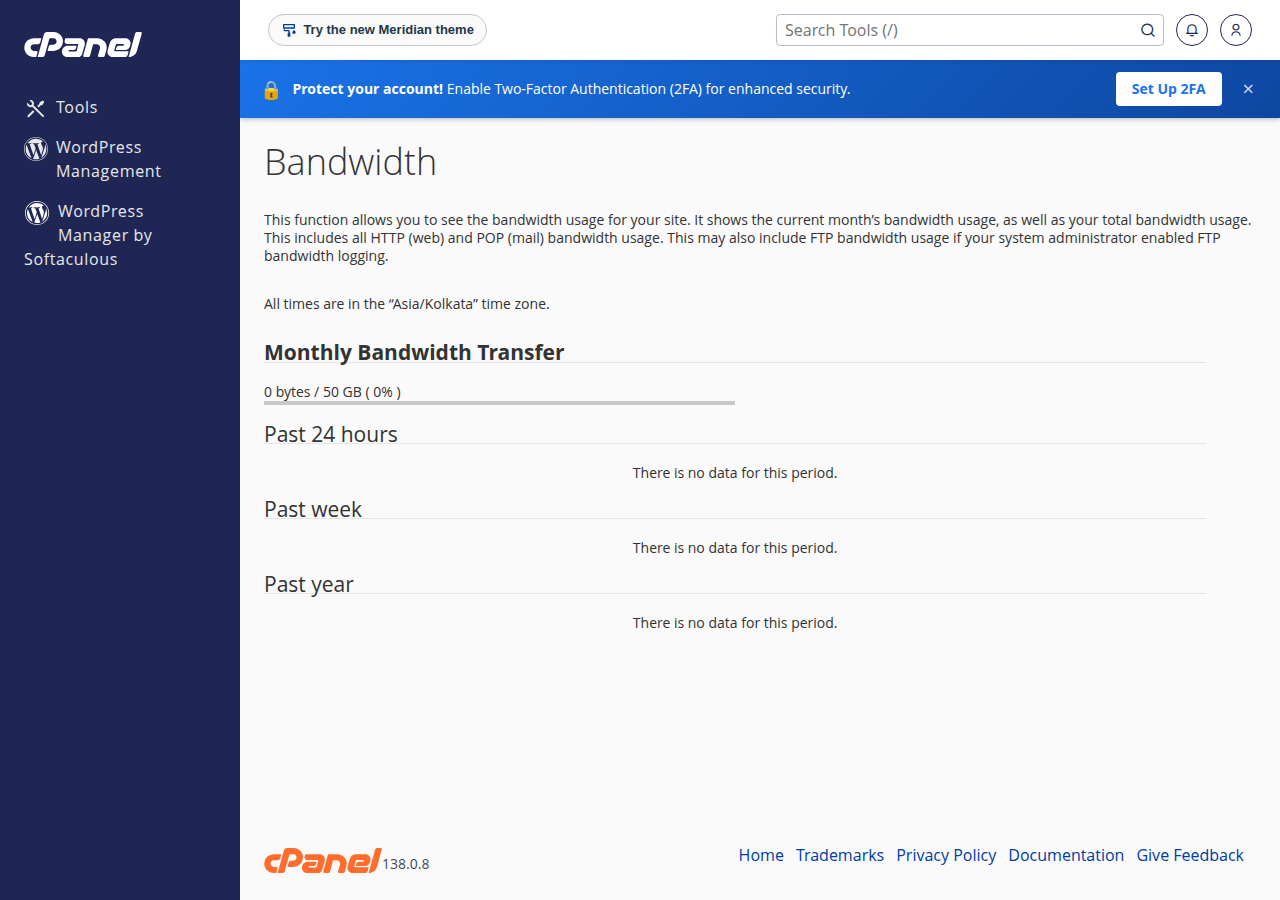
- Open Metrics › Bandwidthfor this month's data transfer and past months, split by web, FTP and email traffic.
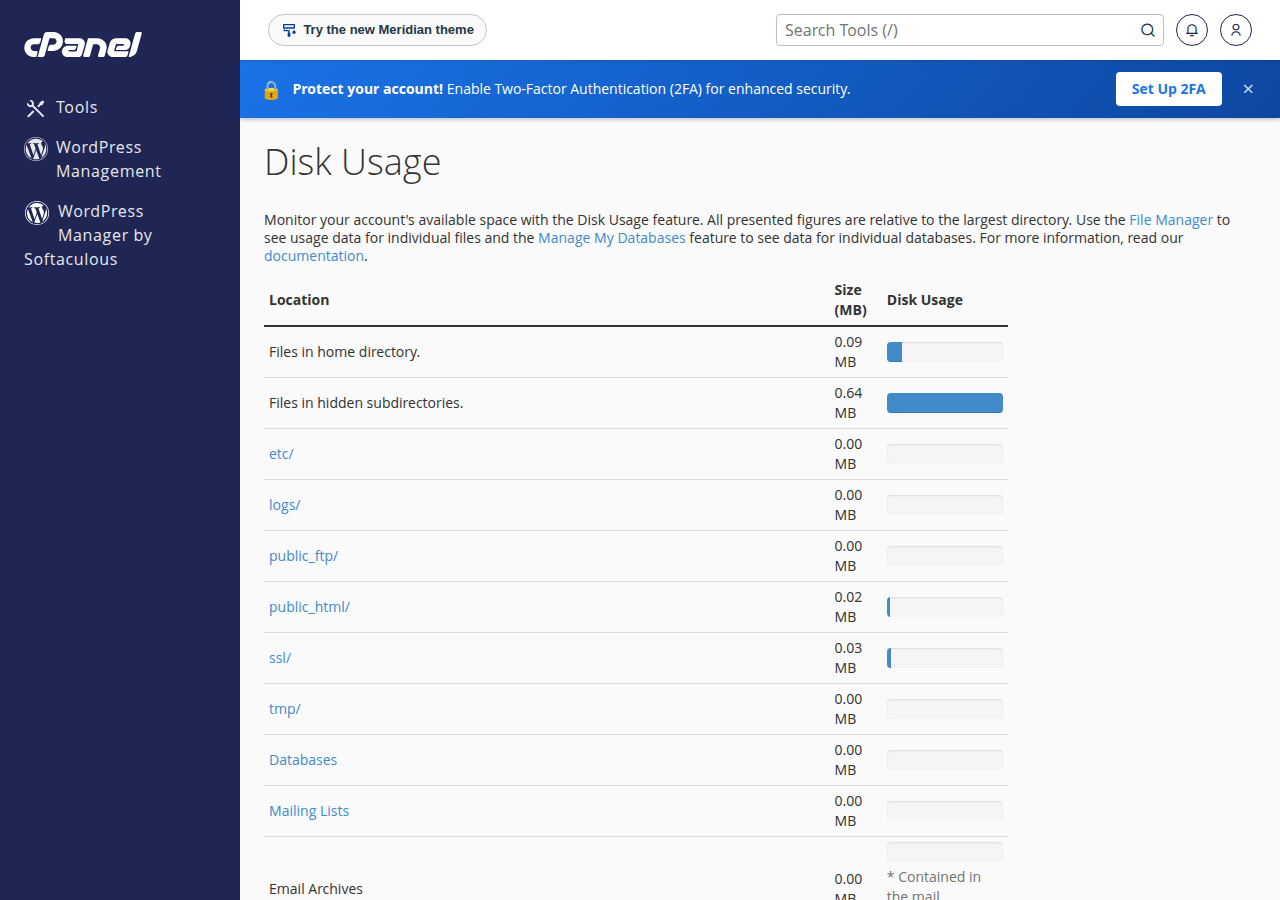
For who is using your bandwidth, Metrics › Awstats shows visitors, pages, files and the busiest bots. It reads both the nginx and Apache logs on our cPanel servers, so it doesn't undercount.
4. Check your usage in DirectAdmin and Webuzo
DirectAdmin. Sign in with the DirectAdmin button on your hosting row in the client area. Open System Info & Files › User statistics for your account's disk and bandwidth use against its limits. If you can't see the figures there, open a ticket and we will read them for you. To find what is taking the space, browse with the DirectAdmin File Manager; your website files are under domains/yourdomain.com/public_html.
The DirectAdmin File Manager has a Trash Bin that keeps deleted files for 30 days. If you are clearing space, empty it once you are sure you don't need those files back.
Webuzo. Log in at https://yourdomain.com:2003 and open the Disk Usage and Bandwidth pages; find them with the search box at the top of the Webuzo panel. If you can't find the figures, ask support.
5. What fills your disk, and how to clear it
Domain India takes weekly JetBackup backups of cPanel and DirectAdmin accounts, so you don't need to keep your own backup archives inside the account itself. Keep your own copy on your computer instead. See backup and restore with JetBackup.
6. How to bring bandwidth down
- Cache your pages. Our shared hosting runs Apache, so on WordPress use WP Super Cache or W3 Total Cache, with one caching plugin active.
- Shrink images and serve modern formats, such as WebP, at the size they are displayed.
- Host video elsewhere. Embed from a video platform instead of serving large files from your account.
- Turn on hotlink protection. In cPanel, Security › Hotlink Protection stops other sites embedding your images.
- Slow down abusive bots and scrapers, but never block Googlebot or Bingbot.
- Consider a CDN in front of the site to serve static files.
Compression is already on: nginx on our cPanel servers gzips HTML, CSS and JavaScript, and DirectAdmin has compression on server-wide, so you don't need a plugin for it.
7. Warnings and running out
On our cPanel servers, cPanel emails the contact address on your cPanel account when bandwidth reaches 80% of the allowance and again when it goes over. Keep that address current under Preferences › Contact Information. If your site already shows "Bandwidth Limit Exceeded", read why does my website say Bandwidth Limit Exceeded to get it back online.
When the account is full, new email bounces, databases can't be written and the site can show errors. Check your usage monthly, and act at around 80% rather than at 100%.
8. When to upgrade
Upgrade when your usage is genuine: a growing site, more mailboxes or more traffic. An active cPanel or DirectAdmin plan can be upgraded at any time, and you pay only the difference for the time left. See can I upgrade my web hosting package at any time? Webuzo customers should contact support before changing plan. Compare plans on cPanel hosting and DirectAdmin hosting.
- 30 GB NVMe SSD Storage
- Unmetered Bandwidth
- 5 Websites
- 50 Email Accounts
Prices on the cards exclude 18% GST.
Can I see my disk and bandwidth usage in the Domain India client area?
No. The client area shows your hosting plan and a button to open your control panel, but not live disk or bandwidth figures. Check them in cPanel or DirectAdmin, or open a support ticket and we will read them for you.
Where do I check disk usage in cPanel?
The cPanel home page shows disk usage against your limit. For detail, open Files, Disk Usage to see which folders use the space, and Email, Email Disk Usage for mailboxes. On Domain India cPanel servers, databases count towards disk usage.
Where do I check bandwidth in cPanel?
Open Metrics, Bandwidth. It shows this month's data transfer and past months, split by web, FTP and email traffic. The home page also shows the monthly total against your limit.
Does email count towards my disk space and bandwidth?
Yes. Mailboxes use your plan's disk space, and on cPanel the bandwidth figure includes sending and collecting email as well as website and FTP traffic.
What happens if I go over my bandwidth allowance?
On Domain India cPanel servers the monthly limit is enforced, so the website can show a Bandwidth Limit Exceeded page until the next month or until the limit is raised. On DirectAdmin, going over can suspend the account. Upgrade or cut usage before you reach the limit.
Do I need to keep backups inside my hosting account?
No. Domain India takes weekly JetBackup backups of cPanel and DirectAdmin accounts. Keep your own extra copy on your computer, not inside the account, where it uses disk space.
Ready to check? Open your control panel from your hosting list, read how to check your hosting resource usage for CPU and memory, or open a ticket and we will read your figures with you.
Tell us your domain, and we will tell you what is using your disk space or bandwidth and what to clear first. Live chat is available 24/7, and tickets get a first response within 15 minutes.
Open a support ticket