"Bandwidth Limit Exceeded" means your hosting account has transferred more data this month than its plan allows, so the server has stopped serving your website until the limit is raised or the new month begins. It is not a hack or a server fault. This guide explains what bandwidth is, which Domain India plans have a monthly limit, how to get the site back quickly, and how to stop it happening again.
Your account has used its monthly data transfer allowance. To get the site back now, upgrade to a plan with a higher or unmetered allowance, or contact support. Then find what used the data: large images and videos, downloads, bots and scrapers, or other sites hotlinking your files. Compress media, block abusive bots, turn on hotlink protection and put a CDN in front of the site. Many Domain India plans have unmetered bandwidth; the entry plans have 50 GB a month.
1. What bandwidth means on a hosting plan
On a hosting plan, "bandwidth" really means data transfer: the total amount of data your account sends and receives in a month. Every time someone opens a page, their browser downloads the HTML, images, stylesheets, scripts and fonts, and all of it counts. Downloads, uploads by FTP and email traffic can count too.
A quick way to estimate your monthly use:
page weight x page views per day x 30 = monthly transfer
2 MB        x 1,000              x 30 = about 60 GB a month
Modern pages often weigh 1 to 3 MB each, mostly images and scripts. So a site with a thousand page views a day can outgrow a 50 GB allowance on page views alone, before counting bots and downloads.
2. Monthly bandwidth on Domain India plans
These are the monthly allowances in the Domain India catalogue on 19 September 2026:
| Plan family | Entry plan | Middle plan | Top plan |
|---|---|---|---|
| cPanel | Starter: 50 GB | Growth: 100 GB | Business and Agency: Unmetered |
| DirectAdmin | DA Starter: 50 GB | DA Growth: Unmetered | DA Business: Unmetered |
| Webuzo | Starter: 50 GB | Developer: 100 GB | Agency: Unmetered |
| Windows (Plesk) | ASP Starter: 50 GB | ASP Business: 150 GB | ASP Enterprise: Unmetered |
Unmetered means the plan has no fixed monthly transfer cap. Your account's other resource limits (CPU, memory, entry processes and disk space) still apply, as explained in understanding hosting resource limits.
Your own plan's figures are on the plan pages for cPanel, DirectAdmin and Webuzo hosting. If your account was set up under an older plan, its limit may differ: ask support to confirm it.
3. What happens when you reach the limit
The allowance is counted per calendar month.
- cPanel: when the account goes over its allowance, the website shows a "Bandwidth Limit Exceeded" page (HTTP status 509) instead of your content. On our cPanel servers, cPanel also emails the contact address on your cPanel account when usage reaches 80% of the allowance and again when it goes over, so keep that address current.
- DirectAdmin: depending on the account's settings, going over the limit can suspend the account rather than show a message.
- Webuzo and Windows (Plesk): the behaviour depends on the panel. If your site goes offline and you suspect bandwidth, contact support.
A new month resets the counter, but waiting days for a reset is rarely acceptable for a business website. The next section gets you back online first.
A "Resource Limit Is Reached" page (508) or a 500 or 503 error is about CPU, memory or processes, not data transfer. Those have their own guide: understanding the "Resource Limit Is Reached" error.
4. Get your website back online
- Confirm it is bandwidth.The page says "Bandwidth Limit Exceeded", or your panel shows the month's usage at or above the allowance.
- Upgrade if the traffic is genuine.An active cPanel or DirectAdmin plan can be upgraded at any time from the client area: open Hosting › My hosting, select your hosting service and choose Change plan. You pay only the difference for the time left until your renewal date, plus 18% GST, and the new limits apply as soon as that invoice is paid.
- Contact support if you are on Webuzo or Windows,or if the usage looks wrong for your traffic. We can check the account and tell you what used the data.
- Then find the causewith the checks in section 6, so the next month does not end the same way.
Details of plan changes are in can I upgrade my web hosting package at any time?
5. Common causes of high bandwidth use
If usage jumped suddenly with no campaign behind it, read what to do if your website has been hacked before anything else.
6. Find out what is using your bandwidth
In cPanel, three pages help:
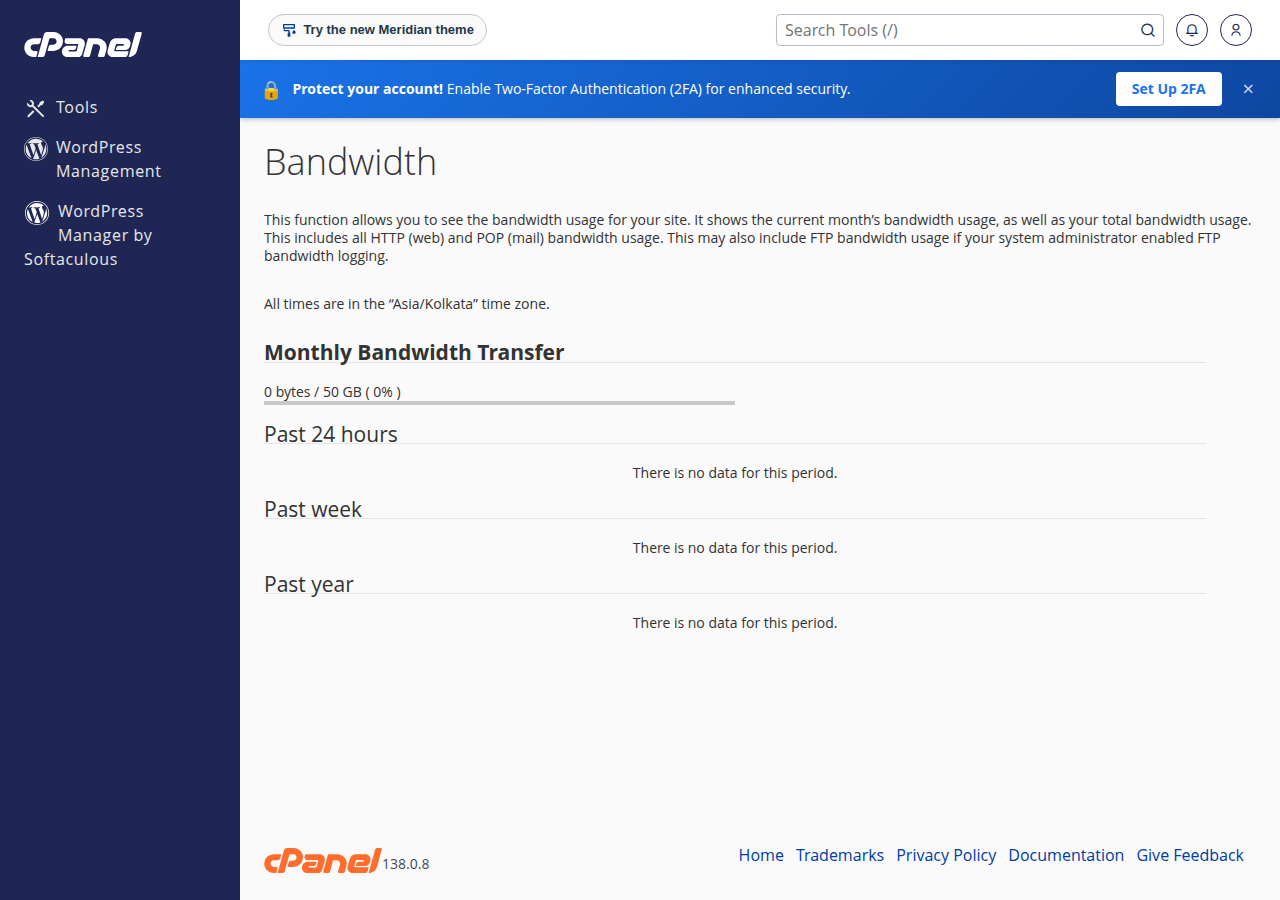
- Metrics › Bandwidth shows this month's and earlier months' transfer, split by web, FTP and email traffic.
- Metrics › Awstats lists the pages, files and visitors (including robots) that transferred the most data.
- Metrics › Resource Usage shows whether the same traffic is also causing CPU or entry-process faults: see how to check your hosting resource usage.
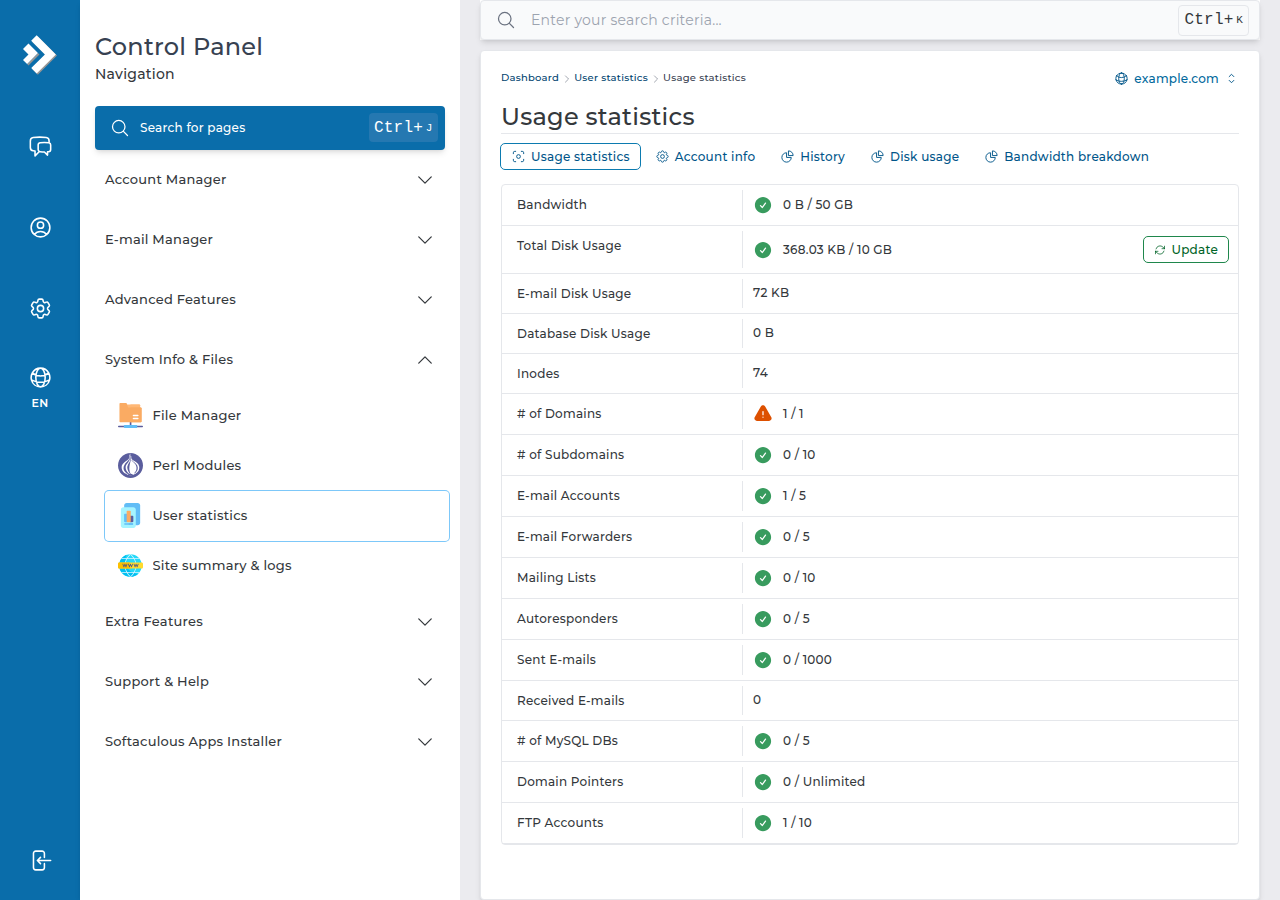
On DirectAdmin, open System Info & Files › User statistics, which shows this month's bandwidth against your limit; Site summary & logs in the same group has each domain's statistics and access log. On Webuzo, type Bandwidth in the search box at the top of the panel. Or ask support to read the figures with you.
A typing mistake in .htaccess takes the whole site down with a 500 error. Keep a copy of the working file, and open your site in a private window after each change. On cPanel, add ?t=1 to the address to skip the server's page cache while you test.
- 100 GB NVMe SSD Storage
- Unmetered Bandwidth
- 25 Websites
- 150 Email Accounts
- 30 GB NVMe SSD Storage
- Unmetered Bandwidth
- 5 Websites
- 50 Email Accounts
What does "Bandwidth Limit Exceeded" mean?
It means your hosting account has transferred more data this month than its plan allows, so the server has stopped serving the website. It is not a hack or a server fault. On cPanel hosting the site comes back when the allowance is raised, for example by upgrading the plan, or when the new month's allowance begins. If your account was suspended instead, contact support.
How much bandwidth do Domain India hosting plans include?
The entry plans on cPanel, DirectAdmin, Webuzo and Windows hosting include 50 GB of data transfer a month. cPanel Growth and Webuzo Developer include 100 GB, and ASP Business 150 GB. cPanel Business and Agency, DA Growth, DA Business, Webuzo Agency and ASP Enterprise are unmetered.
How do I fix "Bandwidth Limit Exceeded" quickly?
If the traffic is genuine, upgrade to a plan with a larger or unmetered allowance from your hosting service's Change plan option in the client area; the new limits apply when the invoice is paid. If you are on Webuzo or Windows hosting, or the usage looks wrong, contact support.
Does unmetered bandwidth mean unlimited resources?
No. Unmetered means there is no fixed monthly data transfer cap. Your account's CPU, memory, entry process and disk space limits still apply, so a very busy site can still need a bigger plan or a VPS.
How can I see how much bandwidth my site uses?
In cPanel, open Metrics and then Bandwidth to see transfer by month, and Awstats to see which pages, files and robots used the most. On DirectAdmin, open System Info & Files, then User statistics. On Webuzo, search the panel for Bandwidth. Or ask support to check the figures with you.
Can bots use up my bandwidth?
Yes. SEO crawlers, AI scrapers and badly behaved bots can download every page and image many times a day. Block the ones you do not need in .htaccess, steer good crawlers with robots.txt, and consider a CDN such as Cloudflare. Never block Googlebot from your whole site.
Will a CDN reduce my bandwidth usage?
Usually a lot. A CDN serves copies of your images, stylesheets and scripts from its own servers, so most of that data no longer leaves your hosting account. Your HTML pages and uncached requests still come from your hosting.
Tell us your domain and when the error started, and we will check your account's usage and help you choose between optimising and upgrading.
Open a support ticket