Bandwidth, or data transfer, is the amount of data your hosting account sends and receives in a month. Every page view, image, download, email and FTP upload adds to it. This guide explains what uses bandwidth, how to estimate what your site needs, how much each Domain India plan includes, and how to keep your usage down.
Monthly bandwidth is roughly your average page size multiplied by your page views. A small business site with 300 page views a day of 2 MB pages uses about 18 GB a month. Domain India Starter plans include 50 GB a month, and several higher plans are unmetered. On cPanel, check usage under Metrics › Bandwidth. The cheapest fixes are smaller images, page caching, blocking bad bots and hotlink protection. For busy dynamic sites, CPU and memory limits usually matter more than bandwidth.
1. What bandwidth is, and what it is not
When someone opens your page, the server sends them the HTML, style sheets, scripts, fonts and images. All of that is data transfer. Hosting plans count the total over a month.
People often mix up two meanings of "bandwidth":
- Data transfer (what hosting plans count): the total amount of data sent in a month, measured in GB.
- Connection speed: how fast data can flow at one moment, measured in Mbps. Shared hosting plans don't sell this; it is a property of the server's network.
On cPanel, the bandwidth figure counts website traffic and also email (sending and collecting mail) and FTP transfers. A mailbox that downloads large attachments on several devices uses bandwidth too.
2. What makes bandwidth usage grow
A modern web page often weighs 1 to 3 MB with all its images and scripts, far more than the 5 KB text pages of early websites. Images are usually the largest part, which is why they are the first thing to fix.
3. Estimate your monthly bandwidth
Use this rough formula:
Average page size x page views per day x 30 = monthly transferExample. A shop's pages average 2 MB. It gets 100 visitors a day who each view 3 pages, 300 page views in all:
2 MB x 300 x 30 = 18,000 MB, about 18 GB a monthThe real number is usually lower, because returning visitors' browsers keep images and style sheets in their cache. Add a margin for bots and for your busiest months. To find your page size, open your site in Chrome, press F12, open the Network tab and reload: the total transferred is shown at the bottom.
4. How much bandwidth each Domain India plan includes
These figures are from the Domain India catalogue on 19 September 2026:
| Plan family | Starter | Middle plan | Higher plan |
|---|---|---|---|
| cPanel | 50 GB (Starter) | 100 GB (Growth) | Unmetered (Business) |
| DirectAdmin | 50 GB (DA Starter) | Unmetered (DA Growth) | Unmetered (DA Business) |
| Webuzo | 50 GB (Webuzo Starter) | 100 GB (Webuzo Developer) | Unmetered (Webuzo Agency) |
| Windows (Plesk) | 50 GB (ASP Starter) | 150 GB (ASP Business) | Unmetered (ASP Enterprise) |
| VPS | 2 TB (VPS Starter) | 3 TB (VPS Basic) | up to 10 TB, or unmetered on VPS Enterprise |
The App Platform has no bandwidth fees; its plans are set by apps, memory and storage.
Unmetered means the plan has no fixed monthly transfer cap. It does not remove the account's CPU, memory and process limits, and the Acceptable Use Policy still applies: it lists resource-intensive background processes that affect other users, and exceeding allocated bandwidth, disk or CPU limits, as resource abuse. In practice, a normal business website on an unmetered plan never needs to think about bandwidth.
5. Check your usage
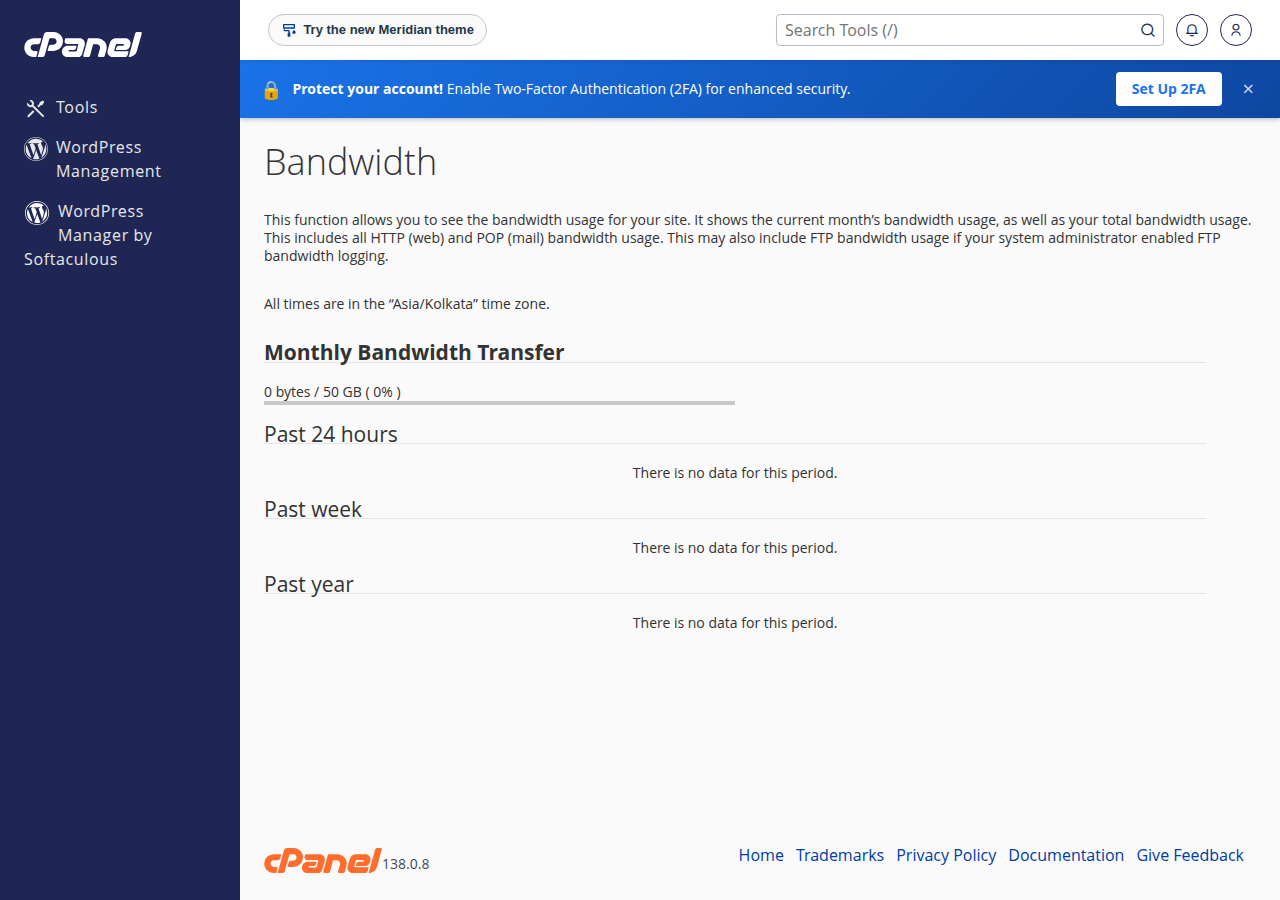
cPanel: open Metrics › Bandwidth. It shows this month's transfer and history by month, split by website traffic, FTP and email. Your total and the plan limit also appear in the statistics column on the cPanel home page.
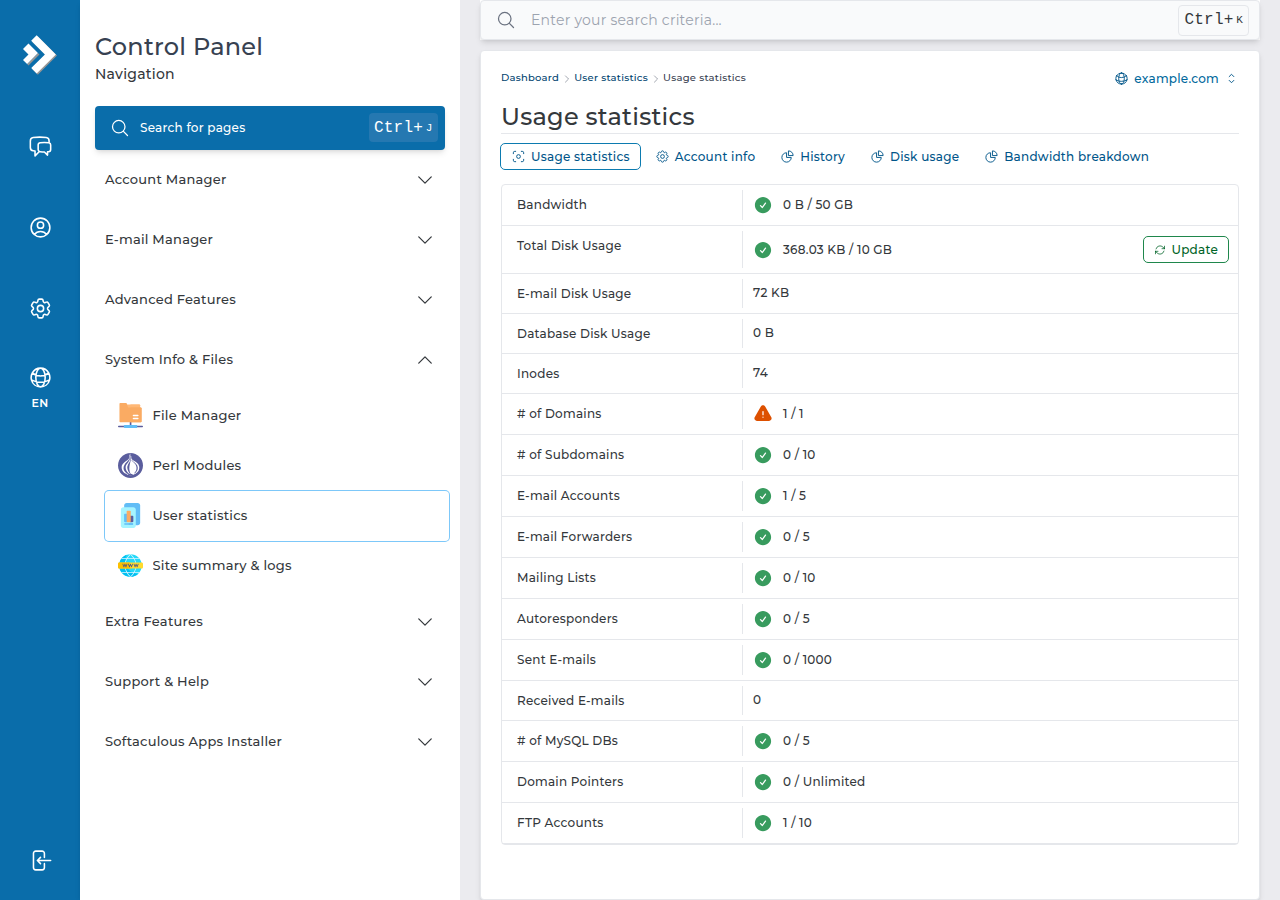
DirectAdmin and Webuzo: in DirectAdmin, open System Info & Files › User statistics. In Webuzo, open the Bandwidth page; find it with the search box at the top of the Webuzo panel.
For CPU, memory and process usage, which are separate from bandwidth, see how to check your hosting resource usage.
6. What happens if you go over
On our cPanel servers the monthly bandwidth limit is enforced (checked on 23 September 2026). When an account passes its limit, its websites can stop serving pages and show a "bandwidth limit exceeded" message until the next month's count starts or the limit is raised. Your visitors see an error instead of your site, so don't let it get that far.
If you are near your limit:
- Find the cause.Look at which domain and which protocol (web, email or FTP) grew in the Bandwidth page. A sudden jump usually means bots, hotlinking or a large file that got shared.
- Apply the quick fixesin section 7. Blocking one aggressive bot can make a big difference quickly.
- Upgrade if the traffic is real.You can move to a bigger plan at any time and pay only the difference for the time left until your renewal date. See can I upgrade my web hosting package at any time.
If your site is already showing the error, contact support and tell us the domain; don't wait for the month to end.
7. Reduce your bandwidth
- Compress and resize images. Upload photos at the size they are shown, not straight from a phone camera. Use WebP where your site supports it. WordPress users can use an image-optimisation plugin.
- Lazy-load images and video. WordPress lazy-loads images by default; keep it on so off-screen images load only when scrolled to.
- Cache pages. Our shared hosting runs the Apache web server, so on WordPress use WP Super Cache or W3 Total Cache rather than a LiteSpeed-only plugin. Browser caching headers also stop repeat visitors re-downloading the same files.
- Turn on hotlink protection. In cPanel, Security › Hotlink Protection stops other sites embedding your images.
- Block bad bots, not Google. Block scrapers and aggressive SEO crawlers you don't need in
.htaccessor a security plugin. Never block Googlebot or Bingbot to save bandwidth; your site would drop out of search. - Move heavy media elsewhere. Put videos on YouTube or Vimeo and embed them, and keep large downloads on a file-sharing or storage service.
- Use a CDN. A CDN such as Cloudflare serves cached copies of your images and files, so fewer requests reach your hosting.
For busy dynamic sites, CPU and memory limits are usually reached before bandwidth. If you see "Resource Limit Is Reached" or 508 errors, read understanding hosting resource limits and my website is slow.
8. Where Domain India fits
A new small business site fits comfortably in a Starter plan's 50 GB. If you expect steady traffic, sell downloads or run several sites, choose a plan with more bandwidth: DA Growth is unmetered, and cPanel Growth includes 100 GB. Prices on the cards are live and exclude 18% GST.
- 30 GB NVMe SSD Storage
- Unmetered Bandwidth
- 5 Websites
- 50 Email Accounts
- 50 GB NVMe SSD Storage
- 100 GB Monthly Bandwidth
- 5 Websites
- 50 Email Accounts
For very high traffic or large media, a VPS includes terabytes of monthly transfer. Support is on 24/7 live chat, and tickets get a first response within 15 minutes; there is no phone support.
Frequently asked questions
How much bandwidth does a small business website need?
Multiply your average page size by your monthly page views. A site with 300 page views a day and 2 MB pages uses about 18 GB a month, well inside the 50 GB included with Domain India Starter plans.
Does email count towards my bandwidth?
On cPanel, yes. The bandwidth figure includes email and FTP transfers as well as website traffic, so large attachments downloaded to several devices add to it.
What does unmetered bandwidth mean?
The plan has no fixed monthly data-transfer cap. The account's CPU, memory and process limits still apply, and so does the Acceptable Use Policy, which treats resource-intensive processes that affect other users as abuse.
What happens if my website goes over its bandwidth limit?
On Domain India cPanel servers the monthly limit is enforced, so the account's websites can stop serving pages and show a bandwidth-exceeded message until the next month or until the limit is raised. Upgrade the plan or cut usage before you reach it, and contact support if the error is already showing.
Where can I see my bandwidth usage in cPanel?
Open Metrics and then Bandwidth. It shows this month's transfer and past months, split by web, FTP and email traffic. The cPanel home page also shows the monthly total against your limit.
Should I block Googlebot to save bandwidth?
No. Blocking Googlebot removes your site from Google search. Block scrapers and unwanted crawlers instead, compress images and use caching; those cut bandwidth without hurting search visibility.
Ready to check your usage? Open your hosting services to reach your control panel, or compare cPanel hosting and DirectAdmin hosting if you need more bandwidth.
Tell us your domain and what your site serves, and we will help you find the cause or the right plan.
Ask our team