You have ordered DirectAdmin hosting from Domain India. There is nothing to "activate" by hand: once the invoice is paid, the account is created for you and your login details are sent by email and shown in the client area. This page explains what happens after payment and the first five things to do so your website goes live.
Most hosting accounts are created automatically within a couple of minutes of payment; a small number need a manual check and take longer. When the account is ready, open Hosting › My hosting in the client area and click DirectAdmin to sign in without a password. Then point your domain at the hosting, install WordPress with Softaculous or upload your files to public_html, create your mailboxes, and check that the free Let's Encrypt certificate has been issued.
1. How the account gets set up
- Your payment is confirmed.Most online payments are marked paid within a couple of minutes; a bank transfer has to be matched by hand, so it takes longer.
- The invoice is marked paid.You can see it under Invoices, with the status Payment Received.
- The account is createdon a DirectAdmin server.
- Your login details are sentto the email address on your Domain India account. The same details are always on the service's Manage › Access tab.
Most hosting accounts are created within a couple of minutes of payment. A small number need a manual check by our team and take longer, for example when a payment is still clearing or an order is flagged for review. We give no setup-time guarantee. The reasons a setup waits are in how long does it take for my account to be set up.
No welcome email? You do not need it. The Access tab shows your username, server IP and panel URL, and has a Reset password button. See I didn't get my welcome email.
2. Your first five steps
- Point your domain at the hosting.Use the nameservers or the A record for your hosting account, as explained in how do I change my nameservers. A nameserver change can take up to 24 to 48 hours to reach everyone, so build your site in the meantime.
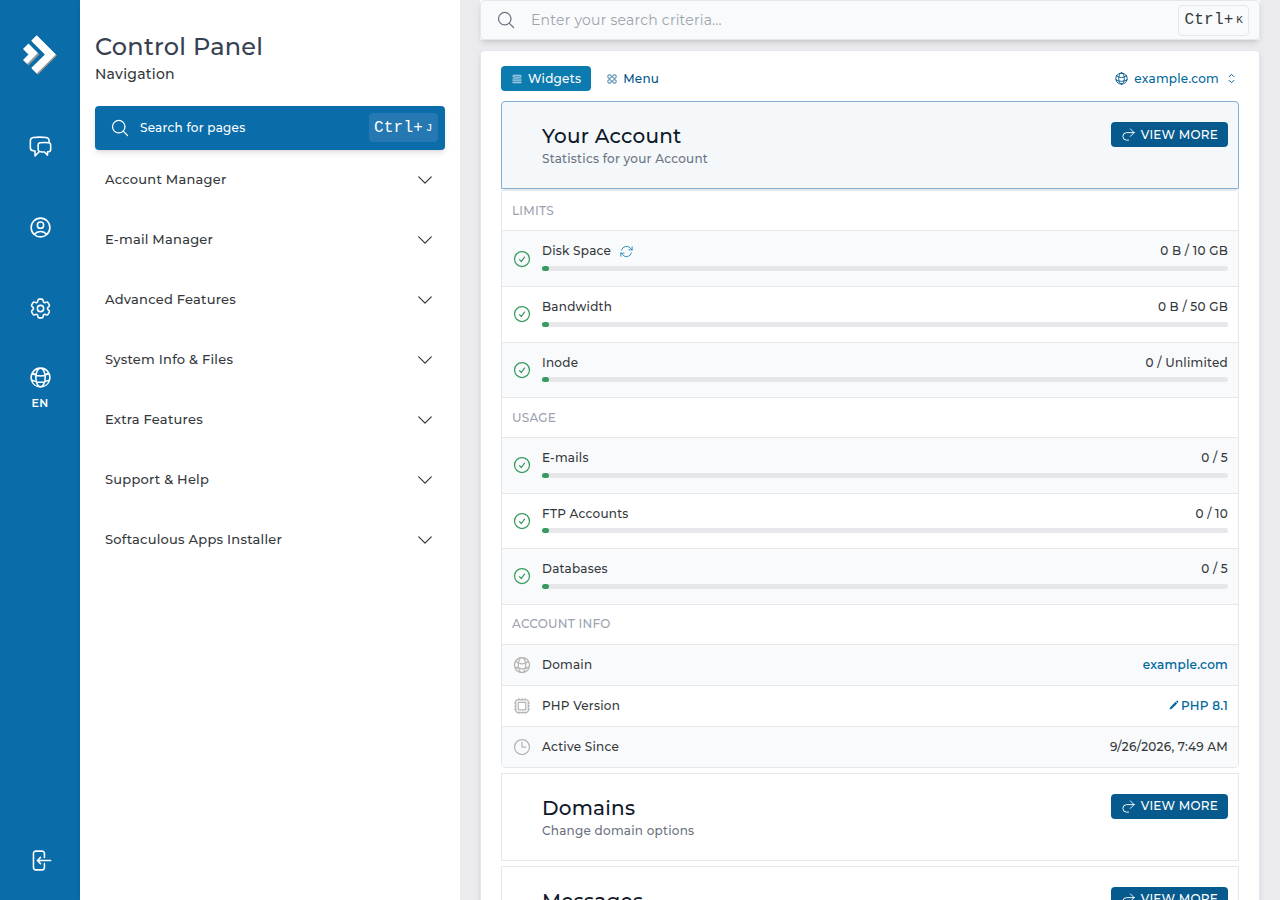
- Log in to DirectAdmin.In the client area, open My Hosting and click DirectAdmin on your domain's row. It opens in a new tab, already signed in. To log in directly instead, go to
https://yourdomain.com:2222once your domain points at us, and use your DirectAdmin username and password. - Install your website.Softaculous is installed on our DirectAdmin servers: open it from the DirectAdmin home page (use the search box if you can't see it), choose WordPress or another app, and install it on your domain. If you already have a site, upload it instead (step 4 below explains where).
- Create your mailboxes.In DirectAdmin's email section, create an address such as
[email protected]with a strong password. Read mail athttps://yourdomain.com/webmail, or set up your phone and computer with the settings in email client settings for cPanel and DirectAdmin. - Check SSL.Once the domain points at the server, DirectAdmin issues a free Let's Encrypt certificate and renews it automatically. If the site still shows a certificate warning a few hours after DNS has updated, follow how to enable Let's Encrypt SSL in DirectAdmin.
Each domain has its own folder: domains/yourdomain.com/public_html. Upload with the DirectAdmin File Manager (see the DirectAdmin File Manager guide) or with FTP. DirectAdmin shows index.html before index.php, so delete the default index.html placeholder once your own site is in place, or visitors will keep seeing it.
3. What is already set up for you
Two limits worth knowing on day one: the PHP upload limit is 64 MB, and outgoing mail is limited to 1,000 messages per day per account (200 per mailbox by default). Jailed SSH access is available on every shared hosting plan; it is off by default, so ask support to enable it for your account. See enabling and accessing SSH on DirectAdmin.
4. Common first-day problems
| Problem | Fix |
|---|---|
| The service still shows as pending | Check that the invoice shows Payment Received; a bank transfer takes longer. Still pending after a couple of hours? Open a ticket with the invoice number |
| The DirectAdmin button does nothing | Allow pop-ups for domainindia.com, or log in directly on port 2222 |
| The domain shows an old site or nothing | DNS is still updating after a nameserver change; wait, and test on mobile data |
| You see a default page instead of your site | Delete the placeholder index.html from public_html |
| The site shows a certificate warning | The certificate is issued only after the domain points at the server; recheck after DNS has updated |
| Site, webmail and panel all stop loading together | The server firewall may have blocked your IP after failed logins; contact support with your public IP |
More login fixes are in how to log in to DirectAdmin from the client area.
5. DirectAdmin hosting at Domain India
DirectAdmin is our lowest-priced Linux control panel. DA Starter is ₹100 a month, excluding 18% GST (Domain India list price on 19 September 2026), with one website, 10 GB of NVMe storage and five email accounts. Compare every plan on DirectAdmin hosting. New shared hosting purchases can be refunded in full within 30 days, requested by support ticket; renewals are not refundable. See the refund policy.
Support is on 24/7 live chat, and tickets get a first response within 15 minutes; how long a fix takes depends on the problem. There is no phone support.
Frequently asked questions
How long does it take to set up DirectAdmin hosting on Domain India?
Most hosting accounts are created automatically within a couple of minutes of payment. A small number need a manual check and take longer, for example when a payment is still clearing. There is no setup-time guarantee; if nothing has appeared after a couple of hours, open a ticket with your invoice number.
Do I need to activate my DirectAdmin hosting myself?
No. The account is created once the invoice is paid, and your login details are sent by email and shown on the service's Access tab in the client area. You then point your domain at the hosting and build your site.
How do I log in to DirectAdmin for the first time?
Sign in to the Domain India client area, open Hosting, My hosting, and click the DirectAdmin button on your domain's row. DirectAdmin opens in a new tab, already signed in. You can also log in at yourdomain.com on port 2222 with your DirectAdmin username and password.
Where do I upload my website files in DirectAdmin?
Upload them to domains/yourdomain.com/public_html with the DirectAdmin File Manager or FTP. DirectAdmin serves index.html before index.php, so remove the default index.html once your own site is uploaded.
Is SSL included with DirectAdmin hosting?
Yes. DirectAdmin issues a free Let's Encrypt certificate once your domain points at the server and renews it automatically.
Is my DirectAdmin hosting backed up?
Yes. JetBackup 5 takes a weekly backup of your account every Sunday and keeps five copies. You can restore or download them from JetBackup in DirectAdmin. Keep your own copy as well before major changes.
Ready to go live? Open My Hosting and click DirectAdmin, read the DirectAdmin login guide, or open a ticket if your account has not appeared.
Log in to DirectAdmin with one click, install WordPress with Softaculous and create your mailboxes. Support is on 24/7 live chat if you need a hand.
Open My Hosting