If your hosting account has been suspended for running an outdated or insecure script, it usually means something in the account has been exploited, or was about to be, and was putting other customers or the server at risk. This article explains why that leads to a suspension, what our servers already do automatically, and exactly how to get your account back online.
A security suspension protects the other customers on a shared server from malware, spam or phishing coming out of one account. To get it lifted, open a support ticket, ask what was found, and send a remediation plan: what you will update, remove or restore, and who will do it. Cleaning the site is the account owner's job, or their developer's; our servers remove known malware automatically, but that is not a full cleanup. Once the entry point is closed, support reviews your plan and tells you the next step.
1. What this suspension means
A shared hosting server runs many customers' accounts side by side. When one account is sending spam, hosting a phishing page, spreading malware or attacking other sites, the damage reaches everyone: the server's IP address can be blacklisted, mail from other customers starts bouncing, and the server slows down.
Our Acceptable Use Policy prohibits hosting malware, viruses, trojans and phishing pages, and says that suspended accounts may request a review by contacting support with a remediation plan. A security suspension is not a penalty for having old software; it is how we stop harm while the cause is fixed.
Accounts can also be suspended for an unpaid renewal. That is handled by paying the invoice, not by cleaning the site; see managing renewals. If you are not sure which applies, ask in a ticket.
2. Why outdated scripts get exploited
Most hacked sites are running software with a known, already-fixed hole. When a developer fixes a security bug, the fix is public, and bots scan the internet for sites still on the old version.
Scripts that commonly lead to trouble:
- Outdated WordPress plugins and themes, especially ones that are no longer maintained.
- Nulled (pirated) themes and plugins, which often ship with a hidden backdoor and can never be updated.
- Old CMS versions past end of life, such as Joomla 3 or Drupal 7, which no longer receive security fixes.
- Forgotten installs: a test copy of the site, an old blog on an addon domain, a staging folder nobody updates.
- Stand-alone file managers, upload forms and mail scripts copied into a site years ago.
- Very old PHP versions, which no longer get security fixes and keep old code running that should have been replaced.
Every website inside one hosting account shares the same files and user. One forgotten install can give an attacker a way into every other site in the same account.
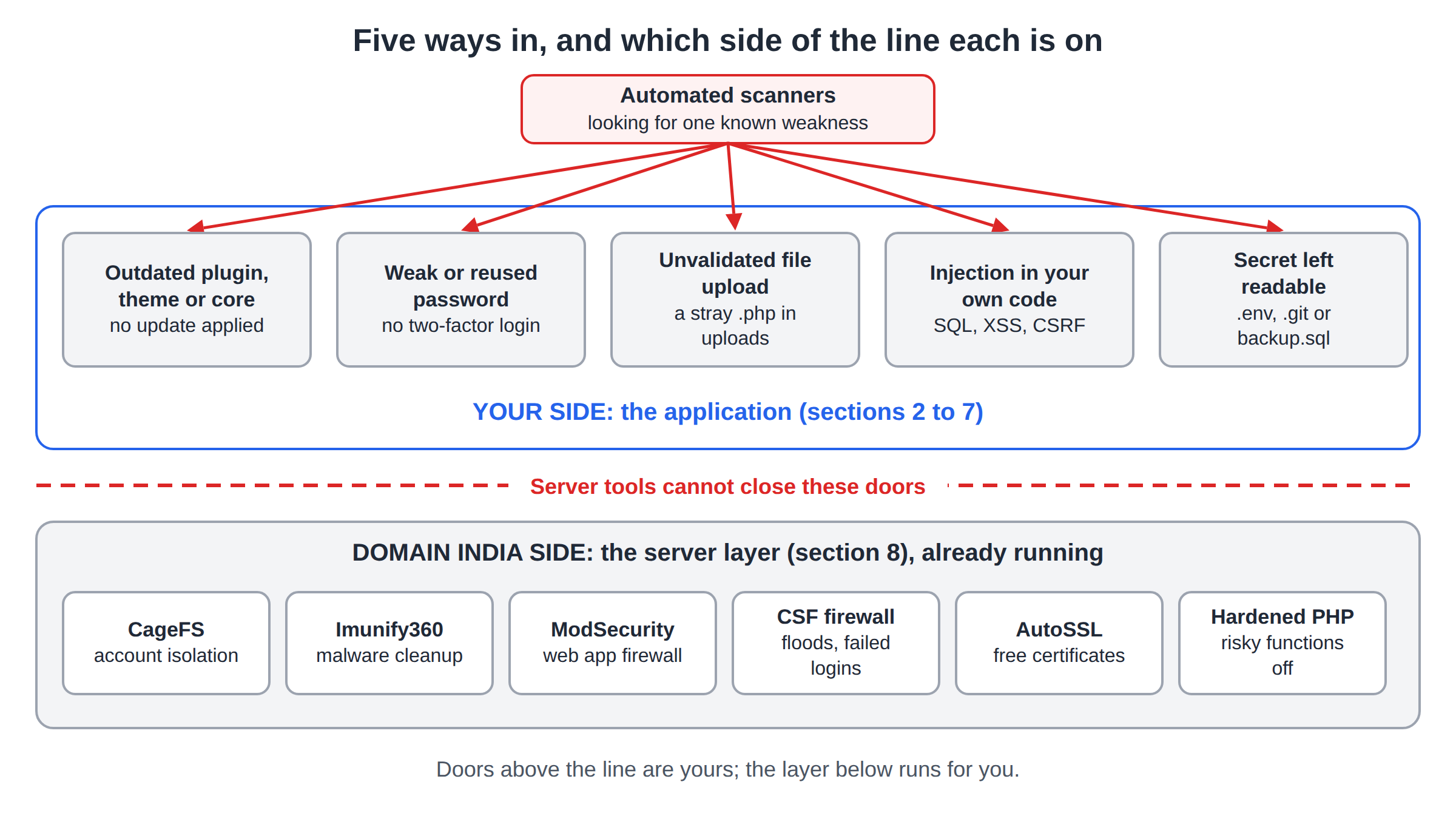
3. What our servers do automatically
Our cPanel and DirectAdmin servers run CloudLinux with CageFS, so each account is isolated from the others, plus the Imunify360 security suite and the CSF firewall. On our cPanel servers we measured this configuration on 20 September 2026:
| Layer | What it does | What it does not do |
|---|---|---|
| Web application firewall | Blocks many common attacks, with WordPress rules on by default | Fix the vulnerable plugin behind them |
| Real-time malware scanning | Scans new and changed files as they are written, plus a weekly full scan | Let you start a scan yourself from the panel |
| Automatic cleanup | Removes malicious code from infected files and keeps the original for 14 days | Email you when it finds or cleans something |
| Proactive Defense | Stops known malicious PHP behaviour while it runs | Find backdoors or injected content in your database |
These layers stop a great deal before it becomes a problem. They do not close the hole the attacker used, so a site with an outdated plugin can be reinfected again and again. That repeat pattern, or activity that harms others such as outgoing spam or a phishing page, is when a suspension becomes necessary.
4. How to get your account unsuspended
- Open a support ticket.Use New ticket in the client area, or /support/ticket. Name the domain and ask what was found and which files or scripts were involved.
- Read what support sends you.The reply tells you what triggered the suspension. Keep a copy for your developer.
- Send a remediation plan.Say what you will update, remove or restore, who will do the work (you or a named developer), and how you will stop it happening again. This is the review the Acceptable Use Policy describes.
- Do the work support agrees to.Support will tell you what access you have while you work; the next steps depend on what was found.
- Confirm in the ticket when you are done.List what you changed. Support reviews it and tells you the next step, including whether the account can go back online.
Our live chat is open 24/7, and tickets get a first response within 15 minutes; how long the whole process takes depends on what was found and how quickly the cleanup is done. There is no phone support.
Domain India does not clean hacked websites as part of your hosting plan. Imunify360's automatic cleanup removes known malicious code from files, but it cannot tell which plugin let the attacker in, find every backdoor, or check your database. You or your developer need to do that. If you are not sure whether support can help further in your case, ask in the ticket.
5. What a proper cleanup involves
A good remediation plan covers these steps. The full walk-through is in the security checklist for hacked websites.
- Change every password connected to the site from a computer you have checked for malware: control panel, FTP, database, CMS administrators and email. Turn on two-factor authentication.
- Remove what should not be there: administrator accounts you did not create, unknown plugins, unknown PHP files in
wp-content/uploads, FTP accounts and cron jobs you did not add. - Update or remove every script in the account, including old test copies and addon-domain sites. Delete what you no longer use.
- Replace nulled themes and plugins with licensed or free WordPress.org versions.
- Switch to a supported PHP version your site works with.
Restoring from a backup
If you have a backup from before the infection started, restoring it is often faster than cleaning file by file. Our cPanel and DirectAdmin hosting runs weekly JetBackup 5 backups and keeps five copies, which you can restore from the panel; see how to restore or download a backup with JetBackup.
A restored backup still contains the outdated plugin that was exploited, so update everything immediately after restoring. Pick a backup from before the first sign of trouble, not simply the newest one. If you cannot reach your panel while the account is suspended, ask in the ticket how to restore.
6. How to avoid a repeat
Keep your app installer's update alerts switched on; see how to update the Softaculous notification email. For WordPress specifically, work through useful tips to secure WordPress.
7. Where Domain India hosting fits
On our cPanel and DirectAdmin servers, Imunify360 and the firewall are configured server-wide, the same for every account, so a more expensive shared plan does not add protection; it adds resources. If you run many sites, consider giving important ones their own hosting account, so one forgotten install cannot reach them.
- 25 GB NVMe SSD Storage
- 50 GB Monthly Bandwidth
- 1 Website
- 10 Email Accounts
Plan cards show live Domain India list prices, excluding 18% GST. If your application needs software or settings that shared hosting does not allow, a VPS gives you full control, along with full responsibility for its security.
Why was my hosting account suspended for an outdated script?
Because a script in the account was exploited, or was being used to send spam, host phishing or spread malware, which puts other customers on the shared server at risk. Domain India's Acceptable Use Policy prohibits hosting malware and phishing pages. Open a support ticket to find out what was found.
How do I get my suspended account back?
Open a support ticket, ask what was found, and send a remediation plan covering what you will update, remove or restore and who will do it. Once the work is done, confirm it in the ticket, and support reviews it and tells you the next step.
Will Domain India clean my hacked website?
Cleaning a hacked site is not included in Domain India hosting. The servers' Imunify360 removes known malicious code from files automatically, but you or your developer still need to find the entry point, remove backdoors, check the database and update everything.
Why wasn't I told when malware was found?
Imunify360 on Domain India's shared servers cleans known malware automatically and silently; it does not email customers. Install a WordPress security plugin with email alerts so you hear about new administrators, changed files and vulnerable plugins yourself.
Can I restore a backup instead of cleaning the site?
Often, yes. Domain India cPanel and DirectAdmin hosting keeps weekly JetBackup 5 backups, five copies, which you can restore from your panel. Choose one from before the infection started, then update every plugin, theme and CMS straight away, because the backup has the same weakness.
How do I stop this happening again?
Update WordPress, plugins and themes every week, delete anything you do not use including old test sites, never install nulled themes or plugins, use unique passwords with two-factor authentication, and keep your own backups off the server.
Ready to get back online? Open a support ticket with your domain, work through the hacked-site checklist, and read why and how WordPress websites get hacked to close the door for good.
Tell us your domain and ask what was found. We will explain what triggered the suspension and what we need from you to review it.
Open a support ticket