If your website shows a grey page that says "SORRY!", and the address bar ends in /cgi-sys/defaultwebpage.cgi, your visitor reached a cPanel server that does not have your domain set up. The server is working; it just doesn't know which website to show. Almost every case comes down to DNS pointing at the wrong IP address, or the domain missing from the hosting account, and both can be fixed in minutes.
The cPanel default page appears when a domain points to a cPanel server where that domain is not configured. Compare your domain's A record with the server IP on your hosting's Access tab (or the Point a domain to this hosting card) in the client area, and fix whichever is wrong. If the IP is right, check the domain is listed on cPanel's Domains page; if it is not, add it. Missing website files or a broken .htaccess do not cause this page.
1. What the page is
Every cPanel server has a fallback page for requests it cannot match to an account. When a browser asks the server for a domain it does not host, the server answers with this page instead of an error. We reproduced it on our cPanel server on 23 September 2026: a request for a domain not set up there is redirected to /cgi-sys/defaultwebpage.cgi, which shows "SORRY!" and suggests the IP address may have changed, the server may be misconfigured, or the site may have moved.
Two things it tells you straight away:
- the domain resolves to a cPanel server, not nowhere;
- that server does not have the domain in any account, or is not the server your account is on.
The page is sent with no-cache headers, so once the cause is fixed it disappears as soon as DNS has updated.
2. The causes, most likely first
| Cause | How it happens | How to confirm |
|---|---|---|
| The A record points to the wrong server | An old IP after a move between servers, a typo, or an A record copied from an old article | The IP from dig A differs from the server IP in your client area |
| The domain is not in the hosting account | It was never added, or an addon domain or alias was removed | The domain is missing from cPanel's Domains page |
| The hosting account has ended | The account was terminated, but DNS still points at the server | The service is not Active in Hosting › My hosting |
| DNS has not fully updated | Nameservers or A records changed recently, and some networks still use the old answer | Results differ between networks, or between dig and a public resolver |
| You opened the server by its IP | Typing the server IP shows the default page, which is normal | The address bar shows an IP, not your domain |
3. Step 1: check where your domain points
Find the IP your domain resolves to. On macOS or Linux:
dig A yourdomain.com +short
dig A www.yourdomain.com +short
dig A yourdomain.com @1.1.1.1 +short
On Windows, run nslookup yourdomain.com. Online DNS propagation checkers, which query resolvers in many countries at once, are a useful second opinion.
Now find the IP it should be. In the client area, open Hosting › My hosting, click Manage, and open the Access tab: the Login details card shows the server IP. The Point a domain to this hosting card on the same service shows the same IP and your hosting nameservers.
- The IPs differ: the domain points to the wrong server. Go to section 4.
- The IPs match: the domain points to the right server but is not set up there. Go to section 5.
4. Step 2: fix the DNS
How you fix it depends on who answers for your domain's DNS. The Point a domain to this hosting card gives two options:
- Option 1: hosting nameservers. Set the domain's nameservers to the ones on the card. cPanel then manages every record, including the A records, so they cannot drift. See How do I change my nameservers.
- Option 2: A records. If you keep DNS elsewhere, such as Cloudflare or another provider, edit the A records for
@andwwwthere so both show the server IP from the card. See How to change your domain DNS settings.
Copy the values from your own client area, never from an old email or article: different servers use different IPs and nameservers. Changes usually take effect within a few hours and can take up to 24-48 hours to reach every network.
If your account has moved to a different server, an A record kept at another DNS provider still points to the old one, and that server shows this page. Update @, www and any subdomain records. If you use hosting nameservers, check they match the ones now shown on the card, because different servers use different nameservers.
Using Cloudflare with the proxy on? dig shows Cloudflare's addresses, not ours. Check the A records in the Cloudflare dashboard instead; they must hold the server IP from your client area.
5. Step 3: make sure the domain is in your account
If the IP is right, the server does not have the domain in your account.
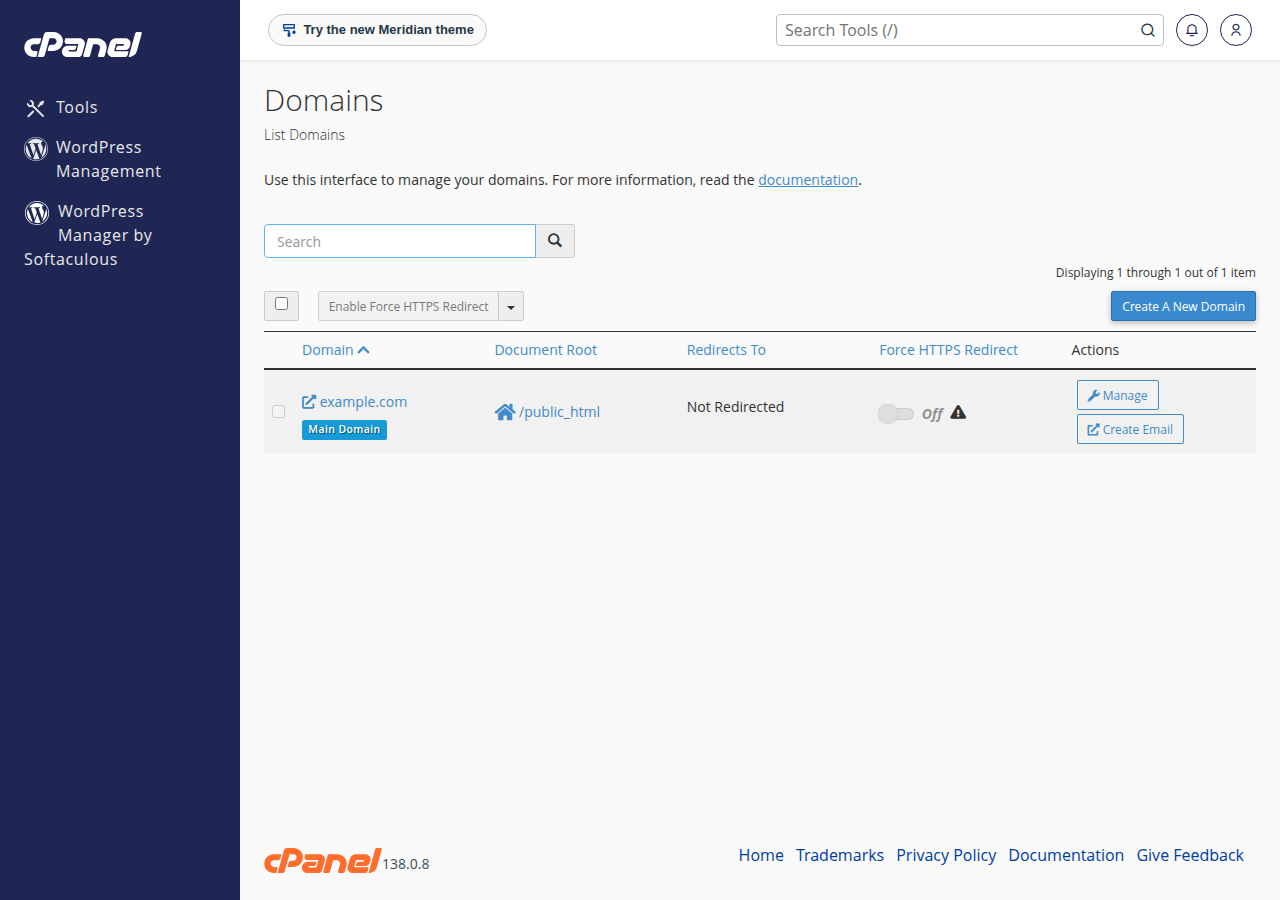
- Open cPanel.In Hosting › My hosting, click the cPanel button on your domain's row. See How to log in to cPanel.
- Open Domains.In the Domains section, click Domains. Every domain in the account is listed.
- Look for yours.If it is missing, click Create A New Domain and add it. Untick Share document root for a separate website; tick it to show the main site. See how to add an addon domain.
- Reload the site.Once the domain is added, the server knows which folder to serve, and the default page goes.
If cPanel refuses the domain because it already exists elsewhere, it is in another account, perhaps one under a different Domain India login. Open a ticket and we will find it.
6. What about HTTPS and certificate warnings?
A domain that points at the wrong server often shows a certificate warning before the default page. The server presents its own certificate, issued for the server's hostname, because it holds none for your domain. On our cPanel server that is what we measured.
AutoSSL issues a free Let's Encrypt certificate only for domains that are in the account and point to the server. So fix sections 4 and 5 first; the certificate follows the next time AutoSSL runs. See the AutoSSL guide.
7. What does NOT cause this page
Older guides listed more causes that send people down the wrong path:
- Missing website files. An empty folder gives a file listing or a 403 error, not the default page. See HTTP 403 Forbidden.
- A broken
.htaccess. That gives a 500 error. See troubleshooting a 500 error. - Outdated plugins. They can break a site in many ways, but not this one.
Do not delete and re-add a working domain to "reset" it. Removing a domain also removes its DNS zone from the server, which can break its email until it is set up again.
8. When to contact us
Open a ticket at /support/ticket, or /client/support/new when signed in, if the IP matches, the domain is listed in cPanel, and the page still appears after a few hours. Include the domain, the output of dig A yourdomain.com +short, and a screenshot. Support is 24/7 live chat, and tickets get a first response within 15 minutes. There is no phone support.
Frequently asked questions
What does cgi-sys/defaultwebpage.cgi mean?
It is the fallback page of a cPanel server. It appears when a browser asks the server for a domain that is not set up in any account on that server, so the server does not know which website to show.
How do I fix the cPanel default page on my domain?
Compare the IP your domain resolves to with the server IP shown on the Access tab of your hosting in the Domain India client area. If they differ, fix the A records or nameservers. If they match, add the domain on cPanel's Domains page.
How long does the fix take to show?
Adding a domain in cPanel works at once. A DNS change usually takes effect within a few hours and can take up to 24-48 hours to reach every network, because resolvers cache the old answer.
Can missing files cause the default page?
No. If the domain is set up but its folder is empty, you see a file listing or a 403 error instead. The default page means the server does not have the domain configured at all.
Why do I see a certificate warning as well?
When a domain points to a server that does not host it, the server presents its own certificate, issued for its hostname, so the browser warns. Once the domain is in your account and points to the server, AutoSSL issues a free certificate.
I use Cloudflare. What should I check?
The A records in the Cloudflare dashboard. With the proxy on, public DNS lookups show Cloudflare's addresses, so check that the dashboard records hold the server IP from your Domain India client area.
Ready to fix it? Open your hosting list to copy the server IP, then check your domain's DNS in My domains. If you are new to DNS, what is a nameserver explains the basics, and cPanel hosting shows what each plan includes.
Copy your server IP from the Access tab, compare it with your domain's A record, and add the domain in cPanel if it is missing.
Open My Hosting