An error page is what visitors see when something goes wrong: a missing page (404), a blocked folder (403) or a server fault (500). The server's plain default page tells visitors nothing and sends them away. A custom page in your site's style, with a link home or a search box, keeps them on your site. This guide shows how to set custom error pages on Domain India hosting with cPanel's Error Pages tool, with .htaccess, and in WordPress.
On cPanel, open Advanced › Error Pages, choose the domain, click the error code (start with 404), edit the page and click Save. It is saved as a file such as 404.shtml in the domain's folder, and the server uses it automatically. On any of our Linux panels you can also create your own pages and point to them with ErrorDocument lines in .htaccess. WordPress shows its theme's 404 page instead, so change that in the theme.
1. The error codes worth customising
| Code | What it means | Worth a custom page? |
|---|---|---|
| 404 Not Found | The address doesn't exist: an old link, a typo or a removed page | Yes, the most important one |
| 403 Forbidden | Access to a file or folder is blocked | Yes, if visitors can reach protected folders |
| 401 Authorization required | A password-protected folder refused the login | Optional |
| 500 Internal server error | A server-side fault, often a broken .htaccess or script | Useful, with limits (section 5) |
| 503 Service unavailable | The site can't respond for the moment | Optional |
Start with 404: real visitors see it most often. For finding the cause of the errors themselves, see understanding HTTP status codes in cPanel and DirectAdmin.
2. Custom error pages with cPanel's Error Pages tool
- Open cPanelfrom the cPanel button in the client area (Hosting › My hosting). See how to log in to cPanel.
- Open Error Pagesin the Advanced section, or type "error pages" in the search box.
- Choose the domainfrom the list, if your account has more than one.
- Click the error codeyou want to edit, such as 404 (Not found). cPanel lists the common codes first and can show every code.
- Write your pagein the editor, as HTML. Use Select Tags to Insert to add live details: Referring URL, Visitor's IP Address, Requested URL, Server Name, Visitor's Browser or Redirect Status Code.
- Click Save, then test with an address that doesn't exist, such as
https://yourdomain.com/test-missing-page.
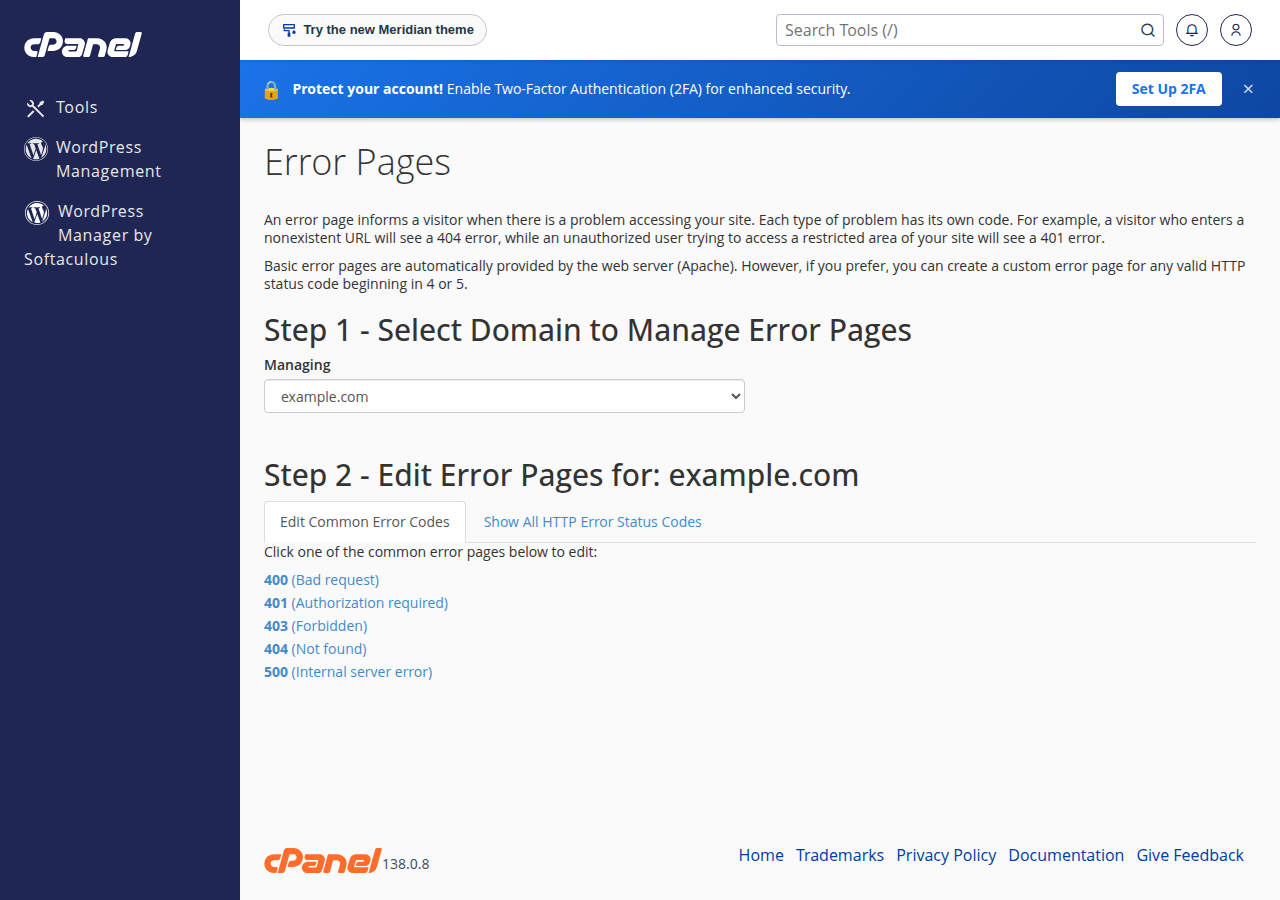
cPanel saves the page as a file named after the code, such as 404.shtml, in the domain's document root (public_html for your main domain). The server is set to use /404.shtml, /403.shtml and the other code files automatically, so no further change is needed. You can also create or edit those files directly in the File Manager.
The inserted tags are server-side includes, which work because the file ends in .shtml. For example, this line shows the address the visitor asked for:
<p>We couldn't find <!--#echo var="REQUEST_URI" --> on this site.</p>3. Custom error pages with .htaccess
.htaccess works on our cPanel, DirectAdmin and Webuzo hosting, because the web server is Apache on all three. It is the way to use your own file names or a single folder of error pages.
Create the pages first, for example in a folder called errors inside public_html, then add these lines to the .htaccess file in public_html:
ErrorDocument 403 /errors/403.html
ErrorDocument 404 /errors/404.html
ErrorDocument 500 /errors/500.html
ErrorDocument 503 /errors/503.html
A self-contained 404 page you can start from:
<!doctype html>
<html lang="en">
<head>
  <meta charset="utf-8">
  <meta name="viewport" content="width=device-width, initial-scale=1">
  <title>Page not found | Your Business</title>
  <style>
    body { font-family: system-ui, sans-serif; max-width: 36rem; margin: 15vh auto; padding: 0 1rem; color: #222; }
    a { color: #0a58ca; }
  </style>
</head>
<body>
  <h1>Sorry, we can't find that page</h1>
  <p>It may have moved, or the link may be mistyped.</p>
  <p><a href="/">Go to the home page</a>.</p>
</body>
</html>Use a path that starts with /, not a full https:// address: with a full address Apache redirects the visitor and the real error code is lost. Keep a copy of your working .htaccess before you edit it, because one typo gives the whole site a 500 error. Never add php_value or php_flag lines: PHP on our servers does not run as an Apache module, so those lines also cause a 500 error.
An ErrorDocument line in .htaccess takes priority over the server default, so it wins over a 404.shtml made with the cPanel tool. Keep styles inside the page and use links that start with /, because the error page can be shown at any address on your site and relative links break.
4. DirectAdmin and Webuzo
- DirectAdmin: the current DirectAdmin on our servers has no Custom Error Pages tool. Create
404.shtmlindomains/yourdomain.com/public_html, which the server already uses for "not found", and use.htaccessfor other codes. The full guide is managing custom error pages in DirectAdmin. - Webuzo: use the
.htaccessmethod in section 3. If a page doesn't appear, ask support.
5. When your custom page doesn't appear
On cPanel, a proxy cache sits in front of Apache and can keep an earlier copy of a page. When you test, add something like ?t=1 to the address to be sure you see the current response.
Check that a missing page really returns 404, not just the right look:
curl -sI "https://yourdomain.com/test-missing-page?t=1" | head -1The first line should say 404. If it says 200, search engines treat every missing address as a real page (a "soft 404"). If you use a .php file as an error page, set the code at the top with http_response_code(404);.
6. WordPress 404 pages
In WordPress, the 404 page belongs to your theme:
- Block themes: open Appearance › Editor › Templates and edit the Page: 404 template.
- Classic themes: edit or add
404.phpin a child theme, so a theme update doesn't overwrite it.
Add a search box and links to your main pages. For removed pages that have a new home, a 301 redirect is better than any 404 page; see links and redirects: 301, 302, 404 and 410.
7. What makes a good error page
- Say what happened in plain words. "We can't find that page" beats "Error 404".
- Offer a way forward: a link home, your main sections, a search box or a contact link.
- Keep it light: no large images or external scripts.
- Show no technical details such as file paths, server names or database messages.
8. Error pages on Domain India hosting
Every Domain India Linux hosting plan runs Apache with .htaccess support, and cPanel plans add the Error Pages editor. On cPanel and DirectAdmin, weekly JetBackup backups let you restore a file if an edit goes wrong. cPanel plans start at ₹125 a month and DirectAdmin at ₹100 a month (Domain India list prices on 24 September 2026, excluding 18% GST).
Where is the Error Pages tool in cPanel?
In the Advanced section of cPanel. You can also type error pages in the search box at the top. Choose the domain, click the error code and edit the page.
Where does cPanel save a custom error page?
As a file named after the code, such as 404.shtml, in the domain's document root. For the main domain that is public_html. The server uses these files automatically.
How do I set a custom 404 page with .htaccess?
Create the page, for example public_html/errors/404.html, then add the line ErrorDocument 404 /errors/404.html to the .htaccess file in public_html. Use a path starting with a slash, not a full URL.
Why does my WordPress site ignore my custom 404 page?
WordPress handles unknown addresses itself and shows the theme's 404 template. Edit the 404 template in the site editor, or 404.php in a child theme.
Does DirectAdmin have an Error Pages tool?
Not in the current version on Domain India's servers. Create 404.shtml in the domain's public_html folder, and use ErrorDocument lines in .htaccess for other codes.
Why do I get a 500 error after editing .htaccess?
Usually a typo, or a php_value or php_flag line, which our servers do not allow in .htaccess. Restore your saved copy, then add your changes back one line at a time.
Ready to set up your error pages? Open cPanel from your hosting list, or read troubleshooting 500 Internal Server Error if a page is failing. Looking for hosting? Compare cPanel hosting plans.
Tell us the domain and the address that shows the error, and we will help you find the cause.
Open a support ticket