Most web applications, from WordPress to a custom PHP site, keep their data in a MySQL-compatible database. On Domain India hosting you create databases and database users in your control panel, and you look inside them, import and export with phpMyAdmin. This page is the short version of both jobs.
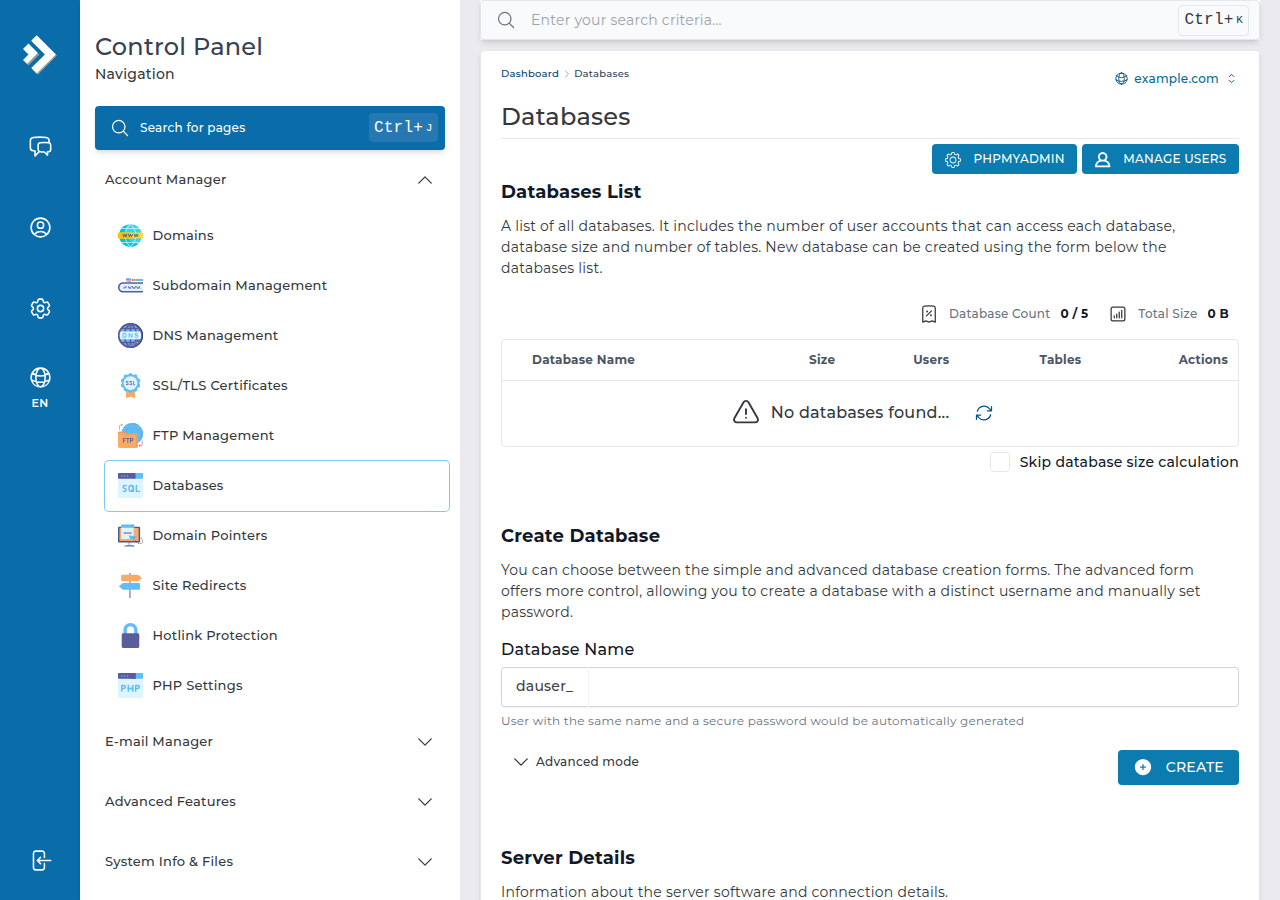
Create the database and its user in the control panel: in cPanel, Databases › Manage My Databases or the Database Wizard; in DirectAdmin, Account Manager › Databases. Give the user ALL PRIVILEGES for a normal website. Names get your account username as a prefix, and the host is localhost. Then use phpMyAdmin to browse, run SQL, export and import. Export a copy before you change or delete anything.
Creating, linking and deleting databases and users: How do I create a MySQL database and user. Everything inside phpMyAdmin: How to access and manage your MySQL database with phpMyAdmin.
1. Create a database and user in cPanel
- Sign in to cPanel.The quickest way is the cPanel button on your service under your hosting services.
- Open the Database Wizardin the Databases section.
- Name the database.cPanel adds your account username as a prefix, for example
acme_shop. - Create the userwith a strong password. Save the full user name and the password.
- Grant privileges.Tick ALL PRIVILEGES for WordPress or another normal website, and finish.
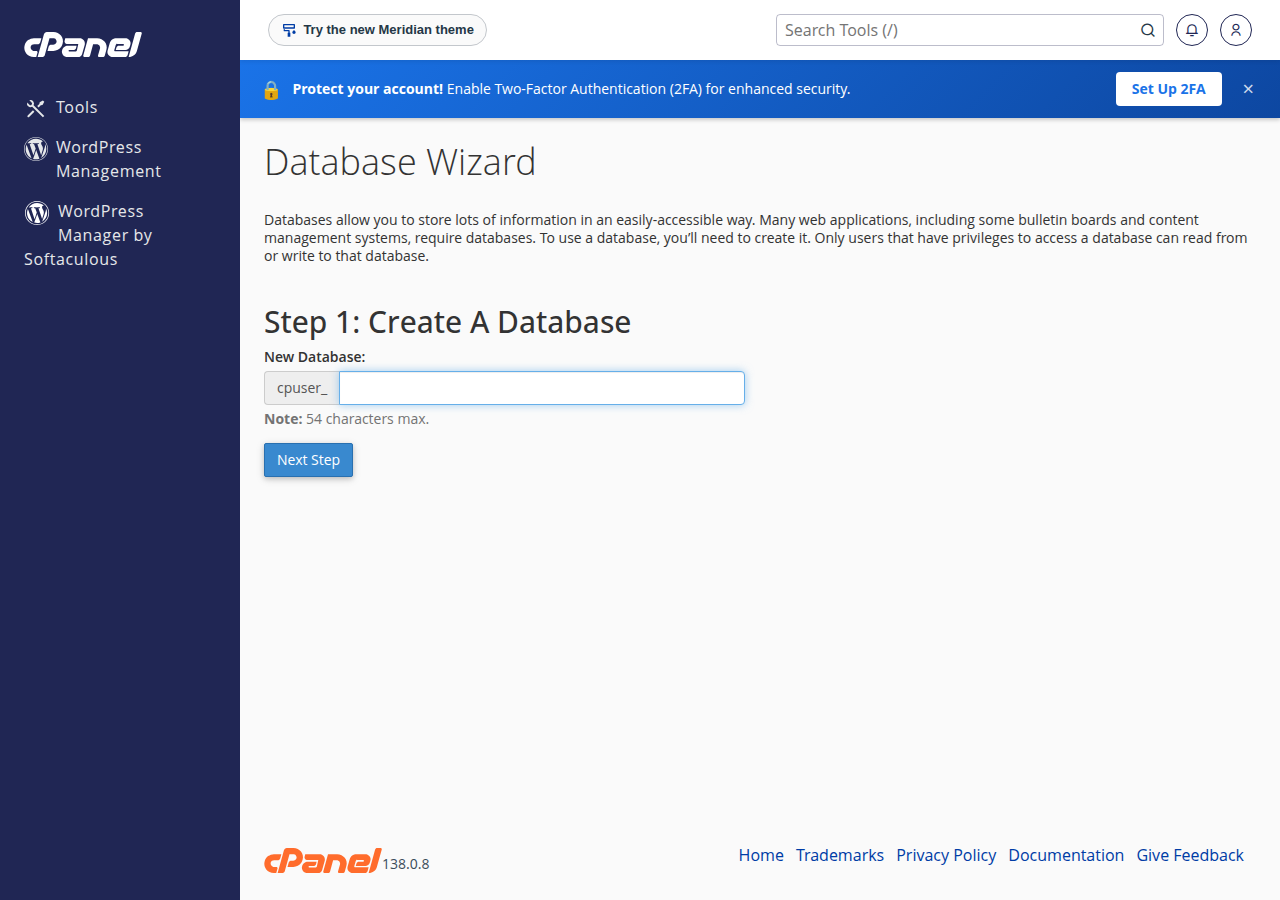
You can do the same on the Manage My Databases page: create the database, create the user, then use Add User To Database and Make Changes on the privileges screen. Your website connects with the full prefixed names and the host localhost.
2. DirectAdmin and Webuzo
- DirectAdmin: open Account Manager › Databases (use the search box if you can't see it). In the Create Database form, type a database name and click CREATE. DirectAdmin creates a user with the same name and a secure password; open Advanced mode first if you want a separate user name and your own password. Copy the details it shows. The database and its user are created in one step.
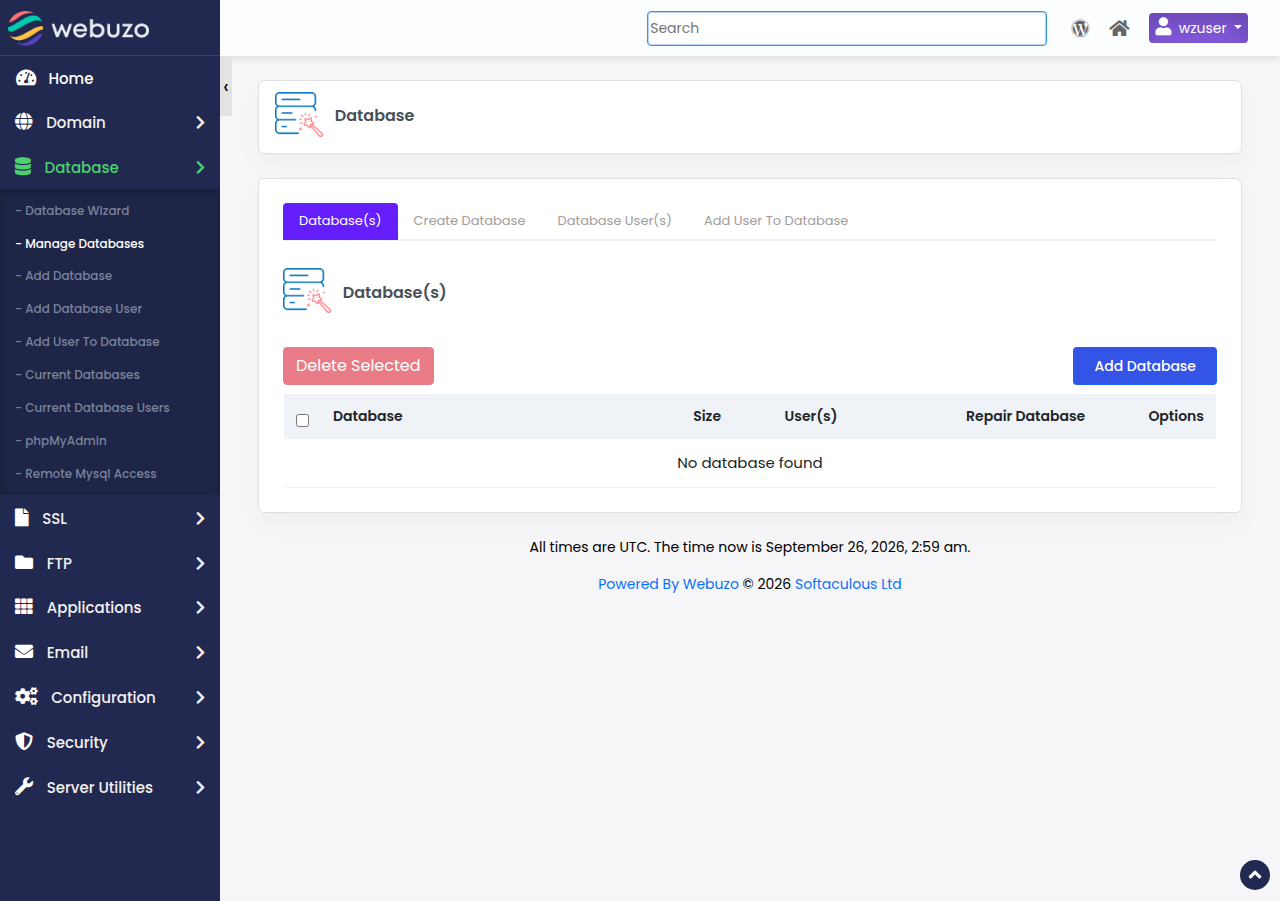
- Webuzo: go to Database › Manage Databases, create the database and the user, then add the user to the database. If a menu looks different, ask support. See MySQL databases in Webuzo.
3. Open phpMyAdmin
- cPanel: click phpMyAdmin in the Databases section. It opens already signed in and lists every database on your account.
- DirectAdmin: open Account Manager › Databases and click phpMyAdmin. If it asks you to sign in, use a database user and its password, not your panel login. See phpMyAdmin in DirectAdmin.
- Webuzo: see phpMyAdmin access in Webuzo.
phpMyAdmin can't create databases or users on shared hosting; that is done in the control panel, as above.
4. Everyday jobs in phpMyAdmin
On our cPanel servers the import limit was 50 MB when we checked in September 2026; compressing the dump as .sql.gz usually makes it fit. If an import fails with an error such as #1044 or "Unknown collation", see database troubleshooting.
Deleting a database or running an UPDATE or DELETE without a WHERE clause can't be undone. Export first. Deleting a database does not delete its user, so remove the user separately.
5. Good habits
- Use a strong, unique password for each database user, and keep it out of tickets and screenshots.
- Give each application its own database and user, so one compromised site can't read another's data.
- Keep your own exports before updates and big changes. Weekly JetBackup 5 backups on our cPanel and DirectAdmin servers also include your databases.
- Check tables only when something reports an error. Repairs are covered in database optimisation and repair.
- Remove databases and users you no longer use.
Desktop tools such as MySQL Workbench can't connect directly, because port 3306 is closed to outside connections on our shared servers. Use an SSH tunnel once jailed SSH is enabled on your account; see how to connect to the MySQL database.
- 25 GB NVMe SSD Storage
- 50 GB Monthly Bandwidth
- 1 Website
- 10 Email Accounts
- 10 GB NVMe SSD Storage
- 50 GB Monthly Bandwidth
- 1 Website
- 5 Email Accounts
Prices on the cards exclude 18% GST.
How do I create a MySQL database on Domain India cPanel hosting?
Sign in to cPanel and open Database Wizard in the Databases section. Enter a database name, create a user with a strong password, tick ALL PRIVILEGES and finish. The names get your cPanel username as a prefix, and the host is localhost.
Why can't I create a database inside phpMyAdmin?
On shared hosting, databases and users are created in the control panel, such as cPanel's Manage My Databases page or DirectAdmin's Databases page. phpMyAdmin is for working inside databases that already exist.
How do I back up a database with phpMyAdmin?
Select the database, open the Export tab, keep the Quick method and SQL format, and click Export. Save the downloaded .sql file somewhere safe, off the server as well.
How big a file can I import in phpMyAdmin?
The limit is shown on phpMyAdmin's Import page. On Domain India's cPanel servers it was 50 MB when checked in September 2026. Compress the dump as .sql.gz to fit more, and ask support for larger files.
How many databases can I create?
It depends on your plan. Domain India Starter plans include 5 MySQL databases, and the higher plans include more; each plan page lists the number.
Ready to set up your database? Open your hosting services to reach your control panel, or open a support ticket if something doesn't work.
Tell us the domain, the database name and the exact error. Never include your database password.
Open a support ticket