phpMyAdmin is the web tool for working inside a MySQL or MariaDB database from your browser: browsing tables, editing rows, running SQL, and importing or exporting .sql files. This guide covers phpMyAdmin on Domain India DirectAdmin hosting: how to open it, the everyday jobs, the import size limit, and what to do when something fails.
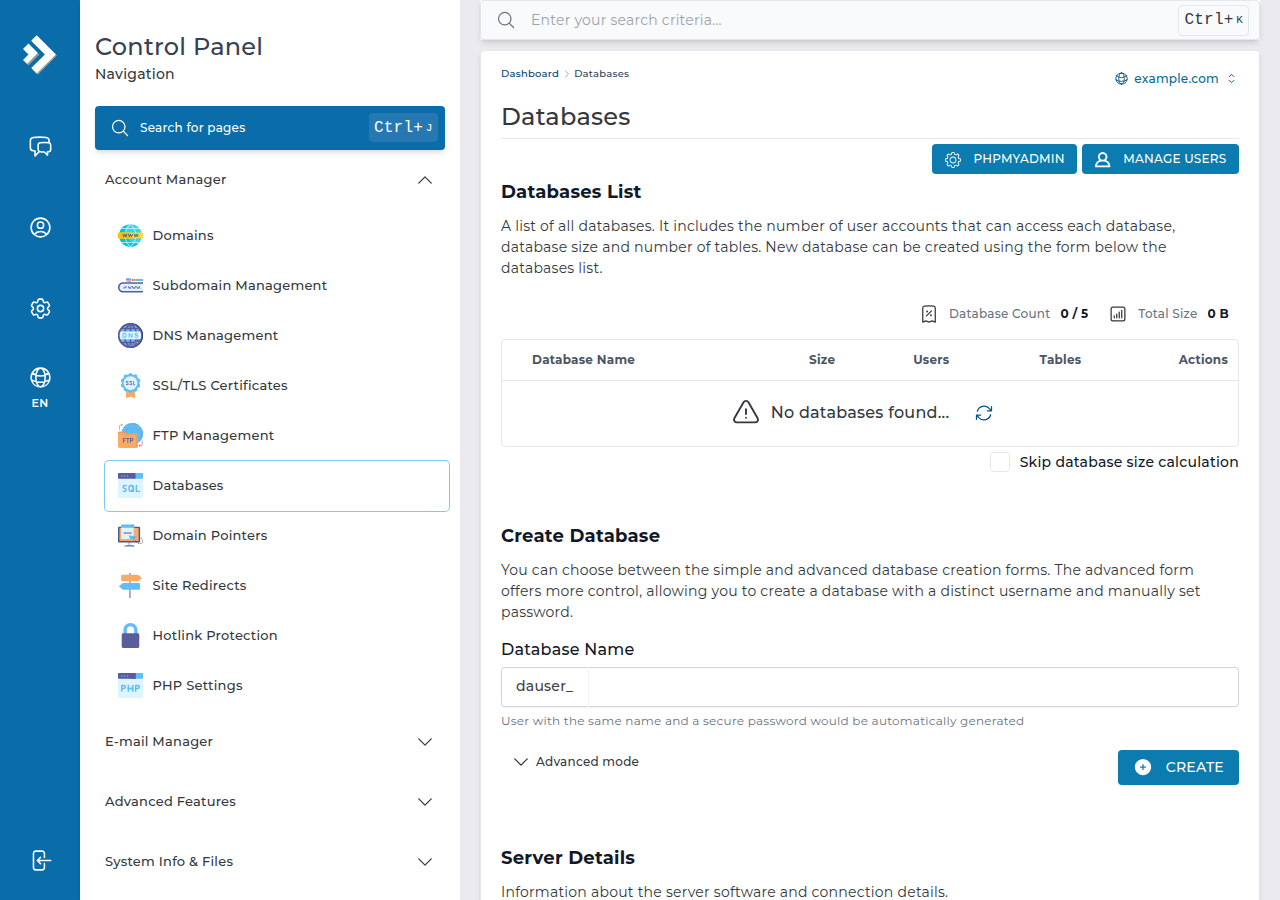
In DirectAdmin, open Account Manager › Databases and click phpMyAdmin; one-click sign-in is switched on for our DirectAdmin servers, so it opens already signed in. You can also go to https://yourdomain.com/phpmyadmin and sign in with a database user and its password. Create databases and users in DirectAdmin, not in phpMyAdmin. Export a copy before you change anything, and keep imports under the 64 MB upload limit (compress larger dumps).
The general phpMyAdmin guide for all our panels is how to access and manage your MySQL database with phpMyAdmin.
1. What runs on our DirectAdmin servers
| Item | On Domain India DirectAdmin hosting |
|---|---|
| phpMyAdmin | Version 5.2, with one-click sign-in from DirectAdmin |
| Database server | MariaDB 10.6, which works with MySQL applications such as WordPress |
| Import limit | 64 MB per file (the PHP upload limit) |
| Remote access on port 3306 | Closed from outside; use an SSH tunnel |
These values were measured on our DirectAdmin servers on 24 September 2026. phpMyAdmin's home page shows the exact server version under Database server if you need it.
2. Open phpMyAdmin
- Sign in to DirectAdmin.The quickest route is the DirectAdmin button on your domain's row in My Hosting; it signs you in with no DirectAdmin password. Other routes are in how to log in to DirectAdmin.
- Open Account Manager › Databases.You can also type "Databases" into DirectAdmin's search box.
- Click phpMyAdmin.It opens in a new tab, already signed in, with your databases listed on the left.
Direct address: https://yourdomain.com/phpmyadmin also works once your domain points at our server. Sign in with a database user and its password, not your DirectAdmin or client-area login. Database names and users carry your DirectAdmin username as a prefix, for example acme_wp.
3. Create the database first, in DirectAdmin
On shared hosting your database user can manage only your own databases, so phpMyAdmin has no working "create database" option. Create the database and its user on DirectAdmin's Databases page, then open phpMyAdmin to work inside it. The full steps, including connecting your application, are in creating and connecting to a MySQL database in DirectAdmin.
4. Everyday jobs
Select a database on the left to see its tables and a row of tabs across the top.
LIKE %...%..sql file.Look before you change anything. Run a SELECT first, then limit every change with a WHERE clause:
-- See the values first
SELECT option_name, option_value
FROM wp_options
WHERE option_name IN ('siteurl', 'home');

-- Then change only those rows
UPDATE wp_options
SET option_value = 'https://www.example.in'
WHERE option_name IN ('siteurl', 'home');
Use the table names you see on the left: WordPress tables may start with a prefix other than wp_.
There is no undo in phpMyAdmin. Export the database before you change or delete anything, and never run UPDATE or DELETE without a WHERE clause. For a WordPress domain change, use a search-and-replace tool that understands serialized data rather than a plain SQL replace.
5. Export (back up) a database
- Select the databaseon the left.
- Open Export.Keep Quick and the SQL format for a normal backup.
- For a large database, choose Customand set compression to gzipped; the file is much smaller.
- Click Exportand keep the file on your own computer.
Your whole account, databases included, is also backed up weekly by JetBackup 5 (every Sunday, five copies kept); see creating backups with JetBackup in DirectAdmin. An export of your own before a big change is still the quickest way back.
6. Import a database
- Create an empty database and userin DirectAdmin, then select that database in phpMyAdmin. Importing into a database that already has the same tables gives "table already exists" errors.
- Open Importand choose your
.sql,.sql.gzor.zipfile. The limit shown next to the file chooser is 64 MB. - Click Importand wait for the success message. Don't close the tab while it runs.
A dump that is too large as plain .sql usually fits once compressed as .sql.gz. If it is still too large, you can import from the command line over SSH: jailed SSH access is available on every shared hosting plan; it is off by default, so ask support to enable it for your account. See enabling and accessing SSH on DirectAdmin.
For dumps made elsewhere, use the utf8mb4 character set with the utf8mb4_unicode_ci collation.
7. Troubleshooting
| Problem | What to do |
|---|---|
| phpMyAdmin asks for a login | Use a database user and its password from DirectAdmin's MySQL page, or open phpMyAdmin from DirectAdmin to sign in automatically |
| "Access denied" for a database user | Check the user is assigned to that database with full privileges in DirectAdmin, and reset its password there |
| The file is larger than the import limit | Compress it as .sql.gz, or import over jailed SSH once support has enabled it |
| Import stops with #1044, #1227 or "Unknown collation" | The dump contains statements or a collation shared hosting doesn't allow; see database troubleshooting |
| The page is blank or keeps logging you out | Clear cookies for your domain, try a private window, and disable browser extensions |
| Your desktop tool can't connect | Port 3306 is closed from outside; use an SSH tunnel once jailed SSH is enabled |
Each error code is explained in database troubleshooting.
8. DirectAdmin hosting at Domain India
phpMyAdmin is included with every DirectAdmin plan. DA Starter includes 5 MySQL databases, DA Growth 10 and DA Business 50. DA Starter is ₹100 a month, excluding 18% GST (Domain India list price on 19 September 2026); compare plans on DirectAdmin hosting. Support is on 24/7 live chat, and tickets get a first response within 15 minutes; there is no phone support.
Frequently asked questions
How do I open phpMyAdmin in DirectAdmin?
Sign in to DirectAdmin, open Account Manager › Databases and click phpMyAdmin. On Domain India DirectAdmin servers it opens already signed in. You can also go to yourdomain.com/phpmyadmin and sign in with a database user and its password.
Which username and password does phpMyAdmin want?
A database user and that user's password, as created on DirectAdmin's Databases page. Your DirectAdmin password and your client-area password do not work there.
What is the phpMyAdmin import limit on DirectAdmin?
64 MB per file on Domain India DirectAdmin hosting. Compress larger dumps as .sql.gz, or import over jailed SSH once support has enabled it on your account.
Can I create a database in phpMyAdmin?
No. On shared hosting, create databases and database users on DirectAdmin's Databases page, then use phpMyAdmin to work inside them.
Which database server does DirectAdmin hosting use?
MariaDB 10.6 on Domain India DirectAdmin servers, measured in September 2026. It works with applications written for MySQL, such as WordPress. phpMyAdmin's home page shows the exact version.
Can I connect to my database from MySQL Workbench or HeidiSQL?
Not directly, because port 3306 is closed to outside connections. Once jailed SSH is enabled on your account, connect through an SSH tunnel using an SSH key.
Ready to work on your database? Open My Hosting and click DirectAdmin, read database troubleshooting if an import fails, or open a ticket with the exact error.
Tell us the domain, the database name and the exact error message. Never include your database password.
Open a support ticket