The .htaccess file tells the Apache web server how to handle requests for your site: redirects, HTTPS, blocked visitors, error pages and password protection. This page gives corrected, copy-ready versions of the rules people ask for most, and says which old favourites don't work on Domain India shared hosting.
Every rule type, with explanations and testing tips, is in Mastering .htaccess: a comprehensive guide. New to the file? Start with introduction to .htaccess files.
Edit public_html/.htaccess (on DirectAdmin, domains/yourdomain.com/public_html/.htaccess), back it up first, and add one rule at a time. mod_rewrite is already on. Use Require for access control, and a path starting with / for ErrorDocument. Don't add php_value or php_flag lines: on our servers they cause a 500 error. Compression is already on at server level, so you don't need gzip rules.
1. Before you edit
- Turn on Show Hidden Files in your File Manager; the name starts with a dot.
- Copy the file to
.htaccess.bakbefore every change. If the site shows a 500 error, put the backup back. - Add your rules above any application block such as
# BEGIN WordPress. - Test with
curl -I https://yourdomain.com/. On cPanel, add?t=123to the URL to skip the cache in front of Apache.
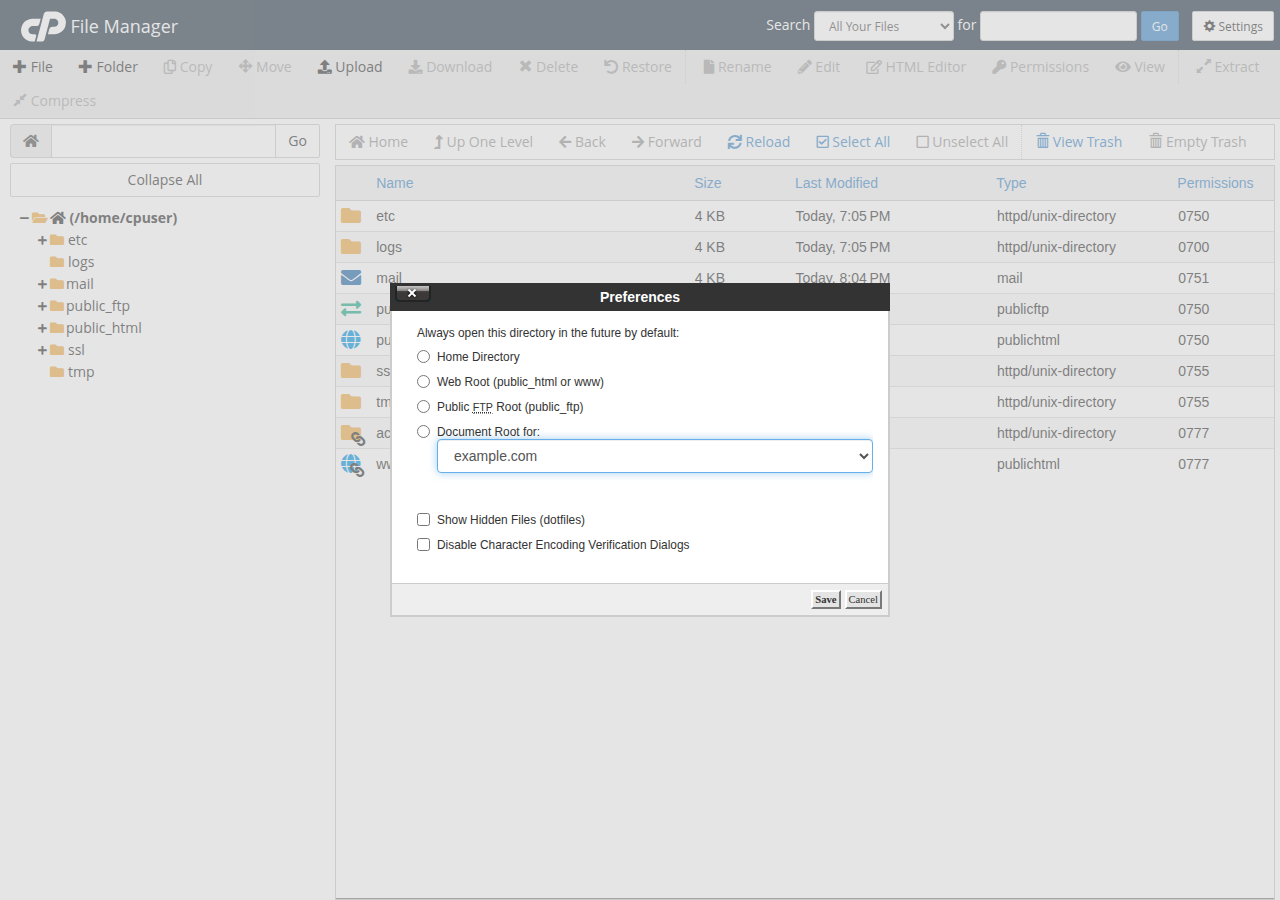
2. Force HTTPS
Once your free SSL certificate is active:
RewriteEngine On
RewriteCond %{HTTPS} off
RewriteRule ^ https://%{HTTP_HOST}%{REQUEST_URI} [R=301,L]
cPanel also has a Force HTTPS switch in Domains. Use the switch or the rule, not both.
3. Redirect www to non-www (and HTTPS in one step)
The old rule on this page left the dot unescaped and ran as a second redirect after the HTTPS one. This single rule does both in one hop:
RewriteEngine On
RewriteCond %{HTTPS} off [OR]
RewriteCond %{HTTP_HOST} ^www\. [NC]
RewriteCond %{HTTP_HOST} ^(?:www\.)?(.+)$ [NC]
RewriteRule ^ https://%1%{REQUEST_URI} [R=301,L]
To go the other way, to www, use the rule in how to redirect non-www to www. Test with a 302 first and switch to 301 when it works, because browsers remember a 301.
4. Block an IP address
On cPanel, use Security › IP Blocker. Elsewhere, add this at the top of the file (the addresses are examples; 123.456.789.0 in the old version was not a valid address):
<RequireAll>
    Require all granted
    Require not ip 203.0.113.45
    Require not ip 198.51.100.0/24
</RequireAll>
A Require not ip line on its own is invalid and can give every visitor a 500 error. More in blocking IP addresses.
5. Custom error pages
ErrorDocument 404 /errors/404.html
ErrorDocument 403 /errors/403.html
Use a path starting with /, never a full URL, or Apache sends a redirect instead of a real 404. cPanel has an Error Pages tool; DirectAdmin has none, so use this rule or a 404.shtml file. See custom error pages in DirectAdmin.
6. Password-protect a folder
The easiest way is the panel tool: Directory Privacy in cPanel, or Password Protected Directories in DirectAdmin. It creates the password file and the rules for you. Done by hand, keep the password file outside public_html:
AuthType Basic
AuthName "Restricted area"
AuthUserFile /home/username/.htpasswds/private/passwd
Require valid-user
Only use this on a site with HTTPS, because Basic authentication sends the password with every request. See can I password protect directories.
7. Rules that don't work here
PHP runs through PHP-FPM or CGI, not as an Apache module, so php_value and php_flag lines (for example to raise the upload limit) give a 500 error. Change PHP settings in cPanel's MultiPHP INI Editor or a .user.ini file. On DirectAdmin, an Options line may use only Indexes, IncludesNOEXEC, MultiViews, SymLinksIfOwnerMatch, FollowSymLinks or None.
- Upload limit: PHP uploads are capped at 256 MB on cPanel and 64 MB on DirectAdmin; see PHP upload file size limit.
- Gzip: not needed. Our cPanel servers compress text responses in the nginx layer in front of Apache, and DirectAdmin has compression on server-wide.
- Windows (Plesk) hosting ignores
.htaccess; rules go inweb.config.
Frequently asked questions
Where is the .htaccess file on Domain India hosting?
In your website folder: public_html on cPanel and Webuzo, or domains/yourdomain.com/public_html on DirectAdmin. It is hidden, so turn on Show Hidden Files in the File Manager.
Why does my site show a 500 error after I edited .htaccess?
A line is invalid or not allowed. On Domain India shared hosting, php_value and php_flag lines always cause a 500, as does a Require not ip line outside a RequireAll block. Restore your backup copy and add rules one at a time.
How do I increase the upload limit if php_value doesn't work?
Use cPanel's MultiPHP INI Editor or a .user.ini file. The PHP upload limit is capped at 256 MB on cPanel and 64 MB on DirectAdmin.
Do I need to enable mod_rewrite?
No. mod_rewrite is already loaded on Domain India's cPanel, DirectAdmin and Webuzo servers, and .htaccess files are allowed.
Do I need gzip rules in .htaccess?
No. Compression is already on at server level on Domain India's cPanel and DirectAdmin hosting.
Ready to go further? Read Mastering .htaccess and common rewrite rules, or open a support ticket if a rule won't behave.
Send us the rule, the URL you tested and what you expected to happen. Support is on 24/7 live chat, and tickets get a first response within 15 minutes.
Open a support ticket