An .htaccess file is a small text file that tells the Apache web server how to handle requests for one folder of your website: redirects, HTTPS, blocked files, custom error pages and caching. It works without access to the server's main configuration, which is why it is the standard tool on shared hosting.
Ready-to-use rules for redirects, clean URLs, access control, caching, error pages and security headers are in Mastering .htaccess: a comprehensive guide. For rewrite patterns, see common .htaccess rewrite rules.
.htaccess is a plain text file, usually in public_html, that Apache reads on every request, so changes apply at once. On Domain India cPanel, DirectAdmin and Webuzo hosting, .htaccess is allowed and mod_rewrite is already loaded. A php_value or php_flag line gives a 500 error on our servers. Back up the file before every edit and change one thing at a time.
1. What the file does
Apache checks every folder on the path to the requested file and applies each .htaccess it finds. So:
- a file in
public_htmlaffects the whole website; - a file in
public_html/blogaffects only that folder and the folders below it; - rules in a deeper folder can override rules from above.
Because Apache reads the file on every request, there is nothing to restart. That also means one typo takes the site down with a 500 Internal Server Error straight away.
2. Where it lives on your hosting
| Hosting | Location of the main site's file |
|---|---|
| cPanel | public_html/.htaccess (an addon domain has its own folder and file) |
| DirectAdmin | domains/yourdomain.com/public_html/.htaccess |
| Webuzo | public_html/.htaccess for the main domain |
| Windows (Plesk) | Not used: IIS ignores .htaccess; rules go in web.config |
WordPress, Laravel and most other applications create their own .htaccess. Add your rules above their block, never inside it, because the application may rewrite its own section.
3. Create or edit the file safely
- Show hidden files.The name starts with a dot, so it is hidden. In cPanel's File Manager open Settings and tick Show Hidden Files; see how to use the File Manager or the DirectAdmin File Manager guide.
- Back up first.Copy the existing file to
.htaccess.bak, or download it. - Create or open the file.If none exists, create a new file named exactly
.htaccess, with no extension. Over FTP or SFTP, upload it with permissions 644. - Add one rule and save.Test the site before you add the next rule.
- Test properly.Run
curl -I https://yourdomain.com/to see the real status code. On cPanel, add?t=123to the URL to bypass the nginx cache in front of Apache.
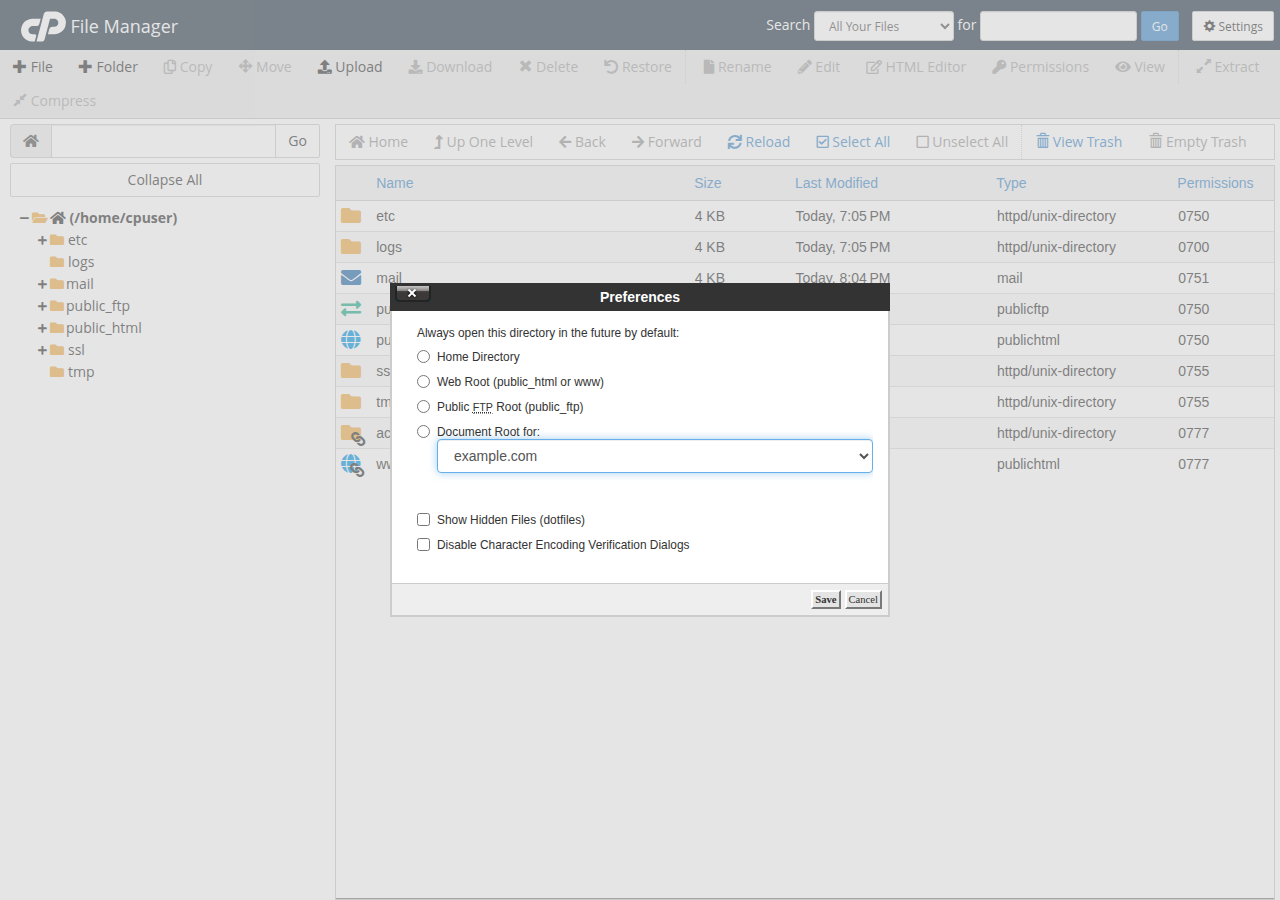
4. A safe first file
These lines are a sensible start for a plain PHP or HTML site. They force HTTPS once your free SSL certificate is active, stop Apache listing a folder's contents when there is no index file, and block direct downloads of a secrets file:
RewriteEngine On
RewriteCond %{HTTPS} off
RewriteRule ^ https://%{HTTP_HOST}%{REQUEST_URI} [R=301,L]

Options -Indexes

<Files ".env">
    Require all denied
</Files>
Directory listing is on by default on cPanel, so Options -Indexes is worth adding. Use Require for access control; it is the current Apache 2.4 syntax. To settle on www or non-www as well, use the single combined rule in how to redirect non-www to www instead of stacking a second redirect.
5. What not to put in .htaccess
PHP runs through PHP-FPM or CGI, not as an Apache module, so php_value and php_flag lines give a 500 error. Change PHP settings in cPanel's MultiPHP INI Editor or a .user.ini file instead. On DirectAdmin, an Options line may use only Indexes, IncludesNOEXEC, MultiViews, SymLinksIfOwnerMatch, FollowSymLinks or None.
If the site breaks after an edit, restore your backup, then read the error log (in cPanel, Metrics › Errors). See troubleshooting 500 internal server errors.
Frequently asked questions
What is an .htaccess file?
It is a plain text file that gives the Apache web server instructions for one folder of a website and the folders below it, such as redirects, HTTPS, access rules, error pages and caching. Apache reads it on every request, so changes take effect immediately.
Where is the .htaccess file on Domain India hosting?
In the website's document root: public_html on cPanel, or domains/yourdomain.com/public_html on DirectAdmin. The file is hidden, so turn on Show Hidden Files in the File Manager.
Do I need to enable mod_rewrite?
No. mod_rewrite is already loaded on Domain India's cPanel, DirectAdmin and Webuzo servers, and .htaccess files are allowed. Add RewriteEngine On and your rules.
Can I change PHP settings in .htaccess?
No. On Domain India shared hosting, php_value and php_flag lines cause a 500 error because PHP does not run as an Apache module. Use cPanel's MultiPHP INI Editor or a .user.ini file.
Does .htaccess work on Windows hosting?
No. Windows (Plesk) hosting runs IIS, which ignores .htaccess. Redirects and rewrite rules go in web.config.
Ready to write your own rules? Continue with Mastering .htaccess, compare cPanel hosting and DirectAdmin hosting, or open a support ticket if a rule won't behave.
Send us the rule, the URL you tested and the result you expected, and support will check it against your server.
Open a support ticket