A domain name is the easy-to-remember address people type to reach your website or send you email, such as yourbusiness.in. Computers still find each other by number, so every visit starts with the internet translating the name into an IP address. This guide explains the parts of a domain name, who runs each part, how a name is looked up, and what you control once you register one.
A domain name is a human-friendly label that the Domain Name System (DNS) translates into the numeric IP address of a server. The registry for each extension (such as .in or .com) records only which nameservers answer for your domain; those nameservers hold the actual records that point your website, email and subdomains to the right servers. You rent a domain from a registrar for one or more years, and it keeps working only while you renew it.
1. What a domain name is
Every server on the internet has an IP address, a number such as 203.0.113.10 (IPv4) or 2001:db8::10 (IPv6). Numbers are hard to remember and change when a website moves server. A domain name fixes both: people remember the name, and you can change the number behind it without changing your address.
The same name can serve several things at once. www.yourbusiness.in can point to your website, email for @yourbusiness.in can go to a mail server somewhere else, and shop.yourbusiness.in can point to a third server. Each of these is a separate setting, called a DNS record.
2. The parts of a domain name
Read a domain name from right to left, from the most general part to the most specific.
| Part | Example in shop.yourbusiness.co.in | What it is |
|---|---|---|
| Top-level domain (TLD) | .in | The extension, run by a registry. .in is India's country-code extension |
| Second-level extension | .co.in | Some country codes offer extra endings under the main one, such as .co.in or .org.in |
| Your name | yourbusiness | The part you choose and register |
| Subdomain | shop | A name you create yourself under your domain, at no extra cost |
www is simply a subdomain that most websites use by convention. You decide whether www.yourbusiness.in and yourbusiness.in both open your site; most hosting setups make both work.
A domain name can use letters, numbers and hyphens, and each part between the dots can be up to 63 characters long. It cannot start or end with a hyphen, and it is not case-sensitive: YourBusiness.in and yourbusiness.in are the same domain. Names in Indian scripts are possible too, through internationalised domain names such as those ending in .भारत.
3. Who does what: registry, registrar and you
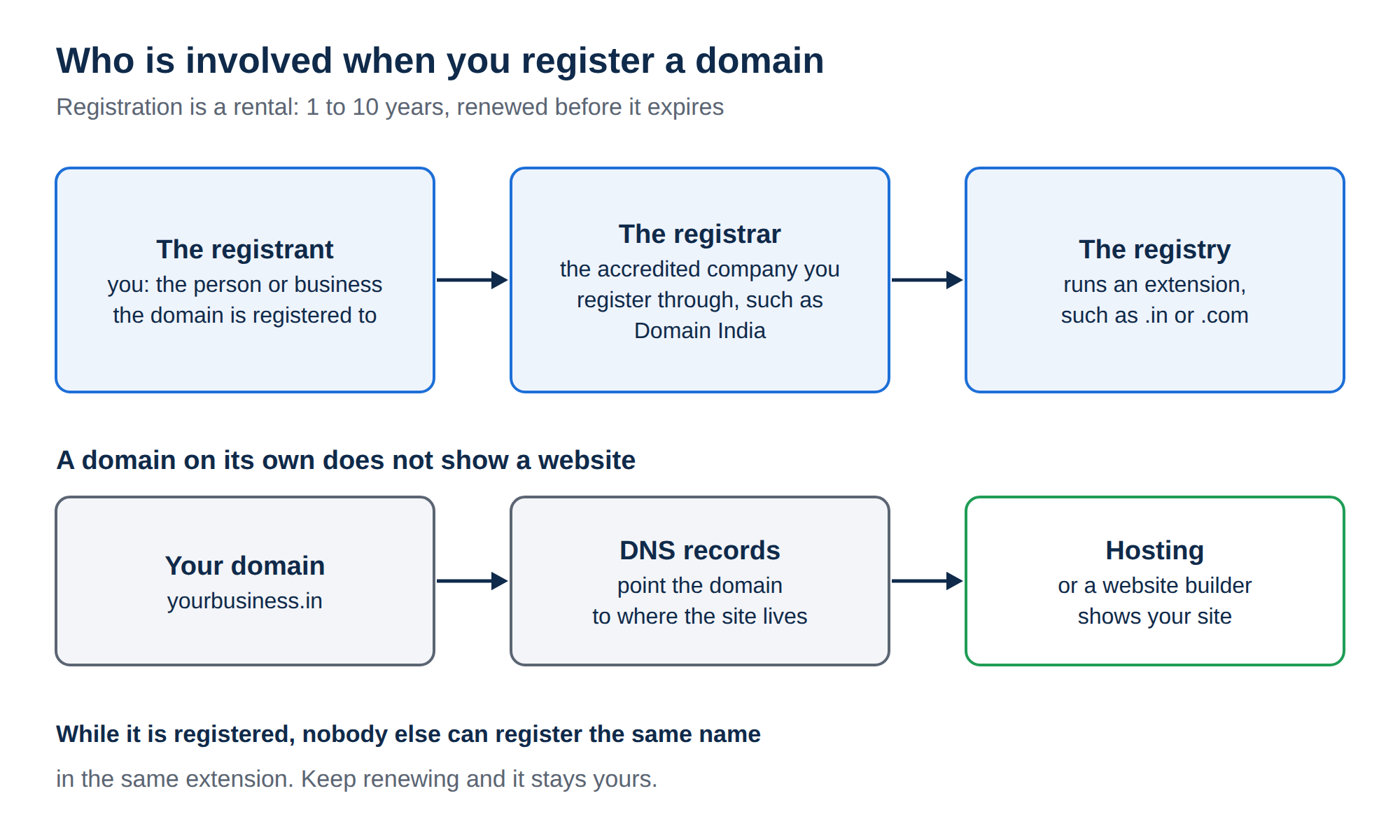
Three roles keep the system running.
For generic extensions such as .com, .net and .org, the rules are set by ICANN, the body that coordinates the global domain system. Country-code extensions such as .in follow the policy of their own country's registry.
4. How a name becomes an IP address
Every time someone opens your website, a lookup like this happens, usually in a fraction of a second.
- The visitor's device asks a resolver.A phone or computer sends "where is www.yourbusiness.in?" to a DNS resolver, usually run by the internet provider or a public DNS service.
- The resolver asks the root servers.They don't know your domain, but they know which servers handle each extension, such as .in.
- The resolver asks the registry's servers.The .in servers don't hold your website's address either. They reply with the nameservers your registrar published for your domain.
- The resolver asks your nameservers.These are authoritative for your domain, so they give the real answer, such as the IP address in your A record.
- The browser connects.The browser opens a connection to that IP address and the site loads. The resolver caches the answer for a while, so the next visitor gets it faster.
Email works the same way; the question is then "which mail server accepts email for this domain?", answered by the MX record.
A common myth is that a central registry collects everyone's DNS records. It doesn't. The registry stores only which nameservers to ask. Your records live on those nameservers, which is why changing nameservers moves all of your DNS to a new provider at once.
5. Nameservers and DNS records
Two settings are often both called "DNS", and it helps to keep them apart:
- Nameservers decide who answers for your domain. You set them at your registrar. Every domain has at least two, so the domain keeps working if one is unreachable.
- DNS records are the answers themselves: an A record for the website's IP address, an MX record for email, a CNAME for an alias such as
www, and TXT records for SPF and verification. You manage them at whichever provider your nameservers point to.
When you buy hosting, the simplest setup is to use the nameservers shown for your hosting account, so the control panel manages every record for you. If your email already runs elsewhere, you can keep your current DNS and add A records for the website instead. Both options are explained in What is a nameserver and why do I need it and How do I change my nameservers.
6. Why changes take time to appear
Resolvers cache answers so they don't have to repeat the full lookup for every visitor. Each record carries a TTL (time to live) that says how long it may be cached. Until the cached copies expire, some visitors still get the old answer.
That is why a nameserver change usually takes effect within a few hours and can take up to 24-48 hours to reach every network. A change to a single record is usually faster, depending on its TTL. For the detail, read Understanding DNS propagation.
7. Registering a domain is renting it
You don't buy a domain outright. You register it for a period, usually one year or more, and renew it to keep it. While the registration is current:
- only you can decide where the domain points;
- you can move it to another registrar, usually once it is at least 60 days old;
- your contact details are held by the registrar and the registry.
If a domain is not renewed, it stops working: the website and email go offline, and after a while the name can be released for anyone to register. At Domain India a renewal invoice is emailed up to 30 days before the due date, and nothing is charged to a saved card automatically. The domain renews when that invoice is paid. See How auto-renewal works.
For .in and its second-level extensions (.co.in, .net.in, .org.in and others), personal registrant details are not shown in public WHOIS. This is free and automatic; there is nothing to switch on.
8. Domain name vs web hosting
A domain and hosting are two separate services that work together.
| Question | Domain name | Web hosting |
|---|---|---|
| What it is | Your address, such as yourbusiness.in | The server space where your website files and email live |
| What it holds | Nameservers and DNS settings | Files, databases and mailboxes |
| Renewal | Yearly, per domain | Yearly or every 2 or 3 years, per plan (VPS and App Platform plans can also be monthly) |
You can keep the domain with one company and hosting with another; you just point the domain at the hosting. For a first website, Hosting basics walks you from order to a live site.
9. Where Domain India fits
Domain India is a NIXI-accredited .IN registrar, and you can manage your domains and hosting from one client area. Domain India list prices on 19 September 2026, excluding 18% GST:
Every other extension's price is on the domain pricing page. If you also need a website, a shared hosting plan includes email at your domain and a control panel that manages your DNS records once the domain uses the hosting nameservers:
- 25 GB NVMe SSD Storage
- 50 GB Monthly Bandwidth
- 1 Website
- 10 Email Accounts
Support is by 24/7 live chat and support tickets. Tickets get a first response within 15 minutes; resolution can take longer depending on the issue. There is no phone support.
Frequently asked questions
How does a domain name work in simple terms?
A domain name is a readable label for a server's numeric IP address. When someone types it, their device asks the Domain Name System, which finds your domain's nameservers through the registry and gets the IP address from them. The browser then connects to that address.
What is the difference between a domain name and an IP address?
An IP address is the number computers use to reach a server, such as 203.0.113.10. A domain name is the name people use instead. DNS links the two, so you can move your website to a new server and new IP address without changing your domain name.
Who owns the domain name I register?
You are the registrant and control the domain while the registration is current. You register it through a registrar for a fixed period and renew it to keep it. The registry for the extension keeps the official record.
Does the registry store my website's address?
No. The registry stores only which nameservers answer for your domain. Your A, MX and other records are stored on those nameservers, which is why changing nameservers moves all of your DNS at once.
Why does my domain have two or more nameservers?
For redundancy. If one nameserver cannot be reached, resolvers ask another, so your website and email keep working. Always enter every nameserver your provider gives you.
What happens if I don't renew my domain?
The website and email on it stop working, and after a while the name can be released so that someone else can register it. At Domain India a renewal invoice is emailed up to 30 days before the due date, and the domain renews when you pay it.
Is my personal information public when I register a .in domain?
For .in and its second-level extensions such as .co.in, personal registrant details are not shown in public WHOIS. This is free and automatic, with nothing to switch on. A company or organisation name may still appear.
Ready to claim your name? Search for a domain, compare extensions on the domain pricing page, or open a support ticket if you are not sure how to point an existing domain at your hosting.
Check whether your name is available as a .in, .co.in, .com or another extension, and register it with a NIXI-accredited .IN registrar.
Search domains