Domain forwarding sends everyone who types one domain to another address, for example yourbrand.co.in to https://www.yourbrand.in. On Domain India you set it up where the domain is served: in your hosting control panel with a permanent (301) redirect. This guide shows how, which redirect type to choose, and how to avoid the usual HTTPS and email mistakes.
The Domain India client area has no separate forwarding switch on the domain's page. To forward a domain, point it at your hosting and add a redirect there: in cPanel use Domains to add the domain and Redirects to send it on with a 301; in DirectAdmin add it as a Domain Pointer with "Create as an Alias" unticked, or use a .htaccess rule. Use a 301 for permanent forwarding, avoid "masked" forwarding, and set up email forwarding separately.
1. What domain forwarding does
When someone visits the forwarded domain, the server answers with a redirect status code and the new address, and the browser goes there. Common uses:
- sending the
.co.inor.comversion of your brand to your main.insite; - keeping an old domain working after a rebrand;
- catching common misspellings of your name;
- sending a short campaign domain to a page on your main site.
For the redirect to happen, the forwarded domain must point at a server that sends it. That is why forwarding is set up on your hosting, not just at the registry.
2. Choose the redirect type
| Type | What it tells browsers and search engines | Use it for |
|---|---|---|
| 301 (permanent) | The domain has moved for good; index the destination | Brand variants, misspellings, an old domain after a rebrand |
| 302 (temporary) | The move is temporary; keep the original address | A short promotion or a temporary landing page |
| Masked or framed | Shows the other site inside a frame, keeping the old address in the bar | Avoid: many sites block framing, it breaks HTTPS and it hurts search visibility |
For almost every business use, a 301 is right. For the full comparison, see 301 vs 302 redirects.
3. Before you start: point the domain at your hosting
- Find your hosting details.In the client area, open your hosting services, select the plan and open the Access tab for its nameservers and server IP.
- Open the domain.Go to your domains and select the domain you want to forward.
- Set the nameservers or A record.Use the hosting nameservers, or keep your DNS where it is and point the A records for
@andwwwto the server IP. See how to change your nameservers. - Wait for DNS to update.Nameserver changes can take a few hours, sometimes up to 48 hours, to reach everyone.
The domain page's option to switch to Free DNS does not make forwarding work. Point the domain at your hosting with its nameservers or A records, as above, and set the redirect in the control panel.
4. Forward a domain in cPanel
- Add the domain.Log in to cPanel (how to log in), open Domains › Domains, click Create A New Domain, enter the domain to forward and tick Share document root. This adds it as an alias of your main site.
- Open Redirects.In the Domains section, open Redirects.
- Set the type.Choose Permanent (301).
- Pick the domain and path.Select the domain you just added and leave the path as
/to forward the whole domain. - Enter the destination.Type the full address, including
https://, for examplehttps://www.yourbrand.in/. - Choose the www optionthat covers both
olddomain.inandwww.olddomain.in, then click Add.
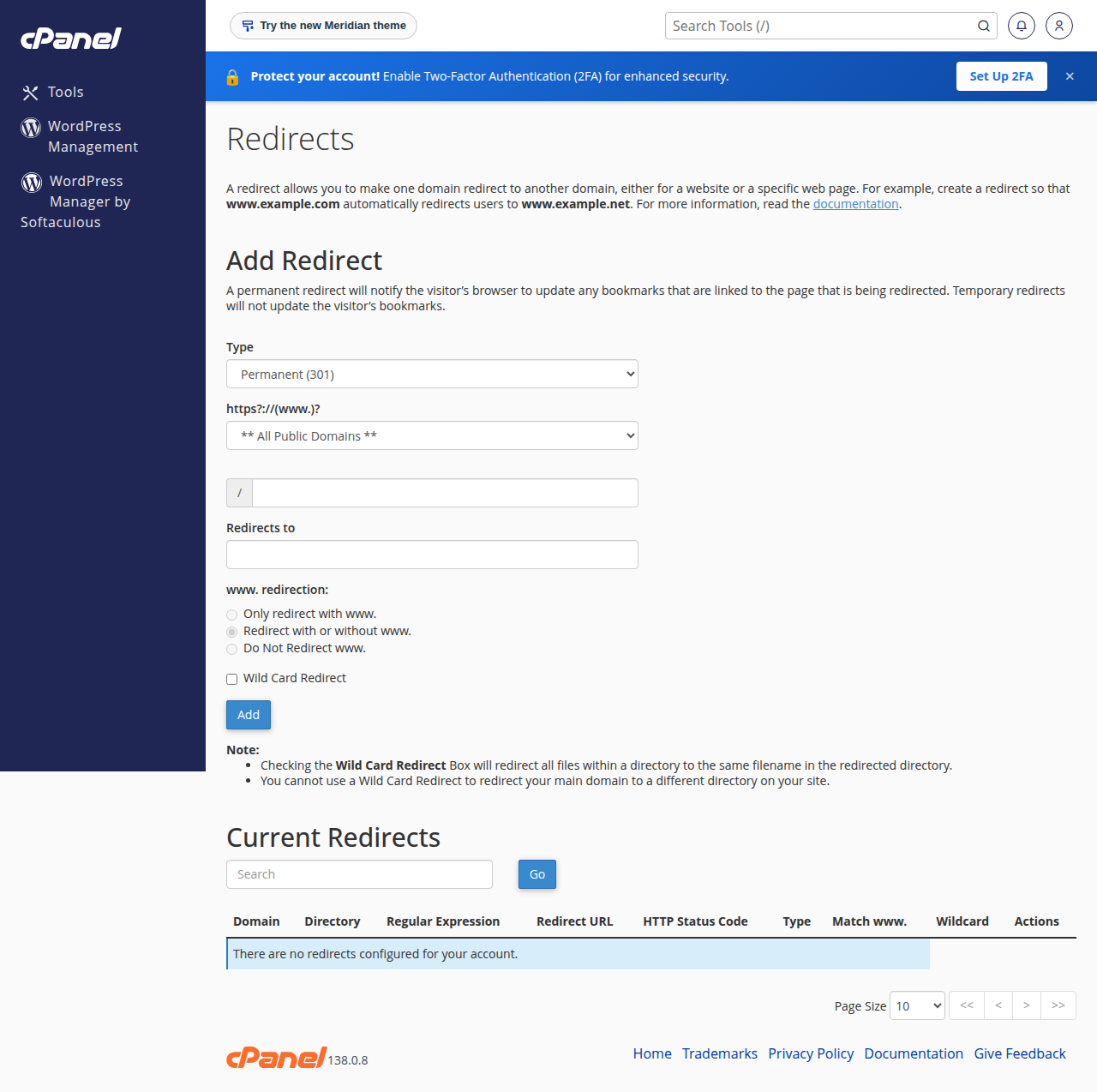
cPanel writes the rule into your .htaccess file. If the panel won't add the domain, see the difference between parked, addon and subdomains or ask support to check your plan's limits.
5. Forward a domain in DirectAdmin
DirectAdmin has a built-in way to forward a second domain to your main one:
- Open Account Manager › Domain Pointers and click CREATE DOMAIN POINTER.
- Enter the domain to forward.
- Untick "Create as an Alias". With the box unticked, visitors are redirected to your main domain; ticked, the second domain shows the same site without redirecting.
- Save.
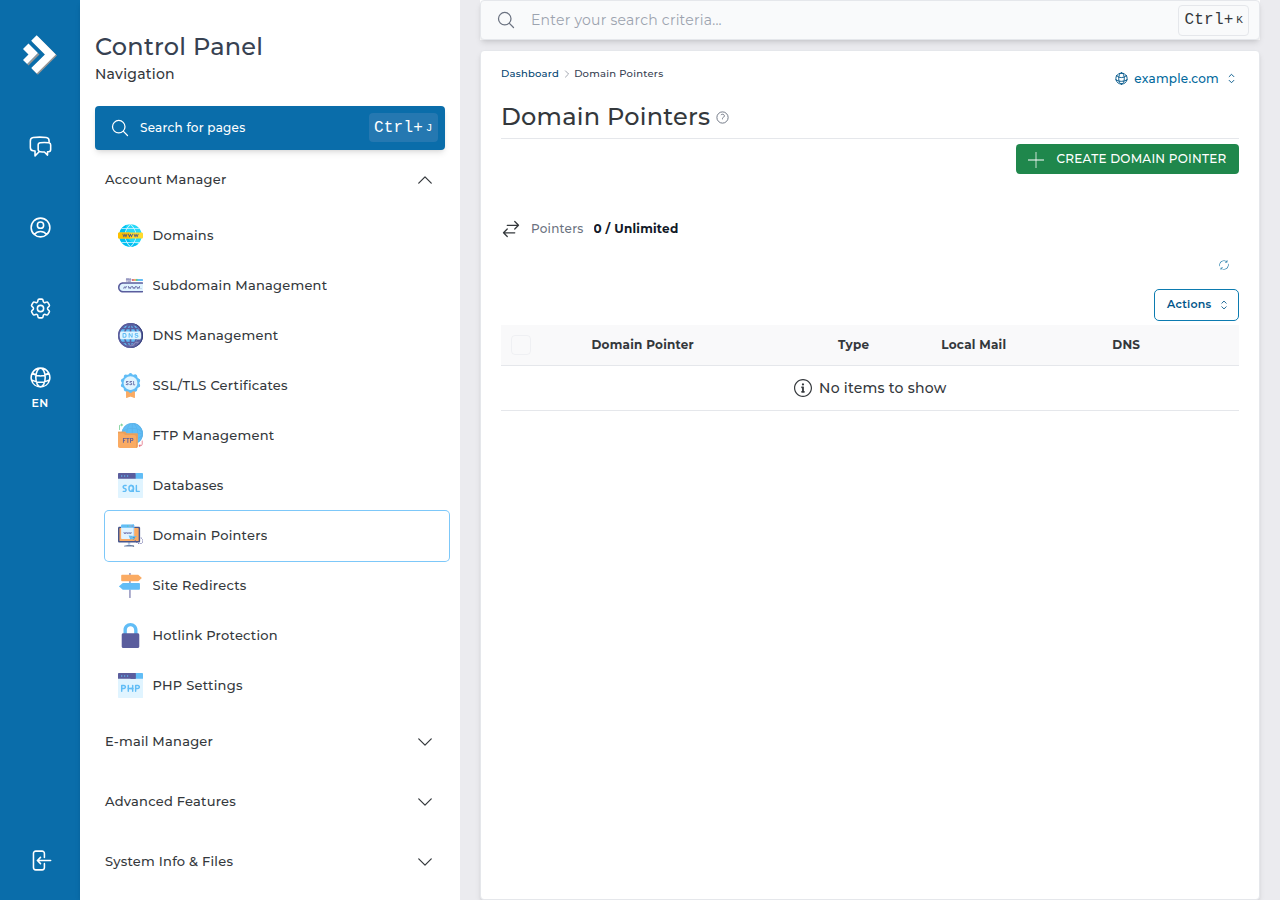
To forward to any other address, add the domain to your account and put a redirect rule in its .htaccess, as in the next section. Full pointer steps are in managing domain aliases in DirectAdmin.
6. Forward with .htaccess (any Linux panel)
Domain India shared hosting runs Apache with mod_rewrite on cPanel, DirectAdmin and Webuzo. This rule forwards every page of the old domain to the same path on the new one:
RewriteEngine On
RewriteCond %{HTTP_HOST} ^(www\.)?olddomain\.in$ [NC]
RewriteRule ^(.*)$ https://www.newdomain.in/$1 [R=301,L]
To send every page to the new home page instead, use https://www.newdomain.in/ without $1. Keeping paths is better when the old domain had a real website, because old links still land on the matching page.
7. HTTPS, testing and common problems
HTTPS on the forwarded domain. A visitor who types https://olddomain.in needs a valid certificate on the old domain before the redirect can happen. Domain India hosting includes free SSL: once the forwarded domain points at your hosting, AutoSSL on cPanel or Let's Encrypt in DirectAdmin can issue a certificate for it. See AutoSSL in cPanel or Let's Encrypt in DirectAdmin.
Testing. Check the real answer with curl, adding ?t= and any value to skip the cache:
curl -sI "http://olddomain.in/?t=1" | head -n 5On our cPanel servers an nginx cache can keep redirect responses for up to 120 minutes, so a browser test without the query string may show an old result.
| Problem | Likely cause | Fix |
|---|---|---|
| Old domain shows an error or another host | DNS still points elsewhere | Check the nameservers or A records; wait for DNS |
| "Not secure" warning before redirecting | No certificate yet for the old domain | Let AutoSSL or Let's Encrypt issue one after DNS points at us |
| Redirect loop | The destination redirects back, or two rules overlap | Keep one rule per domain; check the destination's own redirects |
Only www or only the bare domain works | One name has no DNS record | Add A records for both @ and www |
8. Email forwarding is a separate job
Forwarding a website does not forward email. To send mail for [email protected] to another address, create an email forwarder in your hosting panel: see how to create an email forwarder in cPanel or email forwarders in DirectAdmin. The domain's MX records must point to the same hosting for the forwarder to receive mail.
9. Where Domain India fits
Every Domain India shared hosting plan can hold extra domains and redirect them, with free SSL, so one hosting account can forward all your brand variants to your main site. Compare cPanel hosting and DirectAdmin hosting, and register the variants you want to protect on the domain registration page.
- 25 GB NVMe SSD Storage
- 50 GB Monthly Bandwidth
- 1 Website
- 10 Email Accounts
Prices on the cards exclude 18% GST.
Can I forward a domain from the Domain India client area?
The domain's page in the client area has no separate forwarding switch. Point the domain at your Domain India hosting and add a 301 redirect in cPanel's Redirects tool, a DirectAdmin domain pointer, or a .htaccess rule.
Should I use a 301 or a 302 redirect for domain forwarding?
Use a 301 for anything permanent, such as brand variants, misspellings or an old domain after a rebrand. Use a 302 only for a short temporary campaign.
What is masked or framed forwarding, and should I use it?
Masked forwarding shows the destination site inside a frame so the old address stays in the browser bar. Avoid it: many sites refuse to be framed, it causes HTTPS problems and search engines do not credit the content to your domain.
Do I need hosting to forward a domain?
Yes, on Domain India the redirect is served by a hosting account, so the domain must point at hosting where the redirect is set up. One hosting account can forward several domains.
Why does my forwarded domain show a security warning?
The old domain has no certificate yet. Once it points at your Domain India hosting, AutoSSL or Let's Encrypt can issue a free certificate for it, after which the https address redirects cleanly.
Does forwarding a domain forward its email too?
No. Website forwarding and email forwarding are separate. Create email forwarders in your hosting panel and make sure the domain's MX records point to that hosting.
Ready to send all your brand names to one site? Open your domains to point them at your hosting, follow the cPanel or DirectAdmin steps above, or open a support ticket if a redirect won't behave.
Tell us the domain to forward and where it should go, and we will check the DNS and the redirect with you.
Open a support ticket