A domain alias makes a second domain show the same website as your main domain, for example yourbrand.co.in opening yourbrand.in. DirectAdmin calls this a domain pointer. You add one in a minute from your DirectAdmin panel, and it works as soon as the second domain's DNS points to your hosting server.
This page covers the DirectAdmin steps. For the difference between aliases, addon domains and subdomains, the DNS each one needs, and how many websites each plan allows, see the difference between parked, addon and subdomains.
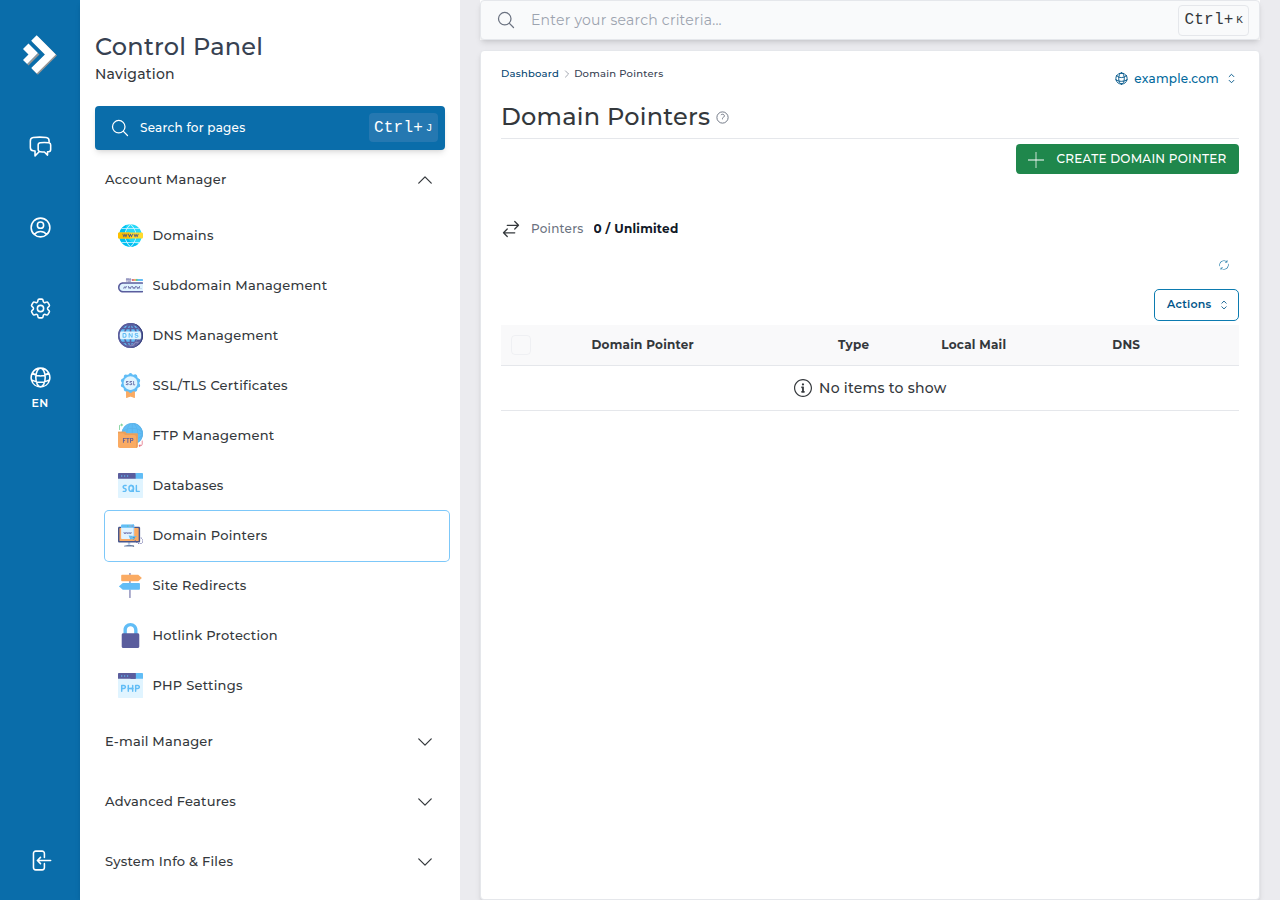
In DirectAdmin, open Domain Pointers, choose CREATE DOMAIN POINTER, enter the second domain and leave Create as an Alias ticked to show the same site, or untick it to redirect visitors to your main domain. Then point the second domain at your hosting with the nameservers or A record shown in the client area. On Domain India DirectAdmin plans, domain pointers don't count as extra websites.
1. Alias or redirect?
A DirectAdmin domain pointer works in one of two ways, set by one checkbox:
| Pointer type | What visitors see | Best for |
|---|---|---|
| Alias (Create as an Alias ticked) | Your main website, with the second domain still in the address bar | Brand variants you want to work exactly like the main site |
| Redirect (box unticked) | They are sent on to your main domain | Old domains and misspellings, and anything where SEO matters |
An alias shows the same pages on two addresses, which splits search-ranking signals. If the second domain only needs to bring people to your site, a redirect is usually the better choice.
2. Add a domain pointer
- Log in to DirectAdmin.In the client area, open your hosting list and click the DirectAdmin button on your hosting row; it signs you in without a password.
- Pick the main domain.If your account has more than one domain, select the one the pointer should lead to.
- Open Domain Pointers.If you can't see it on the dashboard, type "pointer" into the panel's search box.
- Add the pointer.Click CREATE DOMAIN POINTER, enter the second domain without
wwworhttps://, and set Create as an Alias as described above. - Save,then set up the DNS as in section 3.
The same page lists your existing pointers, where you can delete one you no longer need. If you can't change the alias setting on an existing pointer, delete it and add it again with the other setting.
3. Point the second domain at your hosting
Adding a pointer only prepares the server. The second domain works once its DNS points to your hosting server, and the values to use are on the Point a domain to this hosting card on your hosting service page in the client area:
- Hosting nameservers: set the domain's nameservers to the ones shown on the card. This suits a domain whose website and email are both with us.
- A records: if the domain's DNS is managed elsewhere, add A records for
@andwwwwith the server IP shown on the card.
Copy the values from the card rather than typing them from memory. Step-by-step help is in how do I change my nameservers and how to change your domain's DNS settings. DNS changes can take several hours to reach every network.
4. Test it
Open the second domain in a private browser window. An alias shows your main site with the second domain in the address bar; a redirect lands on your main domain. From a terminal, curl -I https://second-domain.com shows a redirect status (a 3xx code) and a Location header for a redirect pointer.
If the page doesn't load, check the DNS first. If it loads with a certificate warning, the free SSL certificate doesn't yet cover the new name; wait until DNS has updated everywhere, then open a ticket if the warning stays.
5. Aliases on Domain India DirectAdmin plans
On our DirectAdmin plans, domain pointers are not capped, and they don't count towards the plan's number of websites (measured on our DirectAdmin server, 24 September 2026). A separate website with its own files is a different thing: it is added as another domain and does count. DA Starter hosts one website and DA Growth five. Prices on the card are live and exclude 18% GST.
- 30 GB NVMe SSD Storage
- Unmetered Bandwidth
- 5 Websites
- 50 Email Accounts
What is a domain pointer in DirectAdmin?
A domain pointer makes a second domain lead to a domain already in your DirectAdmin account. As an alias it shows the same website under the second name; without the alias option it redirects visitors to the main domain.
Is a domain alias the same as a parked domain?
Yes. cPanel used to call it a parked domain and now calls it an alias; DirectAdmin calls it a domain pointer created as an alias. All three show the same website under another domain name.
Does a domain pointer count against my website limit?
No. On Domain India DirectAdmin plans, domain pointers are not counted as extra websites. A second website with its own files is added as another domain and does count towards the plan's limit.
Why doesn't my domain pointer work?
Usually because the second domain's DNS does not point to your hosting server yet. Set its nameservers, or A records for @ and www, to the values on the Point a domain to this hosting card in the client area, and allow several hours for the change to spread.
Should I use an alias or a redirect for SEO?
A redirect. An alias shows the same content on two addresses, which splits ranking signals, while a 301 redirect sends visitors and search engines to one main address.
Ready to add your pointer? Open your hosting list and click the DirectAdmin button, register the extra domain if you don't own it yet, or open a support ticket if the panel refuses it.
Tell us the main domain and the domain you want to point at it, and support will check the panel and the DNS for you.
Open a support ticket