A custom error page is what visitors see instead of the server's plain message when something goes wrong, such as a missing page (404) or a blocked folder (403). A good one keeps people on your site with your branding, a link home and a way to find what they wanted. This guide shows how to set them up on Domain India hosting, with cPanel's Error Pages tool, with .htaccess, and in WordPress.
On cPanel, open Advanced › Error Pages, choose the domain and the error code, write your page and save: the server already uses files named like 404.shtml in your website folder. On DirectAdmin there is no error-page tool, so create 404.shtml in public_html or add ErrorDocument lines to .htaccess. WordPress and most CMSs show their own 404 page, which you change in the theme. Start with the 404 page, keep the 500 page plain HTML, and always test.
1. Which error codes matter
| Code | What it means | Worth a custom page? |
|---|---|---|
| 404 Not Found | The page doesn't exist: an old link, a typo or a removed page | Yes, the most important one |
| 403 Forbidden | Access to a file or folder is blocked | Yes, if visitors can reach protected folders |
| 401 Unauthorized | A password-protected folder asked for a login and it failed | Optional |
| 500 Internal Server Error | A server-side fault, often a broken .htaccess or script | Useful, with limits (section 5) |
| 503 Service Unavailable | The site is temporarily unable to respond | Optional |
Start with the 404 page. Real visitors see it far more than any other error. For fixing the errors themselves, see understanding and resolving 403 Forbidden and troubleshooting 500 Internal Server Error.
2. How error pages work on our servers
Our shared hosting runs the Apache web server, which already looks for error pages in the website's own folder:
- cPanel: a file named after the code, such as
404.shtml,403.shtmlor500.shtml, for every common error code. - DirectAdmin:
404.shtmlfor "not found". Other codes need anErrorDocumentline.
If the file exists, visitors see it; if not, they see Apache's plain default message. You can also point any code at any page with an ErrorDocument line in .htaccess, which is allowed on our cPanel, DirectAdmin and Webuzo servers.
3. Create error pages in cPanel
- Open cPanelfrom the cPanel button on your account in the client area. See how to log in to cPanel.
- Open Advanced › Error Pages.
- Choose the domainfrom the list, if your account has more than one.
- Click the error codeyou want to edit, such as 404 (Not Found).
- Write the page.Paste your HTML, or type your message. The editor can insert tags such as the address the visitor asked for.
- Save and test(section 6).
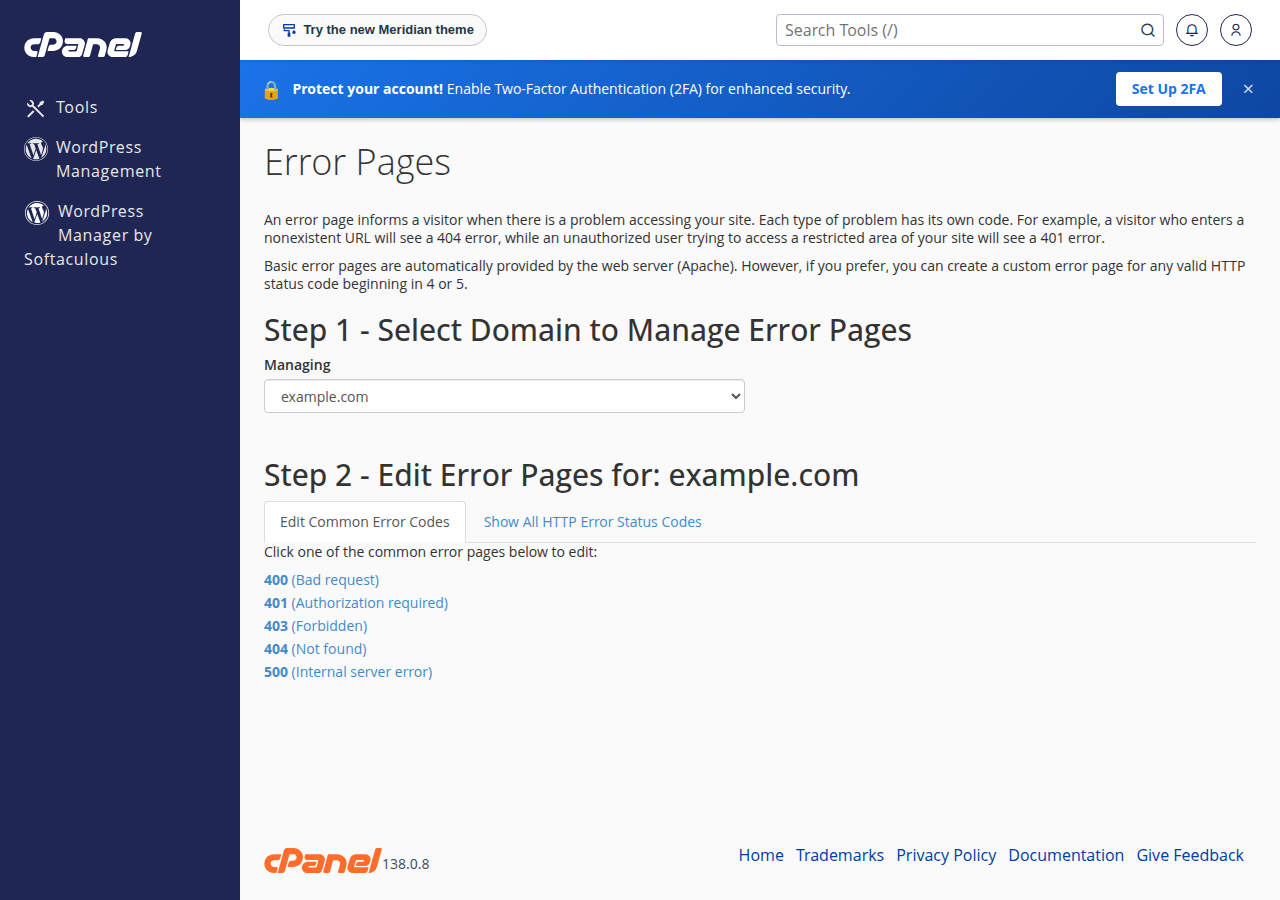
cPanel saves the page as a file such as 404.shtml in that domain's folder, so you can also edit it later in the File Manager.
4. Create error pages with .htaccess (any panel)
This works on cPanel and DirectAdmin, and it is the only way on DirectAdmin, which has no error-page tool on our servers.
- Create the pages.In your website folder (
public_htmlon cPanel,domains/yourdomain.com/public_htmlon DirectAdmin), create a folder such aserrorswith404.html,403.htmland500.htmlin it. - Open
.htaccessin the same website folder, or create it. - Add one line per code, using a path that starts with
/, as below. - Save and test.
ErrorDocument 404 /errors/404.html
ErrorDocument 403 /errors/403.html
ErrorDocument 500 /errors/500.html
Use a local path, never a full https:// address. With a full address, Apache redirects the visitor instead of returning the error code, and search engines treat the missing page as if it exists. On DirectAdmin, the simplest 404 is a file called 404.shtml in public_html, which works without any .htaccess line. The full DirectAdmin walkthrough is in managing custom error pages in DirectAdmin.
Our servers run PHP through PHP-FPM or CGI, not as an Apache module, so a php_value or php_flag line in .htaccess causes a 500 error on every page. Keep .htaccess to Apache directives such as ErrorDocument.
5. Make the pages work well
- Keep your branding and a link home, plus a search box or links to your main sections.
- Say what happened in plain words, such as "We can't find that page."
- Keep it light. A self-contained HTML page with inline styles loads even when other parts of the site are failing.
- Reveal nothing technical. No file paths, database names or error details.
- Keep the 500 page plain HTML. A 500 often means PHP or
.htaccessis broken, so a PHP error page can fail too. If.htaccessitself is broken, Apache can't read yourErrorDocumentline and shows its default message. - Keep the real status code. A "not found" page must return 404, not 200, so search engines drop the dead address instead of indexing your error page.
ErrorDocumentwith a local path does this correctly.
For moved pages, a redirect is better than an error page: see links and redirects: 301, 302, 404, 410.
6. Test your pages
Open an address that doesn't exist, such as https://yourdomain.com/test-missing-page, and check that your page appears. To confirm the status code, run:
curl -I https://yourdomain.com/test-missing-pageThe first line should show 404. On cPanel, a fast proxy in front of Apache can keep a copy of pages for a while; add ?t=1 (any value) to the address to be sure you are seeing the live result.
7. WordPress and other CMSs
WordPress, Joomla and most other CMSs send every address through their own code, so they show their own 404 page instead of your 404.shtml.
- Block themes (most new WordPress themes): open Appearance › Editor › Templates and edit the Page: 404 template.
- Classic themes: the page comes from the theme's
404.php. Change it in a child theme, so a theme update doesn't wipe your changes, and upload it with the File Manager or SFTP rather than editing live files.
Server errors such as 500 happen before WordPress runs, so the .htaccess or 500.shtml method above still applies to them. For WordPress server errors, see common gateway errors in WordPress.
8. Other panels
- Webuzo: use the Error Pages page; find it with the search box at the top of the Webuzo panel. The
.htaccessmethod also works; ask support if it doesn't take effect. - Windows (Plesk): error pages are set per site in Plesk. If you can't find the setting, ask support. See the Plesk Windows hosting guide.
How do I create a custom 404 page in cPanel?
Open Advanced, Error Pages in cPanel, choose the domain, click 404 (Not Found), write your page and save. cPanel saves it as 404.shtml in the domain's folder, and the server shows it for every missing page.
How do I create a custom error page in DirectAdmin?
Domain India's DirectAdmin has no error-page tool. Create a file called 404.shtml in domains/yourdomain.com/public_html for missing pages, and use ErrorDocument lines in .htaccess for other codes.
Why doesn't my custom 404 page show on my WordPress site?
WordPress handles missing addresses itself and shows the theme's 404 template. Edit the 404 template in Appearance, Editor for a block theme, or the 404.php file in a child theme for a classic theme.
Should ErrorDocument use a full URL?
No. Use a path that starts with a slash, such as /errors/404.html. A full https address makes Apache redirect the visitor instead of returning the 404 status, which is bad for search engines.
Why does my custom 500 page not appear?
If the error comes from a broken .htaccess file, Apache can't read the ErrorDocument line in it, so it shows its default message. Keep the 500 page as plain HTML, and fix the .htaccess error first.
Can I put php_value lines in .htaccess next to ErrorDocument?
No. Domain India servers run PHP through PHP-FPM or CGI, so php_value and php_flag lines in .htaccess cause a 500 error. Change PHP settings in your control panel instead.
Ready to set yours up? Open cPanel from your hosting list, read managing custom error pages in DirectAdmin, or open a support ticket if a page won't show.
Tell us the domain and the address you tested, and we will check what the server is returning. Live chat is available 24/7, and tickets get a first response within 15 minutes.
Open a support ticket