You can keep your domain and website with Domain India and have your email handled by another provider, such as Google Workspace, Microsoft 365 or Zoho Mail. Making that work is a DNS job: you verify the domain with the provider, point your MX records at it, and publish SPF, DKIM and DMARC so your mail isn't treated as forged. This guide covers the records every provider needs and where to add them.
Add the records wherever your domain's DNS is actually managed: your hosting control panel if the domain uses hosting nameservers, or your outside DNS provider. Add the provider's verification TXT record, replace all MX records with the provider's, merge the provider into a single SPF record, publish the DKIM record the provider generates for you, and add a DMARC record starting at p=none. On cPanel hosting, set Email Routing to Remote Mail Exchanger so mail from your own website reaches the new provider.
1. Find out where your DNS is managed
This is the step people skip, and it is why most setups fail. DNS records only work where the internet looks them up.
- If your domain uses your hosting nameservers, add the records in your hosting control panel.
- If it uses another DNS provider, such as Cloudflare, add them there. Records in your hosting panel are then ignored.
How to change your domain DNS settings shows how to check which nameservers your domain uses. Don't use the portal's Free DNS option for this; point your domain at your hosting nameservers, or manage DNS at your outside provider.
2. Before you switch
- Create the mailboxes at the new provider first,so mail has somewhere to land once MX changes.
- Copy out mail you want to keep.After the switch, your hosting mailboxes stop receiving new mail. Most providers have an import tool for IMAP mailboxes, or you can move mail with your mail app.
- Lower the TTLon your existing MX records a day ahead if your DNS editor allows it, so the change takes effect sooner.
- Pick a quiet timeand tell your team.
3. The five records every provider needs
| Record | Type | Name | What it does |
|---|---|---|---|
| Verification | TXT (sometimes CNAME) | @ or a name the provider gives | Proves to the provider that you own the domain |
| MX | MX | @ | Tells other servers where to deliver your mail |
| SPF | TXT | @ | Lists the servers allowed to send mail as your domain |
| DKIM | TXT or CNAME | A selector name the provider gives | Lets receivers check your mail's signature |
| DMARC | TXT | _dmarc | Tells receivers what to do with mail that fails, and where to send reports |
Always copy values from your provider's admin console. They can change, and some, such as DKIM keys, are generated for your domain alone.
4. MX records: point mail at the provider
Delete every existing MX record for the domain, including the one pointing at your hosting server, then add the provider's. Mixed MX records split your mail between two places.
| Provider | Typical MX setup | Where to confirm |
|---|---|---|
| Google Workspace | One record, smtp.google.com, priority 1 | Google Admin console |
| Microsoft 365 | One record unique to your domain, shown in the admin center | Microsoft 365 admin center, Domains |
| Zoho Mail | Three records at the zoho.in or zoho.com data centre, depending on your account | Zoho Mail admin console |
Older Google Workspace domains use five aspmx.l.google.com records, which still work. Microsoft 365 generates a value for your domain, so never copy one from someone else's guide. For Google Workspace in full, see our Google Workspace email configuration guide.
5. SPF: one record, every sender
SPF is a TXT record on the root of the domain. A domain may have only one; two SPF records make both invalid. Common includes:
- Google Workspace:
include:_spf.google.com - Microsoft 365:
include:spf.protection.outlook.com - Zoho Mail: the include shown in your Zoho console, such as
include:zoho.infor India-hosted accounts
If your website still sends mail from your hosting server, for example contact-form notifications, keep that server in the same record. A combined record looks like this:
v=spf1 include:_spf.google.com include:yourhostingserver ~allReplace the second include with what your control panel shows. On cPanel, Email Deliverability shows the value for your server. Keep the total number of includes small: SPF allows at most 10 DNS lookups.
6. DKIM and DMARC
DKIM. Each provider generates the key in its admin console. Google gives you a TXT record, usually at google._domainkey. Microsoft 365 gives you two CNAME records, selector1._domainkey and selector2._domainkey. Zoho gives a TXT record with a selector you choose. Publish it exactly as shown, then turn DKIM signing on in the provider's console. If your website sends mail from the hosting server, keep your hosting's own DKIM record too; it uses a different name, so they don't clash.
DMARC. Add a TXT record named _dmarc, starting in monitoring mode:
v=DMARC1; p=none; rua=mailto:[email protected]Read the reports for a few weeks. When every service that sends as your domain passes, move to p=quarantine, then p=reject. Gmail, Yahoo and other large mailbox providers require SPF, DKIM and DMARC from bulk senders, so set all three even if you send little mail. For a deeper explanation, see Email authentication: SPF, DKIM and DMARC.
7. Where to add the records on Domain India hosting
| Your DNS is managed by | Add the records in |
|---|---|
| cPanel hosting nameservers | cPanel, Domains, Zone Editor, then Manage for your domain |
| DirectAdmin hosting nameservers | DirectAdmin, Account Manager › DNS Management |
| Webuzo hosting nameservers | Webuzo, Domain › DNS Zone Settings |
| Windows (Plesk) hosting nameservers | Plesk, Websites and Domains, DNS Settings |
| Another DNS provider | That provider's DNS page |
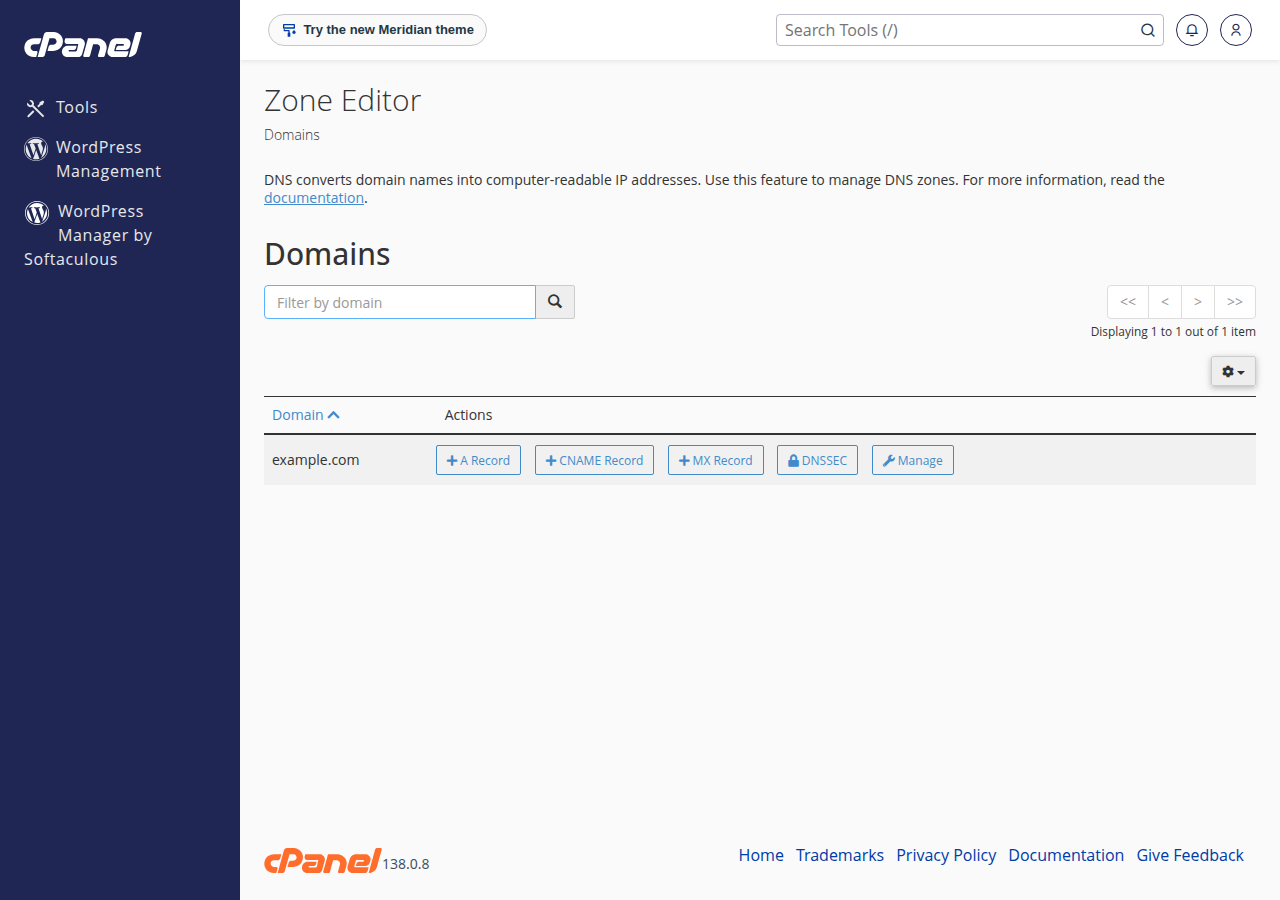
If you can't find the DNS page, ask support.
8. Tell your hosting that mail is remote
Your hosting server may still think it handles your domain's mail. Messages your own website sends to your own addresses can then land in the old hosting mailbox instead of the new provider.
- cPanel: open Email, Email Routing, choose the domain and select Remote Mail Exchanger.
- DirectAdmin: open E-mail Manager › MX Records, untick Use this server to handle my e-mails and click SAVE.
- Webuzo: open Email › Email Router, click the edit icon next to the domain, choose Remote Mail Server and click Change.
- Plesk: ask support to set the domain's mail as remote.
To go back to hosting email later, see Switching back from third-party email to cPanel email.
9. Test the result
DNS changes usually show within an hour, and can take up to 24 to 48 hours everywhere. Then:
- Send a message from an outside address, such as a personal Gmail, to your new mailbox, and reply to it.
- In Gmail, open the received reply, choose Show original, and check that SPF, DKIM and DMARC all say PASS.
- Submit a contact form on your website and check the message reaches the new provider.
10. Where Domain India fits
Domain India provides your domain and the hosting or DNS where these records live; you buy Google Workspace, Microsoft 365 or Zoho directly from them. If you would rather keep email with us, every cPanel, DirectAdmin and Webuzo hosting plan includes mailboxes, and Business Email is a separate mail service priced per mailbox, with webmail at https://mail.yourdomain.com:8443/.
- Priced per mailbox - start with one
- Email at your own domain ([email protected])
- Add and remove mailboxes yourself
- Webmail with calendar, contacts and tasks
The card shows the live Domain India price, excluding 18% GST.
Where do I add MX records for a domain registered with Domain India?
Wherever the domain's DNS is managed. If it uses your hosting nameservers, add them in your control panel, for example cPanel's Zone Editor. If it uses another DNS provider such as Cloudflare, add them there.
Should I delete my old MX records?
Yes. Delete every MX record that doesn't belong to your new provider, including the one pointing at your hosting server. Mixed MX records send some mail to the old mailboxes.
Can I have two SPF records, one for my hosting and one for my email provider?
No. A domain may have only one SPF record. Put every sender in one record, for example v=spf1 include:_spf.google.com plus your hosting server's entry, ending in ~all.
How long do email DNS changes take?
Usually under an hour, but allow up to 24 to 48 hours for every server on the internet to see the change. Lowering the TTL on the old records a day in advance speeds this up.
Why doesn't mail from my website reach my new email provider?
Your hosting server may still deliver your domain's mail locally. In cPanel, set Email Routing to Remote Mail Exchanger for the domain. On other panels, ask support to set the domain's mail as remote.
Does Domain India sell Google Workspace or Microsoft 365?
No. You buy them from Google or Microsoft. Domain India provides the domain, hosting with included email, and a separate Business Email service priced per mailbox.
Ready to connect your email? Check where your DNS is managed in How to change your domain DNS settings, then add the records above. Prefer to keep email with us? Compare Business Email. Stuck on a record? Open a support ticket.
Mailboxes at your own domain, priced per mailbox, with webmail and IMAP and SMTP over TLS.
See Business Email