When your email will not send, the quickest way to find the cause is to test in webmail first. If a message sends from webmail but not from Outlook or your phone, the problem is in the app's settings. If it fails in webmail too, the problem is on the account, the sending limit or the receiving side. This page gives you that short troubleshooting order for cPanel and webmail.
This is the short version. Every setting, error message and fix is explained step by step in I can receive mail, but I cannot send it: what's wrong?
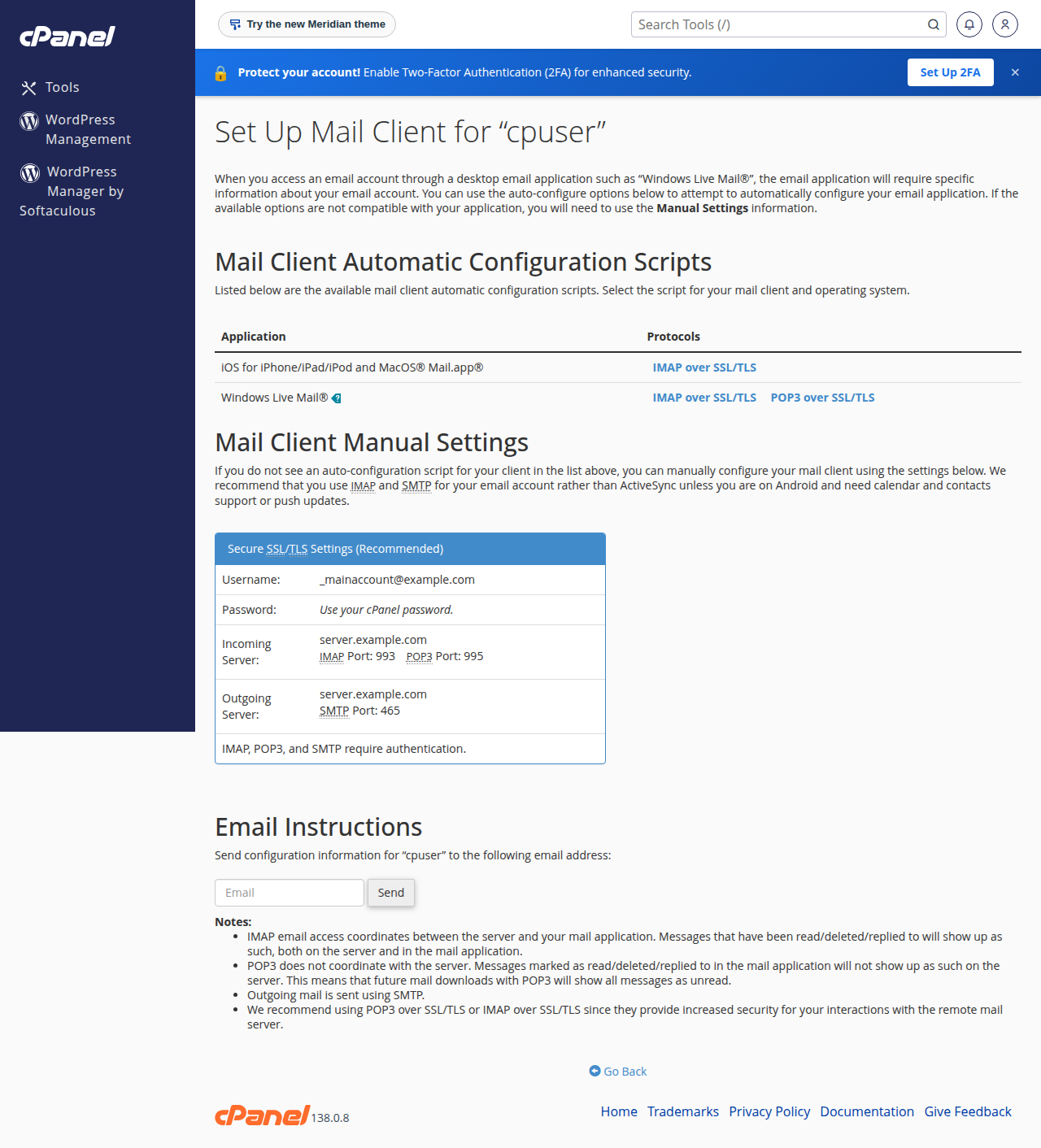
Send a test message from webmail first. If webmail works, fix your mail app: outgoing server mail.yourdomain.com, SMTP authentication on, your full email address as the username, and port 465 with SSL/TLS (or 587 with STARTTLS on cPanel, DirectAdmin and Webuzo). If webmail fails too, check for a suspended account, the sending limit (200 messages per hour per account on cPanel), and your SPF and DKIM records, then contact support with the exact error.
1. Test in webmail first
Webmail runs on the server itself, so it takes your mail app, your network and your ports out of the picture.
- Open webmail.On cPanel hosting, go to
https://yourdomain.com/webmail. Other panels are covered in how to log in to webmail. - Log inwith your full email address and the mailbox password.
- Send a test messageto an address at a different provider, such as a Gmail address, and check its inbox and spam folder.
| Result | What it means | Go to |
|---|---|---|
| Webmail sends, your app does not | Your app's outgoing settings are wrong, or your network blocks the port | Section 2 |
| Webmail fails too, with an error | An account problem or a sending limit | Section 3 |
| Webmail sends, but nothing arrives | The receiving server filtered or refused it | Section 4 |
cPanel webmail uses Roundcube. Older guides mention Horde and SquirrelMail; those clients are no longer part of cPanel.
2. Fix the mail app's outgoing settings
These are the outgoing (SMTP) settings for mailboxes on Domain India hosting. Replace yourdomain.com with your domain.
| Setting | Value |
|---|---|
| Outgoing server | mail.yourdomain.com |
| Authentication | On, with the same login as incoming mail |
| Username | Your full email address |
| Port and encryption (recommended) | 465 with SSL/TLS |
| Port and encryption (alternative) | 587 with STARTTLS, on cPanel, DirectAdmin and Webuzo only |
- Port 587 is not open on Windows (Plesk) hosting, so use 465 there.
- Port 25 is blocked by many internet providers for homes, offices and phones. If sending times out, change to port 465, or try the same settings on mobile data to confirm the network is the problem.
- "Relaying denied" or "authentication required" means SMTP authentication is switched off in your app.
- A new password must be entered in both the incoming and outgoing settings on every device.
In cPanel, open Email Accounts and click Connect Devices next to the address to see the exact settings for that account.
3. When webmail cannot send either
If sending fails in webmail too, look at the account.
- Suspended hosting account. Mail stops when a hosting account is suspended, for example for an unpaid renewal invoice. Check the service in your client area under Hosting › My hosting and any open invoices.
- Sending paused for one address. cPanel lets the account owner suspend outgoing mail for one address while it still receives. Check the address on the Email Accounts page.
- Sending limit reached. cPanel hosting allows 200 messages per hour per account, and DirectAdmin hosting 1,000 messages per day per account (200 per mailbox by default). Each recipient counts as one message, and webmail, apps and website scripts share the allowance. Details are in do you limit the amount of mail I can send.
- Account out of space. A full account can fail to save the copy in Sent, which makes a send look failed.
Server logs and mail services are managed by Domain India on shared hosting, so you cannot restart the mail service or read the server's full mail log yourself. If none of the checks above explains the failure, support can check the log for your messages.
4. When mail sends but never arrives
If the message leaves your Sent folder and the recipient still sees nothing, the receiving server has filtered or refused it.
- Check SPF and DKIM. In cPanel, Email Deliverability shows whether both are valid for each domain and offers the correct records. A domain must have only one SPF record.
- Read any bounce. A bounce message says why the other server refused the mail; understanding email bouncebacks decodes the common ones.
- Check blocklists. A public blocklist checker such as MXToolbox shows whether the sending IP is listed. On shared hosting, the IP belongs to the server, so send the result to support rather than asking for delisting yourself.
- Avoid bulk mail from a hosting mailbox. For newsletters, use a dedicated email delivery service.
Website forms and scripts follow different rules: see PHP sendmail settings.
5. What to send support
Support is available on 24/7 live chat, and tickets get a first response within 15 minutes, although a fix can take longer. There is no phone support. Include:
- the email address that cannot send;
- whether webmail works;
- your mail app, and the outgoing server, port and encryption it uses;
- the exact error message or bounce, and the time you sent the message;
- your public IP address, if your app cannot connect at all.
Why can I send from webmail but not from Outlook?
Webmail runs on the server, so it skips your app's settings and your network. Set Outlook's outgoing server to mail.yourdomain.com, turn on SMTP authentication, log in with your full email address, and use port 465 with SSL/TLS.
Which webmail does cPanel use?
Roundcube. Horde and SquirrelMail are no longer included with cPanel, so older instructions that mention them are out of date.
How many emails can I send from Domain India cPanel hosting?
200 messages per hour per account, counting each recipient as one message. DirectAdmin hosting allows 1,000 messages per day per account (200 per mailbox by default).
What port should I use for outgoing mail?
Port 465 with SSL/TLS on all Domain India hosting. Port 587 with STARTTLS also works on cPanel, DirectAdmin and Webuzo, but not on Windows (Plesk) hosting.
Can I restart the mail server or read the Exim log myself?
Not on shared hosting. The mail service is run by Domain India for the whole server. Contact support and they can check the mail log for your messages.
Ready to fix it? Work through the full sending guide, compare your ports with Domain India port numbers, and if mail still will not send, open a ticket or use the public ticket form.
Tell us the address, whether webmail works, your app's port and encryption, and the exact error, and we will check your account.
Open a support ticket