A non-www to www redirect loops when the rule keeps matching the address it just sent the visitor to. The usual culprits are a proxy such as Cloudflare that makes every request look like plain HTTP, two separate redirect blocks pointing different ways, or WordPress disagreeing with your .htaccess. The fix is one combined rule, placed at the top of .htaccess, that settles HTTPS and www in a single hop.
This page focuses on stopping the loop. For both directions (www and non-www), every line explained, WordPress settings and SEO, read how to redirect non-www to www. For how rewrite rules work in general, see how to enable the mod_rewrite module.
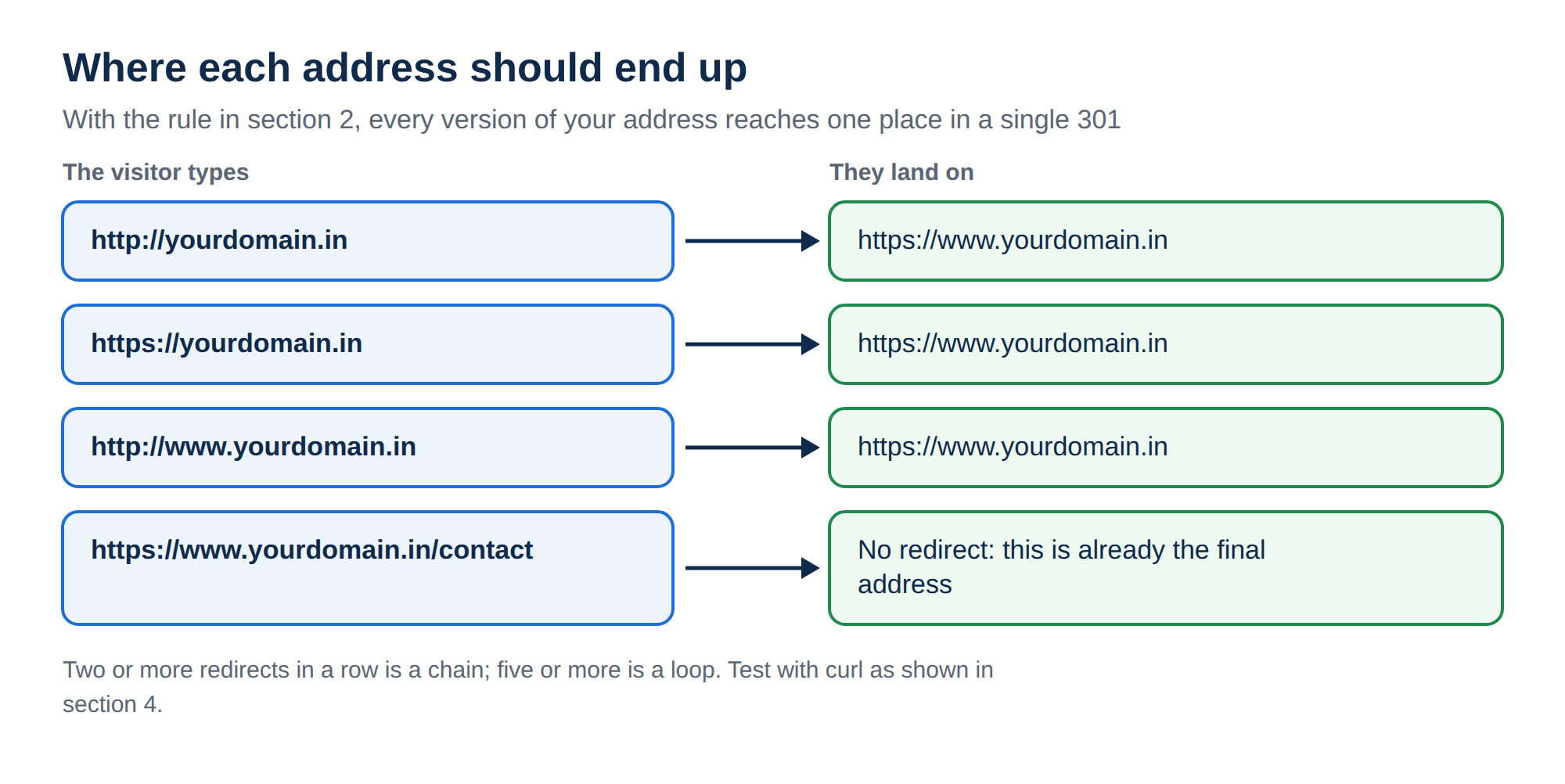
Use one rule that checks the protocol and the host together and redirects straight to https://www.yourdomain, and put it above everything else in .htaccess, including the WordPress block. Remove any separate "force HTTPS" rule, panel redirect or plugin that redirects too. If you use Cloudflare, set SSL to Full (strict), never Flexible. Test with curl -I and a fresh ?t= value, because our cPanel servers can serve a cached redirect for up to two hours.
1. Why a www redirect loops
A redirect loop means the browser is sent from address A to address B, and then B sends it back to A (or to B again). The browser gives up with "too many redirects" (ERR_TOO_MANY_REDIRECTS). With www redirects, the loop almost always comes from one of these:
| Cause | What happens |
|---|---|
| A proxy or CDN in front of the site | Cloudflare in Flexible mode fetches your site over plain HTTP, so an "if not HTTPS, redirect" rule fires on every request, forever |
| Two separate rules | One block forces HTTPS, another adds or removes www, and they disagree about the final address |
| WordPress settings | WordPress Address and Site Address say https://yourdomain.in, the rule says https://www.yourdomain.in, and each sends the visitor back |
| Several redirect tools at once | A cPanel redirect, an .htaccess rule and a plugin each redirect in a different direction |
Older guides, including an earlier version of this page, used a rule that redirected to http://www. on its own. On a site that also forces HTTPS, that sends visitors from HTTPS back to HTTP and round again. Always redirect to the final https:// address.
2. The rule that does not loop
Paste this at the very top of the .htaccess file in your website's root folder (usually public_html), above any # BEGIN WordPress block. Take a copy of the file first so you can undo in seconds.
# Canonical host: https://www.
RewriteEngine On
RewriteCond %{HTTPS} off [OR]
RewriteCond %{HTTP_HOST} !^www\. [NC]
RewriteCond %{HTTP_HOST} ^(www\.)?(.+)$ [NC]
RewriteRule ^ https://www.%2%{REQUEST_URI} [L,R=301]
It redirects only when the request is on HTTP or the host lacks www., and always to the final HTTPS address. At https://www.yourdomain.in neither condition matches, so the rule cannot loop on its own. The third line captures your domain without www. into %2, so you never type your domain name.
If your file already has a separate "force HTTPS" block, delete it. Two blocks create a two-hop chain at best and a loop at worst. The same goes for cPanel's "Force HTTPS Redirect" switch: use either the switch or this rule, not both.
Keep subdomains and folders out of it
The rule redirects every host that does not start with www., which includes subdomains such as blog.yourdomain.in if their folders sit inside public_html. To leave some alone, or to skip a folder, add lines directly above the RewriteRule:
RewriteCond %{HTTP_HOST} !^(blog|shop)\. [NC]
RewriteCond %{REQUEST_URI} !^/blog(/|$) [NC]
The first line excludes the blog and shop subdomains; the second excludes the /blog folder. Keep only the one you need, and use your own names.
3. Behind Cloudflare or another proxy
With a proxy switched on, your server sees the proxy's connection, not the visitor's. In Cloudflare's Flexible SSL mode that connection is plain HTTP, so %{HTTPS} is always off and the rule redirects every request. Set Cloudflare to Full (strict) under SSL/TLS, Overview. Your hosting's free SSL certificate satisfies it, and the rule above then works unchanged.
If you truly cannot use Full (strict), the full redirect guide has a variant of the rule that also trusts the X-Forwarded-Proto header most proxies send.
If you use WordPress, set both address fields under Settings, General to exactly https://www.yourdomain.in, and turn off any plugin that does its own www or HTTPS redirect.
4. Test it without being fooled by caches
Two caches can hide the result of your change:
- Your browser remembers 301 redirects. Test in a private window, or use
R=302while testing and switch toR=301when it is right. - Our cPanel servers run a caching proxy in front of Apache that keeps redirects and pages for up to 120 minutes (measured 22 September 2026). Add a unique
?t=value to each test URL so the request reaches your new rule.
curl -I "http://yourdomain.in/?t=1"
curl -I "https://yourdomain.in/?t=2"
curl -I "http://www.yourdomain.in/?t=3"
curl -sIL --max-redirs 5 "http://yourdomain.in/contact?t=4" | grep -Ei '^(HTTP|location)'
The first three should return 301 with a Location: header pointing at https://www.yourdomain.in/.... The last one follows the whole path: you want exactly one redirect, then 200. More than one redirect is a chain; hitting the limit of 5 is a loop.
That is a syntax problem in .htaccess, such as a typo or curly quotes pasted from a word processor. Put your backup copy back first, then re-paste the rule from plain text. See troubleshooting a 500 Internal Server Error.
5. Where Domain India fits
On Domain India's Linux shared hosting (cPanel, DirectAdmin and Webuzo), mod_rewrite is already loaded and .htaccess files are allowed, so the rules above work as soon as you save. Free SSL is included, which is what the HTTPS part needs. Windows (Plesk) hosting runs IIS, which ignores .htaccess; redirects there go in web.config.
- 25 GB NVMe SSD Storage
- 50 GB Monthly Bandwidth
- 1 Website
- 10 Email Accounts
Frequently asked questions
Why does my non-www to www redirect cause too many redirects?
The rule keeps matching the address it redirects to. The common causes are Cloudflare's Flexible SSL mode, a separate force-HTTPS rule that disagrees with the www rule, WordPress address settings that point elsewhere, or a panel redirect or plugin pointing the opposite way. Use one combined rule and remove the other redirects.
Should I force HTTPS and www in one rule or two?
One. A single rule that checks both the protocol and the host sends every wrong address to the final HTTPS www address in one hop. Two separate rules create a redirect chain and can loop if they disagree.
Where in .htaccess should the redirect go?
At the very top of the .htaccess file in your website's root folder, usually public_html, above any other rewrite rules including the WordPress block.
Why do I still see the old redirect after changing the rule?
Browsers cache 301 redirects, and Domain India's cPanel servers have a caching proxy that can keep a redirect for up to two hours. Test in a private window and add a unique query string such as ?t=123 to the URL.
Ready to set it up? Follow the full non-www to www redirect guide, learn the rule syntax in how to enable the mod_rewrite module, or compare cPanel and DirectAdmin hosting. Still looping? Open a support ticket with your domain and the rule you added.
Apache with mod_rewrite loaded and free SSL on every Linux shared plan, so your canonical address works in minutes.
See cPanel hosting plans