Your domain transfer to Domain India has gone through, but something still looks wrong: the domain isn't shown as active in your client area, or your website and email have stopped working. These are two different problems with different fixes. This guide helps you tell them apart, check whether the transfer really finished, and get the domain working again.
First, check whether the transfer actually completed: a WHOIS lookup shows the new registrar and no pendingTransfer status. If it has completed but the domain doesn't show as active under your domains, the client area may not have caught up yet; open a ticket with the domain name. If the domain is active but your website or email is down, the cause is almost always DNS: the old registrar's free DNS stopped when the domain left, or the nameservers point somewhere that no longer answers.
1. Two different meanings of "inactive"
| What you see | What it usually means | Go to |
|---|---|---|
| The domain doesn't show as active in your client area, but WHOIS shows the transfer finished | The client area hasn't updated yet | Section 3 |
| WHOIS still shows pendingTransfer, or the old registrar | The transfer hasn't finished | Section 2 |
| The domain shows as active, but the website or email doesn't work | A nameserver or DNS problem | Section 4 |
| The domain shows Suspended or Pending verification | A hold or a verification check | Section 5 |
2. Check that the transfer really completed
A transfer can look finished when it isn't. Run a WHOIS lookup on the domain and read two things:
- The "Registrar" line. If it still shows your old registrar, the transfer hasn't completed.
- The "Domain Status" lines.
pendingTransfermeans the registry is still waiting for your old registrar to approve, or for the approval window to end.
For .com and most other generic domains, the registry normally completes a transfer automatically after five days if the old registrar doesn't act, and most transfers finish within about 5 to 7 days. If yours is still pending, Understanding the status of a domain name transfer explains each stage and what you can do to speed it up.
The expiry date is another clue. A completed transfer adds one year to the domain's existing expiry date, so a WHOIS expiry date one year later than before is a good sign the move went through.
3. The transfer completed, but the client area hasn't caught up
Your client area updates when the transfer is confirmed from the registry's side. Occasionally that confirmation reaches our records late, and the domain keeps showing as transferring for a while after the move has actually happened.
- Confirm the transfer in WHOIS.The registrar has changed and
pendingTransferis gone. - Refresh your domains list.Sign out and back in, then open your domains again.
- Open a ticket if it still isn't active.Use a new ticket and give the domain name and the date the transfer completed. Support can check the registry and update the domain for you.
While the client area catches up, the domain itself keeps working at the registry. Its nameservers don't change because of the transfer, so if your website worked before the move, it should still work now, unless your old registrar hosted your DNS (section 4).
4. The domain is active, but the website or email doesn't work
A transfer doesn't change your nameservers, so in most cases nothing goes offline. When something does stop, the cause is usually where your DNS was hosted:
| Your DNS was hosted at | What happens after the transfer | What to do |
|---|---|---|
| Your hosting provider or a DNS service (for example Cloudflare) | Nothing changes; the same DNS keeps answering | Look elsewhere: check the nameservers and records are still right |
| Your old registrar's free DNS | That DNS may stop when the domain leaves, taking your website and email down | Point the domain at your hosting provider's nameservers and make sure your records exist there |
| Domain India hosting | Nothing changes | Check the nameservers match your hosting service page |
To fix it:
- Check the current nameservers.Open the domain in your domains and look at the Nameservers tab.
- Find the right values.If your website is on Domain India hosting, open your hosting service in the client area. The Point a domain to this hosting card shows the nameservers to use, and they are also in your hosting welcome email. Never type nameserver names copied from an old article or forum post.
- Update the nameservers.Click Edit on the Nameservers tab, enter the new values and save.
- Recreate any missing records.If your email is hosted elsewhere, make sure its MX, SPF and other TXT records exist at the DNS provider you now use.
- Allow time.A nameserver change usually takes effect within a few hours, and can take up to 24 to 48 hours to reach every network.
If your email or other services live elsewhere and you don't want to move all your DNS, the same hosting card offers a second option: keep your current DNS and add A records for @ and www pointing to the server IP address shown there.
The full walkthroughs are in How do I change my nameservers and How to change your domain DNS settings.
A browser can show you a cached page. Run dig NS yourbusiness.com +short on macOS or Linux, or nslookup -type=ns yourbusiness.com on Windows, to see which nameservers answer for the domain right now.
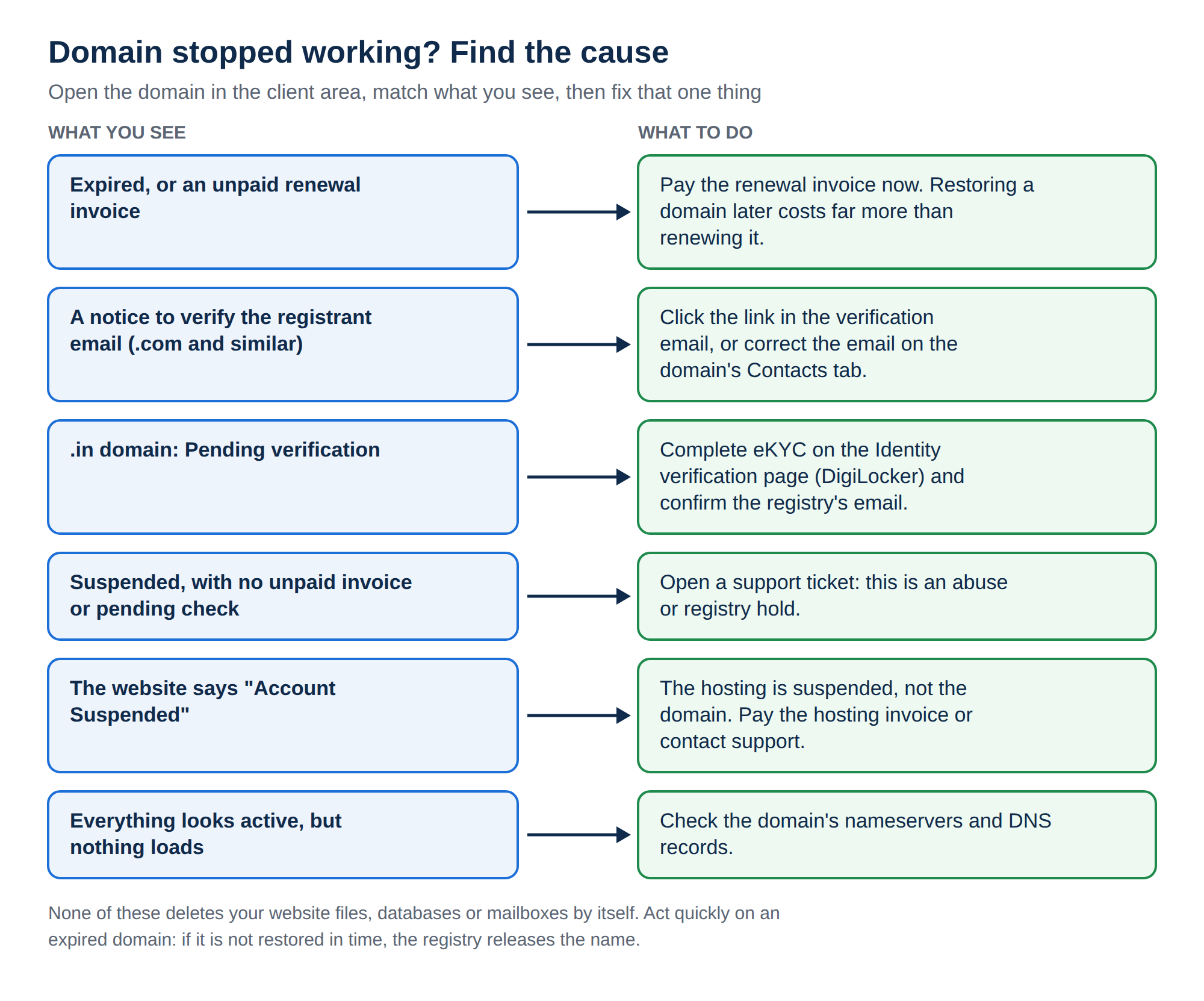
5. A hold or verification after the transfer
Some checks start because a domain has changed registrar:
- .com and other generic domains. After a transfer in, the registrant's email may have to be verified. A verification email with a link is sent to the registrant address. If it isn't confirmed in time, the domain can be suspended until it is. Search your inbox and spam folder for it.
- .in domains. The .IN registry requires the registrant's identity to be verified (eKYC). If your .in domain shows Pending verification after the move, complete it on the Identity verification page.
Why is my domain suspended? covers both checks, and what to do if an email never arrived.
6. Checklist once the domain is active
- Turn the transfer lock back on, so the domain can't be moved without you.
- Check the contact details on the domain and correct anything out of date.
- Check the nameservers point where your website and email are hosted.
- Visit your website and send a test email to confirm everything works.
- Know how renewals work. Domain India never charges a saved card automatically. A renewal invoice is emailed up to 30 days before the due date, and the domain renews when you pay it.
7. Where Domain India fits
Domain India registers and transfers domains, and every domain you hold with us is managed from one client area: nameservers, DNS, contacts, the transfer lock and renewals. If you are moving your website as well, hosting your site and domain together means one account and one support team when something breaks. Compare plans on cPanel hosting:
- 25 GB NVMe SSD Storage
- 50 GB Monthly Bandwidth
- 1 Website
- 10 Email Accounts
Support is available on 24/7 live chat, and tickets get a first response within 15 minutes; resolution can take longer. There is no phone support.
Frequently asked questions
My domain transfer completed but the domain still shows as inactive. What should I do?
First confirm in a WHOIS lookup that the registrar has changed and the pendingTransfer status is gone. If it has and the domain still doesn't show as active in your client area, open a support ticket with the domain name and the date the transfer completed, so support can update it from the registry.
How do I know if my transfer really finished?
Run a WHOIS lookup. The Registrar line changes when the transfer completes, the pendingTransfer status disappears, and the expiry date moves one year later than before.
My website stopped working after the transfer. Why?
Usually because the old registrar was hosting your DNS for free and that DNS stopped when the domain left. Point the domain at your hosting provider's nameservers, or add the right records at your DNS provider, and allow a few hours for the change to spread.
Does a domain transfer change my nameservers?
No. A transfer keeps the nameservers the domain already uses. Problems appear only if those nameservers belonged to the old registrar and stop answering once the domain leaves.
Where do I find the nameservers for my Domain India hosting?
Open your hosting service in the client area. The Point a domain to this hosting card shows the nameservers, and they are also in your hosting welcome email. Don't copy nameserver names from old articles or forum posts.
Why is my .in domain showing Pending verification after the transfer?
The .IN registry requires the registrant's identity to be verified. Complete the verification on the Identity verification page in the client area; if the domain still doesn't work a few hours after it shows complete, open a ticket.
Ready to get your domain working? Open your domains to check its status and nameservers, read How do I change my nameservers, or open a support ticket with the domain name.
Tell us the domain name and the date the transfer completed. We will check the registry and get the domain showing correctly.
Open a ticket