To move a domain from one registrar to another, you need its authorisation code. You may see it called an auth code, EPP code, transfer key or transfer secret. All of these names mean the same thing. This guide explains what the code is, how to get it from any registrar (Domain India included), how to use it to transfer a domain to Domain India, and what to do when the code is rejected.
An auth (EPP) code is a password-like code that belongs to one domain. The new registrar needs it to prove that the owner agreed to the transfer. Get it from your current registrar's control panel, usually on the domain's transfer or security page, after you turn off the transfer lock. Most rejected codes come down to four causes: a copying mistake, a code that has expired or been replaced, a domain that is still locked, or a domain registered or transferred less than 60 days ago.
1. What an auth code is
An auth code is a string of letters, numbers and often symbols, such as k7R#p2Lx!9Qw. Your current registrar creates it for one domain. The registry that runs the extension (for example Verisign for .com, or NIXI for .in) keeps a copy.
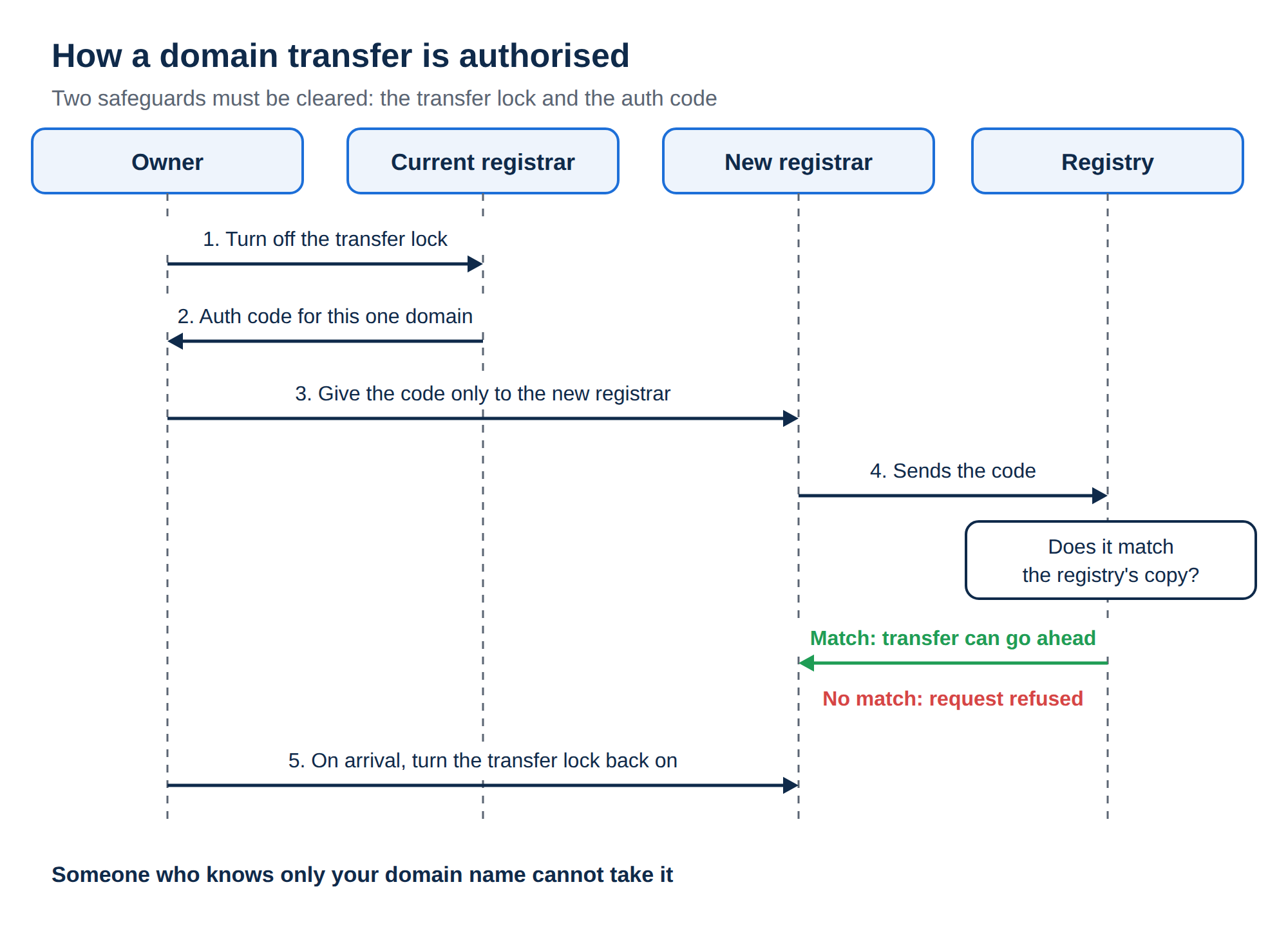
When you start a transfer, the new registrar (the "gaining" registrar) sends the code to the registry. If it matches the registry's copy, the transfer can go ahead. If it doesn't match, the registry refuses the request.
The code has several names because registrars and registries label it differently:
- Auth code or authorisation code: the most common name.
- EPP code: named after the Extensible Provisioning Protocol, the system registrars use to talk to registries. In the protocol itself the field is called
authInfo. - Transfer key, transfer code or transfer secret: used by some control panels.
The code only allows a transfer between registrars. It does not change who owns the domain, where your website is hosted or where your email goes.
2. Why a transfer needs both an unlock and a code
Two separate safeguards protect a domain from being moved without your permission. A transfer can start only when both are cleared.
| Safeguard | What it does | Who controls it | What you do before a transfer |
|---|---|---|---|
| Transfer lock (registrar lock) | Stops the registry from accepting any transfer request | You, in your current registrar's control panel | Turn it off |
| Auth code | Proves that the person asking for the transfer has the owner's permission | Your current registrar creates it; you pass it on | Get the code and give it to the new registrar |
Because of this design, someone who only knows your domain name cannot take it. They would need your registrar account, or an unlocked domain plus its code. That is why the code must stay private (section 6).
3. How to get the auth code from another registrar
Every registrar's control panel looks different, but the steps are nearly always the same:
- Sign in to your current registrar's account.Use the account the domain is registered in. If a web designer or agency bought the domain for you, ask them. A domain registered in someone else's account is under their control until it is moved to yours.
- Open the domain.Look for a menu called Domains, My Domains or Domain Manager, and select the domain you want to move.
- Turn off the transfer lock.It may be called Registrar Lock, Domain Lock, Transfer Lock or Theft Protection. Some registrars show the auth code only after the lock is off.
- Find the code.Look for a button or link called Get Auth Code, EPP Code, Authorization Code, Transfer Code or Transfer Out. It is usually on the domain's transfer, security or advanced settings page.
- Collect the code.Some registrars show it on screen. Others email it to the registrant contact on the domain, so check that inbox and its spam folder.
- Store it safely until you use it.Copy it into a password manager or paste it straight into the new registrar's transfer form. Don't leave it in a chat or a shared document.
Many registrars send the auth code or a transfer approval request to the domain's registrant email address. If that address is out of date, or it is on the same domain you are transferring and that domain has stopped working, you won't receive the email. Update the contact email at your current registrar before you ask for the code.
If you can't find the option, ask your current registrar's support team for the auth code. Registrars are expected to give the code to the domain's owner. A registrar may refuse for a specific reason, such as an unpaid balance or an ownership dispute. It should not refuse simply because you are leaving.
4. How to get the auth code for a domain at Domain India
If your domain is registered with Domain India and you want to move it to another registrar, you can get the code yourself from the client area:
- Sign in to your Domain India client areaand go to Domains → My domains.
- Open the domainyou want to transfer. Until the domain is paid for and active, only its Overview tab is shown.
- Open the Transfer tab.At the top, a "Transfer-out requirements" notice lists the three conditions: the domain must be unlocked, it must be at least 60 days old, and WHOIS privacy must be turned off.
- Unlock the domain.In the Transfer lock box the status shows Locked or Unlocked. Click Unlock domain.
- Get the code.In the Authorisation code (EPP) box, click Get EPP code. For some domains the code is already there, hidden behind dots. Click the eye icon to show it.
- Copy the codewith the Copy button and enter it at your new registrar.
If the code box shows "Not Available", or there is no Unlock domain button for your domain, open a support ticket and our team will help.
If you decide not to transfer after all, go back to the Transfer tab and click Lock domain. For more about the lock, see Understanding domain lock.
5. Using the code to transfer a domain to Domain India
To move a domain to Domain India, first follow section 3 at your current registrar. Then:
- Go to Domain Transferon the Domain India website.
- Enter the domain name and the auth code.Copy and paste the code rather than typing it, so that no characters are misread.
- Pay the transfer fee.The transfer adds one year to your domain's existing registration, so the fee also pays for your next year.
- Approve the transfer.Watch the domain's contact email. You may be asked to confirm the transfer there.
- Check the domain in your client area.When the transfer completes, the domain appears under Domains. Check the contact details, turn the transfer lock back on, and confirm the nameservers point where your website and email are hosted.
A transfer does not change your nameservers, so your website and email keep working during it. The exception is DNS hosted by your old registrar, which may stop when the domain leaves. If your records are there, copy all of them (A, CNAME, MX and TXT, including SPF and DKIM) before you start. Once the domain arrives, point it at your hosting provider's nameservers and make sure the same records exist there, or keep an outside DNS provider and add A records for your website. How do I change my nameservers shows where to find the right values for your hosting. The full walkthrough is Can I transfer an existing domain to Domain India.
6. Keep the code safe: treat it like a password
Anyone who has the auth code of an unlocked domain can try to move it to another registrar. Treat it the way you would treat your bank password.
Give the auth code only to the registrar that is receiving the domain, or type it into their transfer form yourself. Don't post it in a forum, a public support thread, a screenshot or a group chat.
Good habits:
- Keep the transfer lock on unless you are moving the domain yourself, right now.
- Ask for the code only when you are ready to transfer, and use it promptly.
- Lock the domain again if you cancel the move. At some registrars you can also get a new code, which makes the old one useless.
- Protect the registrar account. Anyone who can sign in can unlock the domain and read the code. Use a strong, unique password and turn on two-factor authentication. In the Domain India client area, you'll find two-factor authentication in your security settings.
- Watch for unexpected transfer emails. If you get a transfer approval request you didn't start, don't approve it, and contact your registrar straight away.
- Keep the domain in your own name. If a developer holds the code and the account, they control your domain.
7. Why an auth code is rejected, and how to fix it
When a transfer fails with "invalid auth code" or a similar message, the cause is usually one of these:
| Cause | Why it happens | Fix |
|---|---|---|
| Wrong code | A typing mistake, a space copied at the start or end, confusable characters (0 and O, 1 and l), or the code of a different domain | Copy and paste the code again, with no spaces, and check that it belongs to this domain |
| Expired or replaced code | Some registrars issue codes that are valid only for a limited time, or create a new code each time you ask, so older ones stop working | Ask for a fresh code and use it straight away |
| Domain still locked | The transfer lock is still on at the current registrar, or the registrar has placed its own lock or hold | Turn off the lock; for a registrar hold, contact the current registrar |
| Less than 60 days since registration or last transfer | For .com and most other gTLDs, a domain can't move to a new registrar within 60 days of registration or of its previous transfer | Wait until 60 days have passed, then start again |
| Recent change of owner details | For gTLDs, changing the registrant's name, organisation or email can start a 60-day transfer lock | Wait for the lock to end, or ask the current registrar whether you can opt out before the change |
| Expired or pending-delete domain | A domain deep into its expiry process usually can't be transferred | Renew or restore it at the current registrar first |
You can check a domain's current status with an RDAP or WHOIS lookup. A status of clientTransferProhibited means the registrar lock is still on. serverTransferProhibited means the registry itself has blocked transfers, and only the current registrar can help with that. For more cases, read Check if your domain name can be transferred.
Domain India accepts transfers of domains that are at least 60 days old. The same rule applies when you transfer a domain away from Domain India, as the Transfer tab's requirements notice shows.
8. .in domains and other extensions
.in and .co.in domains use an auth code in the same way as .com. The .in registry is run by NIXI, and Domain India is a NIXI-accredited .IN registrar. Before you ask for the code, check that the registrant details on your .in domain are accurate, because .in domains may need to be verified. See Mandatory KYC for .in domains.
A few extensions work differently. .uk domains, for example, don't use an auth code at all. You move them by changing the domain's registrar tag (the "IPS tag") to the tag of the new registrar. If you hold an extension that isn't .com or .in, ask the receiving registrar what it needs before you start.
9. Where Domain India fits
Domain India registers and transfers domains, and lets you manage DNS, nameservers and the transfer lock from one client area. When you transfer a domain in, one year is added to its current registration period.
| Extension | Transfer to Domain India | Renew (per year) | Register new (1 year) |
|---|---|---|---|
| .in | ₹625 | ₹625 | ₹575 |
| .co.in | ₹525 | ₹525 | ₹475 |
| .com | ₹1,150 | ₹1,150 | ₹1,150 |
Domain India list prices on 19 September 2026, excluding 18% GST. The full price list is on the Domain Transfer page. For choosing and registering a new name, see The ultimate guide to domain name registration. If you are buying a domain from its current owner, read Buying, transferring and selling domains first.
Frequently asked questions
What is a domain auth code?
An auth code, also called an EPP code, authorisation code or transfer key, is a unique code that the current registrar creates for one domain. The new registrar needs it to start a transfer, because it proves that the domain's owner agreed to the move.
Where do I find my EPP code?
In your current registrar's control panel, usually on the domain's transfer or security page, under a label such as Get Auth Code or EPP Code. Many registrars show it only after you turn off the transfer lock, and some send it to the domain's registrant email address.
How do I get the EPP code for a domain registered with Domain India?
Sign in to the client area, go to Domains → My domains, open the domain and choose the Transfer tab. Click Unlock domain, then click Get EPP code in the Authorisation code (EPP) box, or click the eye icon if the code is already shown. If it says Not Available, open a support ticket.
Is it safe to share my auth code?
Share it only with the registrar receiving the domain. Anyone who has the code of an unlocked domain can try to transfer it, so treat it like a password and keep the transfer lock on until you are ready to move.
Why does my auth code say invalid?
Usually the code was mistyped or copied with a space, it has expired or been replaced by a newer code, the domain is still locked, or fewer than 60 days have passed since the domain was registered or last transferred. Get a fresh code, check the lock, and paste the code exactly.
Does the auth code expire?
It depends on the registrar and the extension. Some codes stay valid until they are changed, while others are valid only for a limited time or are replaced every time you ask for a code. Ask for the code when you are ready to transfer and use it straight away.
Can I transfer a domain I registered recently?
For .com and most other gTLDs, not within 60 days of registration or of the domain's last transfer. Domain India accepts transfers of domains that are at least 60 days old.
Will my website or email stop during a transfer?
Not if your DNS is hosted by your web host or a DNS service, because a transfer keeps your nameservers unchanged. If your old registrar hosts your DNS for free, that DNS may stop when the domain leaves, so copy all your DNS records before you transfer and set them up at your hosting provider's nameservers.
How much does it cost to transfer a domain to Domain India?
₹625 for a .in, ₹525 for a .co.in and ₹1,150 for a .com, excluding 18% GST (list prices on 19 September 2026). The transfer adds one year to the domain's existing registration.
Ready to move your domain? Get the auth code from your current registrar, then start at Domain Transfer, or read Can I transfer an existing domain to Domain India for the full walkthrough.
Unlock the domain, get its auth code, and one year is added to the registration when it arrives.
Start a transfer