Yes. You can move a domain you already own from another registrar to Domain India, and keep the same name, website and email. This guide explains what a transfer changes and what it doesn't, how to check that your domain is ready, the exact steps on the Domain India transfer page, what happens after you pay, and what the transfer costs.
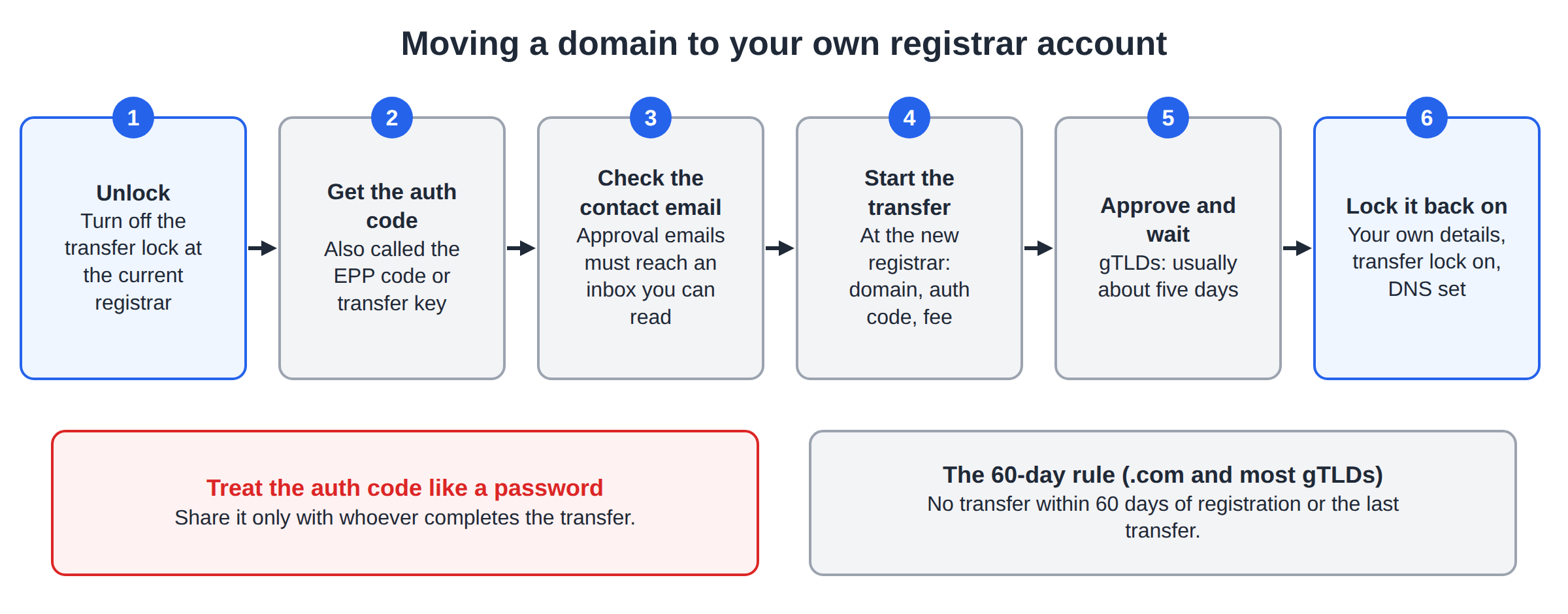
You can transfer most domains to Domain India once they are at least 60 days old. Unlock the domain at your current registrar, get its auth (EPP) code, then enter the domain and the code on the Domain Transfer page and pay the transfer fee. The fee includes one year, which is added to your existing expiry date. Most .com-type transfers finish within about 5 to 7 days, and your website and email keep working if your DNS is set up correctly.
1. What a domain transfer is, and what it doesn't change
Every domain is managed by one registrar at a time. A transfer moves that management to a new registrar, here Domain India. After the transfer, you renew the domain, change its nameservers and manage its lock from the Domain India client area.
A transfer changes who you pay and where you manage the domain. It does not change:
- Ownership. You stay the registrant. The domain is not sold or reassigned.
- Your hosting. If your website is hosted somewhere else, it stays there.
- Your nameservers. The transfer keeps the nameservers the domain already uses, so the same DNS keeps answering.
- Your email. Mailboxes live on your mail provider, not at the registrar.
There is one exception to watch for: if your current registrar also hosts your DNS for free, that DNS may stop when the domain leaves. Section 6 explains how to avoid an outage.
2. Check that your domain can be transferred
Before you pay for a transfer, make sure the domain meets these conditions. The transfer page checks eligibility when you enter the domain, but it is quicker to fix problems first.
| Condition | Why it matters | What to do |
|---|---|---|
| At least 60 days since registration or the last transfer | Registries refuse transfers within this window to prevent theft | Wait until 60 days have passed |
| Transfer lock is off | A locked domain can't be moved | Unlock it at your current registrar |
| You have the auth (EPP) code | The code proves the owner agreed to the move | Ask your current registrar for it |
| Domain is active, not expired or pending deletion | A domain deep in its expiry process usually can't be transferred | Renew or restore it at the current registrar first |
| Registrant email is current | Approval emails and the auth code often go to this address | Update the contact email before you start |
| No recent change of owner details (gTLDs) | Changing the registrant's name, organisation or email can start a 60-day transfer lock | Wait for the lock to end, or ask the current registrar about it |
You can see a domain's status with a WHOIS lookup. clientTransferProhibited means the registrar lock is still on. serverTransferProhibited or pendingDelete means only the current registrar or the registry can clear the block. For less common cases, read Check if your domain name can be transferred.
Start the transfer at least two weeks before the domain's expiry date. If the domain expires in the middle of a transfer, the move can stall and you may have to renew it at the old registrar first.
3. Prepare the domain at your current registrar
Every registrar's control panel looks different, but the preparation is the same everywhere:
- Sign in to the account that holds the domain.If a web designer or agency registered it for you, ask them for access, or ask them to do these steps.
- Check the registrant email.Make sure it is an address you can read today, and preferably not on the domain you are moving.
- Turn off the transfer lock.It may be called Registrar Lock, Domain Lock, Transfer Lock or Theft Protection.
- Get the auth (EPP) code.Look for Get Auth Code, EPP Code or Transfer Out on the domain's transfer or security page. Some registrars show it on screen; others email it to the registrant.
- Note your DNS setup.Write down the domain's current nameservers. If they belong to your current registrar, export or copy every DNS record now (see section 6).
If you can't find the code, ask your current registrar's support team. Registrars are expected to give the code to the domain's owner. For a full walkthrough, and for what to do when a code is rejected, read What is a domain auth (EPP) code and how do I get one?.
Anyone who has the auth code of an unlocked domain can try to move it. Paste it only into the Domain India transfer form, and never into a chat, forum or screenshot.
4. Transfer the domain to Domain India, step by step
Once the domain is unlocked and you have the code, the order takes a few minutes:
- Open the transfer page.Go to Domain Transfer.
- Enter the domain name and the auth code.Paste the code rather than typing it, so that no characters are misread. The form needs a code of at least 6 characters.
- Check eligibility.Domain India checks the domain and shows whether it can be transferred, with the transfer price. If it isn't eligible, fix the reason from section 2 or contact support.
- Choose transfer only, or add hosting.You can move just the domain, or add a hosting plan in the same order.
- Check out and pay.Sign in to your Domain India account, or create one, and pay the transfer invoice. The transfer starts after payment.
- Approve the transfer if asked.Watch the registrant email for approval or confirmation messages (section 5).
After you pay, the invoice appears under Invoices in your client area and the domain under Domains, where you can follow its progress.
5. What happens after you pay
For .com, .net, .org and most other generic domains (gTLDs), a transfer follows the ICANN transfer process:
- Domain India sends the request to the registry with your auth code. If the code is wrong or the domain is locked, the registry refuses it straight away.
- Your current registrar is notified. It may email the registrant to confirm the move. Many registrars let you approve the transfer early from that email, which speeds things up.
- The transfer completes. If the current registrar doesn't approve or reject the request, the registry normally completes it automatically after five days.
Most gTLD transfers finish within about 5 to 7 days. Some registrars take longer, so treat this as a typical time, not a guarantee.
If you did not start a transfer and you receive an approval request, don't approve it. Reject it, lock the domain, and contact your registrar straight away.
If the transfer hasn't completed after a week, or it was rejected, check the lock and the auth code first, then open a support ticket with the domain name so we can see where it stopped.
6. Keep your website and email working during the move
A transfer doesn't change your nameservers, so in most cases nothing goes offline. What matters is where your DNS is hosted.
| Your DNS is hosted at | What happens during the transfer | What to do |
|---|---|---|
| Your hosting provider or a DNS service (for example Cloudflare) | Nothing changes; the same DNS keeps answering | Nothing. Keep the nameservers as they are |
| Your current registrar's free DNS | That DNS may stop when the domain leaves, taking your website and email down | Copy every record first, then move DNS before or right after the transfer |
| Domain India hosting | Nothing changes | Nothing |
If your records are with the old registrar, copy all of them (A, CNAME, MX, TXT, including SPF and DKIM) before you start. Once the domain arrives, point it at your hosting provider's nameservers and make sure the same records exist there. How to change your nameservers shows where to find the right values. The guides are How to change your domain DNS settings and How do I change my nameservers.
7. .in domains and other extensions
.in and .co.in domains transfer the same way: unlock the domain, get the auth code from your current registrar, and enter both on the transfer page. The .in registry is run by NIXI, which sets its own rules, and Domain India is a NIXI-accredited .IN registrar. Keep the registrant details on your .in domain accurate before you start, because .in domains may need to be verified. See Mandatory KYC for .in domains.
Some country extensions don't use an auth code at all. A .uk domain, for example, is moved by changing its registrar tag (the "IPS tag") at the current registrar. If your extension isn't a common gTLD or .in, check the domain pricing page to see whether we offer it, and ask support what the transfer needs before you start.
8. What a transfer to Domain India costs
You pay one transfer fee per domain. The fee includes a one-year extension: the year is added to the domain's existing expiry date, so you don't lose the time you already paid for.
| Extension | Transfer (includes 1 year) | Renew (per year) |
|---|---|---|
| .in | ₹625 | ₹625 |
| .co.in | ₹525 | ₹525 |
| .com | ₹1,150 | ₹1,150 |
| .net | ₹1,438 | ₹1,769 |
| .org | ₹1,150 | ₹1,108 |
| .info | ₹2,453 | ₹2,701 |
Domain India list prices on 19 September 2026, excluding 18% GST. Prices for other extensions are on the domain pricing page.
For example, a .com that expires on 10 March 2027 and transfers in during October 2026 will expire on 10 March 2028 once the transfer completes.
9. After the transfer: a short checklist
When the domain shows as active under Domains in your client area:
- Turn the transfer lock back on, so the domain can't be moved without you.
- Check the contact details and correct anything out of date.
- Check the nameservers point where your website and email are hosted.
- Visit your website and send a test email to confirm everything still works.
- Know how renewals work. Domain India never charges a saved card automatically. A renewal invoice is emailed up to 30 days before the due date, and the domain renews when you pay it. See How auto-renewal works.
10. Where Domain India fits
Domain India registers and transfers domains, and lets you manage nameservers, DNS and the transfer lock from one client area. Keeping your domain and hosting with one provider means one account, one renewal list and one support team when something breaks.
Support is available by 24/7 live chat and by ticket, with a first response to tickets within 15 minutes; fixing an issue can take longer depending on what it is. There is no phone support.
If you are moving your website as well, you can add hosting in the same transfer order. Compare plans on cPanel hosting:
- 25 GB NVMe SSD Storage
- 50 GB Monthly Bandwidth
- 1 Website
- 10 Email Accounts
Frequently asked questions
Can I transfer my existing domain to Domain India?
Yes. Most domains can be transferred once they are at least 60 days old, unlocked and not expired. You need the domain's auth (EPP) code from your current registrar, and you start the transfer on the Domain India Domain Transfer page.
How long does a domain transfer take?
Most transfers of .com and other generic domains finish within about 5 to 7 days. Approving the confirmation email from your current registrar can make it faster. Some registrars take longer, so this is a typical time, not a guarantee.
Does transferring a domain add a year to it?
Yes. The transfer fee includes one year, which is added to the domain's existing expiry date. You don't lose the time left on your current registration.
How much does it cost to transfer a domain to Domain India?
₹625 for a .in, ₹525 for a .co.in and ₹1,150 for a .com, excluding 18% GST. These are Domain India list prices on 19 September 2026, and each fee includes a one-year extension.
Will my website or email go down during the transfer?
Not if your DNS is hosted by your web host or a DNS service, because a transfer keeps your nameservers unchanged. If your old registrar hosts your DNS for free, copy all your DNS records before the transfer, because that DNS may stop when the domain leaves.
Why can't I transfer a domain I registered recently?
Registries block transfers for 60 days after a domain is registered or last transferred, to protect owners from theft. Wait until 60 days have passed, then start the transfer.
Where do I get the auth code?
From your current registrar's control panel, usually on the domain's transfer or security page after you turn off the transfer lock. Some registrars email the code to the registrant. If you can't find it, ask your current registrar's support team.
What if my transfer fails or gets stuck?
Check that the domain is still unlocked, that the auth code is current and pasted without spaces, and that the domain isn't expired. If it is still stuck after a week, open a support ticket with the domain name.
Ready to move your domain? Unlock it and get its auth code from your current registrar, then start at Domain Transfer. For help with the code, read What is a domain auth (EPP) code, or open a support ticket if something blocks the move.
Enter your domain and auth code, pay the transfer fee, and one year is added to your registration when the domain arrives.
Start a transfer