Most domains can move to a new registrar, but not at every moment. A domain that is too new, locked, on hold or expiring can't be transferred until the block is cleared. This guide lists the conditions, shows how to read the status codes that say what is blocking a domain, and what to fix before you transfer it to Domain India.
This page is about checking eligibility. For the complete transfer steps, what happens after you pay and the prices, read Can I transfer an existing domain to Domain India.
A domain can usually be transferred when it is at least 60 days past its registration or last transfer, unlocked at the current registrar, active (not expired, on hold or pending deletion), and you have its auth (EPP) code. Check the domain's status codes with a WHOIS lookup: clientTransferProhibited means you must unlock it; serverTransferProhibited, pendingDelete or a hold means only the current registrar or the registry can clear it.
1. The eligibility checklist
| Condition | Why it matters | What to do |
|---|---|---|
| At least 60 days since registration or the last transfer | Registries refuse transfers inside this window to protect owners from theft | Wait until 60 days have passed |
| Transfer lock is off | A locked domain can't be moved | Unlock it at your current registrar |
| You have the auth (EPP) code | The code proves the owner agreed to the move | Ask your current registrar for it |
| Domain is active, not expired or pending deletion | A domain deep in its expiry process usually can't be transferred | Renew or restore it at the current registrar first |
| Registrant email is current | Approval emails and the auth code often go to this address | Update the contact email before you start |
| No recent change of owner details (gTLDs) | Changing the registrant's name, organisation or email can start a 60-day transfer lock | Wait for the lock to end, or ask the current registrar about it |
The Domain Transfer page also checks eligibility when you enter the domain, but it is quicker to fix problems before you get there.
2. Read the domain's status codes
Every domain carries one or more status codes, standard labels set by the registrar or the registry. A WHOIS lookup shows them. These are the ones that matter for a transfer:
| Status | What it means | Who can clear it |
|---|---|---|
| ok or active | No restrictions | Nothing to clear |
| clientTransferProhibited | The registrar lock is on | You, in your current registrar's control panel |
| serverTransferProhibited | The registry has blocked transfers | Only the registry, usually through the current registrar |
| clientHold or serverHold | The domain is suspended and doesn't resolve | The current registrar or the registry, once the reason is fixed |
| pendingTransfer | A transfer is already in progress | Wait for it to finish or be cancelled |
| redemptionPeriod | The domain has expired and is waiting to be restored | The current registrar, by restoring it |
| pendingDelete | The domain is about to be deleted | No one; wait until it is released, then register it |
clientUpdateProhibited and clientDeleteProhibited often appear alongside the lock. They block changes and deletion, not transfers, but many registrars switch all three together. From a terminal, whois yourbusiness.com shows the same codes on its "Domain Status" lines.
3. The 60-day rule
A domain cannot move to another registrar within 60 days of being registered or last transferred. The window protects owners: a stolen or mistakenly registered domain can't be moved on straight away. Inside the window the transfer is refused, and you simply wait.
On gTLDs such as .com, changing the registrant's name, organisation or email can also start a 60-day transfer lock. If you plan to change owner details and transfer, ask your current registrar how it handles this first.
4. Unlock the domain and get the auth code
At your current registrar:
- Sign into the account that holds the domain. If an agency registered it for you, ask them for access or to do these steps.
- Turn off the transfer lock.It may be called Registrar Lock, Domain Lock or Theft Protection.
- Get the auth (EPP) code.Look for Get Auth Code, EPP Code or Transfer Out on the domain's page. Some registrars email it to the registrant instead.
- Check the WHOIS again.
clientTransferProhibitedshould be gone before you start the transfer.
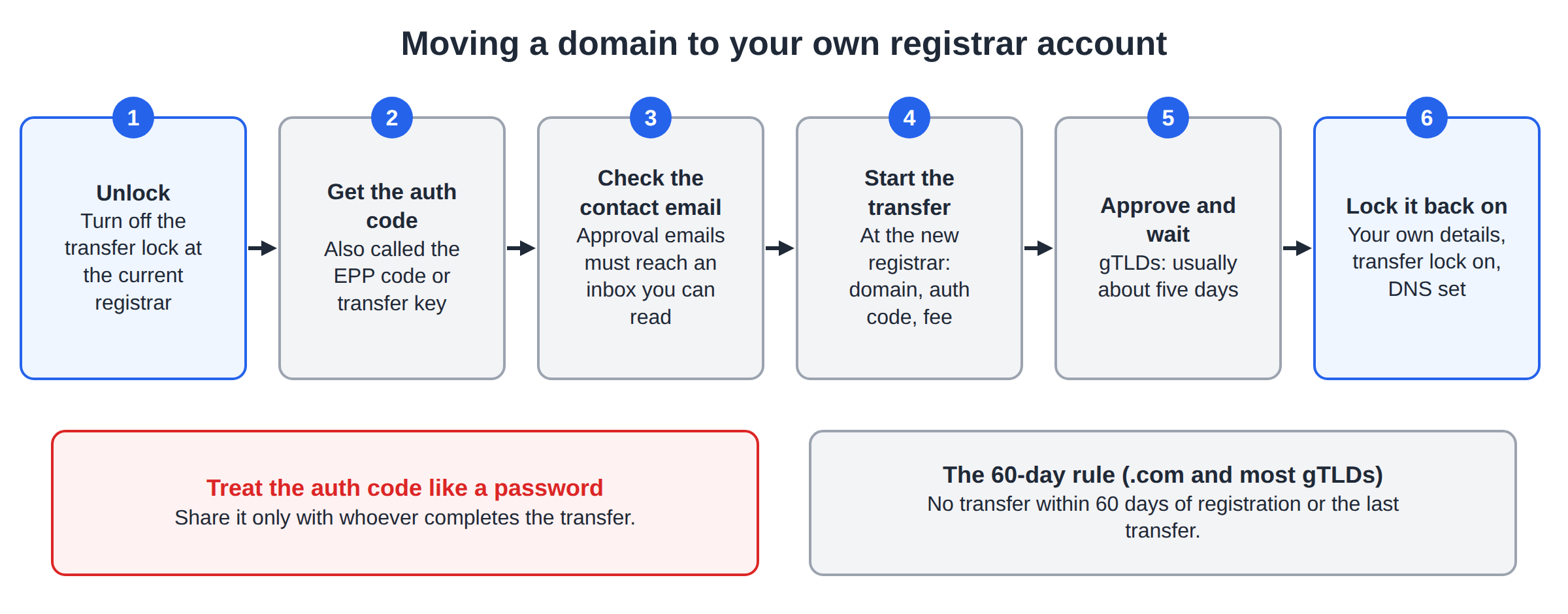
Treat the auth code like a password: paste it only into the Domain India transfer form. For help when a code is missing or rejected, read What is a domain auth (EPP) code and how do I get one?.
5. Expiring and expired domains
Start a transfer at least two weeks before the expiry date; a domain that expires mid-transfer can stall. Once a domain has expired and entered its recovery stages, it usually can't be transferred: renew or restore it at the current registrar, then transfer it once it is active again.
6. .in domains and other extensions
.in and .co.in domains transfer the same way: unlock the domain, get the auth code from the current registrar and enter both on the transfer page. The .in registry is run by NIXI, and Domain India is a NIXI-accredited .IN registrar. Keep the registrant details accurate before you start, because .in domains may need to be verified; see Mandatory KYC for .in domains. For .in domains, personal registrant details are not shown in public WHOIS, so a lookup shows the status codes but not your name or contact details.
Some country extensions work differently: a .uk domain, for example, is moved by changing its registrar tag (the "IPS tag") rather than with an auth code. For any other extension, ask support what its transfer needs before you start.
7. Where Domain India fits
When your domain passes these checks, start at the Domain Transfer page. The transfer fee includes one year, added to the domain's existing expiry date. Domain India list prices on 19 September 2026, excluding 18% GST: ₹625 for a .in, ₹525 for a .co.in and ₹1,150 for a .com. Prices for other extensions are on the domain pricing page.
If something blocks your transfer and you can't clear it, support is available by 24/7 live chat and by ticket, with a first response to tickets within 15 minutes. There is no phone support.
Frequently asked questions
How do I check if my domain can be transferred?
Run a WHOIS lookup and read the domain's status codes. If it shows clientTransferProhibited, unlock the domain at your current registrar. If it shows serverTransferProhibited, a hold, redemptionPeriod or pendingDelete, the current registrar or registry must clear it first. Also check that the domain is at least 60 days old and that you have its auth code.
Why can't I transfer a domain I registered recently?
Registries block transfers for 60 days after a domain is registered or last transferred, to protect owners from theft. Wait until 60 days have passed, then start the transfer.
What does clientTransferProhibited mean?
It means the registrar lock is on. Sign in to your current registrar's control panel and turn off the transfer lock, then check the WHOIS again before you start the transfer.
Can I transfer an expired domain?
Usually not once it has entered its recovery stages. Renew or restore the domain at your current registrar first, then transfer it once it is active again. Start transfers at least two weeks before the expiry date to be safe.
Ready to transfer? Unlock your domain and get its auth code, then start at Domain Transfer. For the complete guide, read Can I transfer an existing domain to Domain India, or open a support ticket if something blocks the move.
Enter your domain and auth code, pay the transfer fee, and one year is added to your registration when the domain arrives.
Start a transfer