Once you have paid for a domain transfer to Domain India, the move runs through a few stages between us, the registry and your current registrar. Knowing which stage your transfer is in tells you whether you need to do something or simply wait. This guide explains each stage, where to follow it, the status codes you may see in WHOIS, and what to do when a transfer stalls or fails.
Follow your transfer under your domains in the client area. After payment, Domain India sends the request to the registry with your auth code; your current registrar is then notified and may email you to approve. For .com and most other generic domains, the registry normally completes the transfer automatically after five days if the old registrar doesn't act, and most finish within about 5 to 7 days. If a transfer fails, the cause is almost always a lock, a wrong auth code or an expired domain.
This page is about following a transfer that has already started. For preparation, the step-by-step order and prices, read Can I transfer an existing domain to Domain India.
1. Where to check your transfer
Sign in and open your domains. A domain that is moving to us appears there while the transfer is in progress, and shows as active once it arrives. The transfer invoice is under your invoices.
You can also check from outside the client area with a WHOIS lookup. The "Registrar" line shows which registrar holds the domain right now, and changes when the transfer completes; the "Domain Status" lines show whether a transfer is pending.
2. The stages of a transfer
For .com, .net, .org and most other generic domains (gTLDs), a transfer follows the ICANN transfer process:
- Payment.The transfer starts once the transfer invoice is paid. An unpaid invoice means nothing has been sent yet.
- Request sent to the registry.Domain India submits the transfer to the registry with your auth (EPP) code. If the code is wrong or the domain is locked, the registry refuses it straight away.
- Pending transfer.The registry accepts the request and tells your current registrar. WHOIS now shows
pendingTransfer. - Approval by the current registrar.Your current registrar may email the registrant to confirm the move. Many registrars let you approve early from that email, which speeds things up.
- Completed.If the current registrar neither approves nor rejects the request, the registry normally completes it automatically after five days. The domain is now managed from your Domain India client area, with one year added to its expiry date.
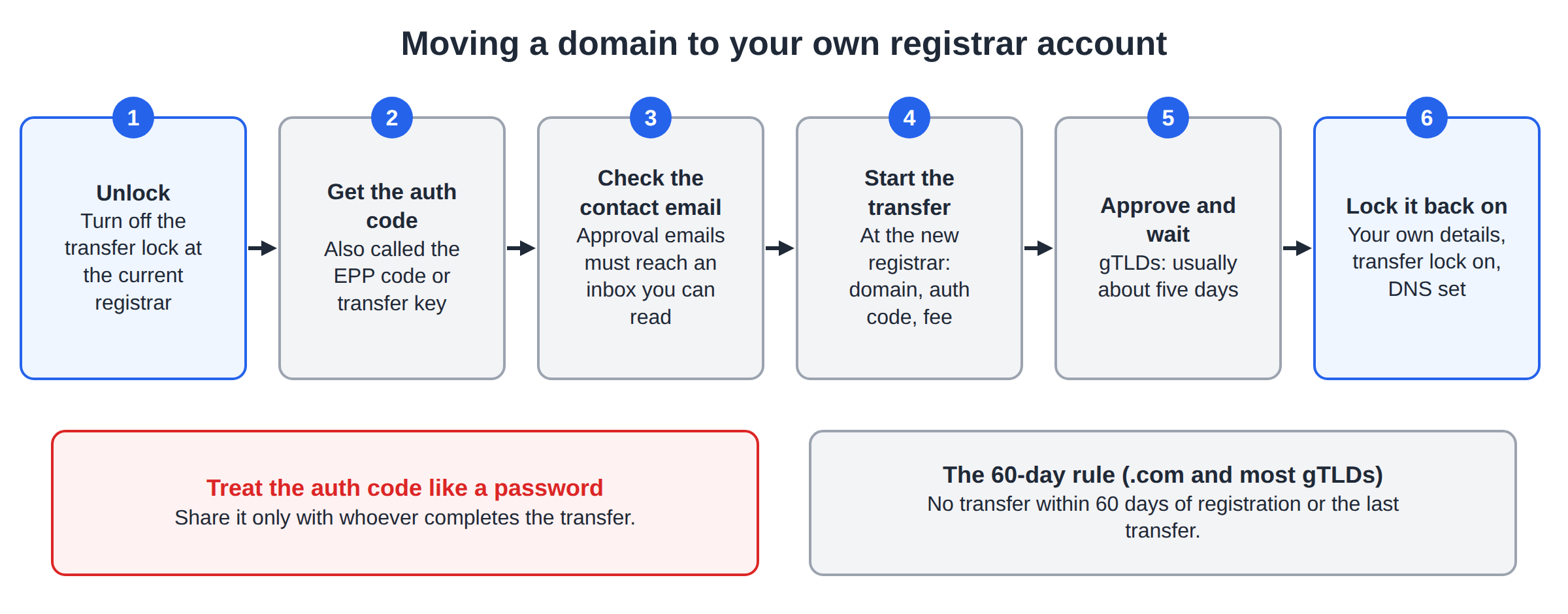
Most gTLD transfers finish within about 5 to 7 days. Some registrars take longer, so treat this as a typical time, not a guarantee.
3. What each stage means for you
| Where the transfer is | What it means | What you do |
|---|---|---|
| Invoice unpaid | Nothing has been sent to the registry | Pay the invoice in your client area |
| Request refused straight away | The auth code was wrong, or the domain is still locked | Check the lock and the code at your current registrar, then contact support |
| pendingTransfer in WHOIS | The registry has the request; the old registrar is being asked | Watch the registrant email and approve if asked |
| Waiting for approval | The current registrar is waiting for confirmation | Approve from the registrar's email to finish sooner, or wait |
| Registrar line has changed and the domain shows as active | The transfer is complete | Run the checklist in section 7 |
| Rejected or failed | The old registrar or the registry refused the move | See section 5 |
4. Approving the transfer email
After the request reaches your current registrar, it may email the registrant address on the domain to confirm the transfer. That email comes from your current registrar, not from Domain India, so search for their name as well as the domain name, and check your spam folder.
- Approve it if you started the transfer. The move can then complete sooner.
- Do nothing and the transfer normally completes on its own after five days, for gTLDs, unless the registrar rejects it.
- Reject it only if you did not start a transfer.
If you did not start a transfer and you receive an approval request, don't approve it. Reject it, lock the domain, and contact your registrar straight away.
If the registrant email on the domain is out of date, the approval email and the auth code may go to an address you no longer read. Update it at your current registrar before you start, as the transfer guide explains.
5. Why a transfer fails, and how to fix it
Almost every failed transfer has one of a few causes:
To read the codes behind these causes, see Check if your domain name can be transferred. For help with the code itself, read What is a domain auth (EPP) code and how do I get one?.
If the transfer hasn't completed after a week, or it was rejected, check the lock and the auth code first, then open a support ticket with the domain name so we can see where it stopped.
6. .in domains and other extensions
.in and .co.in domains transfer the same way: unlock the domain, get the auth code from your current registrar, and enter both on the transfer page. The .in registry is run by NIXI, and Domain India is a NIXI-accredited .IN registrar. Keep the registrant details on your .in domain accurate, because .in domains may need identity verification after the move; see Mandatory KYC for .in domains.
Some country extensions don't use an auth code at all. A .uk domain, for example, is moved by changing its registrar tag (the "IPS tag") at the current registrar. For any other extension, ask support what its transfer needs.
7. After the transfer completes
When the domain shows as active under Domains in your client area:
- Turn the transfer lock back on, so the domain can't be moved without you.
- Check the contact details and correct anything out of date. For .com and other generic domains, a verification email may be sent to the registrant address after a transfer; click the link in it.
- Check the nameservers point where your website and email are hosted.
- Visit your website and send a test email.
If the transfer is complete but the domain doesn't look active, or your website has stopped loading, read Domain name transfer completed, but domain name is still inactive.
8. Where Domain India fits
Domain India registers and transfers domains, and lets you manage nameservers, DNS and the transfer lock from one client area. The transfer fee includes one year, added to the domain's existing expiry date: ₹625 for a .in, ₹525 for a .co.in and ₹1,150 for a .com, at Domain India list prices on 19 September 2026, excluding 18% GST. Prices for other extensions are on the domain pricing page.
Support is available on 24/7 live chat, and tickets get a first response within 15 minutes; resolution can take longer. There is no phone support.
Frequently asked questions
How do I check the status of my domain transfer to Domain India?
Sign in to the client area and open Domains, where the domain appears while the transfer is in progress and shows as active once it arrives. A WHOIS lookup also shows pendingTransfer while the move is under way, and the new registrar once it is complete.
How long does a domain transfer take?
Most transfers of .com and other generic domains finish within about 5 to 7 days. If your current registrar doesn't approve or reject the request, the registry normally completes it automatically after five days. Approving the registrar's email can make it faster.
What does pendingTransfer mean?
It means the registry has accepted the transfer request and is waiting for the current registrar to approve it, or for the approval window to end. You don't need to do anything unless your current registrar emails you to confirm.
Why did my domain transfer fail?
The usual causes are a transfer lock that is still on, a wrong or expired auth code, a domain registered or transferred within the last 60 days, or an expired domain. Fix the cause at your current registrar, then contact support to retry.
Do I have to approve the transfer email?
For .com and other generic domains, no. If you don't respond, the transfer normally completes automatically after five days. Approving the email from your current registrar simply makes it finish sooner.
Will my website stop working during the transfer?
Not if your DNS is hosted by your web host or a DNS service, because a transfer keeps the nameservers unchanged. If your old registrar hosts your DNS for free, copy your records first, because that DNS may stop when the domain leaves.
Ready to check on your transfer? Open your domains, run a WHOIS lookup, or open a support ticket with the domain name if it has stalled.
Tell us the domain name and what you see. We will check where the transfer stopped and what is needed to finish it.
Open a ticket