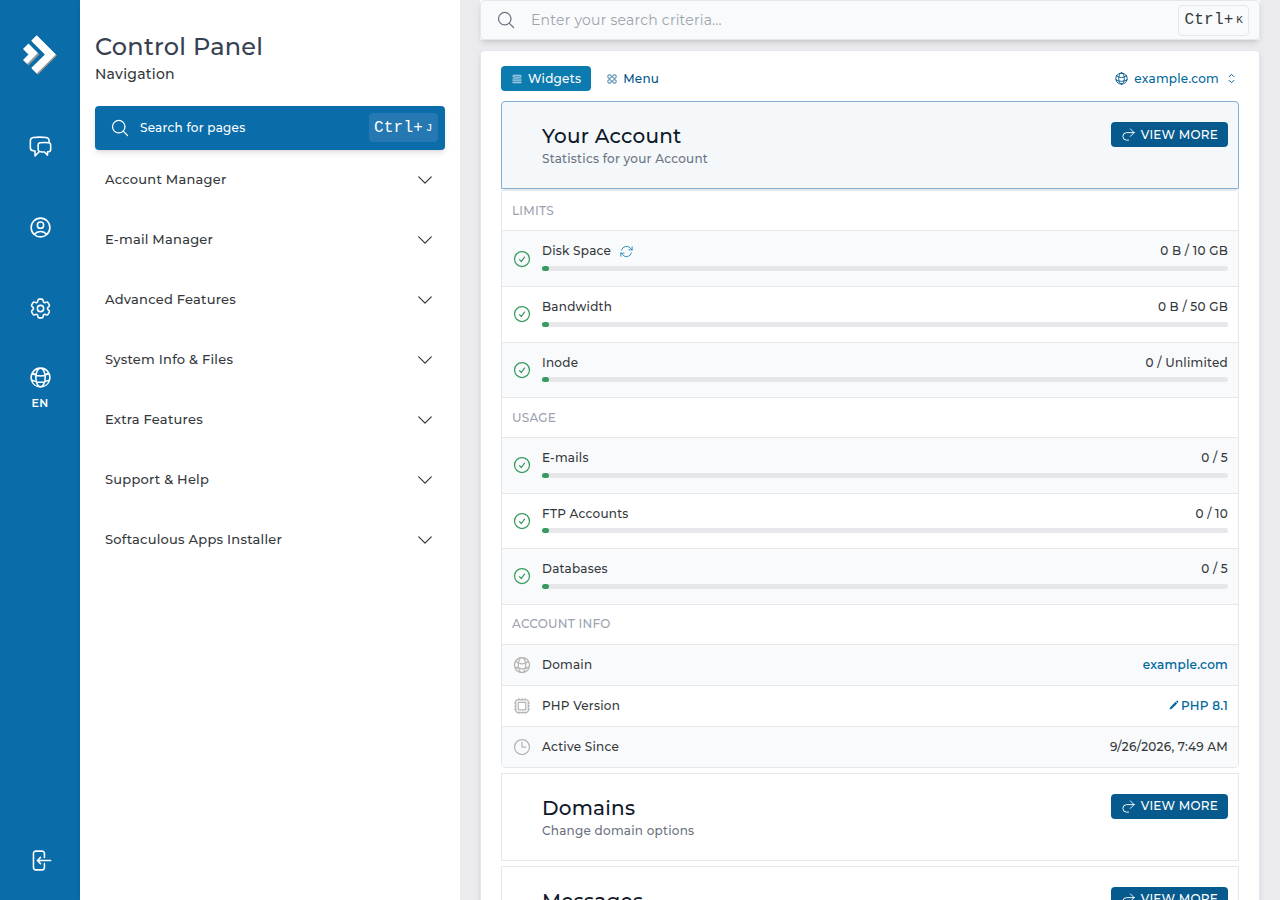
DirectAdmin is the control panel on Domain India's DirectAdmin hosting plans. You open it with one click from the client area, and from there manage your website files, email, databases, SSL, backups and scheduled tasks. This page is the quick-start version: how to get in, where things are, and how to do the four most common jobs.
Open DirectAdmin with the DirectAdmin button on your account in Hosting › My hosting, or log in at https://yourdomain.com:2222. Your website goes in domains/yourdomain.com/public_html, webmail is at https://yourdomain.com/webmail, free SSL comes from Let's Encrypt, and JetBackup keeps weekly backups you can restore yourself. If you can't find a menu item, use the search box at the top of DirectAdmin.
Every area of the panel, with the limits on our servers and a guide for each task, is covered in A comprehensive DirectAdmin end-user guide.
1. Logging in
- From the client area: sign in, open Hosting › My hosting (your hosting list) and click DirectAdmin on your domain's row. It opens the panel already signed in. The button appears only while the account is Active.
- Directly: go to
https://yourdomain.com:2222and sign in with your DirectAdmin username and password. Until your domain points to us, use the panel URL on the account's Access tab (Manage › Access).
Your client-area password and your DirectAdmin password are separate. See logging in to DirectAdmin from the client area and how to reset your DirectAdmin password.
2. Four common tasks
| Task | How | Guide |
|---|---|---|
| Upload your website | File Manager or FTP, into domains/yourdomain.com/public_html | DirectAdmin File Manager guide |
| Create an email account | The panel's email accounts area: name, password and quota | Create an email account in DirectAdmin |
| Create a database | Account Manager › Databases: create the database (a user with the same name is made for you), then connect to localhost | Creating and connecting to a MySQL database in DirectAdmin |
| Switch on free SSL | Nothing to do: issued automatically; check Account Manager › SSL/TLS Certificates | Enable Let's Encrypt in DirectAdmin |
Guides: File Manager, email accounts, databases and Let's Encrypt.
Menu names change between DirectAdmin versions and skins. If a label is not where you expect, type the task ("email", "ssl", "cron") in the search box.
3. Facts about our DirectAdmin servers
- Backups: JetBackup 5 takes a weekly backup on Sunday and keeps 5 copies. Restore files, databases or email, or download a copy, from JetBackup in DirectAdmin. See backup and restore with JetBackup.
- Webmail:
https://yourdomain.com/webmailor/roundcubeopens Roundcube. There is nowebmail.yourdomain.comaddress. - Uploads: the File Manager accepts files up to 500 MB; PHP scripts such as WordPress accept 64 MB.
- Outgoing email: 1,000 messages per day per account.
- Apps: Softaculous is installed, so WordPress and many other apps install in a few clicks.
- SSH: jailed SSH access is available on every shared hosting plan. It is off by default; ask support to enable it, then log in with an SSH key.
- Error pages: there is no Custom Error Pages tool; see custom error pages in DirectAdmin.
The jobs are the same, but the folders differ: each domain has its own folder under domains/, rather than everything under one public_html. DirectAdmin also serves index.html before index.php, so remove a leftover index.html if your new site doesn't appear.
4. Where DirectAdmin hosting fits
DirectAdmin plans start at ₹100 a month for DA Starter (Domain India list price on 24 September 2026, excluding 18% GST), with free SSL, Softaculous and weekly JetBackup backups. Compare plans on DirectAdmin hosting, or see DirectAdmin hosting features.
How do I log in to DirectAdmin at Domain India?
Sign in to the client area, open Hosting, My hosting, and click the DirectAdmin button on your domain's row. You can also go to https://yourdomain.com:2222 and log in with your DirectAdmin username and password.
Where do I upload my website in DirectAdmin?
Into domains/yourdomain.com/public_html in your account, using the File Manager or FTP. Each domain in the account has its own folder under domains.
How do I install a free SSL certificate in DirectAdmin?
DirectAdmin issues a free Let's Encrypt certificate automatically once your domain points to your hosting, and renews it automatically. Check it under Account Manager, SSL/TLS Certificates.
Does DirectAdmin hosting include backups?
Yes. JetBackup 5 backs up each account weekly on Sunday and keeps 5 copies, which you can restore or download from JetBackup in DirectAdmin.
What is the difference between DirectAdmin and cPanel?
Both manage the same things: files, email, databases, domains and SSL. The layout and folder structure differ, and each domain in DirectAdmin has its own folder under domains.
Ready to start? Open DirectAdmin from your hosting list, read the full DirectAdmin guide, or open a ticket if you are stuck. Support is on 24/7 live chat, and tickets get a first response within 15 minutes.
Free SSL, Softaculous and weekly JetBackup backups, managed from one simple panel.
See DirectAdmin plans