When you open DirectAdmin on Domain India hosting, you land on a dashboard that groups every tool into a few sections: your account and domains, email, advanced features, files and system information, and extra tools such as the app installer and backups. This short tour shows what sits where, so you can find a tool quickly, and links to the full guide for each task.
Every task on this page, from uploading files to databases, SSL, cron jobs and backups, is covered step by step in the DirectAdmin end-user guide.
Open DirectAdmin with the DirectAdmin button on your hosting row in the client area, or at https://yourdomain.com:2222. The dashboard groups tools into Account Manager, E-mail Manager, Advanced Features, System Info & Files and Extra Features. The fastest way to any tool is the search box at the top: type "email", "ftp", "cron" or "backup" and open the result.
1. Getting in
Sign in to the client area, open My Hosting and click DirectAdmin on your domain's row; it opens already signed in. You can also go to https://yourdomain.com:2222 and use your DirectAdmin username and password from the service's Manage › Access tab. See logging in to DirectAdmin and resetting your DirectAdmin password.
2. The dashboard sections
Our DirectAdmin server uses the current Evolution skin. Section names and the order of icons can change between DirectAdmin versions, so if a tool isn't where you expect, use the search box.
| Section | What you'll find there |
|---|---|
| Account Manager | Domains, Subdomain Management, DNS Management, SSL/TLS Certificates, FTP Management, Databases, Domain Pointers (aliases), Site Redirects, Hotlink Protection, PHP Settings |
| E-mail Manager | E-mail Accounts, Forwarders, Autoresponders, Vacation Messages, SpamAssassin Setup, SPAM Filters, Mailing Lists, MX Records |
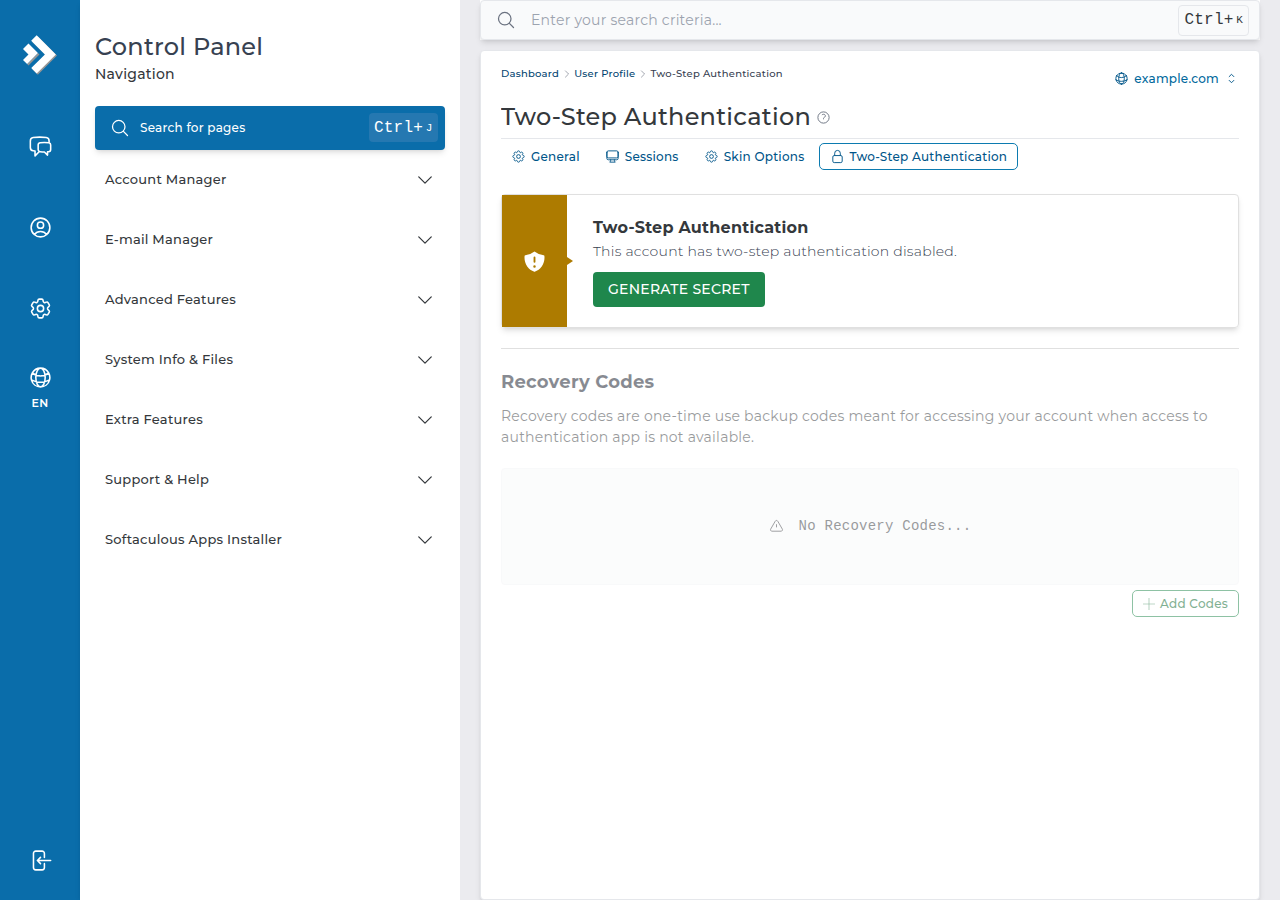
| Advanced Features | Apache Handlers, Backup and Restore, Cron Jobs, MIME types, Login Keys, Two-Step Authentication, Password Protected Directories, Web Application Firewall |
| System Info & Files | File Manager, disk and bandwidth usage, statistics and logs |
| Extra Features | JetBackup, Softaculous, WordPress Manager, SitePad, the PHP selector, Setup Node.js App, Setup Python App, Resource Usage |
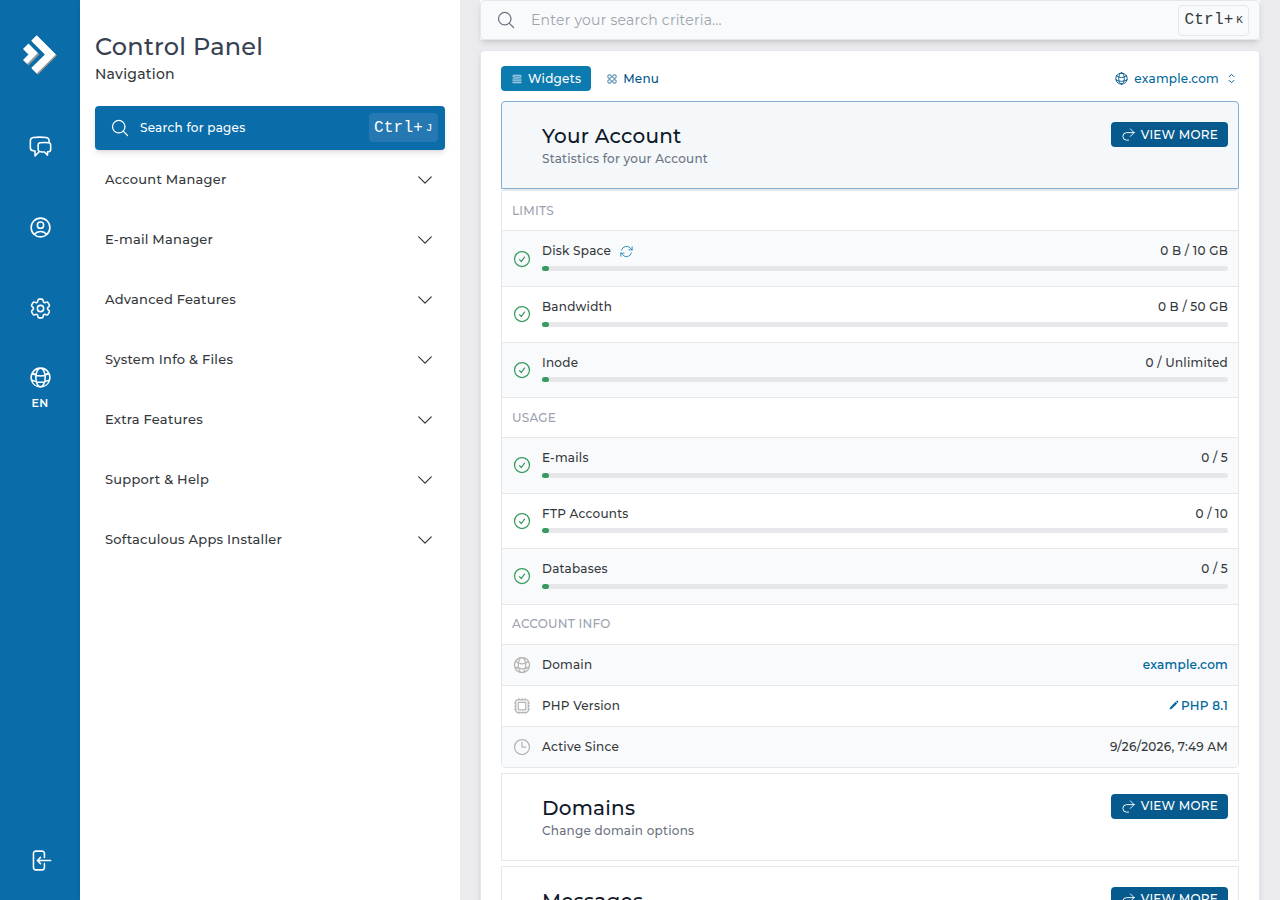
Your account settings, such as changing your password and two-step login where your panel shows it, are under your username at the top right. Two-step login is also listed under Advanced Features › Two-Step Authentication.
3. The tools people use most
domains/yourdomain.com/public_html. Uploads up to 500 MB, and deleted files go to a Trash Bin for 30 days.[email protected], each locked to its folder. Connect on port 21 with FTP over TLS.https://yourdomain.com/webmail (Roundcube).4. Things that work differently on DirectAdmin
- No webmail subdomain. Use
/webmailor/roundcubeon your domain;webmail.yourdomain.comdoes not exist on DirectAdmin hosting. - No error-page editor. Create a
404.shtmlfile or useErrorDocumentin.htaccess; see custom error pages in DirectAdmin. - index.html wins. The server serves
index.htmlbeforeindex.php, so delete a leftover placeholder page after installing a PHP site. - SSH is off by default. Jailed SSH access is available on every shared hosting plan; ask support to enable it for your account. Login is by SSH key only.
- Limits. PHP uploads are capped at 64 MB, and outgoing mail at 1,000 messages per day per account.
The search box at the top of DirectAdmin finds any tool by name. It is quicker than learning the icon layout, and it still works after a panel update moves things around.
5. DirectAdmin hosting at Domain India
DA Starter costs ₹100 a month for one website, excluding 18% GST (Domain India list price on 19 September 2026), with free SSL, Softaculous and weekly JetBackup backups. Compare plans on DirectAdmin hosting or read the DirectAdmin features overview.
- 10 GB NVMe SSD Storage
- 50 GB Monthly Bandwidth
- 1 Website
- 5 Email Accounts
Prices on the cards exclude 18% GST.
Frequently asked questions
How do I open the DirectAdmin dashboard on Domain India hosting?
Sign in to the client area, open My Hosting and click the DirectAdmin button on your domain's row. You can also go to https://yourdomain.com:2222 and sign in with your DirectAdmin username and password.
Where is the File Manager in DirectAdmin?
It is in the System Info & Files section, or type File Manager in the search box at the top of DirectAdmin. Your website files are in domains/yourdomain.com/public_html.
Where are backups in DirectAdmin?
Open JetBackup in the Extra Features section, or search for it. JetBackup 5 backs up your account weekly on Sunday and keeps five copies, which you can restore or download yourself.
Why can't I find a tool that an older guide mentions?
DirectAdmin's layout changes between versions and skins. Use the search box at the top of the panel; if the tool still isn't there, it may not be available on our server, so ask support.
Can I install WordPress from the DirectAdmin dashboard?
Yes. Softaculous is installed on Domain India's DirectAdmin server. Open it from Extra Features and choose WordPress.
Ready to find your way around? Open DirectAdmin from My Hosting, keep the DirectAdmin end-user guide handy, or open a support ticket if a tool is missing.
Tell us your domain and what you are trying to do. Support is on 24/7 live chat, and tickets get a first response within 15 minutes.
Open a support ticket