To connect PHP to a MySQL database on cPanel or DirectAdmin hosting, you need four details: the host, the database name, the database user and its password. For a website on the same hosting account, the host is localhost, and the names include your account username as a prefix. Below is working PHP code for both PDO and mysqli.
Create the database and a database user in your control panel and add the user to the database. In PHP, connect with host localhost and the full prefixed names, for example cpaneluser_shop. Use PDO or mysqli with exceptions on, log errors instead of printing them, and use prepared statements. Port 3306 is closed to outside connections on our shared servers, so remote tools need an SSH tunnel.
For creating databases in cPanel, DirectAdmin and Webuzo, WordPress and Laravel settings, phpMyAdmin, SSH tunnels and error fixes, see How to Connect to Your MySQL Database.
1. Collect the four details
| Setting | What to use | Example |
|---|---|---|
| Host | localhost for a website on the same hosting account | localhost |
| Database name | The full name, including the account prefix | cpaneluser_shop |
| Database user | The full user name, including the prefix | cpaneluser_shopuser |
| Password | The database user's password, not your panel password | a long random password |
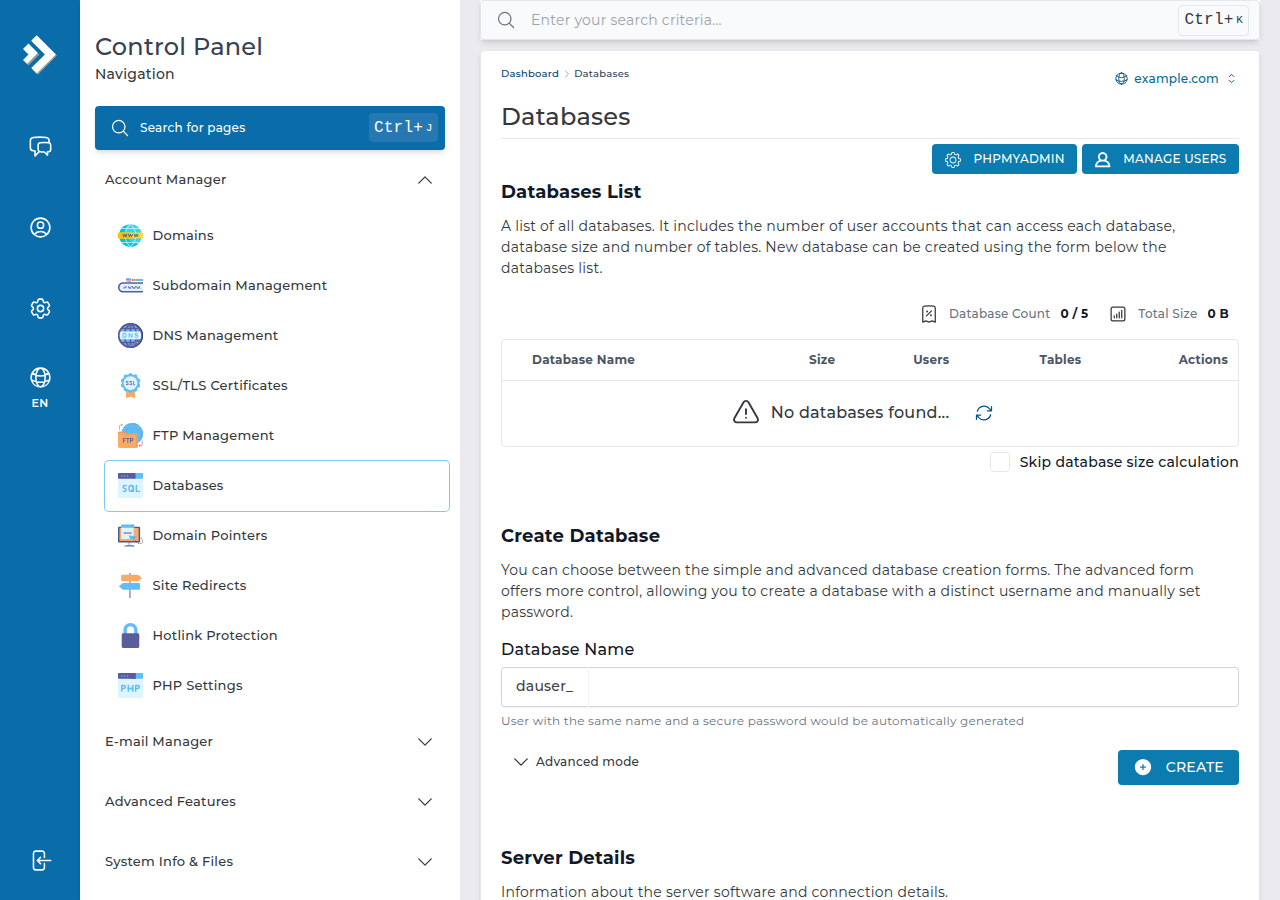
In cPanel, the Database Wizard under Databases creates all three in one flow. In DirectAdmin, use Account Manager › Databases. Both panels put your account username and an underscore in front of the names you type, and your code must use the full name. Forgetting the prefix is the most common cause of "Access denied" and "Unknown database".
2. Keep the settings in a separate file
Put the connection details in their own file, ideally one level above public_html, and include it from your code. For example, /home/cpaneluser/db-config.php:
<?php
return [
    'host' => 'localhost',
    'name' => 'cpaneluser_shop',
    'user' => 'cpaneluser_shopuser',
    'pass' => 'your-database-password',
];
Never commit this file to a public Git repository.
3. Connect with PDO (recommended)
<?php
$cfg = require __DIR__ . '/../db-config.php';

$dsn = "mysql:host={$cfg['host']};dbname={$cfg['name']};charset=utf8mb4";
$options = [
    PDO::ATTR_ERRMODE            => PDO::ERRMODE_EXCEPTION,
    PDO::ATTR_DEFAULT_FETCH_MODE => PDO::FETCH_ASSOC,
    PDO::ATTR_EMULATE_PREPARES   => false,
];

try {
    $pdo = new PDO($dsn, $cfg['user'], $cfg['pass'], $options);
} catch (PDOException $e) {
    error_log('Database connection failed: ' . $e->getMessage());
    http_response_code(500);
    exit('Sorry, the site is having a problem. Please try again later.');
}

$stmt = $pdo->prepare('SELECT id, name FROM products WHERE category = ?');
$stmt->execute([$_GET['category'] ?? '']);
$products = $stmt->fetchAll();
4. Connect with mysqli
If your code already uses mysqli, switch on exceptions so a failed connection is never ignored:
<?php
$cfg = require __DIR__ . '/../db-config.php';
mysqli_report(MYSQLI_REPORT_ERROR | MYSQLI_REPORT_STRICT);

try {
    $mysqli = new mysqli($cfg['host'], $cfg['user'], $cfg['pass'], $cfg['name']);
    $mysqli->set_charset('utf8mb4');
} catch (mysqli_sql_exception $e) {
    error_log('Database connection failed: ' . $e->getMessage());
    http_response_code(500);
    exit('Sorry, the site is having a problem. Please try again later.');
}
The old mysql_connect() functions no longer exist in modern PHP; code that uses them must be updated to PDO or mysqli.
5. Test it, then remove the test
Upload a test script with the File Manager or FTP, open it in your browser, and delete it once it works. If it fails, the real message is in the error_log file in the script's folder, or on cPanel in logs/yourdomain_com.php.error.log in your home folder. Printing the error on the page, as older guides do with die($conn->connect_error), shows your database user name to every visitor.
A quick check: if you can log in to phpMyAdmin with the same database user and password, the details are right and the problem is in your code.
6. Connecting from your own computer
Port 3306 is closed to outside connections on our shared servers, and adding your IP under Remote Database Access does not open it. Use phpMyAdmin, or an SSH tunnel. Jailed SSH access is available on every shared hosting plan (cPanel, DirectAdmin, Webuzo). It is off by default; ask support to enable it for your account. See securing MySQL access with SSH tunnels.
What hostname do I use to connect PHP to MySQL on cPanel or DirectAdmin?
Use localhost when the website runs on the same hosting account as the database. You don't need the server IP address or your domain name.
Why do I get "Access denied for user"?
Usually the user name or database name is missing its account prefix, the password is wrong, or the user was never added to the database. Copy the full names from your control panel and check the user's privileges.
Should I use PDO or mysqli?
Both are current. PDO is recommended for new code because it has a clean interface for prepared statements. Don't use the old mysql_ functions, which were removed from PHP.
Do I need to specify port 3306?
No. With localhost PHP uses the default MySQL port automatically. Port 3306 is closed to outside connections on Domain India shared servers, so it only matters for code running on the server itself.
Ready to build? Compare cPanel hosting and DirectAdmin hosting, or open a support ticket if your database still won't connect.
Every shared hosting plan includes MySQL databases and phpMyAdmin.
See cPanel hosting plans