WordPress has its own scheduler, WP-Cron, which runs scheduled posts, plugin update checks, backup plugins, newsletter digests and clean-up jobs. It doesn't run on a clock: it runs when someone visits your site. This guide explains how WP-Cron works, why scheduled tasks run late or not at all on quiet or cached sites, and how to replace it with a real cron job on Domain India cPanel and DirectAdmin hosting.
WP-Cron only fires when a page request reaches WordPress, so on a low-traffic or heavily cached site scheduled posts show "Missed schedule" and plugin jobs run late. Fix it by adding define( 'DISABLE_WP_CRON', true ); to wp-config.php and running wp-cron.php from a real cron job every 5 to 15 minutes. On our shared servers the shortest interval that actually runs is every 4 minutes.
1. How WP-Cron works
When a visitor opens any page, WordPress checks its list of scheduled events. If one is due, it sends a quick background request to wp-cron.php on your own site, and that request runs the due events while the visitor's page loads normally.
This has three consequences:
- Timing depends on traffic. A post scheduled for 9:00 is published by the first visit after 9:00, which on a quiet site might be 9:40.
- Busy sites check constantly. Every request can trigger the check, which is wasted work on a site with steady traffic.
- It depends on a loopback request. WordPress has to be able to call itself over HTTP. If that request fails, due events never run.
Plugins add their own events. WooCommerce, for example, uses Action Scheduler, which is kicked off by WP-Cron, so order emails and stock updates can also queue up when WP-Cron stalls.
2. Signs that WP-Cron is not running
3. Why it is unreliable on shared hosting
Three things work against visitor-triggered cron:
- Low traffic. A small business site may get no visits for hours overnight.
- Caching. A page served from a cache plugin's stored copy, or from a server-side cache, never starts WordPress, so it never checks the schedule. On our cPanel servers an nginx cache sits in front of Apache and answers many requests on its own; that is good for speed, and it also means fewer requests reach WordPress.
- The loopback request. Security rules or disabled PHP functions can stop WordPress from calling itself. See PHP disabled functions on shared hosting for what is switched off on our servers.
A real cron job avoids all three: the server runs WordPress's scheduler on a fixed timetable, whether anyone visits or not.
4. Replace WP-Cron with a real cron job
- Stop the visitor trigger.Open
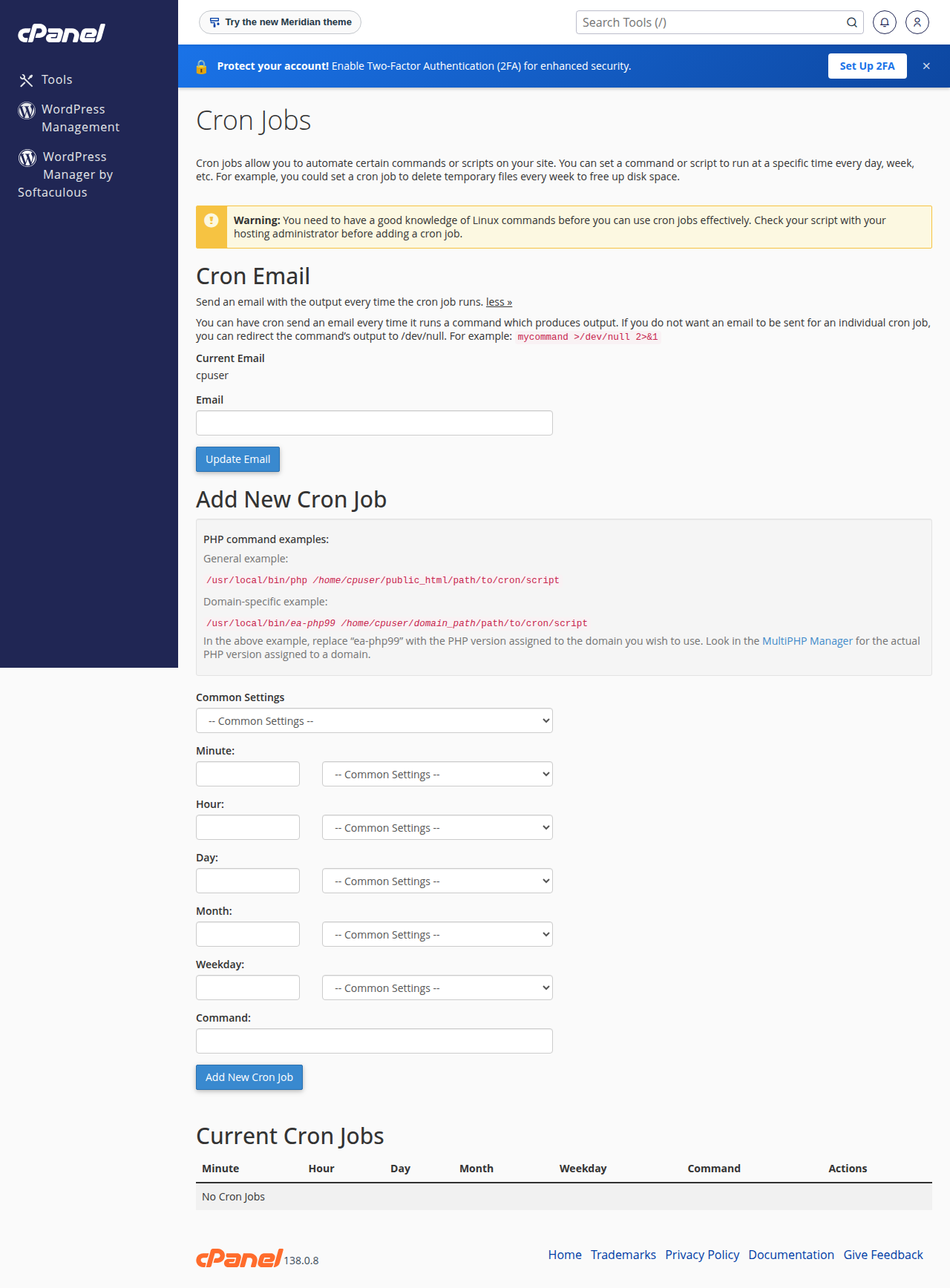
wp-config.phpin the File Manager and add this line above "That's all, stop editing":define( 'DISABLE_WP_CRON', true ); - Open Cron Jobs in your panel.In cPanel it is under Advanced › Cron Jobs. In DirectAdmin, open Cron Jobs (type "cron" in the search box if you can't see it).
- Choose the timing.Every 15 minutes (
/15 *) suits most sites; use every 5 minutes if exact publishing times matter. - Enter the commandfor your panel from the table below, with your own username and folder.
- Save, then test.Schedule a draft post for 20 minutes ahead and check that it publishes on time.
| Panel | Command for the main website |
|---|---|
| cPanel | cd /home/USERNAME/public_html && /usr/local/bin/php wp-cron.php >/dev/null 2>&1 |
| DirectAdmin | cd /home/USERNAME/domains/example.com/public_html && /usr/local/php83/bin/php wp-cron.php >/dev/null 2>&1 |
On cPanel, /usr/local/bin/php runs the PHP version selected for your account. On DirectAdmin each PHP version has its own binary, so change php83 to the version your site uses (php82, php81 and so on). For a WordPress site on an addon domain, cd into that domain's folder instead. On Webuzo, ask support for the PHP path to use.
On our cPanel and DirectAdmin servers, cron jobs set to run every 1, 2 or 3 minutes are rewritten to every 4 minutes automatically. Anything faster than every 4 minutes won't happen, and a WordPress site rarely needs it. Our shared servers run on Indian Standard Time.
More on cron timing and commands is in How to set up a cron job, Setting up cron jobs in DirectAdmin and the cron expression guide.
5. Check that it is working
- WP Crontrol. This free plugin adds Tools › Cron Events, listing every scheduled event, when it runs next and which plugin added it. Events with a next-run time well in the past mean cron still isn't running.
- A temporary log. While testing, replace
>/dev/null 2>&1in your cron command with>> /home/USERNAME/wp-cron.log 2>&1. If the log shows a PHP error, fix it; once the job works, switch back so the log doesn't grow. - WP-CLI over SSH. WP-CLI is available in the jailed shell on our cPanel and DirectAdmin servers. SSH is off by default; ask support to enable it for your account. Then, from your WordPress folder,
wp cron event listshows the queue andwp cron event run --due-nowruns everything that is due.
6. Common problems and fixes
| Problem | Likely cause | Fix |
|---|---|---|
| Posts still show Missed schedule | The cron command never runs, or runs in the wrong folder | Check the path and the cd part, and read the temporary log |
| The log shows "Could not open input file" | The folder or file name is wrong | Check that wp-cron.php is in the folder you cd into |
| A plugin's task fails from cron but works in the browser | The task needs a PHP function that is disabled on shared hosting | Check the disabled functions list, or ask the plugin's developer |
| Old events keep appearing | A deleted plugin left its events behind | Delete them in Tools › Cron Events |
| Cron emails you after every run | The output is not discarded | End the command with >/dev/null 2>&1 |
| "Resource Limit Is Reached" around cron times | A heavy plugin task runs too often | Run cron less often, or move the heavy task to a quieter hour |
Keep one cron job per WordPress site. Two jobs for the same site, or WP-Cron left on alongside a real cron job, just run the same events twice as often.
7. WordPress hosting at Domain India
WordPress runs on all our shared hosting. cPanel has Softaculous and WP Toolkit for one-click installs and updates, and DirectAdmin has Softaculous. Both panels have a Cron Jobs tool, and weekly JetBackup backups sit alongside any backup plugin you use. Our shared servers run Apache, so for page caching use WP Super Cache or W3 Total Cache rather than LiteSpeed Cache.
On 19 September 2026, Domain India list prices were ₹125 a month for cPanel Starter, ₹200 for cPanel Growth and ₹100 for DA Starter, excluding 18% GST. For several WordPress sites, Growth plans host 5 websites in one account.
- 25 GB NVMe SSD Storage
- 50 GB Monthly Bandwidth
- 1 Website
- 10 Email Accounts
- 50 GB NVMe SSD Storage
- 100 GB Monthly Bandwidth
- 5 Websites
- 50 Email Accounts
Prices on the cards exclude 18% GST.
What is WP-Cron in WordPress?
WP-Cron is WordPress's built-in scheduler. It runs scheduled posts, update checks and plugin tasks, but only when a visit reaches WordPress, so tasks can run late on quiet or cached sites.
Why does my scheduled post say Missed schedule?
WP-Cron did not run at the scheduled time, usually because no visit reached WordPress or its loopback request failed. Disable WP-Cron in wp-config.php and run wp-cron.php from a real cron job every 5 to 15 minutes.
Is it safe to set DISABLE_WP_CRON to true?
Yes, as long as you add a real cron job that runs wp-cron.php. Without one, scheduled posts and plugin tasks stop running entirely.
How often should the WordPress cron job run?
Every 15 minutes suits most sites, and every 5 minutes if exact publishing times matter. On Domain India shared hosting, jobs set to every 1, 2 or 3 minutes run every 4 minutes.
Which PHP path should I use for the cron job?
On Domain India cPanel hosting use /usr/local/bin/php, which runs your account's selected PHP version. On DirectAdmin use the versioned binary, for example /usr/local/php83/bin/php. On Webuzo, ask support.
Do I need SSH to set up a WordPress cron job?
No. You create the cron job in your control panel's Cron Jobs tool. SSH is only needed if you want to use WP-CLI, and support can enable jailed SSH on request.
Ready to make your scheduled posts publish on time? Set up the cron job from your hosting list, read the complete WordPress guide, or compare cPanel hosting plans. Stuck? Open a support ticket or use the 24/7 live chat.
Softaculous, WP Toolkit, a Cron Jobs tool, free SSL and weekly backups on every cPanel plan.
See cPanel hosting plans