A cron job is a command the server runs for you on a schedule, such as a PHP script every 15 minutes or a cleanup every night. In DirectAdmin you add one from the Cron Jobs page: set five time fields, type the full command, and save. This short guide covers what is specific to DirectAdmin on Domain India hosting.
Everything about schedules, output, logging and common mistakes is in our main guide, how to set up a cron job. This page covers only the DirectAdmin details.
Open Cron Jobs in DirectAdmin, fill in minute, hour, day of month, month and weekday, and enter a command with full paths, for example /usr/local/php83/bin/php /home/USERNAME/domains/example.com/public_html/cron.php. On our servers the shortest interval that actually runs is every 4 minutes: jobs set to run every 1, 2 or 3 minutes are changed to every 4 minutes automatically. Schedules run in Indian Standard Time.
1. Add a cron job in DirectAdmin
- Log in to DirectAdmin.From the client area, open your hosting service and use the login button.
- Open Cron Jobs.It is listed with the advanced tools. If you can't see it, type "cron" into the search box at the top of DirectAdmin.
- Set the schedule.Fill in the five fields: minute, hour, day of month, month and day of week.
*means "every". - Enter the command.Use full paths for the program and the script (see section 3).
- Save and check.Click the add or create button. The job appears in the list of current cron jobs, where you can change or delete it later.
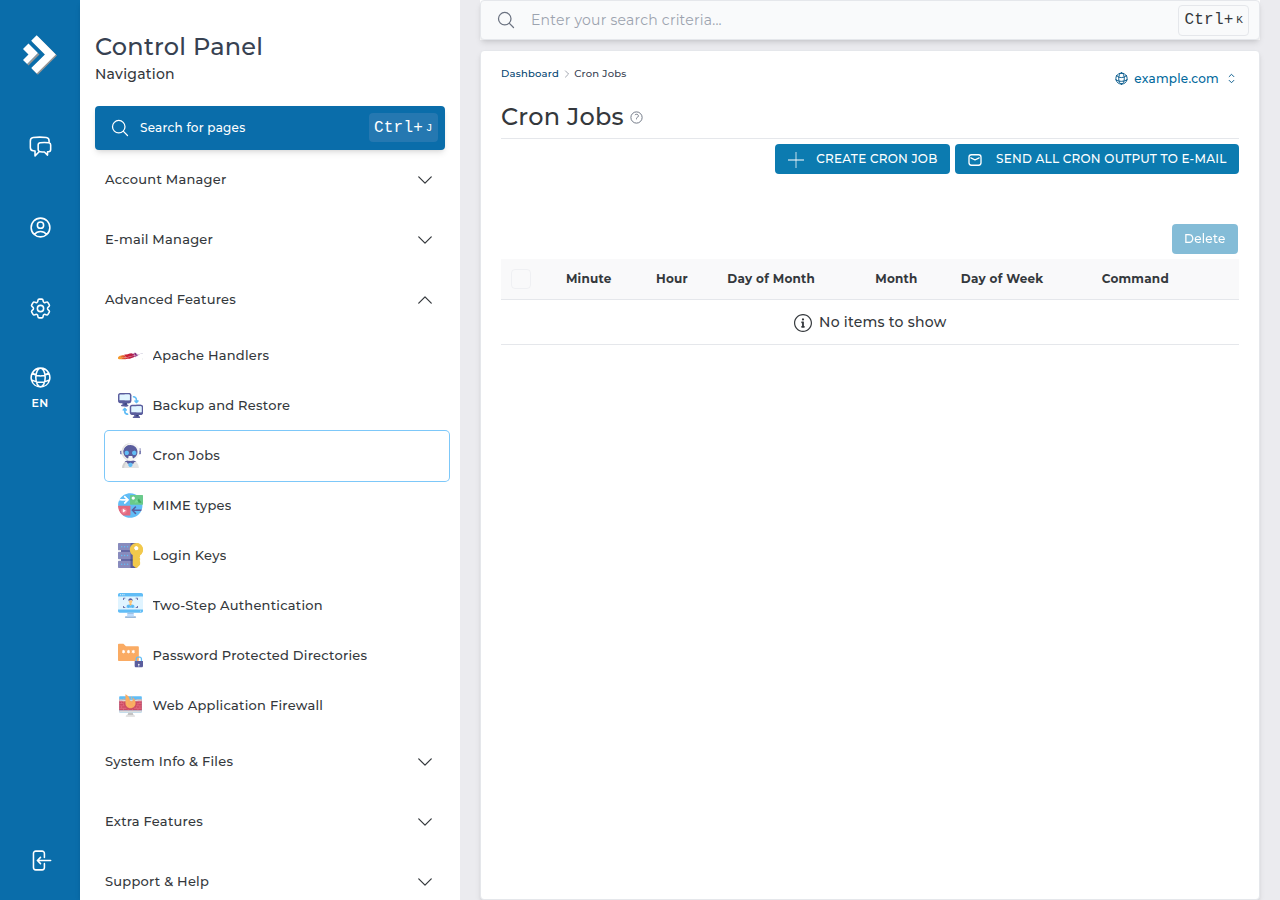
You create and run cron jobs from the panel; SSH access is not needed.
2. The schedule fields
| Field | Allowed values | Example | Meaning of the example |
|---|---|---|---|
| Minute | 0-59 | */15 | Every 15 minutes |
| Hour | 0-23 | 2 | At 2 a.m. |
| Day of month | 1-31 | 1 | On the 1st |
| Month | 1-12 | * | Every month |
| Day of week | 0-7 (0 and 7 = Sunday) | 1-5 | Monday to Friday |
Our DirectAdmin server runs on Indian Standard Time (measured 24 September 2026), so an hour of 2 means 2 a.m. IST. For more patterns, see the cron expression guide.
On our cPanel and DirectAdmin shared servers, an hourly check rewrites any cron job set to run every 1, 2 or 3 minutes to */4, every 4 minutes. A Laravel scheduler or queue job set to "every minute" therefore runs every 4 minutes. If your application truly needs a job every minute, or a process that runs all the time, use a VPS.
3. Writing the command
Cron starts with an almost empty environment, so give the full path to everything.
A PHP script. On our DirectAdmin server each PHP version has its own binary, for example /usr/local/php83/bin/php, with php82 and php81 beside it (measured 24 September 2026). Use the version your site runs on:
/usr/local/php83/bin/php /home/USERNAME/domains/example.com/public_html/cron.phpReplace USERNAME with your DirectAdmin username and example.com with your domain. On DirectAdmin, each website lives in /home/USERNAME/domains/DOMAIN/public_html. If the script includes other files by relative path, change into its folder first:
cd /home/USERNAME/domains/example.com/public_html && /usr/local/php83/bin/php cron.phpA shell script. Run it through bash, so it does not need to be executable: /bin/bash /home/USERNAME/scripts/cleanup.sh.
Keep the output. Add >> /home/USERNAME/cron.log 2>&1 to the end while you test, then >/dev/null 2>&1 once the job works. In a cron command, write every % as \%.
Functions such as exec, proc_open, popen and shell_exec are disabled on our shared servers for command-line PHP as well as websites, and on most DirectAdmin sites curl_exec is also disabled. Scripts that need them fail from cron as well. See PHP disabled functions on shared hosting.
4. When a job does not run
- Nothing happens. Send output to a log file and read the error.
- "No such file or directory". Check the username and domain in the path.
- Runs less often than you set. A job set to every 1-3 minutes runs every 4 minutes (section 2).
- Runs at an odd hour. The server clock is IST; adjust the hour field.
- Overlapping runs. If a job takes longer than its interval, copies pile up and use your plan's resources. See understanding hosting resource limits.
5. Where Domain India fits
Cron jobs are available on every Domain India DirectAdmin plan and are managed from the panel.
- 10 GB NVMe SSD Storage
- 50 GB Monthly Bandwidth
- 1 Website
- 5 Email Accounts
The card shows the Domain India list price on 19 September 2026, excluding 18% GST.
Where are cron jobs in DirectAdmin?
Open Cron Jobs from DirectAdmin's advanced tools, or type "cron" into the search box at the top of the panel. The page lets you add a job and lists your current jobs so you can change or delete them.
What is the shortest cron interval on Domain India DirectAdmin hosting?
Four minutes. An hourly check on our cPanel and DirectAdmin shared servers changes jobs set to every 1, 2 or 3 minutes to every 4 minutes. For a job every minute, use a VPS.
What PHP path should I use in a DirectAdmin cron job?
Use the versioned binary, for example /usr/local/php83/bin/php, followed by the full path to your script in /home/USERNAME/domains/DOMAIN/public_html. Change 83 to the PHP version your site uses.
Which time zone do DirectAdmin cron jobs use?
Our DirectAdmin server runs on Indian Standard Time, so a job set for hour 2 runs at 2 a.m. IST.
Do I need SSH to use cron jobs in DirectAdmin?
No. You create cron jobs in the DirectAdmin panel and they run for your account whether or not SSH is enabled.
Ready to schedule your first job? Read the full cron job guide, check your timing with the cron expression guide, or compare DirectAdmin hosting plans. If a job still won't run, open a support ticket with the exact command and the error from your log.
Schedule scripts, backups and cleanups from your panel on every DirectAdmin plan.
See DirectAdmin plans