Restoring a backup puts your website, databases or email back as they were on the day the backup was taken. On Domain India Webuzo hosting you can do it in two ways: ask our support team to restore from the backups Domain India takes every night, or put back copies you downloaded yourself. This guide covers both, and the checks to run afterwards.
Domain India backs up every Webuzo account every night to a separate backup server. To restore from those backups, open a support ticket saying what to restore (a file, a folder, a database or the whole account) and from which date; there is no self-service restore for them. If you kept your own copies, upload the files with the File Manager or FTP and import the database in phpMyAdmin. Download a copy of the current state before any restore.
Whatever you restore replaces the current files, database or mailboxes. Anything added after the backup date, such as new orders, posts, uploads or emails, is lost for the parts you restore. Download a copy of the current state first, so you can go back if the restore makes things worse.
1. Choose the right way to restore
| What you need | Best route | Section |
|---|---|---|
| Anything back from a past date | Ask support to restore from Domain India's nightly backups | 2 |
| Files and an SQL export on your computer | Restore by hand with File Manager or FTP and phpMyAdmin | 3 and 4 |
| Only one file or folder | Ask support for just that item, or upload it from your own copy | 5 |
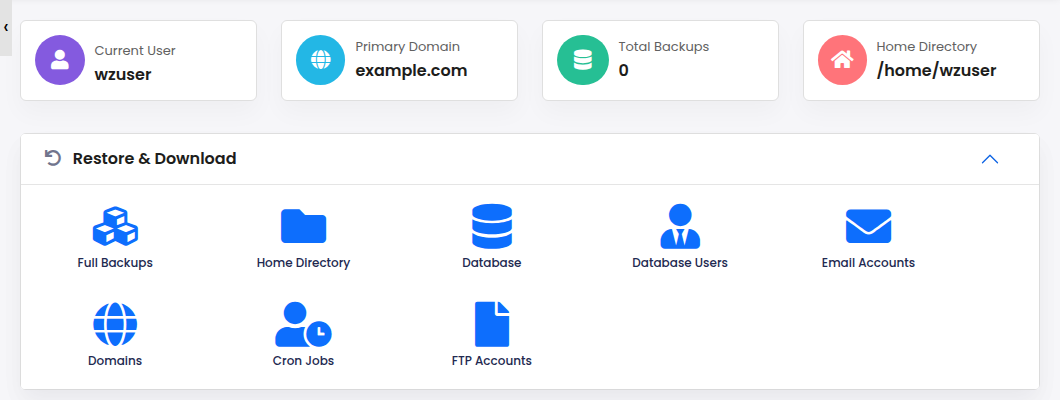
The Backups & Restore page in the Webuzo menu (it opens a tool called Backuply) is not Domain India's backup system: it shows no backups, because our nightly backups are taken on a separate server. Don't rely on it for a restore. Use Domain India's nightly backups through support, or your own copies.
2. Ask support to restore from Domain India's backups
Domain India backs up your Webuzo account every night to a separate backup server. The backups cover your website files, email, databases, Webuzo account settings and DNS zones, and several earlier copies are kept, so you can go back to an earlier date.
- Download today's state first,if the site still loads: your files from the File Manager and a database export from phpMyAdmin. This is your way back.
- Open a ticket
- Say what to restore:a file, a folder, a database, email, or the whole account. Give the file path or database name where you can.
- Say which dateyou want to go back to, ideally from before the problem started. If the site was hacked, pick a date before the first sign of trouble.
- Say what must be left alone,for example new orders or email received since that date.
- Wait for support to confirmthe restore is done, then run the checks in section 6.
Support will tell you which dates are available before anything is restored.
3. Restore your files by hand
If you downloaded your website files yourself, put them back with the File Manager or FTP. Before you start, log in to Webuzo at https://yourdomain.com:2003. Password resets for Webuzo are done by support, so if you do not have your Webuzo password, ask support first. See how to log in to the Webuzo panel.
- Unpack the archive on your computer.On Windows use 7-Zip; on macOS or Linux run
tar -xzf backup.tar.gz. - Upload a zip rather than thousands of files.Zip the folder, upload the single file to the right place, usually
public_html, and extract it in the File Manager. See managing files in Webuzo or uploading files by FTP. - Replace, don't mix.Rename the damaged folder (for example
public_html_old) before extracting, so old and restored files don't combine. Delete the renamed folder once the site works.
4. Restore a database by hand
- Open phpMyAdminfrom your Webuzo panel. See phpMyAdmin access in Webuzo.
- Select the target database.If it no longer exists, create the database and its user in Webuzo first, with the same names and password your website's configuration file expects.
- Export the current contentswith Export before you change anything.
- Click Import,choose your
.sqlor.sql.gzfile and click Go.
If phpMyAdmin rejects the file as too large, ask support to import it for you, or use the command line. Jailed SSH access is available on every shared hosting plan, including Webuzo; it is off by default, so ask support to enable it and log in with an SSH key. Then:
mysql -u database_user -p database_name < backup.sqlImport into a database that uses utf8mb4 with utf8mb4_unicode_ci. Importing into a different character set is a common cause of garbled text after a restore.
5. Recover a single file or folder
When only one file or folder is damaged, a full restore is overkill. Ask support to restore just that file or folder from a given date, or take it from your own copy: extract the archive on your computer, find the file, and upload just that file with the File Manager or FTP. Nothing else on the account is touched.
6. After any restore
- Browse the sitein a private window and test forms, logins and checkout.
- Check the database connection.If the site shows a database error, compare the database name, user and password in your configuration file (for WordPress,
wp-config.php) with what exists in Webuzo. - Check permissions.Files are normally 644 and folders 755. Never use 777.
- Clear cachesin your CMS, your browser and any CDN.
- Test emailby sending and receiving a message, if mail was restored.
- Update everything.An old backup has old plugins and themes; update them and change passwords if the restore followed a hack.
If the site was hacked, restoring is only half the fix. Read the security checklist for a hacked or defaced website.
7. Keep your own copies too
Domain India's nightly backups are there when you need them. It is still good practice to keep a copy you hold yourself: before every major update, and regularly on busy sites, download your files and export your databases, and keep them off the server. See how to back up in Webuzo and how can I download a backup of my site.
Frequently asked questions
How do I restore a backup on Webuzo hosting?
Open a support ticket saying what to restore (a file, a folder, a database or the whole account) and from which date. Support restores it from Domain India's nightly backups. There is no self-service restore for these backups.
How far back can I restore?
Several earlier copies are kept, including daily, weekly and monthly ones as they build up. Support will tell you which dates are available. Support will tell you which dates are available before anything is restored.
Will restoring delete changes made after the backup date?
Yes, for the parts restored. New files, database changes and emails after the backup date are replaced. Download a copy of the current state before the restore so you can go back.
Can I restore only my database?
Yes. Ask support to restore just that database from a given date, or import your own SQL file with phpMyAdmin's Import tab.
Can I use Backup and Restore in the Webuzo panel?
Don't rely on it. That section is not Domain India's backup system. Ask support to restore from the nightly backups, or use your own copies.
My backup is too big for phpMyAdmin. What can I do?
Ask support to import it, or ask support to enable jailed SSH on your account and import it with the mysql command using an SSH key.
The site shows a database error after restoring. Why?
The database name, user or password in your configuration file usually no longer matches what exists in Webuzo. Recreate the user or correct the configuration file.
Ready to restore? Open a support ticket with your domain, what to restore and the date you need. Live chat is available 24/7, tickets get a first response within 15 minutes, and there is no phone support.
Webuzo hosting with Softaculous, free SSL and nightly backups, restored by our support team.
See Webuzo plans