A backup is only useful if it was made before something went wrong and you can get it back. On Domain India Webuzo hosting there are two kinds: the backups Domain India takes of your account every night, and the copies you make yourself. This guide explains both, and shows how to make your own copy with the File Manager and phpMyAdmin.
Domain India backs up every Webuzo hosting account every night to a separate Domain India backup server. The backup covers your website files, email, databases, Webuzo account settings and DNS zones, and several earlier copies are kept, so you can go back to an earlier date. To restore something, open a support ticket saying what to restore and from which date. It is still good practice to keep your own copy: compress public_html in the File Manager and download it, and export each database from phpMyAdmin.
1. The backups Domain India takes for you
| Item | On Domain India Webuzo hosting |
|---|---|
| Schedule | Every night |
| Where copies are kept | A separate Domain India backup server, not the server your site runs on |
| What is included | Website files, email, databases, Webuzo account settings and DNS zones |
| Databases | Dumped consistently, not copied while half-written |
| History | Several earlier copies (daily, weekly and monthly as they build up) |
| How to restore | Open a support ticket; there is no self-service restore for these backups |
| Price | Included with your hosting; there is no separate backup add-on |
You don't need to switch anything on. To get something back, see restoring a Webuzo backup.
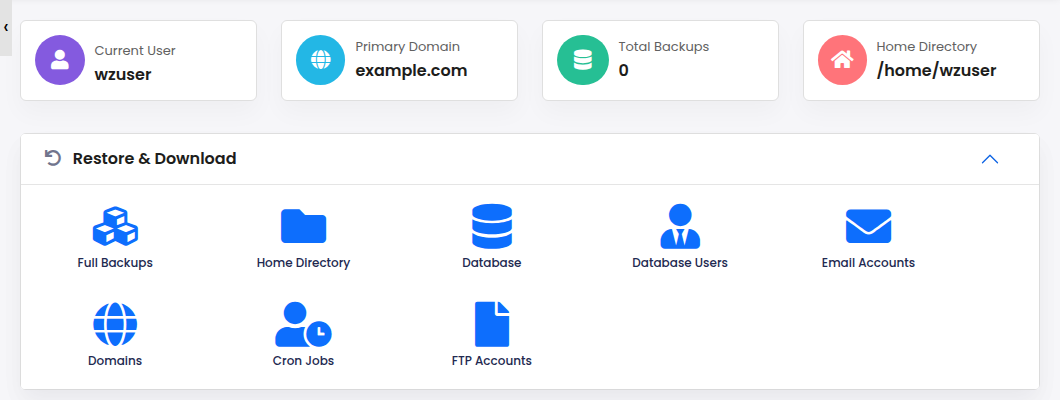
The Backups & Restore page in the Webuzo menu (it opens a tool called Backuply) is not Domain India's backup system and shows no backups, so don't rely on it. Use Domain India's nightly backups through support, and your own copies made as described below.
2. What to keep in your own copy
A website on Webuzo has three parts, and a useful copy has all three:
| Part | Where it lives | How to copy it yourself |
|---|---|---|
| Website files | Your domain's folder, usually public_html | Compress and download in the File Manager, or download over FTP |
| Databases | MySQL, one per application | Export in phpMyAdmin |
| Mailboxes on the server | Keep copies in a desktop mail app over IMAP |
Your application's database settings (for WordPress, wp-config.php) are part of the files, so a file copy and a database export from the same day are enough to rebuild the site.
3. Make your own copy: files and databases
Your files
- Log in to Webuzo.Go to
https://yourdomain.com:2003and sign in with your Webuzo username and password, shown on the service's Manage › Access tab. More in how to log in to Webuzo. - Open the File Managerand select your site's folder, usually
public_html. - Compress itinto a
.zipor.tar.gzarchive with the File Manager's compress option. - Download the archive,then delete it from the server so it doesn't use your disk space.
Your databases
- Open phpMyAdminfrom Webuzo's database section; see phpMyAdmin in Webuzo.
- Select the databaseon the left.
- Open Export,keep Quick and the SQL format, and click Export. For a large database, choose Custom and set compression to gzipped.
- Repeat for each database.Save the
.sqlfiles with your files archive.
The full walk-through is in how to back up a MySQL database using phpMyAdmin.
4. When to make your own copy
.htaccess or change configuration files.Keep your copies in at least two places, for example your computer and cloud storage. Once in a while, open one and check it: the archive should unpack, and the .sql file should contain your tables.
5. Keep copies from filling your disk
Archives you leave on the server count towards your plan's disk space, and a full disk stops uploads and incoming email. Download each archive, then delete it from the server. Delete old archives from the File Manager too.
6. Troubleshooting
| Problem | What to do |
|---|---|
| Compressing a folder fails | Check your free disk space first; the archive needs room while it is built. Delete old archives and try again |
| The download stops part-way | Try a different browser or network, or download the files over FTP |
| The archive won't open | Download it again; if it still fails, compress the folder again |
| phpMyAdmin export is too slow or times out | Use Custom export with gzip compression, or export fewer tables at a time |
| You need a restore | Open a support ticket saying what to restore and from which date; see restoring a Webuzo backup |
7. Webuzo hosting at Domain India
Webuzo Starter is ₹100 a month, excluding 18% GST (Domain India list price on 19 September 2026), with one website and 10 GB of NVMe storage; compare plans on Webuzo hosting. Nightly backups are included on every Webuzo plan. If you want to restore backups yourself from the panel, our cPanel and DirectAdmin plans include weekly JetBackup 5 backups; see backup and restore with JetBackup.
Support is on 24/7 live chat, and tickets get a first response within 15 minutes; how long a restore takes depends on the case. There is no phone support.
Frequently asked questions
Is my Webuzo hosting account backed up?
Yes. Domain India backs up every Webuzo account every night to a separate backup server, including your website files, email, databases, Webuzo account settings and DNS zones.
How far back do the backups go?
Several earlier copies are kept, including daily, weekly and monthly ones as they build up. Support will tell you which dates are available. When you ask for a restore, support will tell you which dates are available.
Can I restore a backup myself?
No. Restores from Domain India's backups are done by support. Open a ticket saying what to restore (a file, a folder, a database or the whole account) and from which date.
Should I use the Backups page in the Webuzo panel?
No. That section is not Domain India's backup system, so don't rely on it. Use the nightly backups through support, and your own copies.
How do I back up only my database?
Open phpMyAdmin from Webuzo, select the database, open Export, keep Quick and SQL, and click Export. The .sql file downloads to your computer.
Do I still need my own copy?
It is good practice, especially before big changes. Keep it off the server, for example on your computer and in cloud storage.
Need something back? Open a ticket with your domain, what to restore and the date. To make your own copy, open My Hosting and log in to Webuzo.
Log in to Webuzo, compress your site's files, export your databases, and download them to your computer.
Open My Hosting