The Dashboard is the first page you see after signing in to the Domain India client area. It shows what you own, what needs your attention and what is due, with shortcuts to the tasks people do most. This guide explains each part of the Dashboard and the menu beside it, so you can find anything in a couple of clicks.
For every section of the client area in detail, including security, team members and billing, see A complete guide to managing your account in the Domain India client area.
Sign in at /client/login and you land on the Dashboard (/client). The top row counts your active services, domains, services renewing within 30 days and open tickets; click any of them to open that list. Below are messages that need action, quick actions (Register domain, Create website, Add mailbox, Deploy app), your services, recent invoices and upcoming renewals. The left menu reaches everything else.
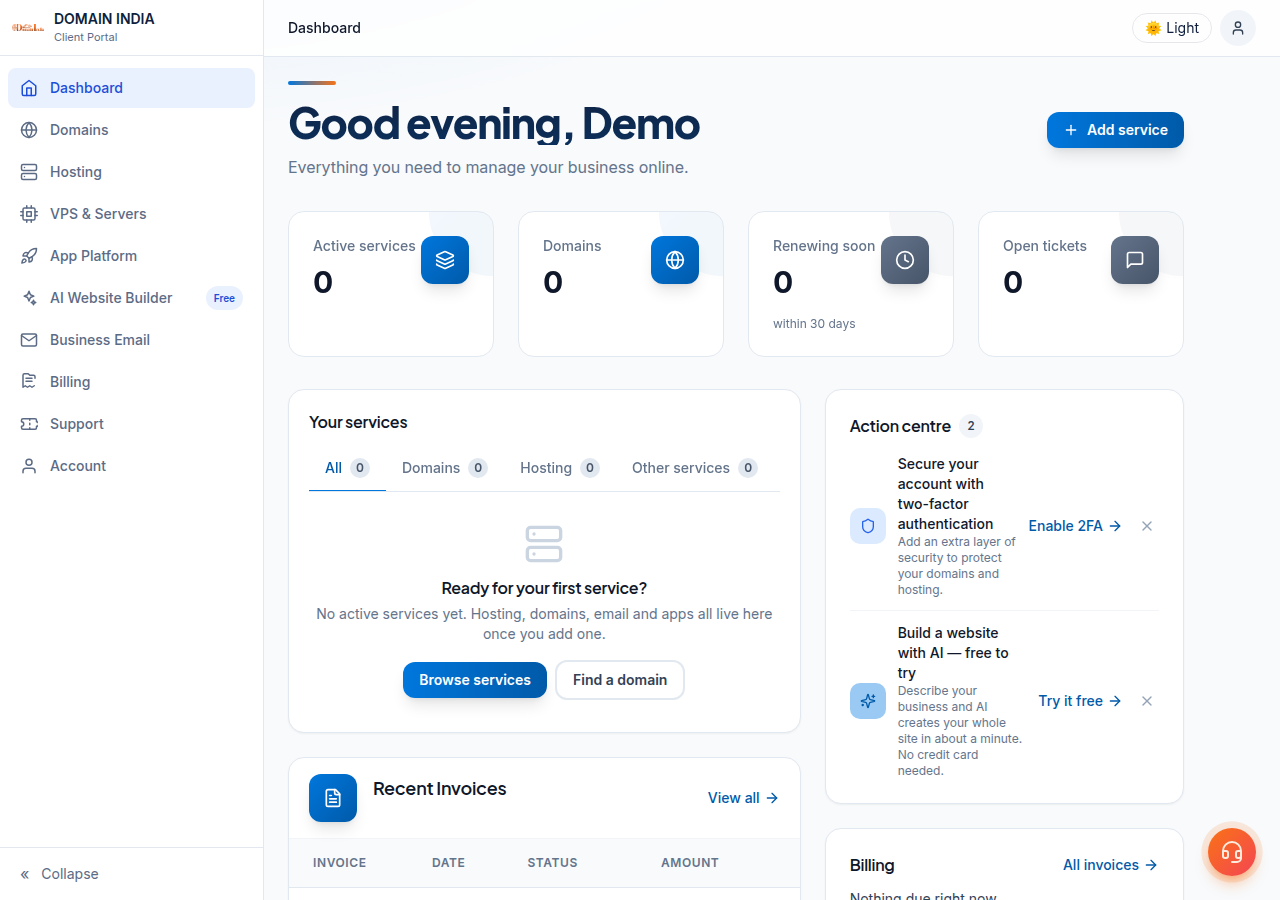
1. The summary row
| Card | What it counts | Click it to open |
|---|---|---|
| Active services | Your active hosting, domains and other services | Your services list |
| Domains | Your active domains | My domains |
| Renewing soon | Services due within 30 days | Renewals |
| Open tickets | Your support tickets still open | My tickets |
A renewal counted here is not a charge. Domain India never charges a saved card automatically; each renewal is an invoice you pay. See how auto-renewal works.
2. Messages that need action
When something needs you, a message appears near the top of the Dashboard with a button to fix it. The ones you will see most:
- Unpaid invoices, with Pay now.
- Verify your identity, when a .in domain needs eKYC. It opens /client/kyc.
- Secure your account with two-factor authentication, with Enable 2FA. See how to enable two-factor authentication.
- Confirm your email address, so renewal and invoice emails reach you.
3. Quick actions and your services
Your services lists what you own, with tabs for All, Domains, Hosting and Other services, and a Manage link on each. Recent Invoices shows your latest five invoices with a View all link, and Upcoming Renewals lists the next services due. Need a hand? has Open ticket, My tickets and Help centre.
4. The left menu
| Menu | What is inside |
|---|---|
| Dashboard | This overview |
| Domains | My domains, Contact profiles, DNS tools |
| Hosting | My hosting, Reseller hosting |
| VPS & Servers | Your virtual servers |
| App Platform | Your deployed applications |
| AI Website Builder | Build and publish a website with AI |
| Business Email | Mailboxes on your own domain |
| Billing | Invoices, Orders, Payments, Renewals, Billing address |
| Support | My tickets, Knowledgebase, Announcements |
| Account | Profile, Identity verification, Security, Team members, Email history, Affiliate |
Order New and Additional Services sit below the menu. To open your control panel, go to Hosting › My hosting and click the panel button on your account's row. See how to log in to cPanel.
5. If something looks wrong
- A new service is missing. Most hosting accounts are created automatically within a couple of minutes of payment; a small number need a manual check and take longer. Reload the page.
- The Dashboard says it could not load. Click Refresh Page. If it keeps failing, try another browser, then open a ticket.
- You can't sign in. Use Forgot password? on the sign-in page, or read how to change your account password.
Where is the Domain India client area dashboard?
Sign in at domainindia.com/client/login. The Dashboard is the first page you see, at domainindia.com/client.
What does Renewing soon mean on the dashboard?
It counts services due for renewal within 30 days. Click it to open the Renewals page. Renewal is an invoice you pay, never an automatic card charge.
How do I open cPanel from the client area?
Open Hosting, My hosting, and click the panel button on your account's row. It shows the name of your control panel and appears while the account is active.
How do I open a support ticket from the dashboard?
Use Open ticket in the Need a hand? card, or go to Support in the left menu. Tickets get a first response within 15 minutes, and live chat is available 24/7.
Why does the dashboard ask me to verify my identity?
The .IN registry requires identity verification (eKYC) for .in domains. The message links to the Identity verification page, where you complete it through DigiLocker.
Ready to find your way around? Sign in to the client area, or open a support ticket if something is not where this guide says. There is no phone support.