On Domain India cPanel hosting you usually don't install an SSL certificate at all: AutoSSL issues a free Let's Encrypt certificate for every domain that points at the server and renews it for you. You install a certificate by hand in cPanel only when you have bought one from another certificate authority, because Domain India does not sell SSL certificates.
This page is the short version. For AutoSSL, removing old certificates and installing a bought certificate in detail, read How to manage SSL certificates in cPanel.
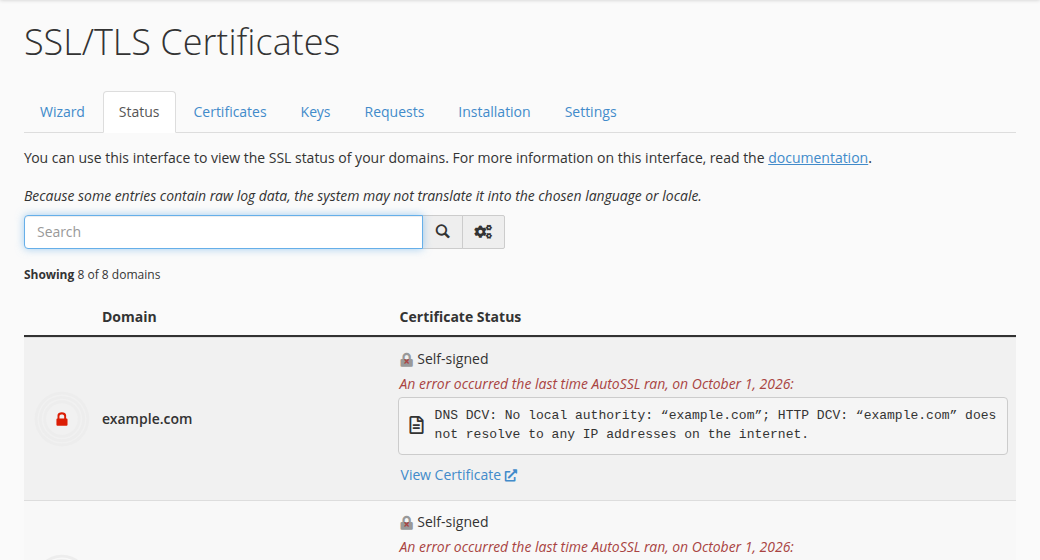
First check the Status tab of Security › SSL/TLS Certificates in cPanel: if your domain and www show a valid AutoSSL certificate, there is nothing to install. To install a certificate you bought elsewhere, open the Installation tab of Security › SSL/TLS Certificates, choose the domain, paste the certificate, let cPanel fill in the matching private key, add the CA bundle and click Install Certificate. No dedicated IP is needed.
1. Check whether you need to install anything
Open cPanel from your hosting service in the client area, then go to Security › SSL/TLS Certificates and choose the Status tab. It lists every domain and subdomain on the account and shows which are covered. If a name is not covered, make sure it points at your hosting, then wait: AutoSSL checks the account on its own every few hours. If you need it sooner, or a name still fails after DNS is right, open a ticket with the domain name and the exact error line from the Status tab, and support can run AutoSSL for you.
A free AutoSSL certificate encrypts traffic exactly as well as a paid one. Buy a paid certificate only when a bank, payment partner or tender specifically asks for organisation details. More on this in AutoSSL in cPanel.
2. Install a certificate you bought elsewhere
- Generate the CSR in cPanel first.Do it in the same account, so cPanel keeps the private key. See how to generate a CSR.
- Get the certificate from your certificate authority.You receive the certificate (.crt) and usually a CA bundle (the intermediate certificates).
- Open the Installation tab.In cPanel, go to Security › SSL/TLS Certificates and click the Installation tab.
- Choose the domain and paste the certificate.cPanel fills in the private key it stored with your CSR. If it doesn't, the CSR was made somewhere else; paste that key, or generate a new CSR here and ask the authority to reissue.
- Add the CA bundle and install.Paste the bundle if cPanel doesn't fetch it, then click Install Certificate.
Our servers use SNI, so every site gets its own certificate on the shared IP address. You don't need a dedicated IP.
The certificate and CSR are safe to share. The private key is not. Neither your certificate authority nor Domain India support needs it. If it has been emailed or pasted into a chat, generate a new CSR and key and have the certificate reissued.
3. After installing
- Check it. Open
https://yourdomain.comin a private window and view the certificate: the name and expiry date should be right. - Force HTTPS. Use the Force HTTPS option in cPanel Domains, or see forcing HTTPS.
- Diary the expiry. A bought certificate does not renew itself. Renew it with the seller and install the new one before it expires; see renewing SSL certificates.
If the browser still warns, read SSL not working.
Do I need to install SSL on Domain India cPanel hosting?
Usually not. AutoSSL issues and renews a free Let's Encrypt certificate for every domain on the account that points at the server. Check the Status tab of Security › SSL/TLS Certificates in cPanel to confirm.
Does Domain India sell SSL certificates?
No. Domain India does not sell SSL certificates. Almost every hosting plan includes free SSL, and a certificate you buy from another certificate authority can be installed in cPanel.
Where do I install a bought certificate in cPanel?
Open Security, then SSL/TLS Certificates, then the Installation tab. Choose the domain, paste the certificate, check the private key, add the CA bundle and click Install Certificate.
Do I need a dedicated IP address for SSL?
No. The servers use SNI, which lets every site on a shared IP address use its own certificate.
Why does cPanel say the private key doesn't match?
The CSR was generated in another account or on another server. Generate a new CSR in this cPanel account and ask your certificate authority to reissue the certificate with it.
Ready to check your site? Open cPanel from My Hosting, read the full cPanel SSL guide, or open a ticket if a certificate won't install.
Tell us the domain and the message cPanel shows, and our support team will check the certificate and DNS for you.
Open a support ticket