A Certificate Signing Request (CSR) is the block of encoded text you give a certificate authority when you buy an SSL certificate. It carries your domain name, your organisation's details and the public half of a new key pair. Before you make one, check whether you need it at all: on Domain India hosting, most websites get a free certificate automatically and never need a CSR. This guide explains when you do, what to enter, and how to generate one in cPanel and the other panels.
Almost every Domain India hosting plan includes free SSL, and on our cPanel server AutoSSL issues Let's Encrypt certificates automatically, so most sites need no CSR. Domain India doesn't sell paid certificates; you need a CSR only when you buy one (for example an organisation-validated one) from a certificate authority. In cPanel, open Security › SSL/TLS Certificates, then the Requests tab, fill in the domains and your organisation details, click Generate, and copy the text that begins -----BEGIN CERTIFICATE REQUEST-----. Keep the private key on the server; never send it to anyone.
1. Do you need a CSR at all?
| Your situation | Do you need a CSR? | What to do instead |
|---|---|---|
| A normal website on cPanel hosting | No | AutoSSL issues and renews a free Let's Encrypt certificate for you |
| A website on DirectAdmin hosting | No | Let's Encrypt is issued automatically on our DirectAdmin server |
| Your certificate says "not secure" or has expired | No | Check the Status tab of SSL/TLS Certificates in cPanel, or ask support |
| You bought an OV, EV or other paid certificate | Yes | Generate the CSR on the server where the site is hosted, as below |
| Your certificate authority asks you to reissue or rekey | Yes, a new one | Generate a fresh CSR and key, then reissue |
A free Let's Encrypt certificate encrypts traffic exactly as well as a paid one. Paid certificates add things such as verified organisation details, a warranty or longer validity. Choose one when a customer, bank or tender asks for it, not for the padlock alone.
In cPanel, the Status tab of Security › SSL/TLS Certificates shows which of your domains and subdomains are covered and when each certificate expires. For more on the automatic certificates, see AutoSSL in cPanel.
2. What goes into a CSR
Gather these details before you open the form. Certificate authorities check organisation details for OV and EV certificates, so they must match your registration documents exactly.
| Field | What to enter | Example |
|---|---|---|
| Domains | Every hostname the certificate must cover, one per line. A wildcard uses an asterisk | example.in and www.example.in |
| Company | Your organisation's legally registered name. An individual can enter their full name | Example Traders Private Limited |
| Company Division | The department, if the CA requires it; otherwise leave blank or use a general term | IT |
| City | The full city or locality name, no abbreviations | Coimbatore |
| State | The full state name, no abbreviations | Tamil Nadu |
| Country | The two-letter country code | IN |
| An address where the CA can contact you | [email protected] | |
| Passphrase | Only if your CA requires one. It is stored unencrypted in the CSR, so never reuse a real password | Leave blank unless asked |
Key type: our cPanel server generates a 2048-bit RSA key by default, which every certificate authority accepts. Only change it if your CA asks for something else.
3. Generate a CSR in cPanel
- Open SSL/TLS Certificates.Sign in to cPanel (see how to log in to cPanel) and click SSL/TLS Certificates in the Security section.
- Open the Requests tab.It lists any requests already on the server, with the Generate a New Certificate Signing Request (CSR) form below.
- Choose the key.In the Key field, keep the option to generate a new key. cPanel creates the key pair and saves the private key in your account.
- Enter the domains.In Domains, type each hostname on its own line, for example
example.inandwww.example.in. - Fill in the organisation details.Complete City, State, Country, Company, Company Division and Email as described in section 2. Add a Description if you want to recognise the request later.
- Generate.Click Generate. cPanel shows the encoded CSR.
- Copy the CSR.Select the whole block, from
-----BEGIN CERTIFICATE REQUEST-----to-----END CERTIFICATE REQUEST-----including both lines, and paste it into your certificate authority's order form.
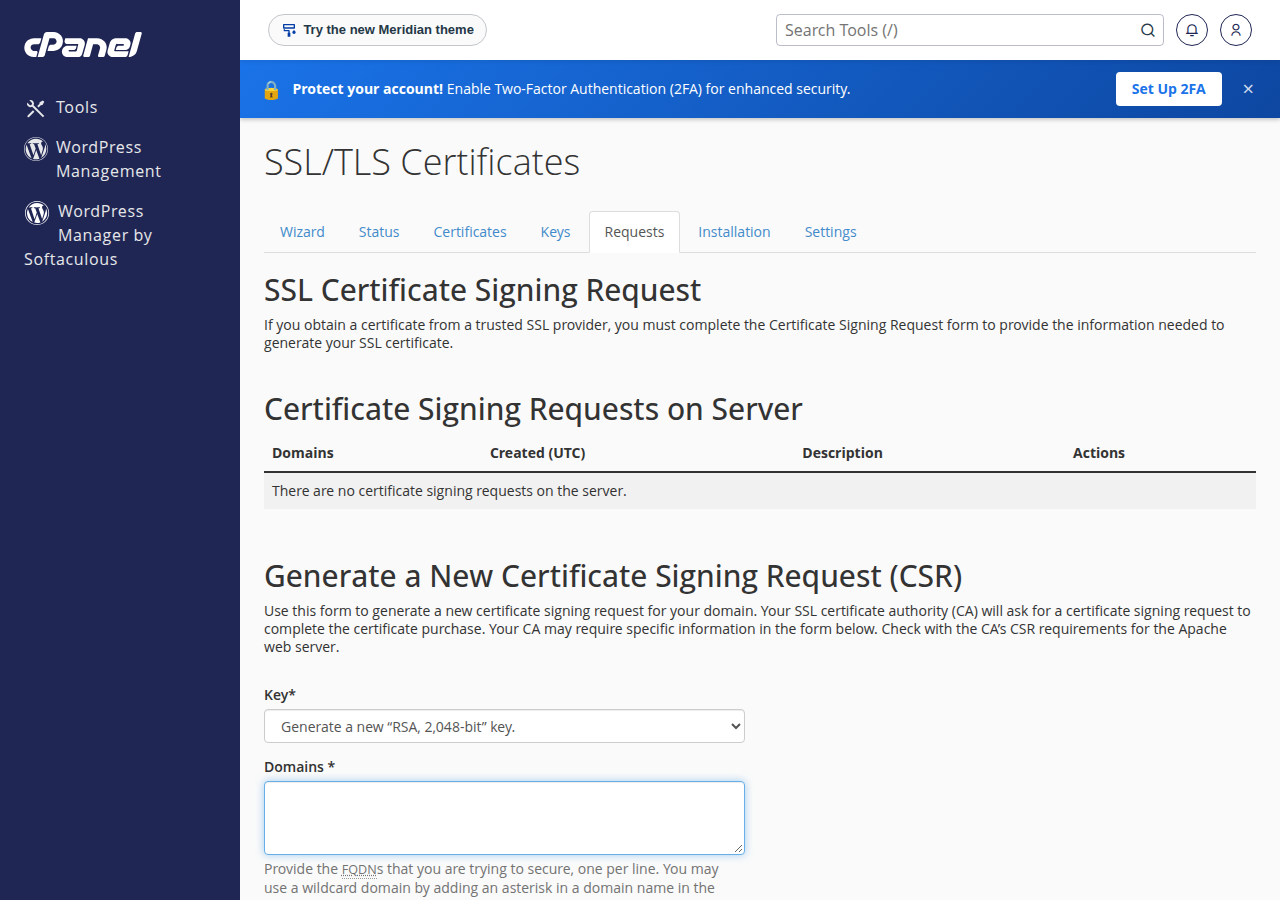
The CSR is saved under Certificate Signing Requests on Server on the same page, so you can view or copy it again later. The matching private key is listed on the Keys tab.
The CSR is public and safe to send. The private key is not. It stays in your hosting account, and cPanel pairs it with the certificate automatically when you install it. Nobody from a certificate authority or from Domain India support needs it. If a private key has been emailed, pasted into a chat or left in a public folder, generate a new CSR and key and ask your CA to reissue the certificate.
4. Other control panels
Every control panel can generate a CSR; only the menu names differ. The DirectAdmin and Webuzo pages below are the ones on our servers; for Windows (Plesk), ask support if you can't find the option.
- DirectAdmin: open Account Manager › SSL/TLS Certificates for your domain, which offers an option to create a certificate request alongside the free Let's Encrypt option.
- Webuzo: open SSL › Cert Signing Request.
- Plesk (Windows hosting): open the SSL/TLS certificates page of your domain and add a new certificate; Plesk generates the CSR and key together.
Fill in the same fields from section 2. If you can't find the option, open a support ticket with the domain and the certificate type, and we will point you to it.
5. After the certificate is issued
- Complete validation.The certificate authority checks that you control the domain, by email, a DNS record or a file on your site. OV and EV certificates also check your organisation's documents.
- Download the certificate.You receive the certificate (the .crt file) and usually a CA bundle, sometimes called the intermediate chain.
- Install it.In cPanel, open SSL/TLS Certificates, then the Installation tab, and use the Install an SSL Website form. Paste the certificate; cPanel finds the matching private key it stored when you generated the CSR. Add the CA bundle if it isn't fetched automatically.
- Check it.Open your site with
https://and view the certificate details in the browser. Make sure every hostname you need is covered.
AutoSSL normally leaves a valid certificate that you installed yourself in place, but check the Status tab of SSL/TLS Certificates after the change to confirm which certificate each hostname uses.
6. Common CSR problems
| Problem | Likely cause | Fix |
|---|---|---|
| CA rejects the CSR | Missing lines, extra spaces, or special characters in the company name | Copy the whole block again including the BEGIN and END lines; avoid symbols other than a full stop or comma |
| Certificate won't install: "no matching key" | The CSR was generated on another server or account, or the key was deleted | Generate a new CSR in the account where the site lives and ask the CA to reissue |
| Browser warns about www or a subdomain | That hostname wasn't in the CSR | Reissue with every hostname listed in Domains |
| Certificate works but some browsers complain | The CA bundle (intermediate chain) is missing | Install the CA bundle from your certificate authority |
If your site shows "not secure" for another reason, such as images loaded over http, see troubleshooting SSL problems.
7. SSL on Domain India hosting
Domain India doesn't sell SSL certificates. Almost every hosting plan includes a free SSL certificate instead. On our cPanel server it is issued and renewed automatically by AutoSSL with Let's Encrypt, so a new site on cPanel hosting is secure without a CSR. A certificate you buy from another certificate authority can be installed on any of our hosting plans.
Compare all plans on cPanel hosting and DirectAdmin hosting. Our support team is on 24/7 live chat, and tickets get a first response within 15 minutes.
8. Frequently asked questions
What is a CSR?
A Certificate Signing Request is an encoded block of text containing your domain names, organisation details and a public key. You send it to a certificate authority when you order an SSL certificate, and the authority uses it to issue a certificate that matches the private key kept on your server.
Does Domain India sell SSL certificates?
No. Domain India does not sell DV, OV, EV or wildcard certificates. Almost every hosting plan includes free SSL; if you need a paid certificate, buy it from a certificate authority, generate the CSR in your control panel and install the issued certificate there.
Do I need a CSR for the free SSL on Domain India hosting?
No. On Domain India's cPanel server, AutoSSL issues and renews free Let's Encrypt certificates automatically, and Let's Encrypt is enabled on the DirectAdmin server. A CSR is needed only when you buy a certificate from a certificate authority.
Where do I generate a CSR in cPanel?
Open SSL/TLS Certificates in the Security section of cPanel, then the Requests tab. Fill in the domains and organisation details and click Generate.
What key size should I use?
A 2048-bit RSA key, which is the default on Domain India's cPanel server and is accepted by every certificate authority. Change it only if your certificate authority asks for a different key type.
Should I send my private key to the certificate authority?
No. Send only the CSR. The private key stays in your hosting account, and cPanel matches it to the certificate when you install it. If the private key has been shared, generate a new CSR and key and have the certificate reissued.
Can one CSR cover both example.in and www.example.in?
Yes, if your certificate supports more than one hostname. List each hostname on its own line in the Domains field. Check with your certificate authority, because some charge more for extra names or wildcard domains.
Ready to secure your site? Sign in to your control panel from My Hosting in the client area, or start with a cPanel hosting plan that includes free SSL.
Tell us the domain and the type of certificate you are installing, and our support team will help you with the CSR or the installation.
Open a support ticket