When SSL "isn't working", the browser shows "Not secure", a certificate error, or a padlock with a warning. On Domain India hosting the certificate is free and automatic, so the cause is almost always around it: DNS pointing elsewhere, a name the certificate doesn't cover, or pages loading http:// content. This page matches each symptom to its fix.
Every AutoSSL status message is explained in AutoSSL in cPanel: how it works; for DirectAdmin, see Let's Encrypt SSL in DirectAdmin. This page is the quick troubleshooter.
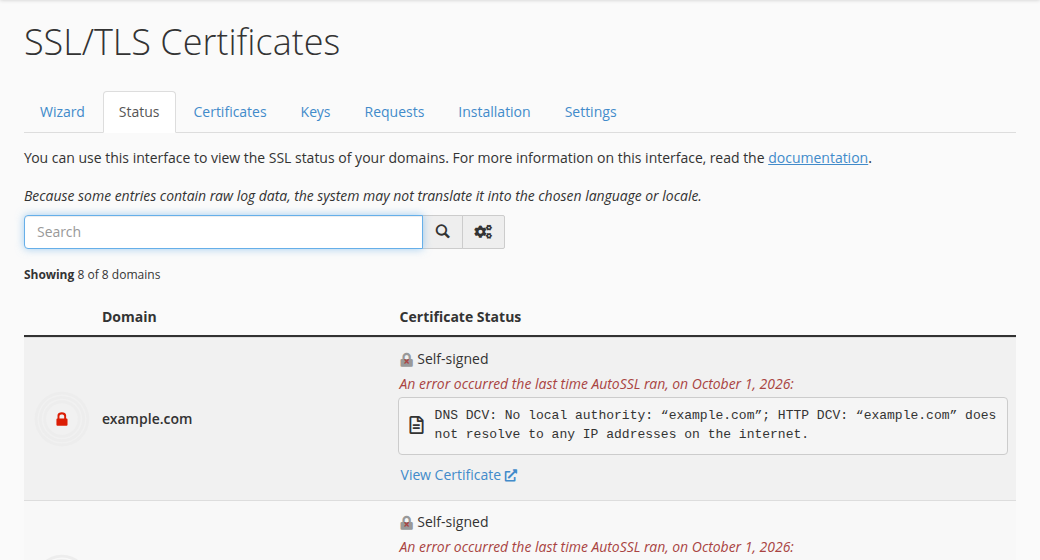
First check that the domain and www both point to your Domain India hosting: a certificate is only issued for names that reach our server. On cPanel, open Security › SSL/TLS Certificates and check the Status tab for the reason a name failed; on DirectAdmin, open Account Manager › SSL/TLS Certificates to see whether the automatic certificate was issued and, if not, why. If the padlock shows a warning, the page is loading images or scripts over http://. Then turn on the HTTPS redirect.
1. Match the symptom to the cause
| What you see | Most likely cause | Fix |
|---|---|---|
| "Not secure" on http:// | Certificate is fine, but visitors aren't sent to HTTPS | Turn on the HTTPS redirect (section 4) |
| "Not secure" or a certificate error on https:// | No certificate for this name yet | Check DNS, then wait for the next AutoSSL run or request Let's Encrypt (section 2) |
| Certificate name error (for example ERR_CERT_COMMON_NAME_INVALID) | The certificate doesn't cover this exact name, often www | Add a DNS record for the missing name, then reissue |
| Certificate expired | Renewal failed because DNS moved to a proxy or another host | Point DNS back to us, then reissue |
| ERR_SSL_PROTOCOL_ERROR | The domain reaches a different server, or no certificate is installed | Check where the domain points with dig |
| Padlock with a warning | Mixed content: some files load over http:// | Update those links to https:// (section 3) |
2. The certificate won't issue
- Check DNS.Run
dig A yourdomain.com +shortanddig A www.yourdomain.com +short. Both should return the server IP shown on your hosting service's Access tab in the client area. If not, fix the nameservers or A records as in how do I change my nameservers. - Check for a proxy.If Cloudflare or another proxy answers for the domain, set the record to DNS only while the certificate is issued, or follow our Cloudflare guide.
- Check CAA records.Run
dig CAA yourdomain.com +short. If there is a CAA record, it must includeletsencrypt.org, or be removed. - Let the validation file through.
.htaccessrules or security plugins that block/.well-known/make the check fail. - Try again.On cPanel, AutoSSL checks every account every three hours on its own, so wait for the next run and check the Status tab of SSL/TLS Certificates again. If you need it sooner, or a name still fails after DNS is right, open a ticket with the domain name and the exact error line from the Status tab, and support can run AutoSSL for you. On DirectAdmin, the panel retries by itself; SSL/TLS Certificates shows the result.
3. Padlock with a warning: mixed content
The certificate is working, but the page also loads some images, scripts or stylesheets over http://, so the browser marks it as only partly secure.
- WordPress: under Settings › General, set both the WordPress Address and the Site Address to
https://. Then replace oldhttp://yourdomain.comlinks in posts and settings with a search-and-replace tool or plugin; back up the database first. - Other sites: change hard-coded
http://links to your own domain in your code and templates tohttps://. - Find the culprits: the browser's developer tools (F12) list each insecure file in the Console.
4. Send every visitor to HTTPS
Visitors who type your address arrive on http:// until you redirect them. On cPanel, turn on Force HTTPS Redirect for the domain under Domains once the certificate is valid. On DirectAdmin, or on any Apache hosting, use an .htaccess rule; the rule and the checks are in how to enable free SSL.
"Too many redirects" usually means a proxy such as Cloudflare connects to your server over http:// while your site forces https://. Set the proxy's SSL mode to Full (strict).
5. Where Domain India fits
Every Domain India cPanel, DirectAdmin and Windows hosting plan includes free SSL: AutoSSL with Let's Encrypt on cPanel, and Let's Encrypt in DirectAdmin and Plesk (see installing SSL in Plesk). An ordinary website needs nothing more.
Frequently asked questions
Why does my site still say Not secure after SSL was installed?
Usually because visitors still arrive on http://. Turn on the HTTPS redirect: on cPanel, Force HTTPS Redirect under Domains; on DirectAdmin, an .htaccess rule. If the padlock shows a warning on https://, the page loads some files over http:// and those links need updating.
Why won't AutoSSL issue a certificate for my domain?
Almost always because the domain or www doesn't point to the Domain India server yet, a proxy such as Cloudflare answers instead, a CAA record doesn't allow Let's Encrypt, or a rule blocks the /.well-known/ check. Fix the cause, then wait for the next AutoSSL run and check the Status tab of SSL/TLS Certificates; if it keeps failing, open a support ticket with the domain and the exact error line.
Why does the certificate work on yourdomain.com but not on www?
The www name has no DNS record pointing to our server, so it was left out of the certificate. Add an A or CNAME record for www, wait for it to resolve, then wait for the next AutoSSL run or request the certificate again.
Still seeing an error? Check your certificates from your hosting services, or open a support ticket with the domain and the exact message. Live chat is available 24/7.
Send us the domain and the error your browser or the cPanel Status tab shows, and we will check the DNS and the certificate with you.
Open a support ticket