SSL certificates expire, and an expired one puts a full-page security warning in front of your website. On Domain India hosting, the free certificate that comes with your plan renews itself, so for most sites there is nothing to do. This guide explains how renewal works for the free certificate, how to check it, what to do when a renewal fails, and how to renew a certificate you bought elsewhere.
The free Let's Encrypt certificate included with Domain India hosting renews automatically: AutoSSL handles it on cPanel, and DirectAdmin and Plesk renew their Let's Encrypt certificates on their own. Renewal only fails when the domain stops pointing at your hosting, a CAA record blocks Let's Encrypt, or a proxy or rule blocks the check. A certificate you bought from another provider does not renew itself: renew it with that provider and install the new one before it expires.
1. Free certificates renew on their own
| Hosting | Who renews the free certificate | What you do |
|---|---|---|
| cPanel | AutoSSL, with Let's Encrypt | Nothing, as long as the domain points at your hosting |
| DirectAdmin | DirectAdmin's Let's Encrypt feature | Nothing after the first install |
| Windows (Plesk) | Plesk's Let's Encrypt extension | Nothing after the first install |
| Webuzo | Free SSL is listed | Ask support how renewal works on your account |
Let's Encrypt certificates are short-lived by design, currently about 90 days, and are replaced well before they expire. You don't pay for these renewals and there is no renewal invoice for them.
2. Certificate lifetimes are getting shorter
Browsers and certificate authorities agreed to cut how long any public certificate may last. Since 15 March 2026, a newly issued certificate can be valid for at most 200 days. The limit falls to 100 days in March 2027 and 47 days in March 2029.
For the free certificate this changes nothing, because renewal is automatic. For a certificate you bought elsewhere it means more frequent reinstalls, even if you paid for several years: the provider issues a fresh certificate within your subscription each time, and you install each one.
3. Check when your certificate expires
- Any site: open it with
https://, click the padlock and view the certificate's "valid to" date. - cPanel: open Security › SSL/TLS Certificates and choose the Status tab. It lists every domain and subdomain and shows each certificate's expiry. There is no button to run AutoSSL yourself; it renews on its own, and support can run it for you if a renewal is urgent.
- Plesk: open SSL/TLS Certificates for the domain. The Plesk details are in installing SSL in Plesk.
- DirectAdmin: open Account Manager › SSL/TLS Certificates. Certificates are issued and renewed automatically, and the page shows any failure reason; ask support if a name keeps failing.
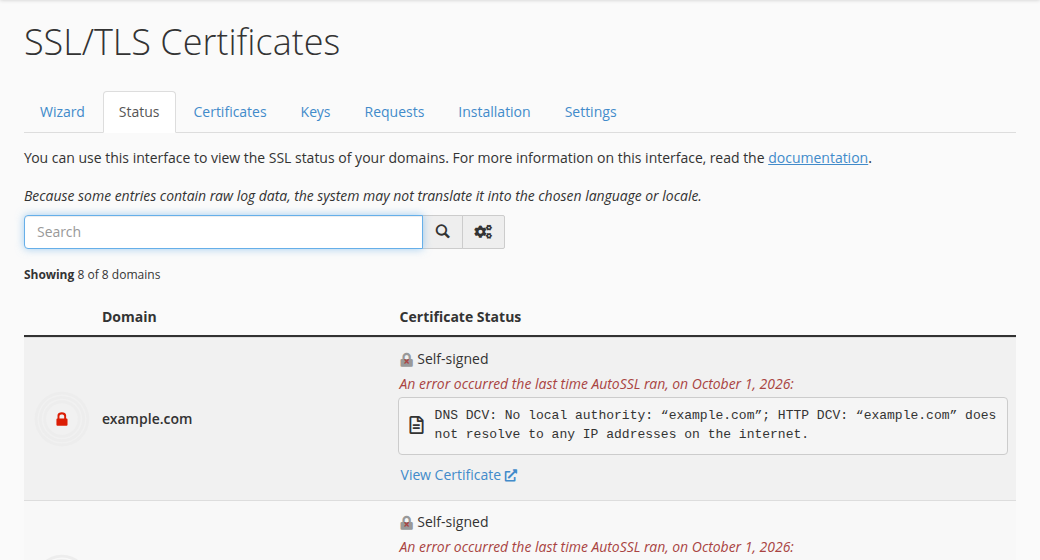
4. When an automatic renewal fails
A renewal repeats the same check as the first issue: Let's Encrypt must reach your site through the domain's DNS. Most failures come from a change made since the certificate was issued.
| Cause | How to spot it | Fix |
|---|---|---|
| The domain points elsewhere | Nameservers or A records changed, or the site moved | Point the domain and www back at your hosting, then wait for the next automatic run (cPanel and DirectAdmin) or reinstall Let's Encrypt (Plesk) |
| A CAA record blocks Let's Encrypt | A CAA record lists only another authority | Add letsencrypt.org to your CAA records |
| A proxy is in front | Cloudflare's proxy or a similar service is on | Pause the proxy during renewal, or use the proxy's own SSL settings |
| A rule blocks the check | A redirect or security rule catches requests to /.well-known/ | Let /.well-known/ through without a redirect |
| A subdomain has no DNS record | www or another subdomain does not resolve | Add the record, or accept that the name stays uncovered |
Fix the cause, then trigger the renewal: on cPanel, wait for the next automatic AutoSSL run and check the Status tab again; DirectAdmin retries on its own; in Plesk, reinstall the Let's Encrypt certificate. If it is urgent or still fails, open a ticket with the domain and the exact error you see; on cPanel, support can run AutoSSL for you.
Let's Encrypt limits repeated failed attempts. If a request fails, fix the cause first. Retrying the same broken setup many times can lock the domain out of new certificates for a while.
5. Renewing a certificate you bought elsewhere
A paid certificate from another certificate authority is outside the automatic renewal. Plan it before the expiry date:
- Renew with the provider.Pay the renewal or use the next issuance in your subscription, well before the expiry date.
- Generate a new CSR.A fresh key for each renewal is good practice. See how to generate a CSR.
- Complete validation.The provider checks domain control again by email, DNS record or a file on your site.
- Install the new certificate.In cPanel use the Installation tab of SSL/TLS Certificates; on Windows hosting use Plesk. Include the CA bundle, then confirm the new expiry date in the browser.
The renewed certificate is a new file; nothing changes on your website until you install it.
Domain India doesn't sell SSL certificates, so a paid certificate always comes from another certificate authority and is renewed with them.
6. If the certificate has already expired
For a free certificate, fix the cause in section 4 and run the renewal; a new certificate is issued as soon as the check passes. For a bought certificate, renew with the provider and install the new one. Then test in a private window, because browsers can show the old result for a while.
7. SSL on Domain India hosting
Almost every Domain India hosting plan includes free SSL that renews itself, so there is no certificate to diary and no renewal fee. Domain India doesn't sell SSL certificates, so there is never an SSL renewal invoice from us. Compare plans on cPanel hosting and DirectAdmin hosting.
Hosting renewals themselves are separate: Domain India emails a renewal invoice and never charges a saved card automatically. See how auto-renewal works.
Frequently asked questions
Do I need to renew the free SSL on my Domain India hosting?
No. The free Let's Encrypt certificate renews automatically, through AutoSSL on cPanel and through the Let's Encrypt feature in DirectAdmin and Plesk, as long as the domain still points at your hosting.
Is there a charge for renewing the free SSL certificate?
No. The free certificate is part of your hosting plan and its renewals cost nothing. You only need to keep the hosting itself renewed.
Why did my free SSL certificate expire?
Usually because the domain no longer points at your Domain India hosting, a CAA record does not allow Let's Encrypt, or a proxy or redirect rule blocked the check. Fix the cause and run the renewal again.
How do I force an AutoSSL renewal in cPanel?
You can't run AutoSSL yourself on our servers; it checks every domain on the account on its own and requests certificates for those that need one. If a renewal is urgent or keeps failing, open a support ticket with the domain name and the exact error line from the Status tab of Security › SSL/TLS Certificates, and support can run AutoSSL for you.
How long are SSL certificates valid in 2026?
Since 15 March 2026, a newly issued public certificate can be valid for at most 200 days, falling to 100 days in March 2027 and 47 days in March 2029. Free Let's Encrypt certificates are shorter still and renew automatically.
Does a certificate I bought elsewhere renew automatically?
No. Renew it with the provider that sold it, then install the new certificate and CA bundle on your hosting before the old one expires.
Ready to check your certificate? Open your control panel from My Hosting, read AutoSSL in cPanel, or open a ticket if a renewal keeps failing.
Tell us the domain and the error your browser or control panel shows, and our support team will find out why the certificate is not renewing.
Open a support ticket