Installing an SSL certificate does not move visitors to https:// on its own: anyone who types your address or follows an old link still lands on plain http://. Forcing HTTPS sends every one of those requests to the secure address with a permanent (301) redirect. This guide covers the three ways to do it on Domain India hosting, and the traps that cause redirect loops.
First make sure a valid SSL certificate covers both yourdomain.in and www.yourdomain.in. Then use one method: cPanel's Force HTTPS Redirect switch on the Domains page, Webuzo's Force HTTPS switch in Domain › Manage Domains, or a three-line rule at the top of .htaccess (works on cPanel, DirectAdmin and Webuzo). In WordPress, also set both addresses under Settings › General to https://. If you use Cloudflare, set SSL to Full (strict), never Flexible.
1. Before you force HTTPS: check the certificate
A redirect to HTTPS only helps if the HTTPS address works. If the certificate is missing or covers only one name, visitors get a security warning instead of your site.
- Point the domain at your hosting.Both the root name and
wwwneed DNS records pointing to the server. Free SSL is only issued for names that reach us. - Check the certificate.On cPanel, the Status tab of Security › SSL/TLS Certificates shows which names AutoSSL covers. On DirectAdmin, check the domain's SSL Certificates page. See how to enable free SSL.
- Open both addresses.Visit
https://yourdomain.inandhttps://www.yourdomain.inand confirm the padlock shows on both.
Every Domain India shared hosting plan includes free SSL, so there is nothing to buy.
2. Method 1: the cPanel switch
cPanel has a per-domain switch that does the redirect for you, with no file editing.
- Log in to cPanel.
- Open Domains.It is in the Domains section of the cPanel home page.
- Turn on Force HTTPS Redirectfor your domain. The switch can only be turned on once the domain has a working certificate.
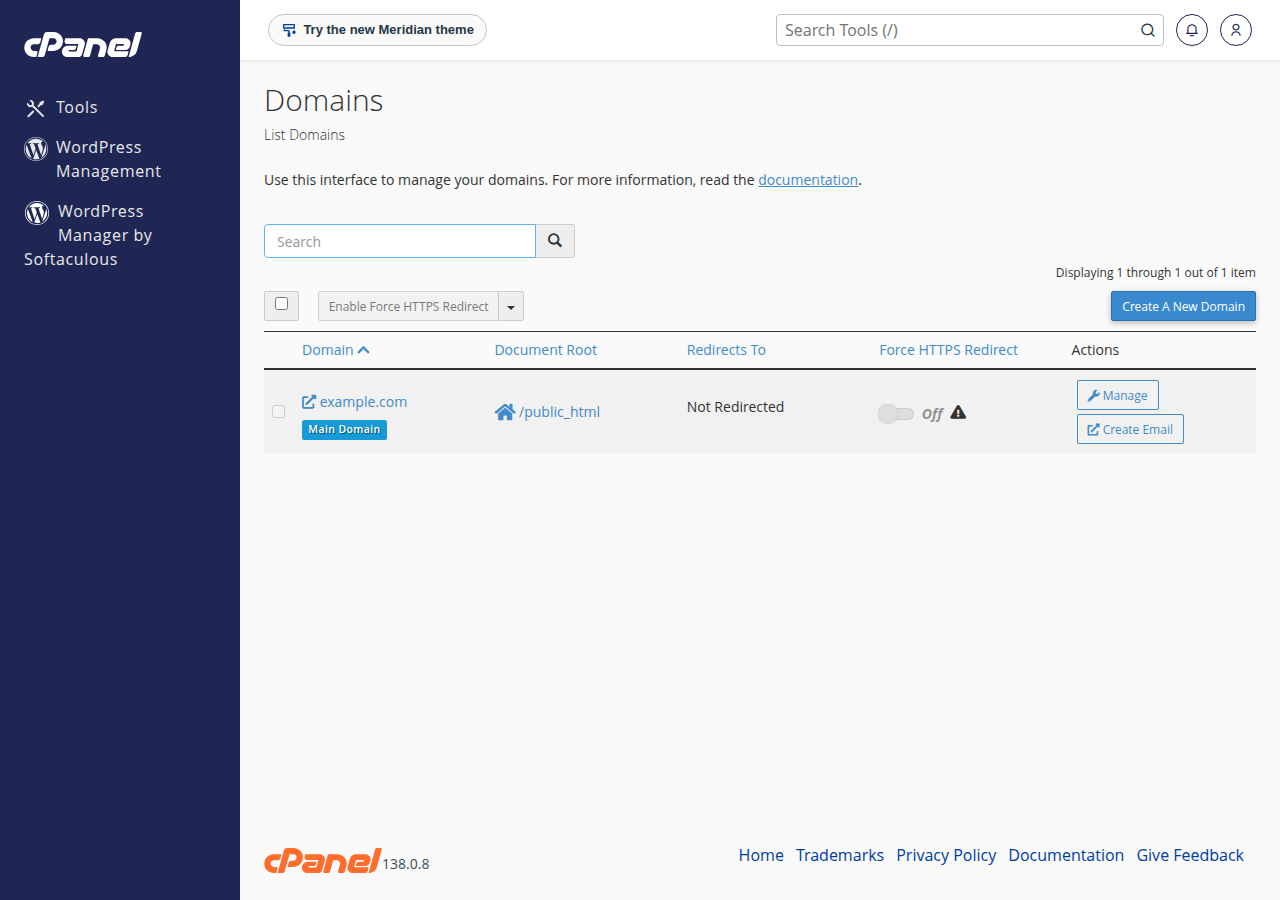
The switch handles HTTP to HTTPS only. It does not choose between www and non-www; for that, use the combined rule in section 3.
3. Method 2: a rule in .htaccess
Domain India's Linux shared hosting (cPanel, DirectAdmin and Webuzo) runs the Apache web server with mod_rewrite, so .htaccess rules work on all three. Open the .htaccess file in your website's root folder, usually public_html. It starts with a dot, so turn on "Show hidden files" in the File Manager. Copy the file somewhere safe first, then paste this at the very top, above any # BEGIN WordPress block:
RewriteEngine On
RewriteCond %{HTTPS} off
RewriteRule ^ https://%{HTTP_HOST}%{REQUEST_URI} [L,R=301]
What it does: if a request arrived over plain HTTP, send it to the same host and path over HTTPS, as a permanent redirect. The path and query string are kept, so http://yourdomain.in/shop/?page=2 goes to https://yourdomain.in/shop/?page=2.
Want www or non-www as well?
If you also want everyone on one host name, don't stack a second rule under this one: two rules make visitors go through two redirects, and can loop. Use the single combined rule from how to redirect non-www to www, which sorts out HTTPS and www in one step, instead of the rule above.
Windows hosting runs IIS, which ignores .htaccess. Use the redirect setting in Plesk instead: see HTTPS redirect in Plesk.
4. WordPress: change the site address too
WordPress stores its own address. If it still says http://, WordPress keeps building links, images and redirects with the old address.
- Open Settings › Generalin the WordPress dashboard.
- Change both addresses.Set WordPress Address (URL) and Site Address (URL) to the same
https://address, for examplehttps://www.yourdomain.in. - Save, then log in again.WordPress signs you out when the address changes.
- Fix old links in your content.Use a search-and-replace plugin, or
wp search-replaceover WP-CLI, to changehttp://yourdomain.intohttps://yourdomain.in. Back up the database first.
You don't need a plugin to force HTTPS; the cPanel switch or the .htaccess rule does it. If you already use a plugin that redirects, keep either the plugin or your rule, not both.
5. Cloudflare and other proxies
If your domain runs through Cloudflare with the orange-cloud proxy on, the SSL mode decides whether forcing HTTPS works.
- Flexible mode fetches your site over plain HTTP. Your server sees every request as HTTP, redirects it, Cloudflare fetches over HTTP again, and the browser shows "too many redirects".
- Full (strict) mode fetches over HTTPS with a valid certificate. The switch and the rule then work unchanged, and your hosting's free certificate is enough.
Change it in Cloudflare under SSL/TLS › Overview. More in the complete Cloudflare setup guide.
6. Test the redirect
Browsers remember 301 redirects, so test in a private window or with curl. On our cPanel servers a redirect can also be served from the page cache for up to two hours, so add a changing value such as ?t=1 to the address while testing:
curl -I "http://yourdomain.in/?t=1"You should see 301 and a Location: header starting with https://. Then check the HTTPS address returns 200:
curl -I "https://yourdomain.in/?t=2"7. Fixing common problems
| What you see | Likely cause | Fix |
|---|---|---|
| "Too many redirects" | Cloudflare Flexible mode, WordPress still on http://, or two redirects pointing different ways | Use Full (strict), update both WordPress addresses, keep one redirect method |
| Padlock missing or "not fully secure" | The page loads images or scripts over http:// (mixed content) | Update the links in your content and theme to https:// |
Security warning on www or the bare domain | The certificate covers only one name | Point both names at the hosting, then let free SSL reissue |
500 error right after saving .htaccess | A typo, or curly quotes pasted from a word processor | Restore your copy of the file and paste the rule again from plain text |
The cPanel switch, an .htaccess rule and a WordPress plugin that all redirect is the most common cause of redirect loops. Pick one place to do it and remove the others.
For a 500 error in general, see troubleshooting a 500 Internal Server Error.
8. Where Domain India fits
The Linux shared hosting plans at Domain India (cPanel, DirectAdmin and Webuzo) include free SSL and let you edit .htaccess in the File Manager or over FTP, which is all you need to force HTTPS. cPanel also has the one-click switch. Compare plans on cPanel hosting and DirectAdmin hosting.
Frequently asked questions
How do I force HTTPS in cPanel?
Log in to cPanel, open Domains, and turn on Force HTTPS Redirect for your domain. The switch needs a working SSL certificate for the domain first, which AutoSSL issues for free once the domain points at the server.
What .htaccess code redirects HTTP to HTTPS?
Put these three lines at the top of .htaccess in your website's root folder: RewriteEngine On, then RewriteCond %{HTTPS} off, then RewriteRule ^ https://%{HTTP_HOST}%{REQUEST_URI} [L,R=301]. It works on Domain India's cPanel, DirectAdmin and Webuzo hosting.
Should the HTTPS redirect be a 301 or a 302?
Use a 301. The move to HTTPS is permanent, and a 301 tells search engines to index the HTTPS address and pass the ranking signals to it.
Why do I get "too many redirects" after forcing HTTPS?
The usual causes are Cloudflare's Flexible SSL mode, WordPress addresses still set to http://, or two redirects in different places pointing different ways. Use Full (strict) in Cloudflare, set both WordPress addresses to https://, and keep only one redirect method.
Do I need to buy an SSL certificate to force HTTPS?
No. Every Domain India shared hosting plan includes free SSL: AutoSSL with Let's Encrypt on cPanel, and Let's Encrypt on DirectAdmin and Plesk.
Does .htaccess work on Windows hosting?
No. Windows hosting runs IIS, which ignores .htaccess. Use the HTTPS redirect setting in Plesk instead.
Ready to secure your site? Make sure free SSL covers both names, then choose your canonical address with how to redirect non-www to www. If a redirect loop won't go away, open a support ticket with your domain name.
Free SSL, a one-click Force HTTPS switch on cPanel, and full .htaccess control from the File Manager.
See cPanel hosting plans