A suspended domain takes your website and email offline at once, and most suspensions are avoidable. They come from a handful of predictable causes: a renewal invoice nobody paid, a verification email nobody clicked, a .in identity check left unfinished, or a hacked website attracting an abuse complaint. This guide covers each one and the habits that prevent it.
Pay renewal invoices as soon as they arrive, because Domain India never charges a saved card automatically. Click any registrant verification email within 15 days, keep the registrant email on an address that does not depend on the domain itself, and finish .in identity verification (eKYC) and the registry's email check straight away. Keep your website secure so it never attracts an abuse complaint. A .in domain renews at the normal price only up to day 36 after expiry.
1. The five causes of a domain suspension
If your domain is already suspended, go to Why is my domain suspended for the fix for each cause.
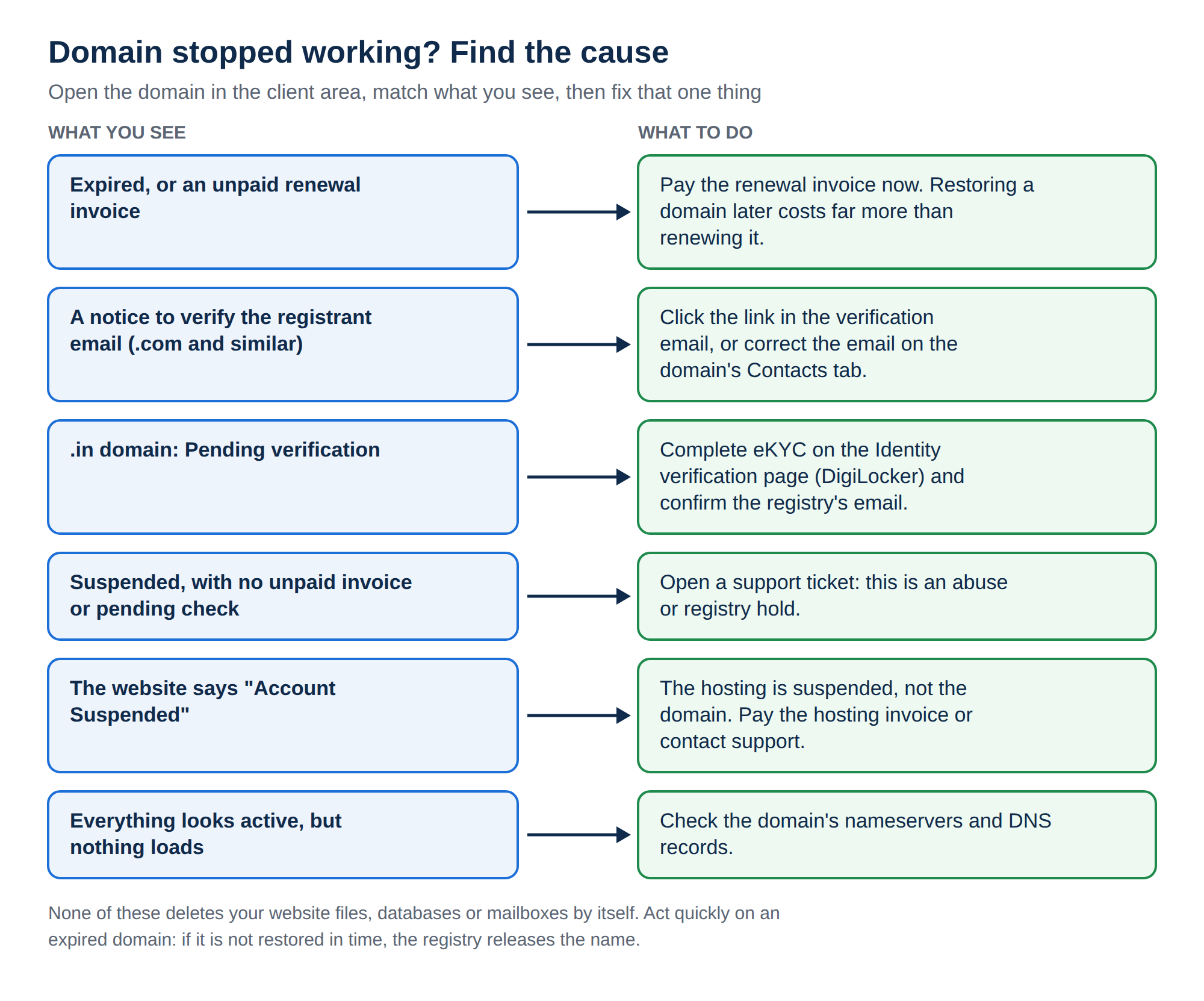
2. Never let a renewal lapse
Unpaid renewals cause more suspensions than everything else combined. Understand how renewal works at Domain India:
- No card is charged automatically. "Auto-renewal" means a renewal invoice is generated and emailed to you; the domain renews only when that invoice is paid.
- The invoice comes early. Renewal invoices are generated up to 30 days before the due date, with reminders in the weeks before expiry.
- Paying early loses nothing. The new year is added to your existing expiry date.
- Keep your account email current.Renewal invoices go to the email on your account. An old address is the most common reason a renewal is missed.
- Pay each invoice when it arrives.Open your invoices and pay, rather than waiting for the due date.
- Renew your main domain for several years.One missed email then cannot take your business offline.
- Add your own calendar remindera month before your main domain's expiry date.
- Review your renewals once a yearand decline the services you no longer need, so the important invoices stand out.
A .in domain can be renewed at the normal price up to day 36 after expiry. From day 37 it can only be restored, for ₹4,000, which includes GST and the renewal. For .com, restoration after the grace period costs ₹8,000, including GST and one year. If a domain is not restored in time, it is deleted and anyone can register it.
The full explanation is in How auto-renewal works.
3. Verify the registrant email on generic domains
For .com, .net, .org and other generic extensions, ICANN requires the registrar to verify the registrant's email address after:
- a new registration;
- a transfer in from another registrar;
- a change to the registrant's name, organisation or email.
A verification email with a link goes to the registrant email on the domain. If it is not confirmed within 15 days, the domain can be suspended until it is. There is nothing to upload and nothing to pay: you only click the link.
If the registrant email has already been verified for another domain, the registrar may treat it as verified and send nothing. If you expected an email and it never arrived, check your spam folder, then open a ticket: the client area has no resend button for this email. See Verification of WHOIS details.
4. Keep the registrant email off the domain itself
This is the trap that turns a small problem into a long outage. If the only email on your registrant contact is [email protected] and that domain is suspended, every email that would help you fix it, including a fresh verification email, is sent to a mailbox that no longer receives mail.
Use an address on a different domain that you check regularly, and keep it current:
- Open your domains and click the domain.
- Open the Contacts tab and choose Registrant.
- Click Edit contact, enter the address and click Save.
On a generic domain, changing the registrant email triggers a new verification, so click the link when it arrives. It can also start a 60-day lock on transfers to another registrar; the domain keeps working normally. The full guide is Change your domain's WHOIS information.
5. Finish .in identity verification straight away
.in and its family (.co.in, .net.in, .org.in and the rest) follow the .IN registry's rules rather than ICANN's. Two checks apply, and both show in the client area:
| Check | Where you complete it | If it is left pending |
|---|---|---|
| Identity verification (eKYC) | The Identity verification page, using DigiLocker | The domain can be held and may not resolve |
| The registry's registrant email check | The confirmation email the registry sends to the registrant address | The domain can be suspended even when your identity is verified |
Before you verify, make sure the registrant name on the domain matches your identity document. If it does not, or the domain is registered in someone else's name, open a ticket first: each registrant is verified separately, and changing the owner's name on a .in domain may need support's help.
6. Keep your contact details accurate
Accurate registrant details are part of your registration agreement. A domain registered under a fake name, an unreachable phone number or a former employee's email is exposed twice: the registry can act on inaccurate data, and you may struggle to prove ownership when you need to.
Check the Contacts tab on each domain once a year. The registrant contact is the one that decides who owns the domain; keep it in your own or your business's name, even if a web designer manages the site for you.
7. Keep the website clean
Registrars and registries can suspend a domain used for phishing, malware or spam. Most owners who receive an abuse complaint did not do anything deliberately: an outdated plugin or a weak password let someone else in.
- Keep your CMS, plugins and themes updated, and remove the ones you do not use.
- Use strong, unique passwords, and turn on two-factor authentication for your client area and control panel.
- Protect contact forms from spam bots.
- If you see a browser or Google warning on your site, act the same day.
Read the security checklist if you suspect a compromise.
8. Your domains with Domain India
Domain India, a NIXI-accredited .IN registrar, manages every domain from one client area: renewals, contacts, nameservers, the transfer lock and, for .in domains, identity verification. Domain India list prices on 19 September 2026, excluding 18% GST:
| Extension | Register (1 year) | Renew (per year) |
|---|---|---|
| .in | ₹575 | ₹625 |
| .co.in | ₹475 | ₹525 |
| .com | ₹1,300 | ₹1,300 |
Does Domain India renew my domain automatically?
Domain India sends a renewal invoice up to 30 days before the due date and never charges a saved card. The domain renews only when that invoice is paid, so pay it when it arrives.
How long do I have to verify my registrant email?
For .com and other generic domains, 15 days from the verification email. If it is not confirmed in that time, the domain can be suspended until it is.
Why should my registrant email not be on the same domain?
If the domain is suspended, mail to that domain stops arriving, so any email that would help you fix the suspension cannot reach you. Use an address on a different domain.
Do .in domains need email verification too?
.in domains need identity verification (eKYC) on the Identity verification page, and the .IN registry separately confirms the registrant email. Both show in the client area, and a pending registry email check can keep a domain suspended.
What happens if I renew a .in domain late?
Up to day 36 after expiry, you pay the normal renewal price. From day 37, the domain can only be restored, for ₹4,000 including GST and the renewal. If it is not restored, it is deleted and anyone can register it.
Can a hacked website get my domain suspended?
Yes. Registrars and registries can suspend a domain used for phishing, malware or spam, even if the owner did not know the site was compromised. Keeping software updated and passwords strong prevents most of these cases.
Ready to check your domains? Open your domains and review each one's expiry date and Contacts tab, or pay what is due in your invoices. If anything looks wrong, open a ticket: support is on 24/7 live chat, and tickets get a first response within 15 minutes, though resolution can take longer.
Register .in, .com and other extensions, and manage renewals, contacts and verification from one client area.
Search for a domain