If you have just registered a domain, transferred one in, or changed the owner's details, you may receive an email asking you to verify the registrant's contact information. It is not spam and it is not optional: for domains such as .com, a registrar must confirm that the registrant's email address works, and a domain whose owner never confirms it can be suspended. This guide explains why the email arrives, how to complete it, and what to do if it went to the wrong address or never arrived.
For .com, .net, .org and other generic domains, ICANN requires the registrar to verify the registrant's email address after a new registration, a transfer in, or a change to the registrant's name, organisation or email. Open the email and click the verification link. If it is not confirmed within 15 days, the domain can be suspended and your website and email stop working until you verify. .in domains follow the .IN registry's rules instead: identity verification (eKYC) plus a separate registry check of the registrant email, both shown in the client area.
The full guide to editing Registrant, Admin, Tech and Billing contacts is Change your domain's WHOIS information. This page covers the verification that follows.
1. What the verification email is
Every domain has a registrant: the legal owner, whose name and contact details are held by the registry. This record is still widely called "WHOIS", although for generic domains the old WHOIS service has largely been replaced by RDAP.
ICANN, the body that coordinates generic domain extensions, requires accredited registrars to keep this data accurate. Under its 2013 Registrar Accreditation Agreement, the registrar must verify the registrant's email address: it sends a message with a link, and the owner proves the address works by clicking it. There is nothing to fill in, no document to upload and no payment.
Two points cause most of the confusion:
- It goes to the registrant email on the domain, not necessarily the email you use to log in to Domain India. If a web designer or former employee registered the domain with their own address, the email goes to them.
- It is about the email address, not your identity. Clicking the link confirms that the address is real and read by someone. It does not change who owns the domain.
2. When you will receive one
The verification is triggered by specific events. If none of these happened recently, treat any "verify your domain" email with suspicion and check the domain in the client area first.
| What happened | Why a verification is sent | Where it goes |
|---|---|---|
| You registered a new domain | ICANN requires verification of every new registrant | The registrant email on the new domain |
| You transferred a domain in from another registrar | The new registrar must verify the contact data it now holds | The registrant email on the domain after the transfer |
| You changed the registrant's email address | A new address must be proved to work | The new address |
| You changed the registrant's name or organisation | ICANN treats this as a change of registrant | The registrant email on the domain |
Changing the Admin, Tech or Billing contact, or correcting the address or phone number, does not normally trigger a new verification. If the registrant's email address has already been verified for another domain, the registrar may treat it as verified and send nothing.
3. The 15-day deadline and what suspension means
The owner has 15 days to click the link. If the registrar does not receive the confirmation in that time, ICANN's rules allow it to suspend the domain until the email address is verified.
A suspended domain stops resolving, so your website does not load and email at that domain stops arriving.
Your files, mailboxes and DNS settings are not deleted. The domain is on hold, not cancelled. Once the verification is completed, the registrar lifts the hold and the domain resolves again. Because DNS answers are cached around the internet, some visitors may keep seeing the old result for a few hours afterwards.
Verify as soon as the email arrives. If the registrant email is on the same domain, for example [email protected], and the domain is suspended, a second verification email sent to that address cannot reach you. Use a registrant address that does not depend on the domain itself.
4. How to complete the verification
- Find the email.Search your inbox and your spam or junk folder for the domain name. Check the mailbox of the registrant email on the domain, which may not be the one you log in with.
- Check it is genuine.It should name the domain you registered, transferred or updated. If you did none of those things, do not click; open a ticket instead.
- Click the verification link.It opens a confirmation page in your browser.
- Look for the confirmation message.The page should say the email address has been verified. You do not need to reply to the email or send it to us.
- Check the domain if it was suspended.If the deadline had passed, wait a little and then load your website. If it still does not work after a few hours, open a ticket with the domain name.
5. If the email went to the wrong address
The fix is to correct the registrant email first, which triggers a fresh verification to the new address.
- Log in and open Domains, then click the domain.
- Open the Contacts tab and choose Registrant.
- Click Edit contact, enter an email address you will keep and check regularly, and click Save.
- Watch the new address for the verification email and click the link.
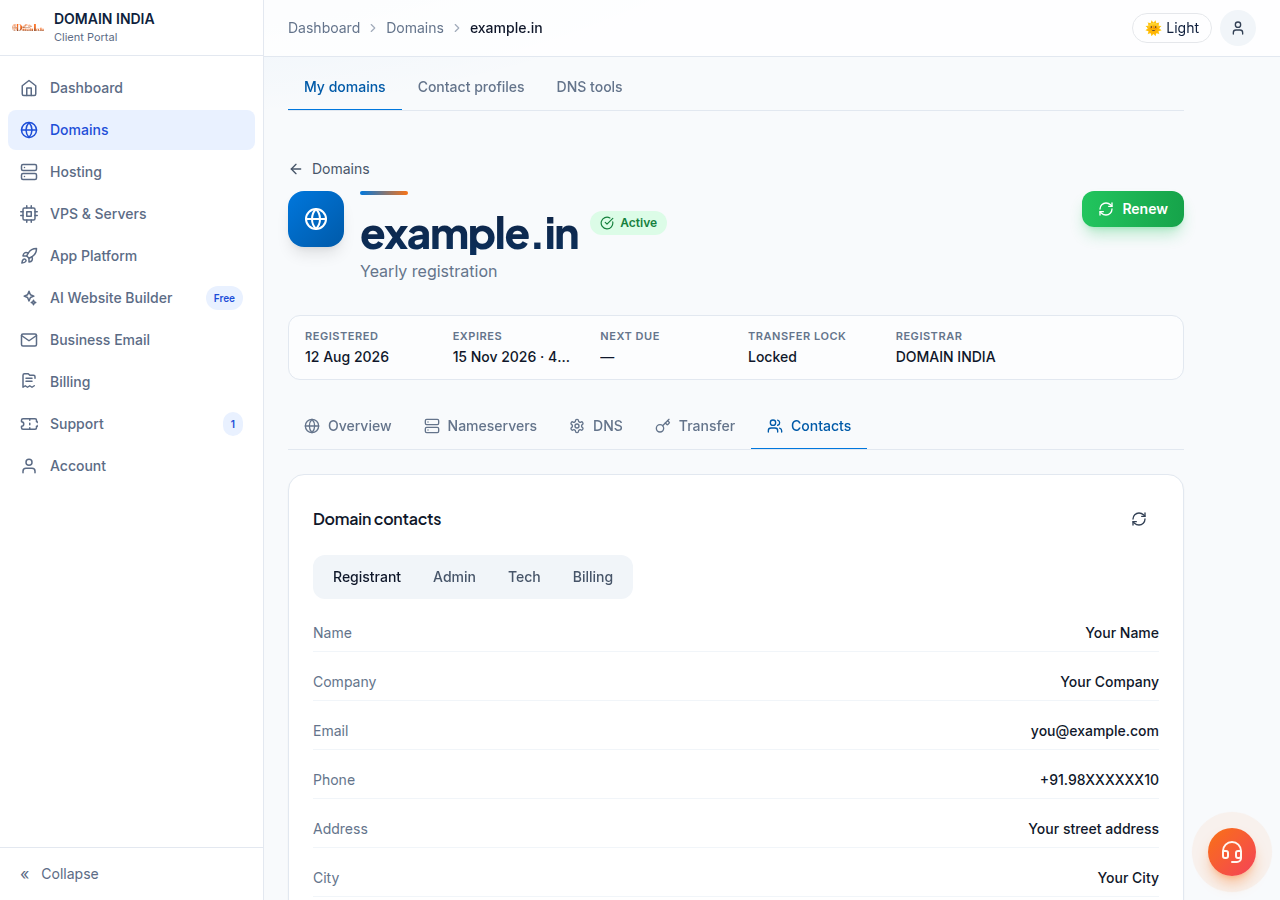
The WHOIS contact guide covers the form, the required fields and error messages in full.
On a generic domain, changing the registrant's name, organisation or email counts as a change of registrant under ICANN's current Transfer Policy. It puts a 60-day lock on transfers to another registrar unless the owner opted out before the change. The domain keeps working normally; only a move to another registrar is blocked. If you plan to transfer the domain soon, ask support before changing the registrant.
6. If the email never arrived, or you need it resent
Before asking for a new email, rule out the usual causes:
- Spam or junk. Verification emails are automated and often filtered. Search for the domain name.
- Wrong mailbox. The email goes to the registrant email on the domain. Check it on the domain's Contacts tab in the client area.
- A mailbox on the domain itself. If the registrant email uses the domain and the domain is suspended, mail to it cannot arrive. Change the registrant email to an outside address as described in section 5.
- A full or disabled mailbox. If the mailbox is over quota or no longer exists, the email bounces and you never see it.
The client area has no button to resend the registrant verification email for .com and other generic domains. To have it sent again, open a ticket with the domain name and the registrant email address you expect it at. The email always goes to the registrant email currently on the domain, so if that address is wrong, correct it first.
7. .in and other Indian domains
.in, .co.in and the other Indian extensions are run by the .IN registry under NIXI, not under ICANN's registrar agreement. The 15-day ICANN process above does not describe them. What applies instead, as the client area shows it:
- Identity verification (eKYC). The registrant's identity is verified on the Identity verification page, which uses DigiLocker. Each registrant is verified separately. See Why is my domain suspended for what happens while it is outstanding.
- Your account email. When you order a .in domain, you also confirm your account email address with a 6-digit code on the same page. This is separate from identity verification, and both are required.
- The registry's own email check. The .IN registry keeps a separate record of whether the registrant email is confirmed. If it is still pending, the domain's page in the client area shows "The registry has not confirmed the registrant email for this domain" and the domain can still be suspended, even when your identity is verified.
- Open the domain.Go to Domains and click the .in domain. Look for a notice about identity or the registrant email.
- Click through to what is outstanding.The notice links to the Identity verification page, which lists which .in domains are affected and when the registry was last checked.
- Ask for the registry email to be resent.If the registry confirmation is pending, use the "Ask us to resend the registry confirmation" link on that page. It opens a support ticket with the subject filled in.
- Confirm the email.When the registry's email arrives at the registrant address, follow its instructions.
To change the registrant email on a .in domain, edit the Registrant contact on the domain's Contacts tab. For the Admin, Tech or Billing contact on a .in domain, open a ticket rather than editing it yourself. Changing the owner's name or organisation may require the new registrant to complete identity verification, so open a ticket before making that change.
8. Managing your domains with Domain India
Domain India is a NIXI-accredited .IN registrar. Every domain you register or transfer to us is managed from one client area: contacts, nameservers, DNS, transfer settings, renewals and, for .in domains, identity verification are all on the domain's page.
Domain India list prices on 19 September 2026, excluding 18% GST:
| Extension | Register (1 year) | Renew (per year) |
|---|---|---|
| .in | ₹575 | ₹625 |
| .co.in | ₹475 | ₹525 |
| .com | ₹1,150 | ₹1,150 |
Why did I get an email asking me to verify my domain's WHOIS details?
For .com and other generic domains, ICANN requires the registrar to verify the registrant's email address after a new registration, a transfer in, or a change to the registrant's name, organisation or email. Clicking the link in the email confirms the address works.
What happens if I do not verify within 15 days?
The registrar can suspend the domain until the registrant email is verified. While it is suspended, the website and email on that domain stop working. Nothing is deleted, and the domain resolves again after verification, although DNS caching can delay this for some visitors by a few hours.
The verification email went to an old address. What should I do?
Log in to the Domain India client area, open Domains, click the domain, open the Contacts tab, choose Registrant, click Edit contact, enter an address you use and click Save. A new verification email is then sent to that address.
Can I resend the verification email myself?
Not for .com and other generic domains: the client area has no resend button for this email. Open a support ticket with the domain name and we will help you get it sent again. It always goes to the registrant email currently on the domain.
Do .in domains need the same verification?
.in domains follow the .IN registry's rules rather than ICANN's. The registrant completes identity verification (eKYC), and the registry separately confirms the registrant email. The domain's page in the client area shows if either is outstanding.
I confirmed the registry email, or support says it is verified, but my .in domain page still says the registry has not confirmed it. Why?
The client area shows the registry's status from its last check, and that can lag behind the registry. The Identity verification page shows when the registry was last checked. If your domain works and support has confirmed the email is verified, nothing more is needed from you. If the notice is still there a day later, or the domain is not working, open a support ticket with the domain name and we will check the status with the registry directly.
Does verifying the email change who owns the domain?
No. It only confirms that the registrant's email address is real and read by someone. Ownership is set by the registrant name and organisation on the domain's Contacts tab.
Ready to check your domains? Open your domains and confirm the registrant email on each one's Contacts tab. If a verification email is missing, open a ticket: support is on 24/7 live chat, and tickets get a first response within 15 minutes, though resolution can take longer. To register a new name, start at domain registration.
Register .in, .com and more than 500 other extensions, and manage contacts, verification, DNS and renewals from one client area.
Search for a domain