Most domains are lost for a dull reason: a renewal email went to an old address, nobody noticed, and the website and email stopped on the expiry date. Monitoring your domain's expiry is simple once you know where the date lives and who gets the reminders. This guide shows how to track expiry dates for domains held with Domain India, how renewal actually works here, and what to do if a date slips past.
Domain India never charges a saved card. Up to 30 days before expiry we email a renewal invoice, and the domain renews only when you pay it, so the reminders are only as good as the email address on your account. Check expiry dates on the Domains and Renewals pages of the client area, add your own calendar reminder, and renew important domains for several years. A .in domain renews at the normal price up to day 36 after expiry; from day 37 restoration costs ₹4,000, including the renewal.
1. Why expiry needs watching
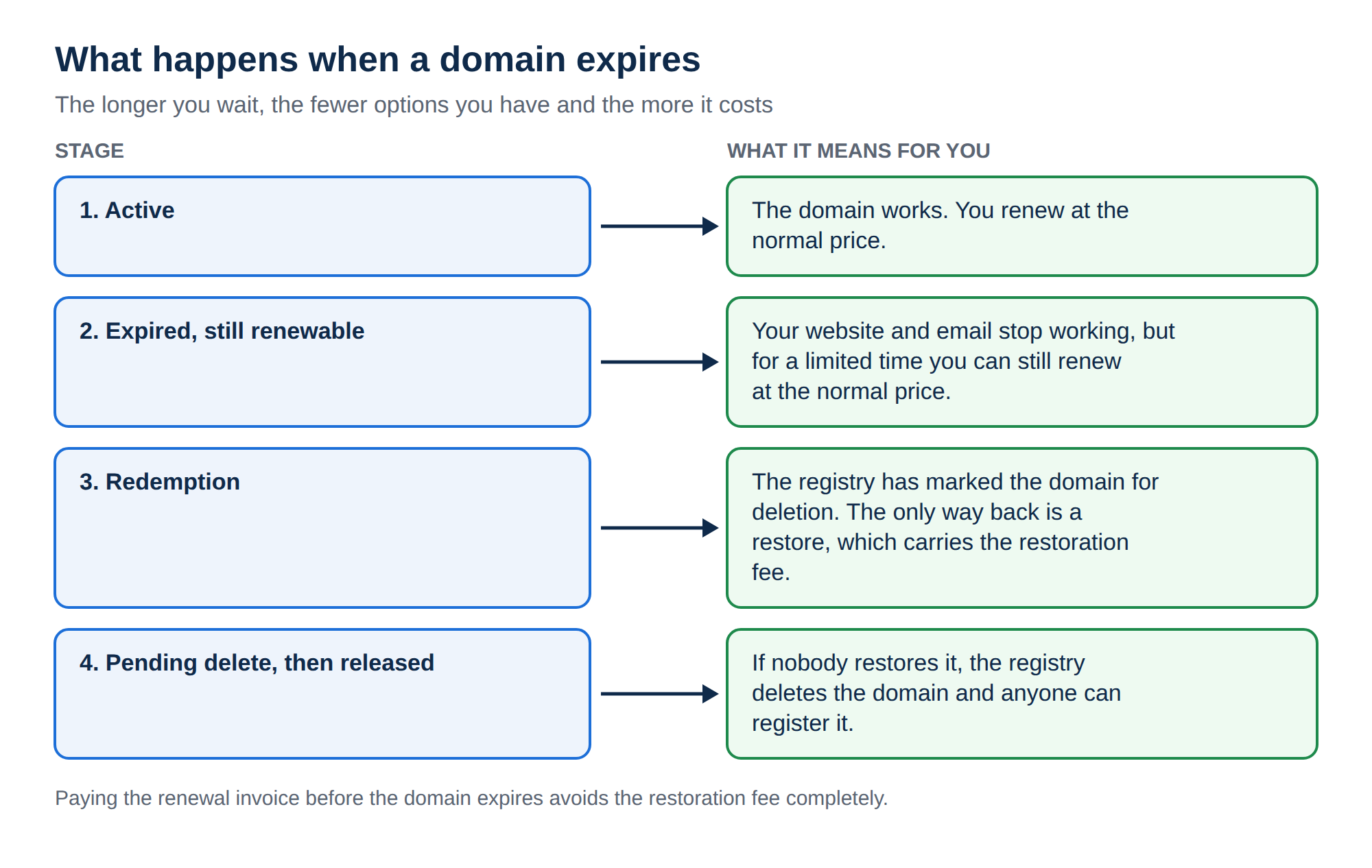
When a domain expires it stops resolving. Your website goes offline and email to your domain stops arriving, often on a working day before anyone connects the two. After that:
- the price to get it back rises sharply once the renewal window closes;
- if nobody restores it, the registry deletes the name and anyone can register it, including a competitor or someone who wants to sell it back to you;
- links, search rankings and printed material built on that name lose their value.
A missed renewal costs far more than the renewal itself, so a few minutes of monitoring is worth it.
2. How renewal works at Domain India
There is no automatic card payment. "Auto-renewal" here means a renewal invoice:
- Invoice.A renewal invoice is generated up to 30 days before the expiry date and emailed to the address on your account.
- Reminders.Reminder emails follow in the weeks before expiry while the invoice is unpaid.
- Payment renews the domain.The domain renews only when that invoice is paid. The years you pay for are added to the current expiry date.
- No payment, no renewal.If the invoice stays unpaid, the domain expires on its date.
The Domain renewal switch on each domain's page controls whether that invoice is sent. Switching it off does not cancel the domain; it runs to its expiry date without an invoice. The full detail is in how auto-renewal works.
3. Where to see your expiry dates
You can also look up any domain's expiry date in a public registration lookup (RDAP or WHOIS). This is useful for domains held at other registrars, but the client area is the source of truth for domains you hold with us.
4. Build a monitoring routine
- Keep the account email current.Make it an address you read every day. If possible use one on a different domain, so an expired domain cannot also cut off its own renewal reminders.
- Allow our emails.Add Domain India to your contacts or safe senders and check spam if a renewal is due and nothing has arrived.
- Add a calendar reminder.Put each important domain's expiry date in a shared calendar, with alerts about 45 days and 7 days before.
- Renew early and for longer.Renewing months ahead loses no time, and a multi-year renewal on your main domain means one missed email cannot take the business offline.
- Review once a quarter.Look through the Domains page, renew what you need and decline what you don't.
In a business, decide who owns domain renewals and who covers when that person is away. Expired domains usually belong to "someone in the office" rather than to a named person.
5. Watching a large portfolio
If you hold many domains:
- Keep them in one account so every expiry date, invoice and reminder is in one place. Moving domains from other registrars is covered in can I transfer an existing domain to Domain India; a transfer adds one year to the existing expiry date.
- Align expiry dates by renewing short-dated domains for extra years, so you deal with renewals in fewer batches.
- Keep a simple register (a spreadsheet is enough) with the domain, what it is used for, its expiry date and who decides on renewal.
- Budget ahead. Renewal prices on 19 September 2026, excluding 18% GST, are ₹625 a year for .in and ₹1,300 a year for .com. Other extensions are on the domain pricing page.
Third-party expiry monitors and registration lookups can alert you about domains you don't hold with us. For your Domain India domains, the reminders and the client area already give you what you need.
6. What happens if a domain expires
| Extension | Time since expiry | What you pay |
|---|---|---|
| .in family (.in, .co.in and others) | Up to day 36 | The normal renewal price |
| .in family | From day 37 | Restoration, ₹4,000 (includes GST and the renewal) |
| .com and similar | During the grace period | The normal renewal price |
| .com and similar | After the grace period | Restoration, ₹8,000 (includes GST and one year) |
The grace period for .com and other generic extensions varies by extension, so ask support for your domain's exact date. If a domain is not restored in time, the registry deletes it and anyone can register it.
If a domain has just expired, pay the renewal invoice from your invoices or click Renew on the domain's page today. The price only goes up from here, and a deleted name may be gone for good.
If the domain is paid and still not working, the cause may be something else, such as a pending verification or nameserver problem. See why is my domain suspended.
7. Not renewing on purpose
Letting a domain go is fine when you no longer need it. Decline the renewal on the Renewals page or simply leave the invoice unpaid; there is no penalty. Domain registrations and renewals are non-refundable once processed at the registry, so decide before you pay.
Frequently asked questions
Does Domain India renew my domain automatically?
Not by charging a card. Domain India never charges a saved card. A renewal invoice is emailed up to 30 days before the expiry date, and the domain renews only when that invoice is paid.
Where can I see when my domain expires?
Sign in to the client area and open Domains. Each domain shows its status and expiry date, and the domain's own page has a Renew button. The Renewals page lists what is coming up for renewal.
How do I make sure I get renewal reminders?
Keep the email address on your account current, preferably one on a different domain, and add Domain India to your safe senders. Add your own calendar reminder for important domains as a backup.
What happens if my .in domain expires?
It stops resolving, so your website and email stop working. You can renew it at the normal price up to day 36 after expiry. From day 37 it can only be restored, for ₹4,000, which includes GST and the renewal.
How much does it cost to restore an expired .com domain?
After the grace period, restoring a .com costs ₹8,000, which includes GST and one year. The grace period varies by extension, so ask support for your domain's exact date.
Can I renew a domain for several years?
Yes. Open the domain in the client area, click Renew and choose the number of years. The years are added to the current expiry date, so renewing early loses no time.
Ready to check your dates? Open your domains and Renewals in the client area, and read domain renewal for the step-by-step renewal guide.
Send us your domain names and we will tell you their expiry dates, whether a renewal invoice is waiting, and what each renewal costs.
Ask support