If a WHOIS lookup on your .in or .co.in domain shows serverHold, the registry has taken the domain out of DNS. Your website and email stop working, but the domain is still registered to you. This guide explains what serverHold means, how it differs from clientHold, why it happens, and how to get it lifted.
serverHold is a status set by the registry that stops a domain resolving; clientHold is the same effect set by the registrar. Neither deletes the domain. On .in domains the usual causes are unfinished identity verification (eKYC), an unconfirmed registrant email, inaccurate registrant details or an abuse report. Complete what the client area shows as outstanding on the Identity verification page, and if the domain is still held, open a ticket. Only the registry can lift serverHold, and there is no way to bypass it.
1. What serverHold means
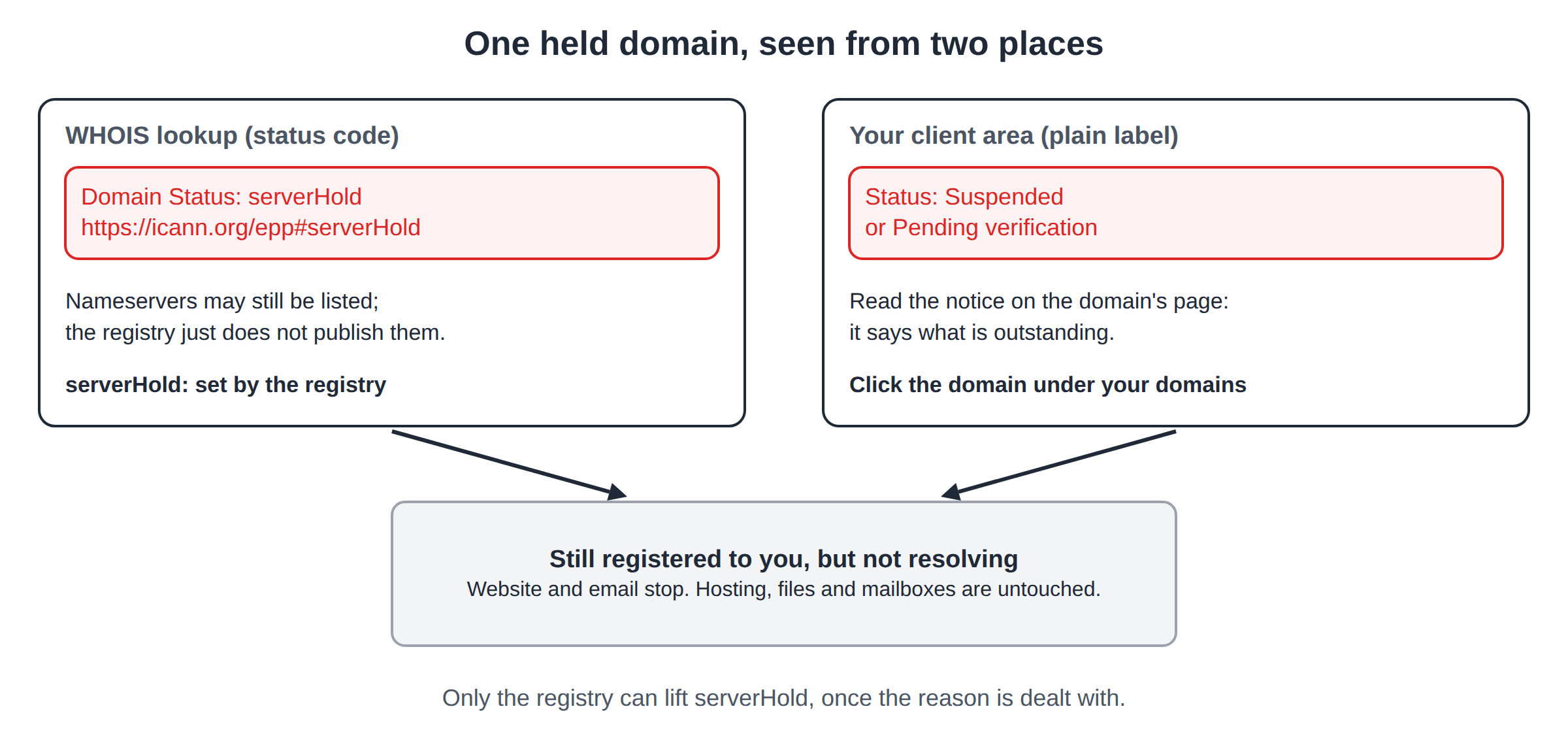
Every domain carries one or more status codes in the registry's records. serverHold tells the registry's DNS not to publish the domain. While it is set, the domain is:
- still registered to the same registrant, with the same expiry date;
- not resolving, because the registry no longer points the world at its nameservers;
- offline for every service on it: website, email and anything else that depends on the name.
Your hosting account, website files, databases and mailboxes are not touched. Once the hold is lifted, the domain resolves again, although cached DNS answers can take a few hours to clear around the internet.
2. serverHold and clientHold: who set it
Status codes come in two families. Codes starting with client are set by the registrar. Codes starting with server are set by the registry that runs the extension, which for .in is the .IN registry under NIXI.
| Status | Set by | Effect | Who can remove it |
|---|---|---|---|
| clientHold | The registrar | The domain stops resolving | The registrar, once the reason is dealt with |
| serverHold | The registry | The domain stops resolving | Only the registry |
From outside, the two look identical: the site and mail simply stop. The difference matters for the fix. A registrar can remove its own client codes. A registry code is lifted by the registry, usually after the registrar asks on your behalf and the registry is satisfied. For the full list of status codes, read Guide to domain name status codes.
3. How to see the status
In a WHOIS lookup. Run a WHOIS lookup on the domain. A held domain shows a status line such as:
Domain Status: serverHold https://icann.org/epp#serverHoldThe same record may still list nameservers; the registry simply does not publish them while the hold is in place.
In your client area. Your client area uses plain labels rather than status codes. Open your domains and click the domain. A status of Suspended or Pending verification, and any notice on the domain's page, tells you what is outstanding.
4. What stops working
| Area | What you see |
|---|---|
| Website | The site does not load; browsers report that the address cannot be found |
| Mail to addresses on the domain is not delivered | |
| HTTPS | Nothing to connect to, so certificates cannot be checked or renewed on the name |
| WHOIS | The status shows serverHold (or clientHold) |
| Hosting, files, mailboxes | Unchanged, and back in use once the hold is lifted |
5. Why a .in domain goes on hold
An expired domain that has not been renewed is a separate problem with its own fix; Why is my domain suspended covers it along with every other cause.
6. How to get the hold lifted
- Open the domain.Go to your domains, click it and read the status and any notice about identity or the registrant email.
- Check the registrant name.It should match the registrant's identity document. If it does not, or the domain is in someone else's name, open a ticket before you verify, because changing the owner's name on a .in domain may need support's help.
- Complete identity verification.Go to Identity verification and complete eKYC with DigiLocker. Each registrant is verified separately.
- Confirm the registry's email.Follow the instructions in the registry's message at the registrant address. If it never arrived, the Identity verification page has a link to ask us to resend it.
- Correct any wrong contact details.Update the registrant email, phone or address on the domain's Contacts tab so they are accurate and reachable.
- Open a ticket if it is still held.If the domain does not load a few hours after both checks show complete, open a ticket with the domain name. We will tell you which hold it is and what is needed, and act at the registry for you where the registry has to lift it.
If the cause is abuse, open a ticket with the domain name straight away. When a compromised website is behind it, cleaning the site comes first; the security checklist covers what to do.
Neither you nor Domain India can switch serverHold off from the client area, and we cannot skip the registry's verification or override its decision, however urgent the situation. What lifts the hold is dealing with the reason for it. We cannot promise how long the registry will take.
7. If you are outside India
Identity verification uses DigiLocker, which is built around Indian identity records. If you are outside India or cannot use DigiLocker, open a ticket with the domain name and we will explain the route for your domain. A .in domain needs a genuine connection with India; see Who can register a .in domain.
8. How to avoid a hold
- Verify as soon as you register. Complete eKYC and confirm the registry's email on day one, not when the site goes live.
- Keep the registrant details real and current. Use an email and phone number you control, ideally an email that does not depend on the domain itself.
- Keep your website secure. A hacked site that starts sending spam or serving malware is the commonest route to an abuse hold.
- Keep paying renewals. A hold does not stop the expiry date. A .in domain renews at the normal price up to day 36 after expiry; from day 37 it can only be restored, for ₹4,000, which includes GST and the renewal.
How to avoid a domain name suspension goes through each habit.
9. .in domains at Domain India
Domain India is a NIXI-accredited .IN registrar, so for .in domains we deal with the registry directly. Status, identity verification, contacts and renewals for every domain you hold with us are on the domain's page in the client area.
| Extension | Register (1 year) | Renew (per year) |
|---|---|---|
| .in | ₹575 | ₹625 |
| .co.in | ₹475 | ₹525 |
Domain India list prices on 19 September 2026, excluding 18% GST. For .in and its second-level extensions (.co.in, .net.in, .org.in and others), personal registrant details are not shown in public WHOIS. This is free and automatic; there is nothing to switch on.
Frequently asked questions
What does serverHold mean on a .in domain?
The .IN registry has taken the domain out of DNS, so it no longer resolves and its website and email stop working. The domain is still registered, and the hosting and mailboxes behind it are untouched. Only the registry can lift the hold.
What is the difference between serverHold and clientHold?
Both stop the domain resolving. clientHold is set by the registrar and can be removed by the registrar once the reason is dealt with. serverHold is set by the registry and can be lifted only by the registry.
Why is my .in domain on serverHold?
The usual reasons are identity verification (eKYC) not completed, the registrant email not confirmed with the registry, inaccurate registrant details, or abuse such as phishing or malware from the domain. The domain's page in your client area shows what is outstanding.
How do I remove serverHold from my .in domain?
Complete identity verification on the Identity verification page, confirm the registry's email at the registrant address and correct any wrong contact details. If the domain is still held a few hours after both checks show complete, open a ticket with the domain name.
How long does it take for serverHold to be lifted?
It depends on the reason and on the registry, so there is no fixed time. Once the hold is lifted, cached DNS answers can take a few hours to clear.
Will I lose my domain while it is on serverHold?
Not because of the hold itself; the registration stays in place. It still expires on its normal date, so keep renewing it. A .in domain can be renewed at the normal price up to day 36 after expiry; from day 37 it can only be restored, for ₹4,000 including GST and the renewal.
Can Domain India remove serverHold on request?
No. serverHold is controlled by the registry, which lifts it when the reason for the hold is resolved. We tell you what is needed and act at the registry for you.
Ready to get your domain back online?
Open your domains to see the status and any notice, complete eKYC on Identity verification, or open a ticket with the domain name if it is still held. Support is on 24/7 live chat, and tickets get a first response within 15 minutes, though resolution can take longer.
Send us the domain name and what you see, and we will tell you which hold it is and what is needed to lift it.
Open a ticket