Your first email address at your own domain, such as [email protected], takes about a minute to create. If you have a Domain India cPanel, DirectAdmin or Webuzo hosting plan, you create it in your control panel under Email Accounts; if you use Business Email, you add it in the Business Email admin console. This page gives the quick steps for each and the three checks that make the new address actually work.
Every panel in detail, DNS records, passwords, quotas and troubleshooting are covered in How to create email accounts for your domain. cPanel users can also follow creating an email account in cPanel.
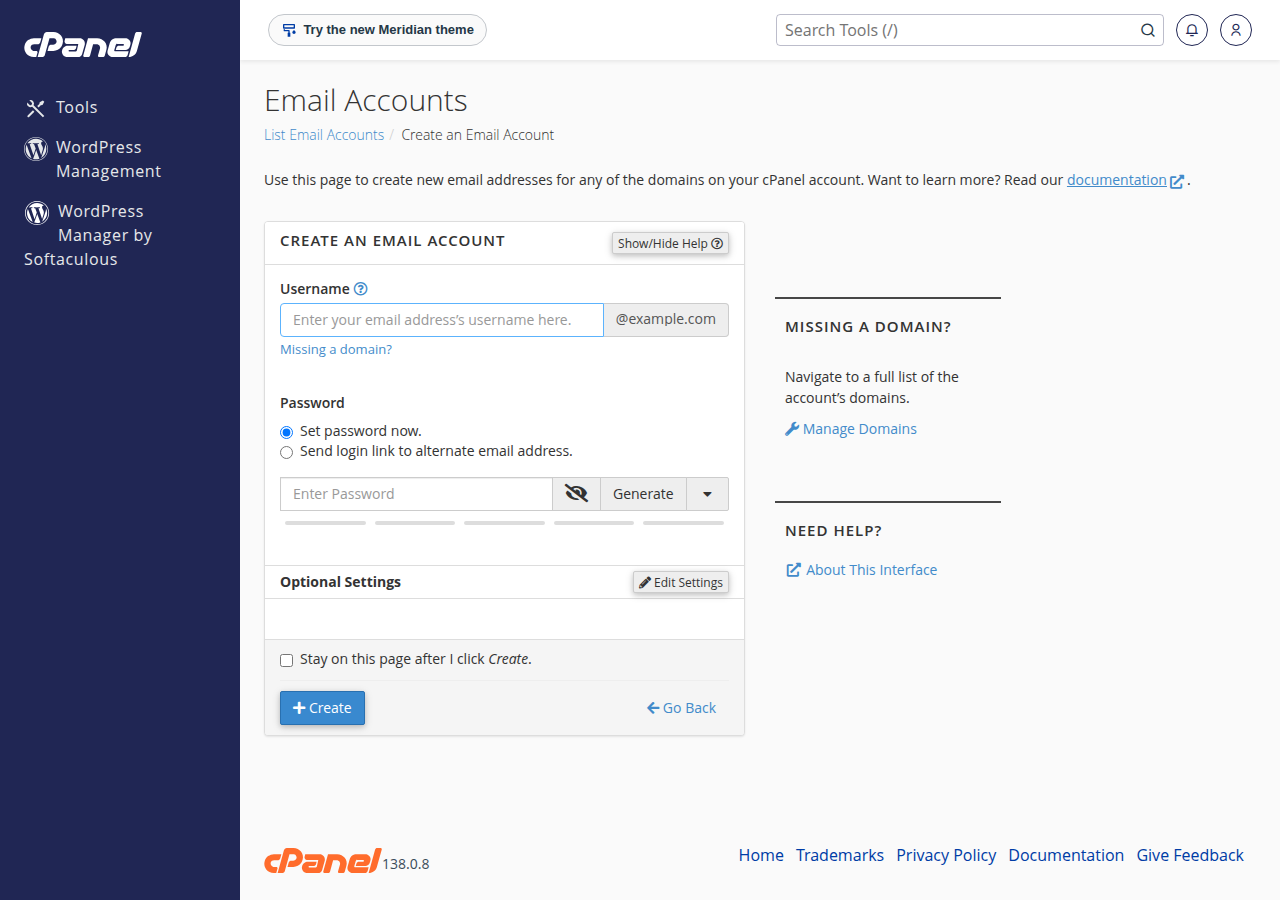
Log in to your control panel and open Email Accounts: in cPanel click + Create, in DirectAdmin open E-mail Manager › E-mail Accounts and click CREATE ACCOUNT, in Webuzo go to Email › Email Account. Enter the part before the @, set a strong password and a storage quota, and create it. The address works straight away, but mail only arrives once your domain's MX record points to the server that holds the mailbox.
1. Before you start
- Know which email you have. Hosting plans include a fixed number of mailboxes managed in the control panel. Business Email is a separate product, priced per mailbox, with its own admin console. If you are not sure, the comparison of Business Email and hosting email explains the difference.
- Log in to your panel. Open it from the client area; see how to log in to cPanel if you are unsure.
- Choose the address. Short role addresses such as info@, sales@ or support@ are easy to say and type.
2. Create the address in your control panel
- cPanel.Open Email › Email Accounts and click + Create. Type the username, pick the domain if you have more than one, set a password (or click Generate), choose the storage and click + Create. A new cPanel mailbox defaults to 1,024 MB of storage.
- DirectAdmin.Open E-mail Manager › E-mail Accounts and click CREATE ACCOUNT. Enter the username and a password, set the quota in MB and click CREATE ACCOUNT.
- Webuzo.Go to Email › Email Account, click Create, enter the username, choose the domain, set a password and quota, then click Create.
- Business Email.Sign in at
https://mail.yourdomain.com:8443/as the domain administrator, open the admin console and add a mailbox. You can add mailboxes up to the number you have paid for.
How many addresses you can create depends on your plan. On the Domain India plan list of 19 September 2026, cPanel Starter includes 10, DA Starter and Webuzo Starter include 5, cPanel Growth and DA Growth include 50, and DA Business includes 250. Forwarders and aliases do not count as separate mailboxes.
When someone leaves, change the mailbox password or set up a forwarder first. Delete the account only after anything important has been saved, because deleting it removes all the mail stored in it.
3. Three checks that make it work
- The MX record. Mail reaches your new mailbox only if the domain's MX record points to the server that holds it. If your domain uses your hosting nameservers, the panel manages this for you; see how do I change my nameservers.
- The username. Mail apps and webmail need the full email address as the username, not just the part before the @.
- The quota. When a mailbox is full, new mail bounces. Set a sensible fixed quota rather than Unlimited, because every mailbox shares your plan's disk space with your website.
4. Read and send your mail
- Webmail on cPanel:
https://yourdomain.com/webmail,https://webmail.yourdomain.comorhttps://yourdomain.com:2096. - Webmail on DirectAdmin:
https://yourdomain.com/webmailorhttps://yourdomain.com/roundcube. - Webmail on Webuzo:
https://yourdomain.com/webmail. - Business Email:
https://mail.yourdomain.com:8443/.
For Outlook, Apple Mail, Thunderbird or a phone on hosting email, use IMAP on port 993 and SMTP on port 465, both with SSL/TLS, with mail.yourdomain.com as the server and the full email address as the username. Choose IMAP so the same mail appears on every device. More help: how to log in to webmail.
How do I create my first email account on Domain India hosting?
Log in to your control panel and open Email Accounts. In cPanel click + Create, in DirectAdmin open E-mail Manager, E-mail Accounts and click CREATE ACCOUNT, and in Webuzo go to Email, Email Account. Enter the part before the @, a strong password and a quota, then create it. The address works straight away.
I created the address, so why is no mail arriving?
Mail is delivered to whichever server your domain's MX record points to. If it still points to an old provider, new mail goes there. Check the MX record first, then check that the mailbox is not over its quota.
What username do I use in webmail and mail apps?
Always the full email address, such as [email protected], with the password you set for that mailbox.
How much storage should I give a new mailbox?
A fixed quota is safer than Unlimited, because all mailboxes share the plan's disk space with your website. A new cPanel mailbox defaults to 1,024 MB; give more to people who receive large attachments.
Can I get an email address at my domain without a hosting plan?
Yes. Business Email is a separate Domain India product that works without hosting and is priced per mailbox, starting from one.
Ready to set up your first address? Follow the steps above in your panel, read the full guide to creating email accounts for more detail, or see Business Email if you want email without hosting. If you get stuck, chat with us 24/7 or open a support ticket with your domain name.
Tell us your domain and the address you want to create, and our team will help you get it working.
Open a support ticket