SPF (Sender Policy Framework) is a DNS record that lists which servers may send email for your domain. Receiving mail servers check it to spot forged mail, and Gmail, Yahoo and Outlook.com now expect it before they trust your messages. This guide explains how SPF works, how to write a correct record, and where to add it on each kind of Domain India hosting.
SPF is one TXT record at your domain's root, starting v=spf1, that lists every service allowed to send mail as your domain and ends with ~all or -all. Keep exactly one SPF record, stay under 10 DNS lookups, and add it wherever your domain's DNS is actually managed. On cPanel, Email › Email Deliverability checks SPF and shows the correct record for you. Pair SPF with DKIM and DMARC: SPF alone doesn't stop spoofing of the From address.
1. What SPF does, and what it doesn't
When a server receives a message, it looks at the envelope sender (the Return-Path address, also called MAIL FROM), looks up that domain's SPF record, and checks whether the connecting server's IP address is on the list. The result is pass, fail, softfail, neutral or none.
Two limits are worth knowing:
- SPF checks the envelope sender, not the From address people see. A spammer can use their own envelope domain and still show your address in From. DMARC closes that gap by requiring SPF or DKIM to pass for the same domain that appears in From.
- SPF breaks when mail is forwarded, because the forwarding server isn't on your list. DKIM usually survives forwarding, which is why you want both.
Since 2024, Gmail and Yahoo require every sender to have SPF or DKIM, and bulk senders to have SPF, DKIM and DMARC. Outlook.com applies similar rules to high-volume senders.
2. How to read an SPF record
A record is a single line of text:
v=spf1 a mx include:_spf.example-mailer.com ~all| Part | Meaning |
|---|---|
| v=spf1 | Marks this TXT record as SPF. It must come first. |
| a | The IP addresses in your domain's A (and AAAA) records may send. |
| mx | The servers in your domain's MX records may send. |
| ip4:203.0.113.10 | This IPv4 address (or range, with /24 and so on) may send. ip6: does the same for IPv6. |
| include:domain | Also allow whatever that domain's SPF record allows. Used for mail services. |
| ~all | Softfail everything else: accept but treat as suspicious. |
| -all | Fail everything else: receivers may reject it. |
Each mechanism can take a qualifier: + pass (the default, so +a and a mean the same), - fail, ~ softfail and ? neutral. The ptr mechanism is deprecated; don't use it. The old separate "SPF" DNS record type is obsolete too: SPF is always published as TXT.
3. Write your record
- List every sender.Your hosting mail server, your business email service, your website's contact form, newsletter tools, CRM or billing software, and any app that sends mail "from" your domain.
- Get each service's SPF value.Mail services publish the
include:to use in their setup guide. Don't guess it. - Combine them into one line.Start with
v=spf1, add each mechanism once, and end with oneall. - Choose the ending.Use
~allwhile you are still finding all your senders, and-allonce DMARC reports show nothing legitimate failing. - Check itwith a lookup tool before and after you publish it (section 6).
Examples:
# Only your hosting server sends mail
v=spf1 a mx ~all

# Hosting server plus a newsletter service
v=spf1 a mx include:servers.newsletter-example.com ~all

# A fixed server IP plus an external mail provider
v=spf1 ip4:203.0.113.10 include:_spf.provider-example.com -allTwo TXT records that both start with v=spf1 make SPF fail with a permanent error, and your mail may land in spam. The most common cause is adding a new service's record next to the existing one. Merge them into a single record instead.
4. The limits that break records quietly
- 10 DNS lookups. Every
include,a,mx,ptr,existsandredirectcosts a lookup, and so do the includes inside those includes. Past 10, the result is a permanent error. Remove services you no longer use, and preferip4:for your own fixed servers, becauseip4andip6cost nothing. - 255 characters per string. A long record must be split into several quoted strings inside the same TXT record, which most DNS editors do for you. Never split it into two records.
- Two "void" lookups. Includes that point at domains with no SPF record count against a small limit. Clean up stale includes.
- Subdomains need their own record. SPF isn't inherited, so mail sent as
news.example.comneeds a record onnews.example.com. - Domains that never send mail should publish
v=spf1 -allso nobody can use them for spoofing.
5. Where to add SPF on Domain India hosting
SPF works only where your domain's DNS is actually served. If your domain uses our hosting nameservers, edit it in your control panel. If the DNS is elsewhere (another registrar, Cloudflare), add the record there. Not sure? See how to change your domain's DNS settings.
cPanel
Open Email › Email Deliverability. It lists each domain, says whether SPF and DKIM are valid, and shows the exact record to publish. If the domain uses our hosting nameservers, it can install the record for you; otherwise, copy it to your DNS provider. To add a third-party service, edit the existing record in Domains › Zone Editor rather than adding a new one. DKIM is on by default for new cPanel accounts, so a correct SPF record plus the existing DKIM key covers most mail. Details: how to make DNS changes in cPanel.
DirectAdmin and Webuzo
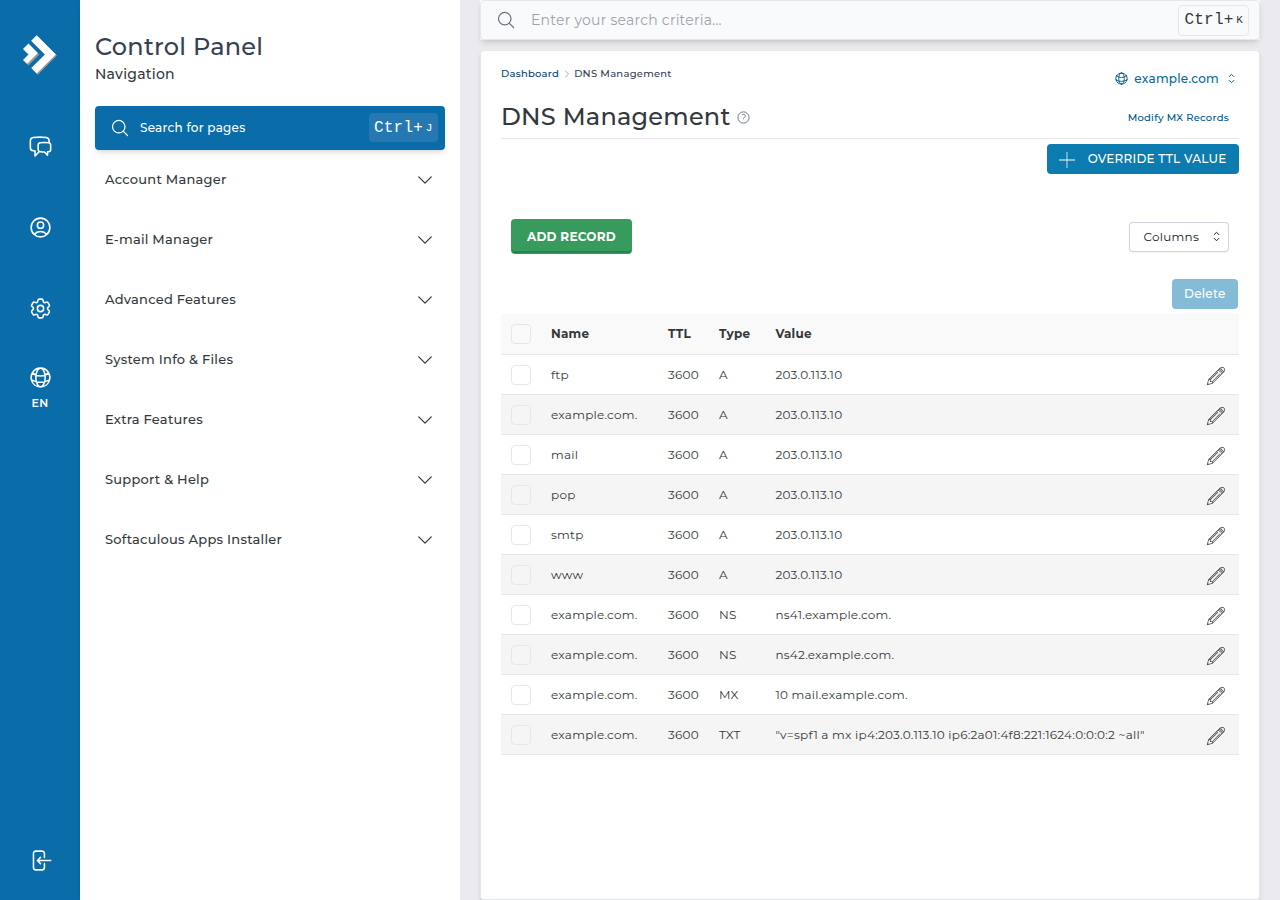
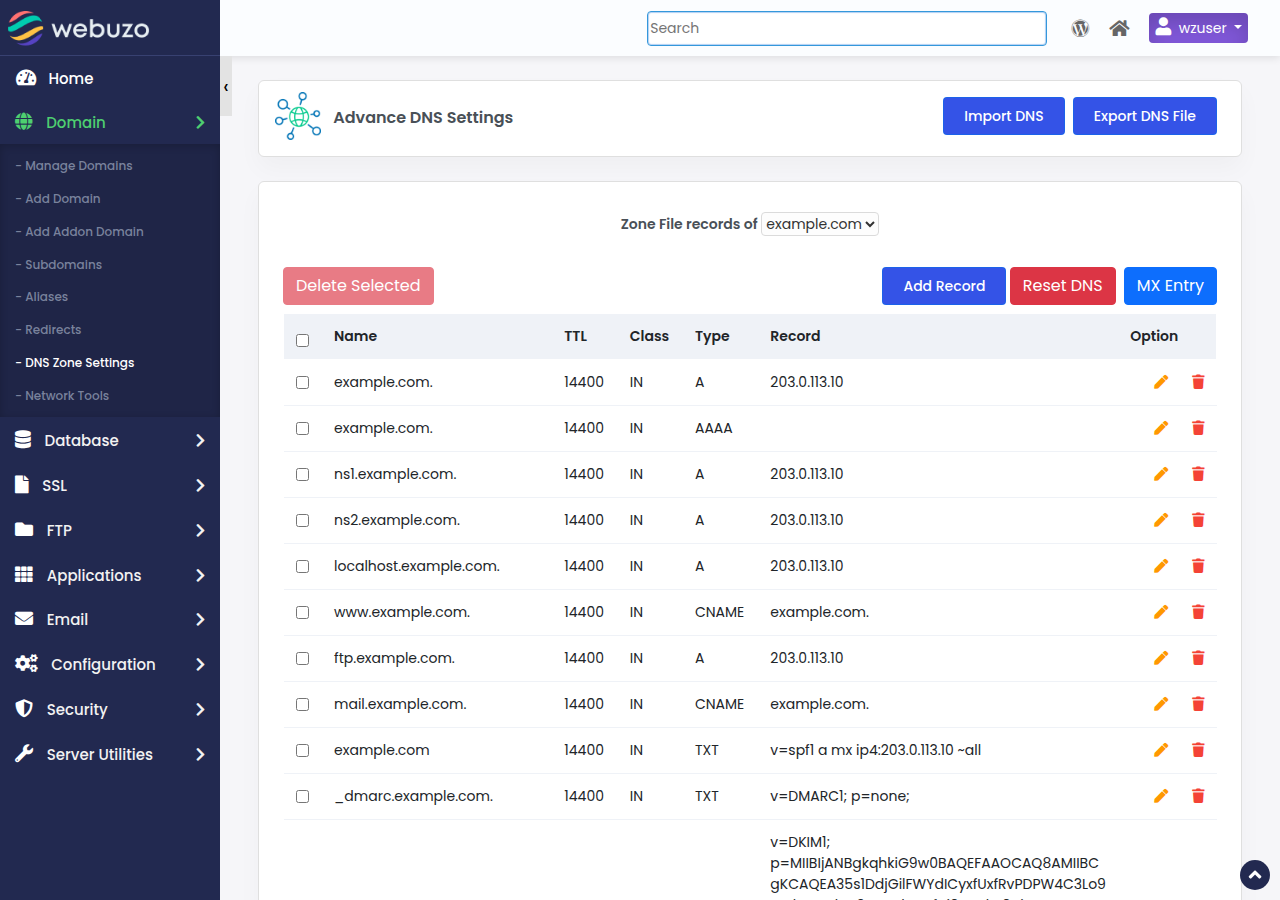
Open the DNS management page for the domain and look for an existing TXT record starting v=spf1 before you add anything. If there is one, edit it to include your new sender; if there is none, add one TXT record at the domain's root. On DirectAdmin, DKIM uses the selector x; see how to check and manage DKIM in DirectAdmin.
Windows (Plesk)
When the domain uses our hosting nameservers, Plesk creates SPF, DKIM and DMARC records for mail-enabled domains. Edit the existing SPF record in Plesk's DNS settings to add a service; don't add a second record or replace a strict -all with a weaker one.
Business Email
Business Email signs every message with DKIM and provides the SPF and DMARC records to publish for your domain. If you also send from your hosting account or a newsletter tool, merge everything into one SPF record.
6. Test and troubleshoot
After publishing, allow time for DNS caches to update, then check:
- Lookup tools: MXToolbox's SPF check or Google Admin Toolbox's Check MX show the record, the lookup count and any syntax errors.
- Command line:
dig +short TXT example.com(ornslookup -type=TXT example.com) shows what the world sees. - Real mail: send a message to a Gmail address and choose Show original. The top shows SPF, DKIM and DMARC with PASS or FAIL. The full method is in how to test email deliverability.
| Result | Likely cause | Fix |
|---|---|---|
| permerror | Two SPF records, a syntax error or more than 10 lookups | Merge into one record, fix the syntax, remove unused includes |
| softfail or fail | The sending service isn't in your record | Add that service's include or IP |
| none | No SPF record found where the DNS is served | Publish it at the DNS provider your nameservers point to |
| fail on forwarded mail only | Forwarding sends from another server | Make sure DKIM passes; DMARC accepts either |
On our cPanel servers, SRS (which rewrites forwarded mail so SPF keeps working) is off, so mail forwarded from a cPanel mailbox to an outside address relies on DKIM.
7. SPF, DKIM and DMARC together
SPF says which servers may send. DKIM signs each message so receivers can prove it wasn't altered and that your domain sent it. DMARC ties both to the visible From address, tells receivers what to do with failures and sends you reports. Set up SPF and DKIM first, then add DMARC with p=none, read the reports, and tighten gradually. See setting up DMARC and the wider email deliverability guide.
8. Where Domain India fits
Every Domain India shared hosting plan includes mailboxes on your domain and DNS editing for domains on our hosting nameservers, so you can publish SPF yourself. Shared hosting isn't for bulk mail: outgoing mail is limited to 200 messages per hour per account on cPanel and 1,000 per day on DirectAdmin. For mail kept separate from your website hosting, Business Email is priced per mailbox:
- Priced per mailbox - start with one
- Email at your own domain ([email protected])
- Add and remove mailboxes yourself
- Webmail with calendar, contacts and tasks
The price on the card is a live Domain India list price and excludes 18% GST.
What is an SPF record?
An SPF record is a DNS TXT record at your domain, starting v=spf1, that lists the servers allowed to send email for that domain. Receiving servers compare the sending server's IP address with the list and mark the message pass or fail.
Can a domain have two SPF records?
No. Two TXT records starting v=spf1 cause a permanent SPF error. Merge every sender into one record.
Should I use ~all or -all?
Use ~all (softfail) while you are still confirming every service that sends mail for you, and move to -all (fail) once your DMARC reports show that all legitimate mail passes.
What is the SPF 10-lookup limit?
SPF evaluation may make at most 10 DNS lookups. Each include, a, mx, exists and redirect counts, including those nested inside includes. Beyond 10 the record returns a permanent error, so remove unused includes and use ip4 or ip6 for fixed servers.
Where do I add the SPF record for my domain?
Add it wherever your domain's DNS is managed. If the domain uses Domain India hosting nameservers, use your control panel (on cPanel, Email Deliverability or the Zone Editor). If the DNS is hosted elsewhere, add it at that provider.
Does SPF stop people spoofing my From address?
Not on its own, because SPF checks the envelope sender, not the visible From address. DMARC, combined with SPF and DKIM, is what protects the From address.
Why does SPF fail on forwarded mail?
A forwarding server resends the message from its own IP address, which isn't in your SPF record. DKIM signatures usually survive forwarding, so DMARC can still pass on DKIM.
Ready to set it up? Check your record in cPanel's Email Deliverability or your DNS provider, then follow setting up DMARC. If a result still fails, open a support ticket with the domain name and the message headers.
Send us your domain and where its DNS is managed, and support will check your SPF, DKIM and DMARC records with you.
Open a ticket